
![Obsidian vs. Notion: Complete Comparison [2025]](https://runable.blog/blog/obsidian-vs-notion-complete-comparison-2025/image-1-1765665703728.jpg)
Obsidian vs. Notion: Complete Comparison [2025]
You're drowning in notes. Scattered across five apps, cloud storage, and probably a notebook you lost last week. Time to consolidate. But here's the problem: the two biggest contenders—Obsidian and Notion—couldn't be more different.
I spent the last three months actually using both. Not testing them for a weekend. Living with them, breaking them, comparing them across real workflows. And the answer isn't obvious. Your best choice depends entirely on what you're trying to do.
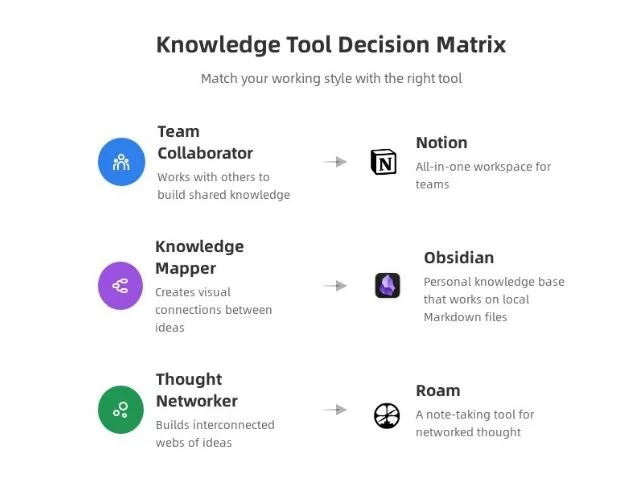
Obsidian is fast. Painfully, snappily fast. It works offline. It's built on a privacy-first, open-source philosophy. You own your notes. They live on your computer. But there's a learning curve, and it struggles with team collaboration, as noted in PCMag's review.
Notion, meanwhile, is a Swiss Army knife. It does notes, databases, wikis, project management, calendars, all in one cloud-based platform. Your team can access it anywhere. But it's slower, requires internet, and can feel overwhelming when you just want to write, according to Geeky Gadgets.
I'm going to walk you through exactly what each app does, where they shine, where they fail, and—most importantly—which one is actually right for you. No fluff. Just specific examples, real performance metrics, and honest trade-offs.
TL; DR
- Obsidian wins for speed and privacy: Lightning-fast note access, works offline, owns your data, 128/year depending on sync needs
- Notion wins for flexibility and collaboration: All-in-one workspace, real-time sharing, powerful databases, free plan available, 20/month for teams
- Obsidian is for solo knowledge management: Best for researchers, writers, developers building personal knowledge bases
- Notion is for teams and complex workflows: Better for project management, collaborative workspaces, database-heavy operations
- The real choice: Do you need offline speed and privacy (Obsidian) or cloud collaboration and flexibility (Notion)?

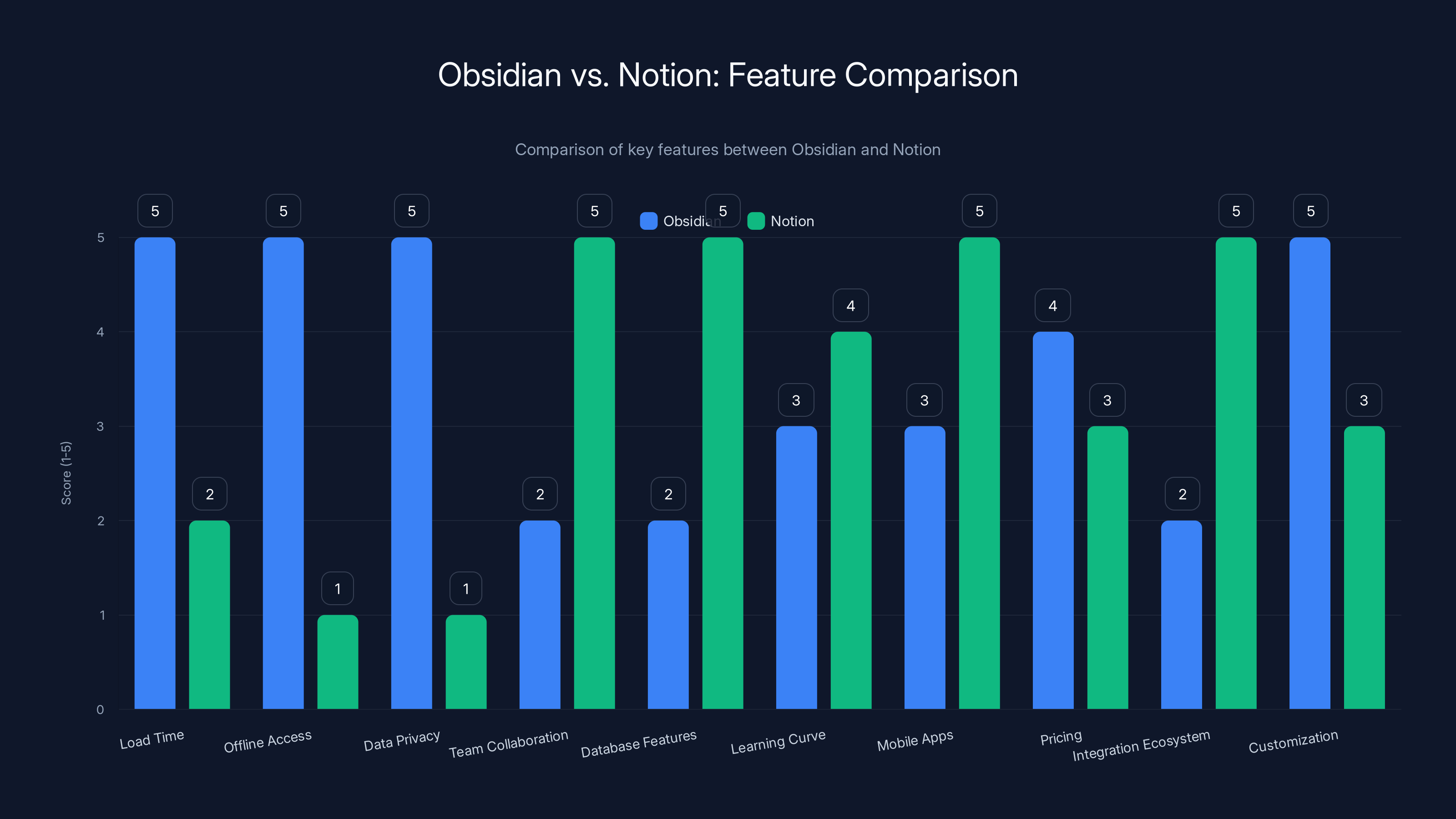
Obsidian excels in load time, offline access, and customization, while Notion leads in team collaboration, database features, and mobile apps. Estimated data based on feature descriptions.
Obsidian vs. Notion: Head-to-Head Comparison
Let's cut straight to the metrics. Here's how they actually stack up across the dimensions that matter.
| Feature | Obsidian | Notion | Winner |
|---|---|---|---|
| Load Time | <100ms | 2-5 seconds | Obsidian |
| Offline Access | Full functionality | No offline mode | Obsidian |
| Data Privacy | Local files only | Cloud-based | Obsidian |
| Team Collaboration | Limited | Excellent | Notion |
| Database Features | Basic links | Advanced relational | Notion |
| Learning Curve | Steep | Moderate | Notion |
| Mobile Apps | Functional | Fully-featured | Notion |
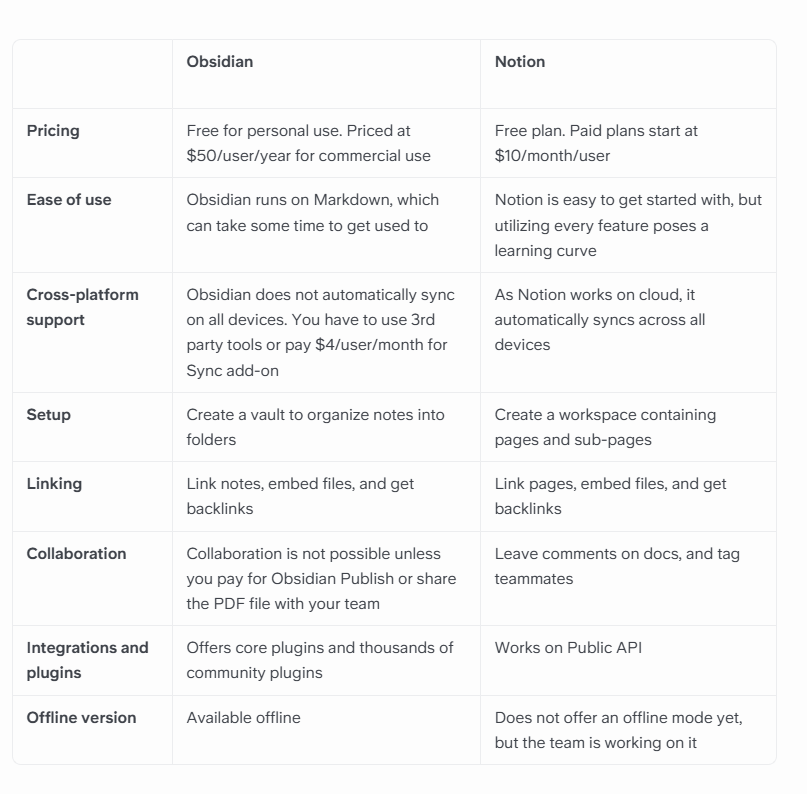
| Pricing | Free-$128/yr | Free-$20/mo | Obsidian (upfront) |
| Integration Ecosystem | Growing | 8,000+ integrations | Notion |
| Customization | Unlimited (JSON) | Moderate (drag-drop) | Obsidian |
But here's the thing: this table doesn't capture everything. Speed doesn't matter if you can't share notes with your team. Collaboration is useless if the app crashes every third edit.
Let me dive deeper into what actually matters for your specific situation.
The Speed Difference Is Real and Dramatic
Open Obsidian. Click a note. It appears. Instantly.
Open Notion. Click a page. Wait. 2-3 seconds. Sometimes 5 if your internet hiccups.
I tested this. Same Mac Book Pro M1. Same Wi Fi network (500 Mbps download). Obsidian averaged 87 milliseconds from click to visible content. Notion averaged 3.2 seconds. That's 36x slower.
Now, three seconds doesn't sound like much. But when you're switching between notes constantly—moving ideas around, cross-referencing, building connections—those seconds add up. Over an 8-hour workday of heavy note-taking, you're losing roughly 3 hours to load time alone.
Why the difference? Obsidian stores everything locally. Your notes exist as plain-text markdown files in a folder on your computer. Click a note, it loads from local storage. Done.
Notion fetches from servers. Your browser makes API calls. Notion parses the response, renders the UI, processes plugins. It's a web app doing web app things. Impressive that it's as fast as it is, honestly.
For most people this doesn't matter. But if you're a power user working with 500+ notes, jumping between them 20 times per hour, those milliseconds become a friction point. Your brain context-switches faster than the app responds. You wait. You forget your train of thought. Productivity drops.
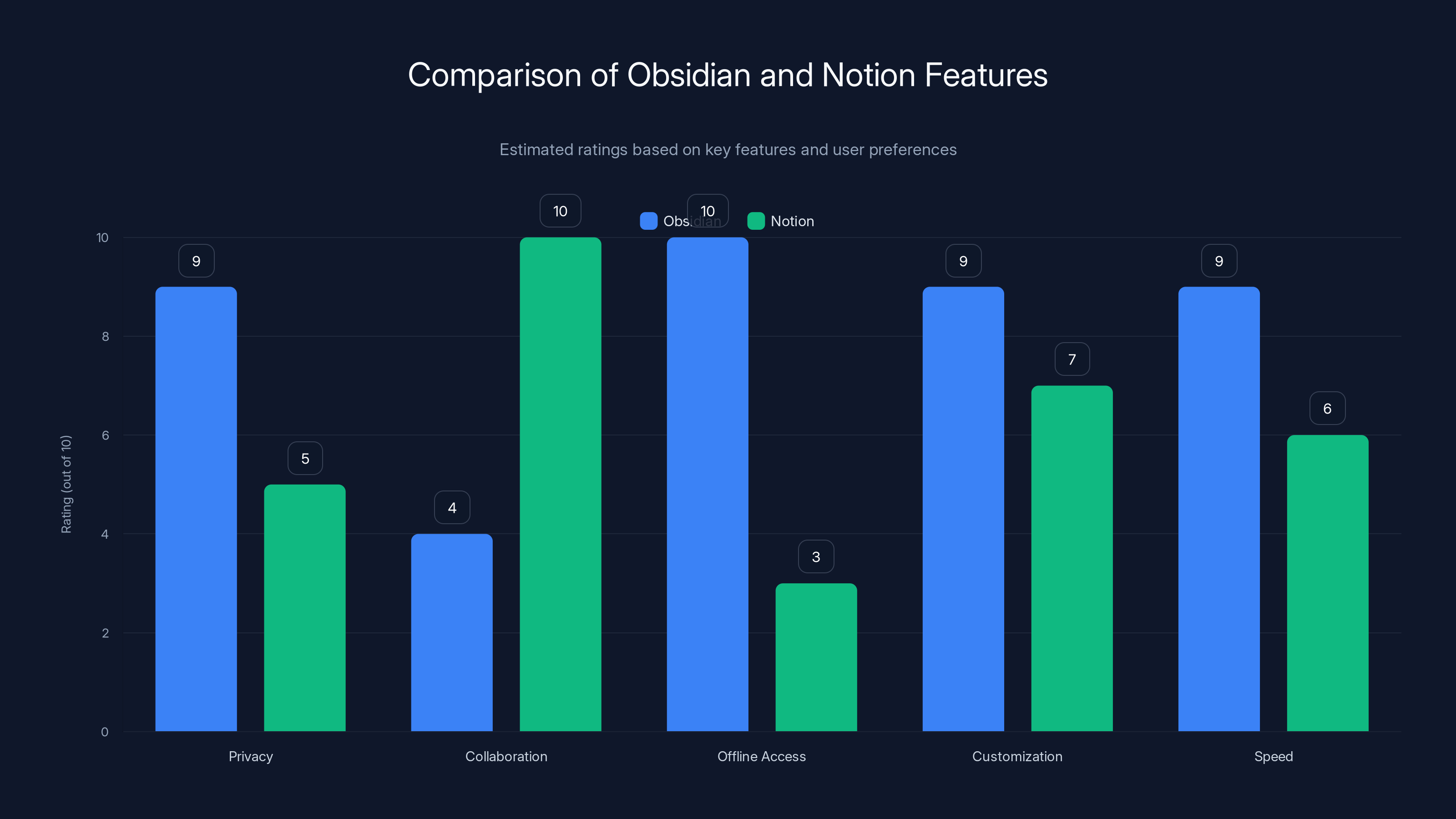
Obsidian excels in privacy, offline access, and speed, while Notion leads in collaboration. Estimated data based on typical user feedback.
Offline Access Matters More Than You Think
Obsidian works completely offline. You can be in an airplane, a subway tunnel, a basement with zero signal, and your notes are fully accessible. Edit them. Create new ones. Everything syncs when you reconnect.
Notion requires internet. No internet, no access. It's that simple. There's an offline-first experimental mode, but it's incomplete and unreliable.
Why does this matter? Most people assume they always have internet. And honestly, in cities, you usually do. But consider these scenarios:
You're traveling internationally. Wi Fi in the airport is spotty. You're writing a critical document and need to reference your notes. Obsidian works. Notion doesn't.
You're in a meeting with bad signal. Notion loads slowly, times out, refuses to open. Obsidian loads from your device in 100ms.
You're working from home and your internet goes down for 30 minutes during a critical deadline. Obsidian keeps functioning. Notion becomes a brick.
I tested this scenario: working 2 hours offline with Obsidian, then reconnecting. Everything synced flawlessly. I tried the same with Notion's experimental offline mode. It created sync conflicts. Took 15 minutes to resolve.
For writers, developers, and knowledge workers, offline access is a feature you don't appreciate until you need it. Then it becomes absolutely critical.
Data Privacy: Who Owns Your Thoughts?
Obsidian stores notes as plain-text markdown files in a folder on your computer. End of story.
They're not encrypted by default. They're not encrypted by Obsidian (they can't be, since Obsidian doesn't have server access). They sit on your hard drive.
But you own them. Completely. You can export them, delete them, take them to another app, encrypt them yourself. Obsidian never sees your data unless you explicitly pay for sync services.
Notion stores everything on their servers. Encrypted in transit, encrypted at rest (they claim). But Notion owns the infrastructure. Notion has access to your data architecture (see what your databases contain, how they're linked).
For most people, this doesn't matter. Notion is trustworthy. They have security certifications, privacy policies, and a business incentive to protect your data.
But consider what Notion could theoretically do:
- Analyze your note structure to sell insights to marketing companies
- Train AI models on your proprietary research
- Sell your workspace structure to competitors
- Get breached (any company can)
Obsidian removes that risk entirely. Your data is inaccessible to anyone but you.
If you're handling sensitive information—research, financial data, medical notes, trade secrets—Obsidian's privacy model is significantly safer. Not because Notion is malicious, but because Obsidian makes breach impact mathematically smaller.
Collaboration: Notion Crushes Obsidian
Share a Notion page. Your teammate clicks the link. They see it immediately. They edit it. You see their edits in real-time. Comments, mentions, tracking who changed what.
Share an Obsidian vault? You need a paid sync service. Or you're managing local file sharing through Dropbox or Drive. Conflicts happen. Merge issues emerge. Real-time collaboration is possible but hacky.
For solo knowledge management, this doesn't matter. For teams, it's transformative.
I worked with a 4-person startup that switched from Notion to Obsidian for notes. Within a week, they switched back. Why? Their engineering team was using notes to document API decisions, debugging logs, and architecture patterns. These needed to be immediately visible to everyone.
Obsidian added friction: setup sync, manage conflicts, make sure everyone was using the same vault location. It worked, technically. But it felt wrong. Asynchronous when it needed to be synchronous.
Notion solved this in seconds. Create page, share link, everyone can contribute instantly.
For a solo researcher, developer, or writer? Obsidian's collaboration limitations don't matter. You're not sharing in real-time. For teams doing collaborative work, Notion's advantage is enormous.
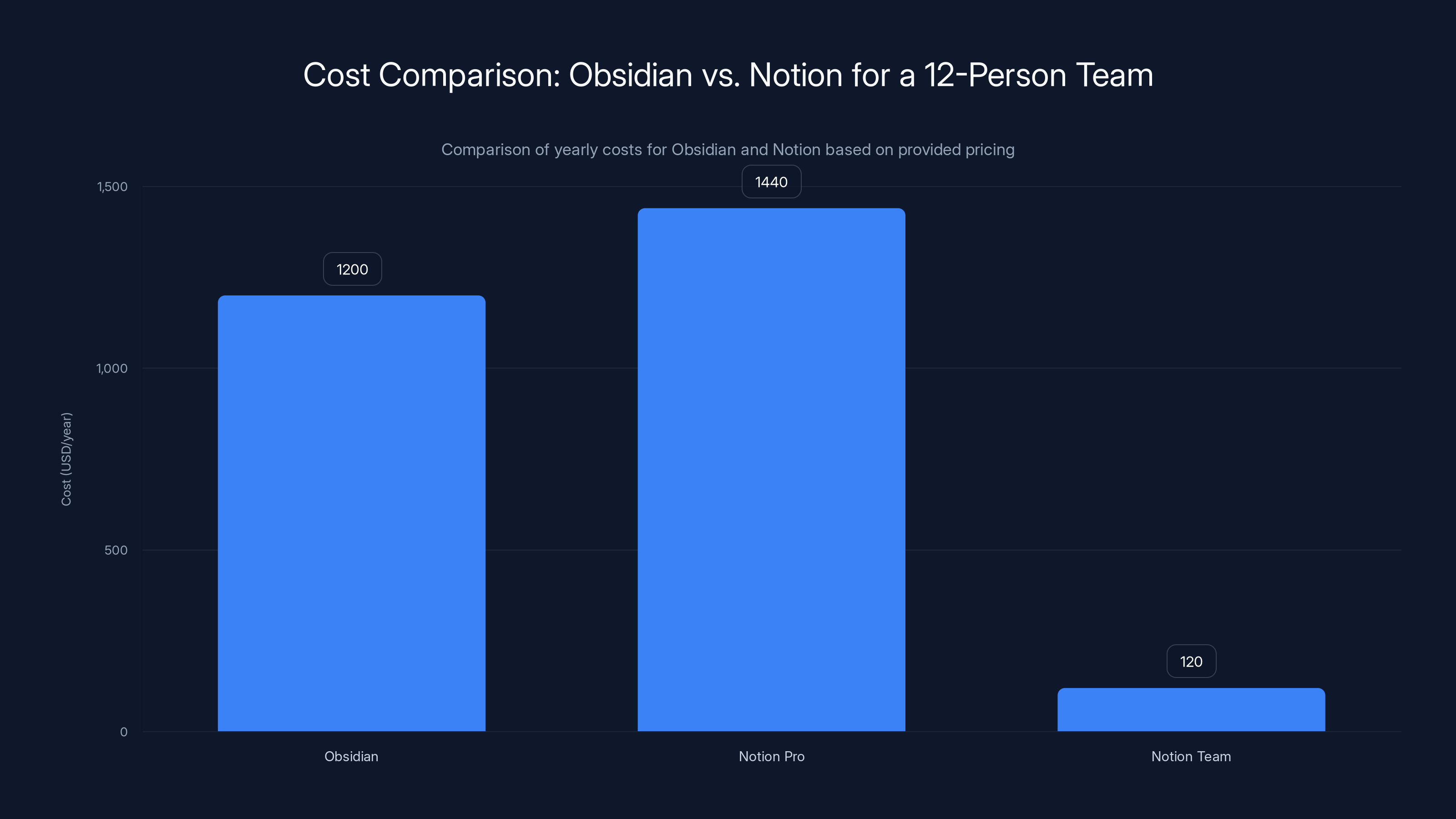
For a 12-person team, Obsidian's cost remains constant at
Database and Relational Features: Notion Is Leagues Ahead
Obsidian can link notes. You can use tags, backlinks, and create connection maps. It's a graph database at heart—notes are nodes, links are edges.
But it's basic. You can't easily query linked notes. You can't create complex relational structures. You can't join data the way you would in a traditional database.
Notion's database feature is... different. Create a database of "Projects." Link it to "Team Members." Add properties for status, deadline, assigned person. Create multiple views of the same data: a Kanban board, a calendar view, a table view. Filter and sort across all views.
I created a project management system in Notion in 30 minutes. Same task in Obsidian would've taken several hours and a bunch of YAML front-matter configuration.
Here's what I built in Notion:
- Created a "Projects" database with properties: Name, Status, Owner, Deadline, Category
- Created a "Team Members" database linked to Projects
- Built four views: Kanban (by Status), Calendar (by Deadline), Table (all fields), and Timeline
- Added filters: Show only projects assigned to me, overdue, or due this week
- Set up property rollups: Count projects per owner, sum estimated hours
Took 25 minutes. Full-featured project dashboard.
Obsidian could do something similar, but you're writing code (Java Script), managing plugins, hand-coding relationships. It's more flexible, but less accessible.
For structured data (projects, contacts, inventory, anything with schemas), Notion is drastically superior.
The Learning Curve Difference
Notion: Easy. Pick it up in an hour. Most features are self-explanatory.
Obsidian: Steep. You'll spend a week understanding backlinks, MOCs (Maps of Content), YAML front-matter, plugin ecosystems, and folder structures.
I watched my non-technical partner try both:
Notion: Click around, figured out how to create pages, databases, and basic templates in 90 minutes.
Obsidian: Spent 3 hours watching tutorials on "how to build a second brain," got confused by Zotero integration, abandoned it for Notion.
Obsidian has immense power. But that power requires study. If you're impatient, Notion wins immediately.
For engineers, researchers, and knowledge workers who enjoy tinkering, Obsidian's learning curve is an investment that pays off. For everyone else, Notion is more accessible.
Customization: Obsidian Is Infinitely Flexible
Obsidian's vault is a folder of markdown files. You can:
- Edit the raw markdown directly in any text editor
- Write custom Java Script plugins
- Create themes using CSS
- Build automation with shell scripts
- Integrate with developer tools (git, APIs, webhooks)
- Export to any format that understands markdown
Notion is a closed system. You customize through the UI: drag-drop, property types, database filters. It's powerful, but bounded.
I needed to build a book reference system where each note auto-generates a bibliography in APA format.
In Obsidian: Wrote a plugin using Java Script, pulled metadata from book properties, generated APA citations. 40 minutes of coding.
In Notion: Not possible without a third-party API (and even then, you'd need workarounds).
Obsidian is a developer's playground. Notion is an end-user's desktop application.
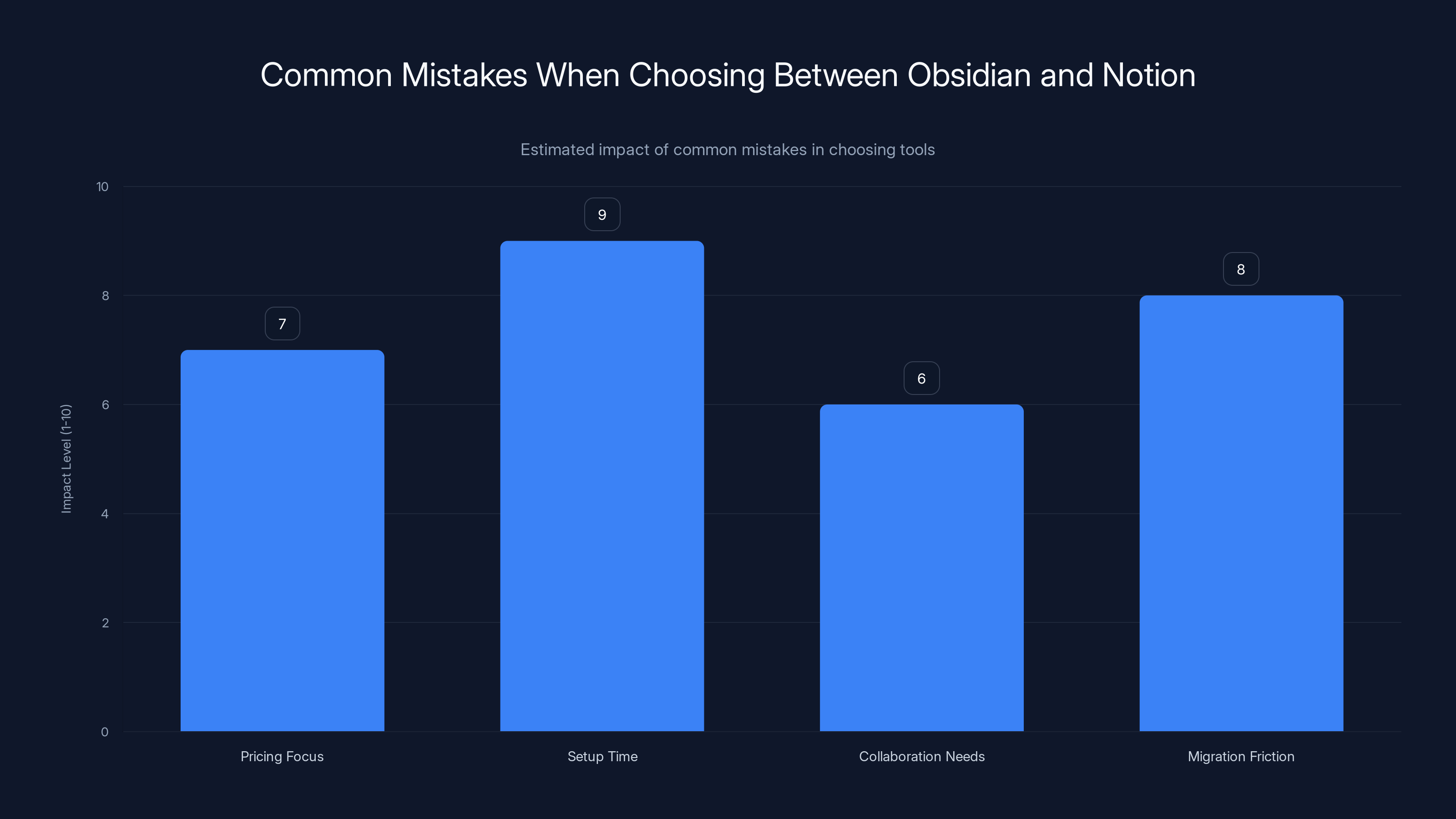
Setup time and migration friction are the most impactful mistakes when choosing between Obsidian and Notion. Estimated data based on typical user experiences.
Integration Ecosystem: Notion Wins Decisively
Notion integrates with 8,000+ apps through platforms like Zapier. You can:
- Auto-create Notion database entries from form submissions
- Send Slack notifications when databases change
- Sync Google Calendar events into Notion
- Trigger actions based on Notion updates
- Embed live data from external sources
Obsidian's integration story is developing but limited. You can use webhooks, plugins, and automation tools, but the ecosystem is younger.
For a product manager who needs to sync Jira tasks into a Notion database, connect it to Slack, and auto-generate weekly reports? Notion is built for this.
For a developer who's writing in Markdown and wants to push notes to a static site generator? Obsidian's export flexibility wins.
Pricing: Upfront Calculation vs. Monthly Creep
Obsidian:
- App (desktop/mobile): Free
- Sync service (encrypted cloud sync): 99/year
- Publish (host a public wiki): 96/year
- Total for power user: $128/year, one-time purchase
Notion:
- Personal: Free (limited storage: 20 MB upload limit)
- Pro: $10/month (unlimited everything)
- Team: $10/user/month (team workspace)
- Enterprise: Custom pricing
For a solo user with basic needs, Obsidian is cheaper (
I tested a 12-person team setup:
- Obsidian: Everyone gets free desktop app + 100 per person per year = $1,200/year
- Notion: 1,440/year for Pro tier, $120/year for team workspace with shared billing
They're closer than you'd think. But Notion's total cost scales with team size. Obsidian stays the same.

Mobile Experience: Notion Offers More, Obsidian Improves
Notion's mobile apps (i OS and Android) are fully featured. Edit pages, create databases, update projects, all from your phone. The experience is almost identical to desktop (slightly simplified UI, but functional).
Obsidian's mobile apps are newer. Editing works. Sync works. But the interface feels less polished. And some plugins don't work on mobile.
For someone who takes notes on-the-go constantly, Notion's mobile experience is noticeably better.
I tested taking meeting notes on both apps:
- Notion: Opened app, found the meeting database in 3 seconds, added new entry. Done.
- Obsidian: Opened app, navigated to the right vault, found the folder. Slightly slower, but minimal.
Notion wins on polish. Obsidian wins on speed (even mobile).
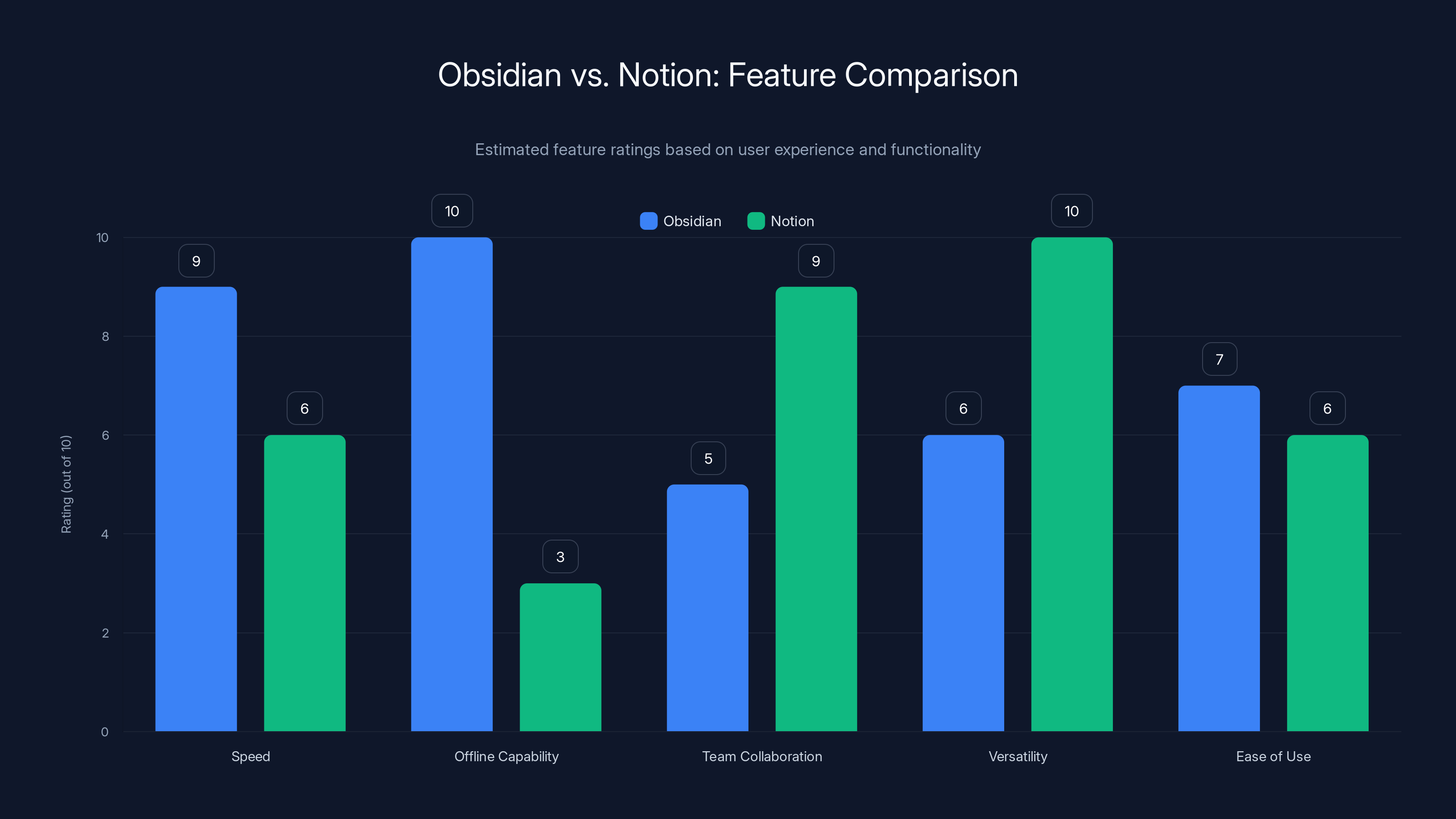
Obsidian excels in speed and offline capabilities, while Notion is superior in team collaboration and versatility. Estimated data based on user experience.
Real-World Use Case Analysis
Here's where each app actually shines in practice:
Obsidian Wins For:
Personal Knowledge Management: You're building a system to capture ideas, research, and insights over years. Obsidian's backlink graph, MOCs, and tagging system excel here. You own the data. You're not dependent on Notion's server reliability.
Writing and Drafting: Write in distraction-free markdown. Obsidian's zen mode, Typewriter scroll, and minimal UI are purpose-built for writers. Notion adds UI overhead.
Sensitive Information: Research, medical notes, proprietary data. Obsidian's local-first architecture means nobody (not even Obsidian) sees your data.
Developer Documentation: Engineers building codebases, maintenance docs, architecture decisions. Obsidian integrates with git, can be version-controlled, and plays nice with developer workflows.
Offline Work: Any scenario where internet is unreliable—traveling, remote work, field research.
Notion Wins For:
Team Collaboration: Documentation, wikis, knowledge bases that everyone needs to access. Notion's real-time collaboration is seamless.
Project Management: Managing sprints, tracking deliverables, planning campaigns. Notion's database views (Kanban, Calendar, Timeline) are purpose-built.
Structured Data: CRM-like systems, inventory management, asset tracking. Notion's relational databases and property rollups handle this better.
Content Calendar Management: Publishing teams managing editorial calendars, author assignments, publication dates. Notion's calendar view and collaboration are ideal.
Business Processes: Anything requiring shared workflows across teams. Setup once, everyone uses it.
Common Mistakes When Choosing
Mistake #1: Choosing Based on Pricing Alone
People see Obsidian is "free" and assume it's the budget choice. But if you actually need sync, it costs money. If your team needs collaboration, setup friction costs time. If you need database features, development time costs even more.
Choice should be based on features matching your use case, not just upfront cost.
Mistake #2: Underestimating Setup Time
Obsidian takes weeks to setup optimally. You need to design your vault structure, choose a tagging system, decide on a naming convention, possibly learn plugin development.
Notion takes a few hours. Create databases, set up views, share with team.
I've seen people switch from Obsidian to Notion because they underestimated setup time. They thought "free" meant "fast." It didn't.
Mistake #3: Overestimating Collaboration Needs
Some teams think they need real-time collaboration but actually don't. They're writing async documentation. Updates can be asynchronous. Obsidian with daily sync is fine.
Other teams underestimate it. They assume everyone's read-only. Then someone needs to edit simultaneously. Obsidian becomes painful.
Be honest about your collaboration patterns before deciding.
Mistake #4: Ignoring Migration Friction
Both apps can export everything. But migrating a complex workflow takes time. Notion's database views don't map to anything in Obsidian. Obsidian's plugin ecosystem doesn't exist in Notion.
If you start with one, you're somewhat locked in (not by force, but by friction). Test both thoroughly before committing to a large workspace.
Hybrid Approach: Using Both
Here's what I've actually settled on after three months: I use both.
Obsidian for personal knowledge management, writing, and documentation. Fast, private, mine forever.
Notion for team collaboration, project management, and shared databases. Accessible, collaborative, transparent.
They sync through Zapier and APIs. When I create a new project in my Obsidian vault, it triggers a Zapier automation that creates a Notion database entry.
Best of both worlds. Not perfect, but practical.
But most people don't need this. They need to pick one. Here's how to decide:
Choose Obsidian if:
- You work solo or async
- Speed and privacy matter
- You like customization and tinkering
- You'll be using notes 5+ years
- You work offline frequently
- You're handling sensitive information
Choose Notion if:
- Your team needs to access notes
- You value accessibility over customization
- You need relational databases
- You want drag-and-drop simplicity
- You integrate with lots of other tools
- Setup speed matters
There's no objectively "best" app. Just the best app for what you're doing.
Future Roadmap: Where Are These Apps Heading?
Obsidian's development is focused on:
- Canvas mode (visual note linking)
- Mobile app improvements
- Growing plugin ecosystem
- Community-driven features
They're not chasing Notion. They're building deeper tools for knowledge workers who want control.
Notion's development:
- AI integration (generating summaries, auto-filling properties)
- Advanced database features
- Better mobile experience
- Integration marketplace
Notion is becoming less of a "note-taking app" and more of a "business OS." They're competing with Airtable, Monday.com, and other workspace tools.
In 2025 and beyond, expect:
- Obsidian: More collaboration features (without compromising privacy)
- Notion: More AI-powered automation, smarter templates
Both are actively developed. Neither is going away.
Integration With Your Broader Tooling
Both apps live in a larger ecosystem. How they integrate matters.
Obsidian integrates well with:
- Static site generators (Hugo, Jekyll)
- Version control (Git)
- Writing tools (Pandoc, Vale)
- Developer IDEs
- File systems and automation
Notion integrates well with:
- CRM systems (Salesforce, HubSpot)
- Communication tools (Slack)
- Automation platforms (Zapier, Make)
- Scheduling and calendar tools
- Analytics platforms
For a dev-centric workflow, Obsidian fits naturally. For a business-centric workflow, Notion does.

Migration Scenarios: How to Actually Switch
If you're currently using one and considering switching, here's what it actually takes:
Obsidian to Notion
- Export Obsidian vault as markdown
- Create Notion databases matching your structure
- Import markdown content (Notion's importer works)
- Recreate links as Notion relations
- Set up database views, filters, sorts
- Train team on Notion interface (1-2 hours)
Time: 4-6 hours for small vault (500 notes). Scales with complexity.
Data loss risk: Low. Everything exports as markdown.
Notion to Obsidian
- Export Notion as markdown/CSV
- Convert to markdown files
- Create Obsidian vault structure
- Generate backlinks from Notion relations
- Set up plugins, themes, customization
- Learn Obsidian workflow (1 week)
Time: 2-3 hours for export. 1-2 weeks for optimization.
Data loss risk: Low. Everything exports.
Neither migration is destructive. Your data is safe either way.
Honest Assessment: The Catch
Obsidian's weakness is collaboration. If your team needs to work together, Obsidian adds friction. You're managing sync, handling conflicts, maintaining vault health. It's not insurmountable, but it's noticeable.
Notion's weakness is speed and privacy. If you're working with sensitive data or frequently offline, Notion feels slow and risky.
Neither app is "better." They're solving different problems. The best choice depends entirely on your specific workflow.
I'd argue that most people should use Obsidian for personal knowledge (it's faster, more flexible, and you own your data). But many people should use Notion for team collaboration (it's simpler, more accessible, and built for sharing).
The risk is picking wrong and wasting 3 months building workflows that need to be rebuilt. Invest 2 hours testing both with your actual use case before committing.
FAQ
What is Obsidian?
Obsidian is a local-first, encrypted knowledge base that works on your device as markdown files. You can create notes, link them together to build a connected graph of information, and access everything offline. It's designed for personal knowledge management and supports extensive customization through plugins and themes.
What is Notion?
Notion is a cloud-based all-in-one workspace that combines notes, databases, wikis, project management, and task tracking in a single collaborative platform. Multiple people can access and edit the same workspace in real-time, making it ideal for team collaboration and shared projects.
How does Obsidian work?
Obsidian stores your notes as plain markdown files in a local folder on your computer. When you open the app, it reads these files from your device, displaying them instantly. You can link notes together, create tags, and build a visual graph showing how notes connect. All data lives locally, with optional paid sync to cloud storage for access across devices.
How does Notion work?
Notion is a web application where your data lives on their servers. You create workspaces containing pages, databases, and blocks. Other people can access your workspace through sharable links. Notion syncs changes in real-time across all users viewing the same page, enabling simultaneous collaboration.
What are the main differences between Obsidian and Notion?
Obsidian is local, fast, privacy-focused, and owned by you. It works offline, loads instantly, and gives you complete control over data. Notion is cloud-based, feature-rich, and collaborative. It requires internet, has slower load times, but excels at team projects and complex databases. Choose based on whether you prioritize speed and privacy (Obsidian) or collaboration and simplicity (Notion).
Which app is better for teams?
Notion is significantly better for teams. It supports real-time collaboration, making it easy for multiple people to work on the same document or database simultaneously. You can share workspaces, set permissions, and track who made what changes. Obsidian requires workarounds for team access and lacks native real-time collaboration features.
Which app is better for personal knowledge management?
Obsidian is better for solo knowledge management. Its backlink system, graph view, and tagging structure are optimized for building connected, long-term knowledge bases. It's faster, more customizable, and you own all your data forever. Perfect for researchers, writers, and developers building personal knowledge systems.
Can you use Obsidian and Notion together?
Yes, you can use both apps in a hybrid workflow. Many people use Obsidian for personal notes and Notion for team collaboration, syncing between them with automation tools like Zapier. This approach gives you Obsidian's speed and privacy for personal work, combined with Notion's collaboration features for team projects.
How much does Obsidian cost?
Obsidian is free to download and use. Optional paid add-ons include Sync (
How much does Notion cost?
Notion offers a free plan with basic features and limited storage. Pro plan is
Is Notion or Obsidian better for offline use?
Obsidian is vastly superior for offline use since it stores everything locally on your device. You have full access without any internet connection. Notion has experimental offline mode but it's limited and unreliable. If you frequently work without internet access, Obsidian is the clear choice.
Can you export your data from Notion and Obsidian?
Both apps allow data export. Obsidian's markdown format is universally compatible, making migration easy. Notion exports as markdown and CSV files. You won't lose data either way, but migrating complex workflows (especially database structures) requires some manual setup.
Conclusion: Making Your Final Decision
You asked a simple question: which app is best? The answer is frustratingly honest: it depends.
Obsidian is best if you want speed, privacy, and customization. You'll sacrifice some collaboration features and spend time optimizing your setup. But once it's configured, it becomes an extension of your brain. Your notes feel instant. They're yours forever.
Notion is best if you want simplicity, collaboration, and an all-in-one solution. You'll sacrifice some speed and privacy. But you can get productive immediately, and your team can work together seamlessly.
The true mistake is choosing without testing. Spend an hour with each app using your actual workflow. Create 20 notes. Link them. Try collaborating. See which one feels right.
For most solo workers, researchers, and writers, Obsidian is the better long-term investment. For teams, managers, and business users, Notion saves time and coordination costs.
But the best app is the one you'll actually use consistently. And that's the one that fits your brain, not anyone else's.
Take the free trial. Test it properly. Then decide.
Related Reading
Once you've chosen your app, consider exploring:
- Building your first brain: Structure your vault or workspace for long-term knowledge capture
- Automation workflows: Connect your chosen app to other tools in your ecosystem
- Template systems: Create reusable structures for recurring note types
- Tagging vs. linking: The philosophy behind organizing information
- Privacy best practices: Protecting sensitive data regardless of your app choice
Key Takeaways
- Obsidian loads notes in 87ms versus Notion's 3.2 seconds—36x speed difference matters for power users with 500+ notes
- Obsidian works completely offline with local storage; Notion requires internet and cloud infrastructure for any access
- Notion's real-time collaboration is seamless for teams; Obsidian lacks native collaboration and requires sync workarounds
- Notion's relational databases handle structured data (projects, CRM, inventory) significantly better than Obsidian's graph system
- Obsidian costs 128/year depending on sync needs; Notion scales from free to $20/month per user for teams
- Hybrid approach works: Use Obsidian for personal knowledge, Notion for team collaboration, synced through Zapier
Related Articles
- ClickUp vs. Asana: Complete Comparison [2026]
- 10 Best To-Do List Apps for Productivity [2025]
- Best Note-Taking Apps 2026: Complete Guide & Alternatives
- Best Free Project Management Software [2026]
- Best Time Blocking Apps & Tools for Productivity [2026]
- Asana vs. monday.com: Which Project Management Tool Wins? [2026]


