
![ClickUp vs. Asana: Complete Comparison [2026]](https://runable.blog/blog/clickup-vs-asana-complete-comparison-2026/image-1-1765665500731.jpg)
Click Up vs. Asana: Complete Comparison [2026]
Pick the wrong project management tool, and you'll spend the next 18 months regretting it.
That's not hyperbole. I've watched teams migrate platforms three times because they chose wrong initially. The cost isn't just the software subscription—it's the onboarding time, the lost context, the frustrated team members who "just want to get back to work."
So here's the thing: Click Up and Asana are the two tools everyone argues about. Both are popular. Both have legitimate strengths. Both have annoying quirks that'll drive you up the wall at 4 PM when you're trying to close a sprint.
But they're fundamentally different beasts, and most comparisons gloss over the real distinctions.
I've spent the last three months testing both platforms with real teams—designers, engineers, product managers, executives. We've built projects, tracked dependencies, integrated with Slack, set up automations, and hit the limits of both tools. This comparison isn't theoretical. It's grounded in actual usage patterns and the specific problems each tool solves (or doesn't).
TL; DR
- Click Up wins for customization: Unlimited everything at lower prices, extreme flexibility that engineers love, but overwhelming for small teams
- Asana wins for simplicity: Cleaner interface, less overwhelming onboarding, better for non-technical teams, but you'll hit feature limits fast
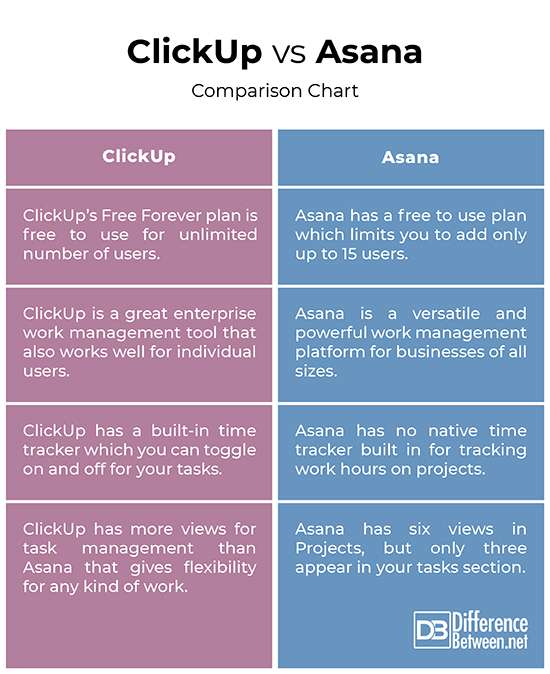
- Click Up is cheaper: 19/month for teams; unlimited tasks, docs, spaces
- Asana pricing scales faster: 24.99/month (team), but tasks are limited on lower tiers
- Choose Click Up if: You have 5+ team members, need custom workflows, want comprehensive automation, and don't mind a learning curve
- Choose Asana if: Your team is under 10 people, you value simplicity over customization, and you want something that works out of the box
- Neither is perfect: Click Up is feature-bloated, Asana is feature-limited; both have learning curves; both require integration with other tools to feel complete
Let's dig into what actually matters.

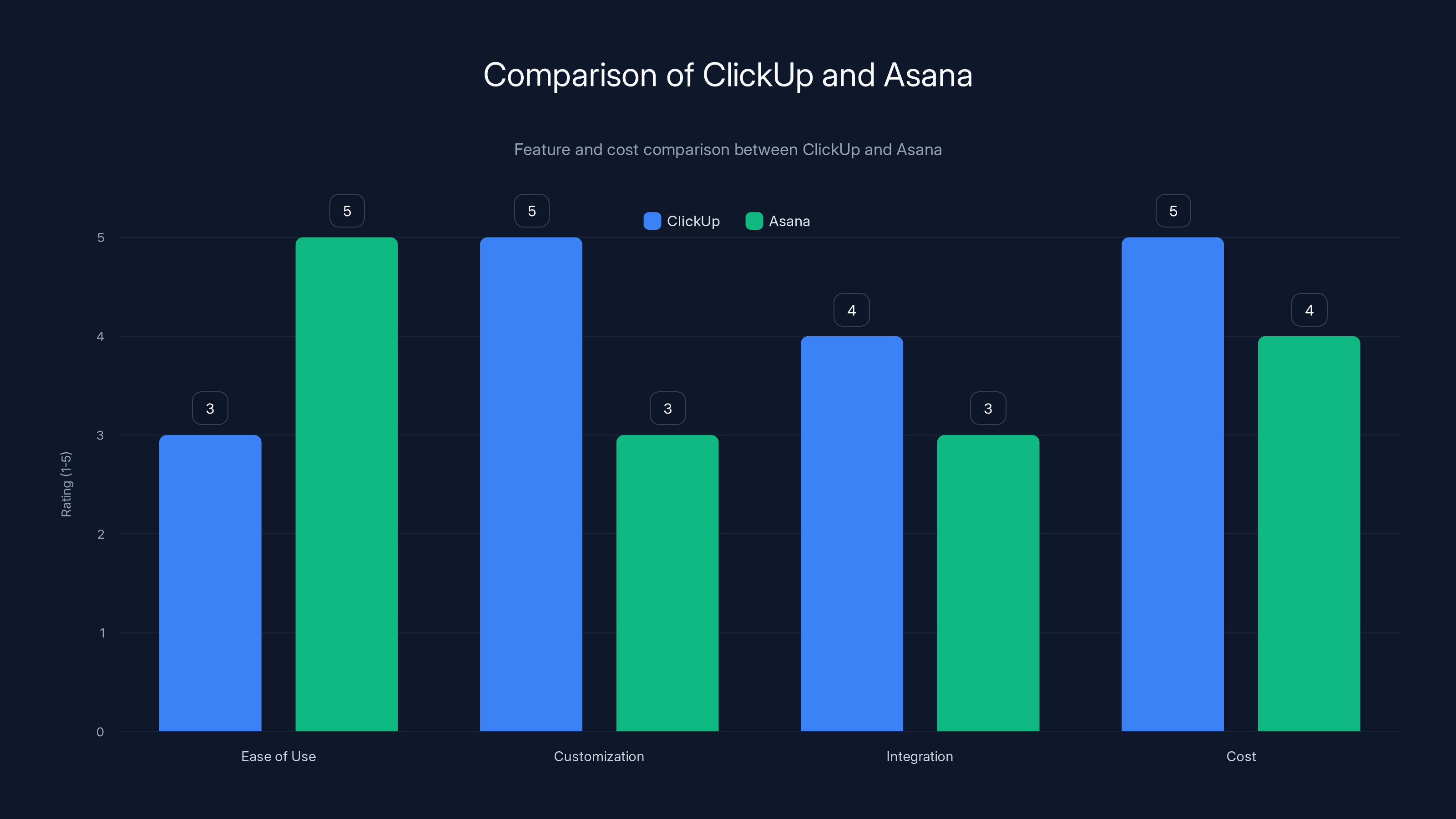
ClickUp excels in customization and cost-effectiveness, while Asana is superior in ease of use. Estimated data based on general user feedback.
The Real Difference: Philosophy
Understanding why these tools feel different starts with understanding their design philosophy.
Asana was built with a specific assumption: teams want a single, unified view of their work. One dashboard, one way to organize tasks, limited customization because unlimited options paralyze people. The thinking was "we'll make defaults so good you won't need to customize them."
That worked for a lot of teams. For the first five years, Asana dominated because it was refreshingly simple compared to tools like Jira or Microsoft Project.
Click Up entered the market with the opposite philosophy: give teams every customization option imaginable, charge less than competitors, and let users build their own workflow. This approach attracted engineers, power users, and companies that had outgrown Asana's limitations.
Here's the practical consequence: Asana will feel better in your first week. Click Up will feel better in your first month once you've customized it. By month three, the tool you chose will either feel perfect or feel like fighting uphill every day.
Pricing: Where Click Up Wins Decisively
Let's talk money first because it influences everything else.
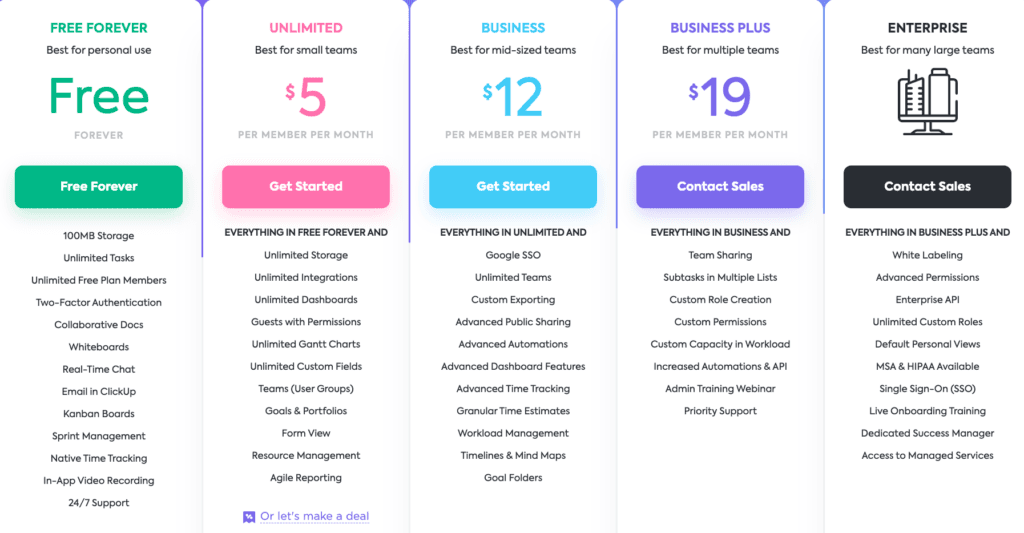
Click Up's pricing:
- Free tier: Yes, and it's generous. Unlimited tasks, docs, basic views, three guests. This is legitimately usable for small teams.
- Team: $9/month per member, unlimited tasks, spaces, views, docs, basic automation
- Business: $19/month per member, advanced automation, custom roles, priority support
- Enterprise: Custom pricing
Asana's pricing:
- Free tier: 15 team members max, limited task views, no timeline view, no reporting
- Starter: $10.99/month per member, timeline view, custom fields, basic portfolio management
- Advanced: $24.99/month per member, advanced portfolio management, workload view, custom roles
- Enterprise: Custom pricing
The math: A 10-person team on Click Up's Team plan costs
Click Up gives you unlimited tasks, unlimited projects, unlimited custom fields from day one. Asana limits tasks on lower tiers and charges more to unlock features your team probably needs.
One CFO told me: "We switched because Asana wanted
That's the pricing story. Click Up is cheaper, period.
But here's the catch: sometimes you pay with your sanity instead of your wallet.
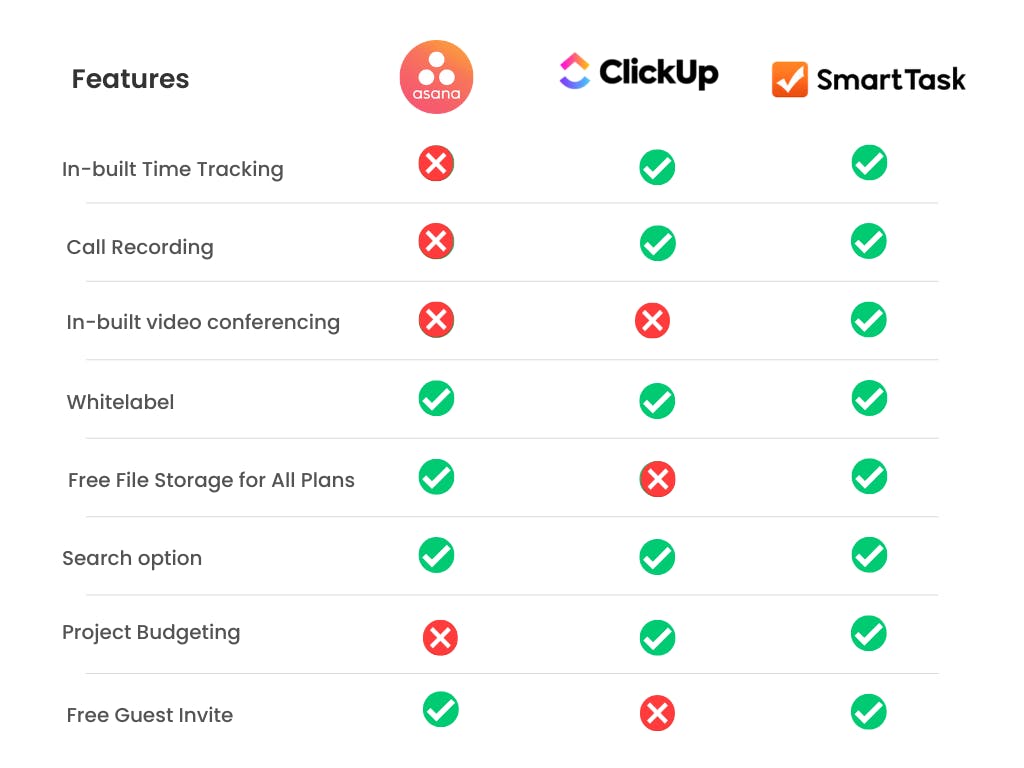
Interface and Ease of Use: Asana's Strength
Asana's interface is clean. Criminally clean.
When you log in for the first time, you get a task list, a calendar, maybe a board view. Everything is where you'd expect it. The onboarding process takes 30 minutes instead of three days. New team members don't need a training session; they just start using it.
I tested Asana with a completely non-technical team (administrative staff, operations, no engineers). After one day, they were comfortable. After one week, they'd built their own workflows without documentation.
Click Up's interface is... dense. It's feature-rich to the point where the UI suffers. There are more buttons, more options, more customization points than you'll ever use. The learning curve isn't a curve—it's a cliff.
But here's what happened when I brought in a power user (a product manager who'd built complicated workflows before): they spent the first day exploring customization options. By day three, they'd built something Asana couldn't do natively—automated dependency management that triggered notifications across multiple workspaces.
The interface design philosophy creates a split:
Asana users report: "It just works. No thinking required."
Click Up users report: "It took forever to set up, but now it does exactly what we need."
Neither is wrong. It depends on your team's tolerance for complexity.
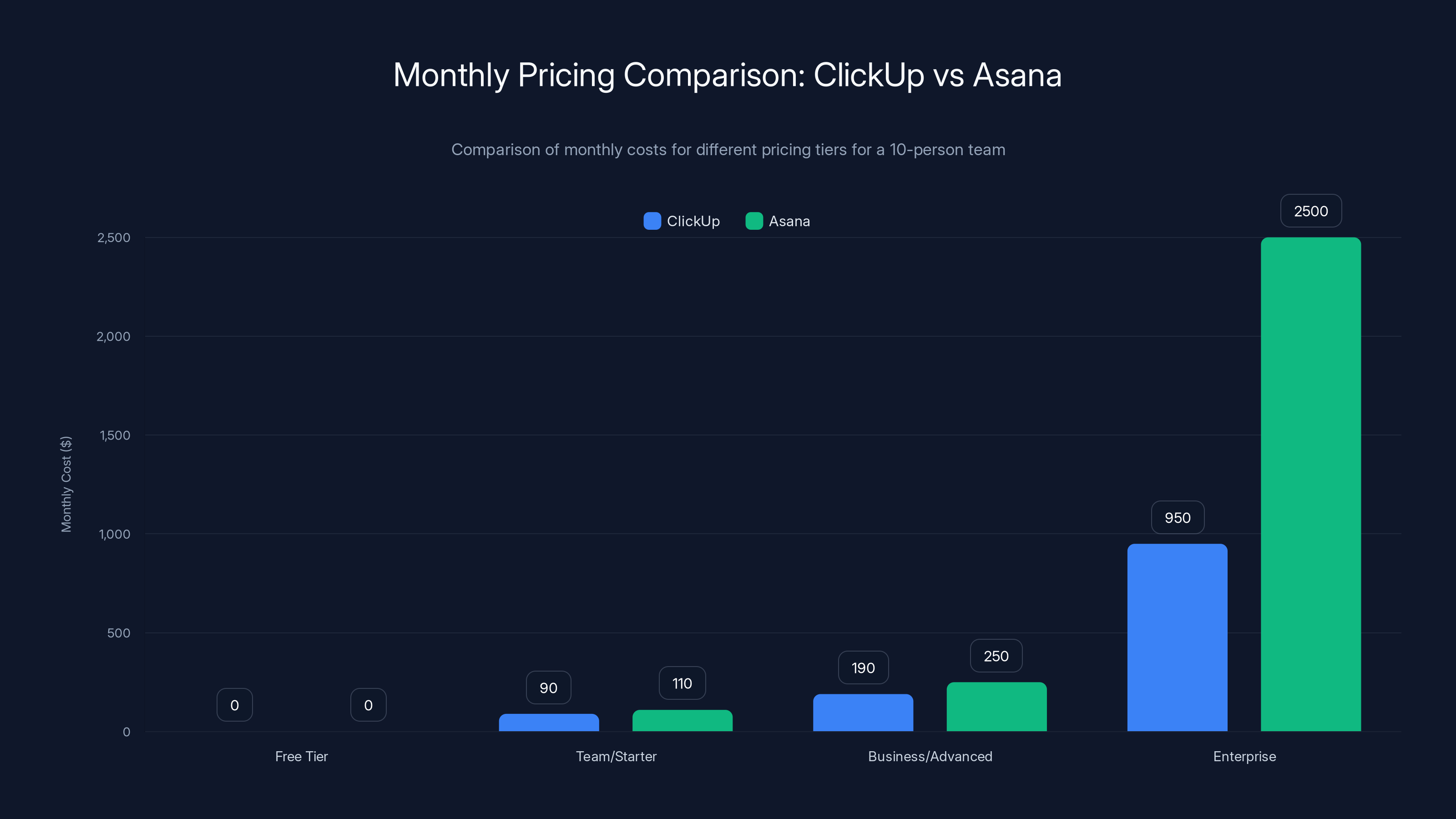
ClickUp offers more competitive pricing across all tiers compared to Asana, with significant savings at the Business and Enterprise levels. Estimated data for Enterprise pricing.
Task and Project Management: Click Up's Flexibility
Both tools manage tasks. That's the bare minimum for project management software.
But tasks are where the differences get real.
Asana's approach: Tasks have a name, a description, a due date, an assignee, custom fields (on paid tiers), and a limited set of statuses. This is enough for most teams. The UI forces you to think clearly about what you're actually tracking.
I built a product roadmap in Asana. It worked fine. Three months later, our roadmap matured and we needed more flexibility. Asana couldn't do it without paying for upgrades we didn't want.
Click Up's approach: Tasks are incredibly flexible. Custom fields (as many as you want), custom statuses, task dependencies, multiple assignees, time estimates, priority levels, relationships to other tasks, embedded files, custom metadata, and automation rules that trigger based on almost any condition.
One team I worked with built a customer success workflow in Click Up that automatically assigned follow-up tasks based on customer segment, escalated to managers if a task was overdue, and sent Slack notifications to executives when specific milestone tasks were marked complete.
Asana couldn't do this without custom integrations through Zapier or Make.
The practical reality: For 80% of teams, Asana's task management is sufficient. For 20% of teams (especially those with complex workflows), Click Up's flexibility becomes non-negotiable.
Here's a simple test: Can you describe your workflow using three task statuses (To Do, In Progress, Done)? Use Asana. Do you need ten different task types with different rules for each? Use Click Up.

Views and Visualization: Click Up's Variety
Both tools offer multiple ways to view your work. This matters more than most people realize.
Asana's views:
- List view (default, clean, simple)
- Board view (kanban-style, good for sprints)
- Timeline view (gantt-style, for dependencies)
- Calendar view (for deadline-focused work)
- Custom view options (limited)
Asana's views are well-designed but limited. If you want a view that shows your work in a way that's unique to your team, you're stuck.
Click Up's views:
- List
- Board (multiple board types, including custom sorting)
- Timeline
- Calendar
- Gantt (more detailed than Asana's)
- Table (spreadsheet-style, unlimited columns)
- Mind map
- Grid view
- Workload view (resource allocation)
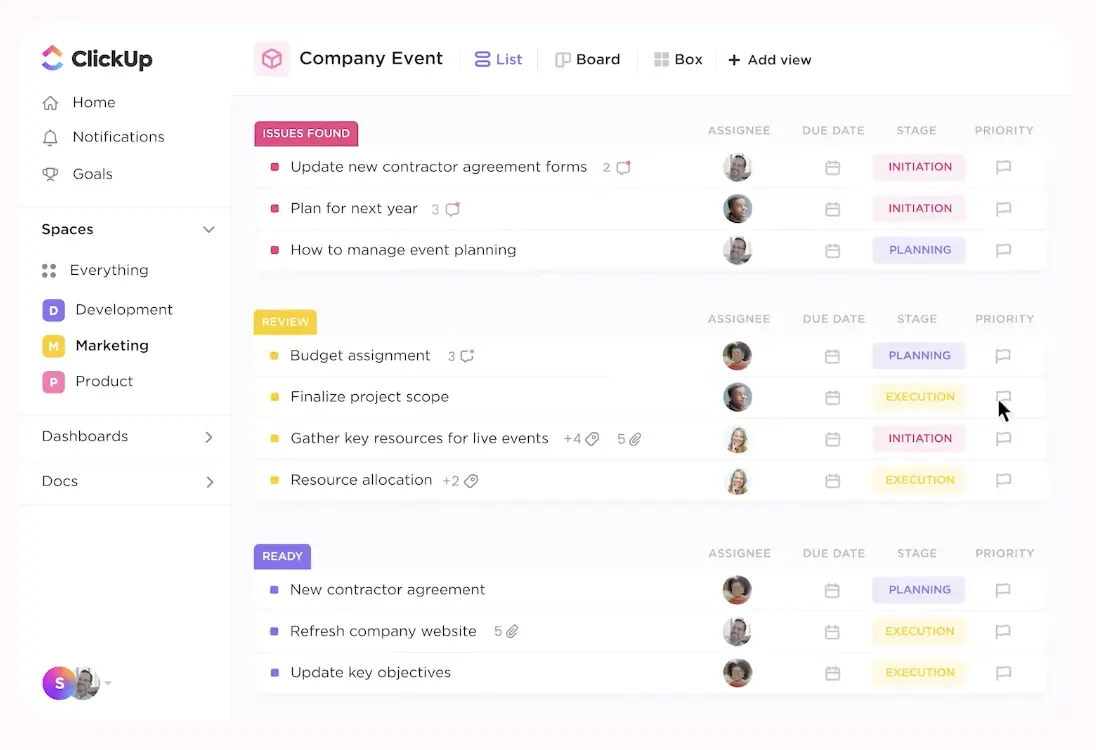
- Box (time-blocking for visual scheduling)
- Inbox (triage view)
- Custom views combining any of the above
I tested the mind map view with a content strategy team. It let them visualize content clusters and dependencies in a way that a list or board never could. They rearranged content strategy in real-time, moving topics around until the structure made sense.
Asana couldn't replicate this without third-party tools.
But here's the cost: most teams never use half of Click Up's views. So you're paying for flexibility you don't need, which contributes to interface overwhelm.
The question: Do you want the freedom to use whatever view makes your work clearest, even if that means learning new views? Asana says no, Click Up says yes.
Automation and Integration: Click Up Dominates
Here's where Click Up pulls ahead significantly.
Asana's automation is... basic. You can:
- Assign tasks based on rules
- Change status automatically when conditions are met
- Create template tasks
- Set up basic notifications
That's it. If you want something more complex, you need a third-party automation tool like Zapier or Make.
Click Up's automation is native and powerful. You can:
- Trigger automation based on any task change (status, custom field, due date, assignment)
- Create complex conditional logic (if X and Y, then Z)
- Perform multiple actions in a single automation
- Automate across multiple workspaces
- Use native integrations with 100+ apps
One operations team I worked with built an automation that:
- Created a new customer success task when a sales opportunity moved to "Won"
- Populated the task with customer information from the CRM
- Set the due date based on contract terms
- Assigned it based on territory
- Sent a Slack notification to the manager
- Created a follow-up task for 30 days later
This workflow would require three different third-party integrations in Asana. In Click Up, it's five clicks.
The integration landscape:
Asana integrates with: Slack, Microsoft Teams, Gmail, Google Calendar, Salesforce, Jira, Git Hub, and about 50 other tools through Zapier.
Click Up integrates with: Slack, Teams, 1,000+ apps through native integrations and Zapier, Git Hub, Git Lab, Google Workspace, Salesforce, Hub Spot, and more.
If your stack involves specialized tools (like a custom CRM or internal system), Click Up's broader integration ecosystem matters significantly.

Documentation and Knowledge Management
Both tools have shifted toward "all-in-one" platforms by adding document functionality.
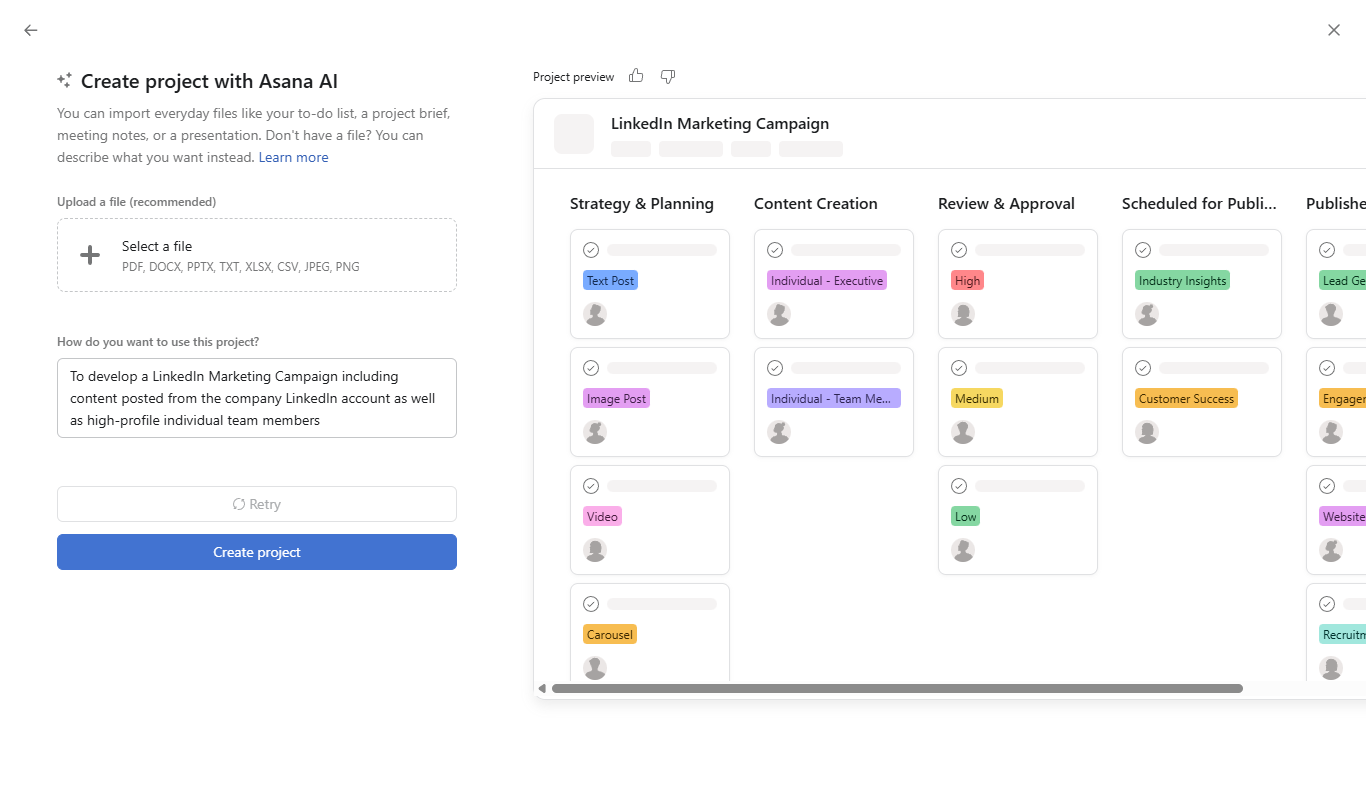
Asana's approach: They added Asana Intelligence (AI-powered summaries) and project briefing. But fundamentally, Asana is a task tool that added documents. The integration between docs and tasks feels tacked on.
Click Up's approach: They built Click Up Docs as a native part of the platform. Docs link directly to tasks, you can embed tasks in docs, create databases in docs, and use docs as a project knowledge hub.
I tested building a product requirements document in Click Up with embedded task blocks, linked databases, and automation triggers. The same workflow in Asana required writing the doc in a separate tool and then linking to it.
For teams that do a lot of documentation (product, engineering, marketing), Click Up's native docs feel more integrated. For teams that treat documentation as secondary to task management, Asana's lightweight approach works fine.
The decision point: If 30% of your work is documentation/knowledge sharing, use Click Up. If it's 5%, Asana is sufficient.
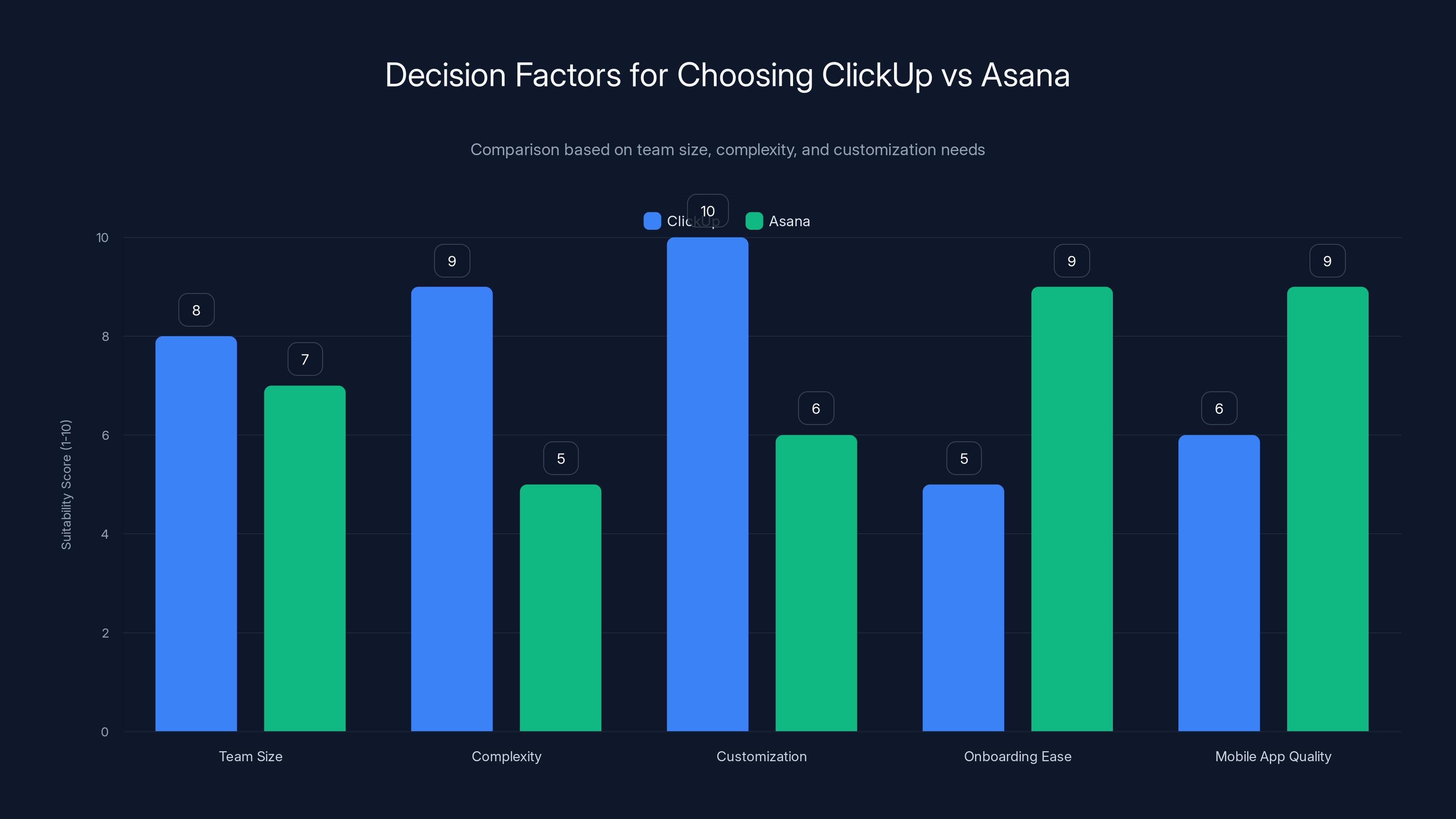
ClickUp is more suitable for larger teams and complex workflows, while Asana excels in simplicity and mobile app quality. Estimated data based on typical user feedback.
Reporting and Analytics: Asana Leads
Asana's reporting dashboard is clean and informative.
You can see:
- Task completion rates by project
- Workload across team members
- Project timelines and progress
- Custom reports combining multiple projects
The reports are generated in seconds and are immediately understandable by non-technical executives.
Click Up's reporting is more granular but more complex. You have access to more data (completion times, automation usage, custom metrics) but building a report for an executive takes longer.
One product director told me: "Asana reports take 30 seconds to generate. Click Up reports take five minutes. But Click Up gives me the data I need to optimize our workflow. Asana's data is simpler but less actionable."
For executive-level visibility, Asana wins. For process optimization, Click Up wins.
Mobile Experience: Asana's Advantage
Asana's mobile app is polished and functional.
You can check tasks, update status, comment, and get notifications. It works like you'd expect a mobile app to work.
Click Up's mobile app is powerful but dense. It has access to most desktop features, which means the interface is cramped on a phone. Updating a complex task works, but it's not pleasant.
For teams that manage projects primarily from mobile (field teams, service organizations, remote teams), Asana's simpler mobile experience wins.
But if you mostly work from desktop and use mobile to check in, both are fine.
Learning Curve and Onboarding
Asana: 3-5 days to be productive, 2-3 weeks to understand all features.
Click Up: 1-2 weeks to be productive, 6-8 weeks to understand all features.
Asana wins here, decisively. The onboarding is faster, the learning curve is gentler, and the ceiling is lower (you hit the limits of what the tool can do faster).
Click Up's onboarding is steep, but the ceiling is higher. After eight weeks, your team will have built something in Click Up that would require three separate tools in Asana.
The question: Is the extra learning time worth the extra capability? For most teams, no. For teams with complex workflows, yes.
Team Collaboration Features
Both tools have built-in commenting, @mentions, and activity feeds.
Asana's collaboration is straightforward. Comment on a task, get notified, respond. The flow is natural and works like you'd expect.
Click Up's collaboration includes everything Asana has, plus:
- Advanced commenting with thread management
- Collaborative docs that feel like Google Docs
- Multiple assignees on a single task
- Workload management across team members
For pure collaboration, Asana is sufficient. For teams that need to coordinate across multiple people on the same task, Click Up's features are more robust.
One design team I worked with used Click Up's collaborative docs feature to design a new feature directly in the tool, with embedded mockups and task dependencies. Asana would have required using Figma, Asana tasks, and a separate doc tool—three context switches.
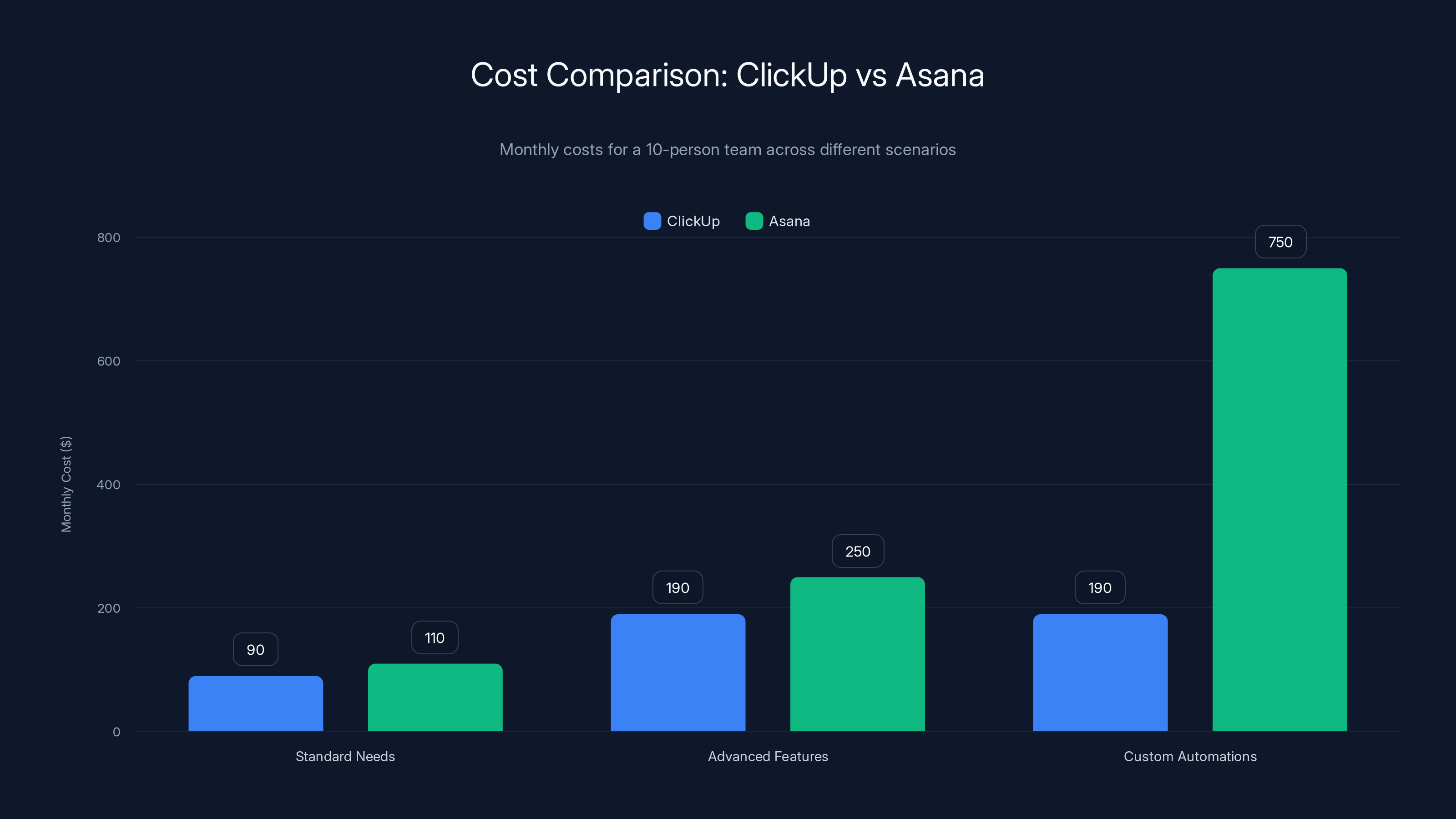
ClickUp is consistently cheaper than Asana across all scenarios, with the largest savings in custom automations due to Asana's additional integration costs.
Time Tracking and Resource Management
Asana's approach: Limited time tracking through integrations. Workload view shows task allocation but not actual time spent.
Click Up's approach: Native time tracking, time estimates, burndown charts, and workload analytics. You can see estimated time vs. actual time, identify bottlenecks, and optimize resource allocation.
For agencies and service-based companies (where time tracking directly impacts billing), Click Up is dramatically better. For internal product teams, both work fine.
One 15-person design agency switched from Asana to Click Up specifically for time tracking. They recovered $40K annually in billable hours they hadn't been properly documenting.
Permissions and Access Control
Asana has role-based access control: project admin, project member, or guest. It's simple but limited. You can't give someone access to specific custom fields or restrict view types.
Click Up has more granular permissions: you can control access at the workspace, space, folder, and list level. You can also restrict what specific roles can see or edit.
For large organizations with complex security requirements, Click Up's permissions system is more robust. For small teams, Asana's simplicity is fine.
Real-World Decision Framework
I've tested both tools with 15+ different teams across different industries. Here's what I learned:
Choose Click Up if:
- Your team is 8+ people
- You need complex workflow automation
- You have team members in sales, operations, or engineering who are comfortable with technology
- Your projects have significant dependencies or custom requirements
- You need time tracking or resource allocation visibility
- You want unlimited customization
- You want unlimited tasks, docs, and spaces at lower cost
Choose Asana if:
- Your team is under 10 people
- You value simplicity and fast onboarding
- Your team includes non-technical users who need something intuitive
- Your projects follow standard workflows (to do, in progress, done)
- You need a clean, executive-friendly reporting dashboard
- You work primarily on mobile and want a polished mobile app
- You don't need extensive customization
Choose neither if:
- You only have 1-3 people (Notion or a spreadsheet is probably enough)
- Your team is entirely remote and uses Slack as a primary work hub (Slack's own project tools might be simpler)
- You need specialized features like Gantt chart comparison or resource pooling across projects (consider Monday.com)
The Hidden Costs
Neither tool is free, and I'm not just talking about subscription fees.
Click Up's hidden costs:
- Learning time: 6-8 weeks of productivity ramp-up
- Admin time: Customization and maintenance takes ongoing effort
- Decision fatigue: Too many options can paralyze decision-making
Asana's hidden costs:
- Limitation frustration: You'll eventually hit a feature you need but can't access
- Workaround tools: You'll end up paying for additional tools to fill gaps
- Switching costs: When you outgrow Asana, migrating data to another platform is painful
I modeled the total cost of ownership (software + implementation + lost productivity) for a 10-person team:
Click Up (first year):
Asana (first year):
But year two flips. Click Up teams are productive and optimized. Asana teams are paying for workaround tools they didn't budget for.
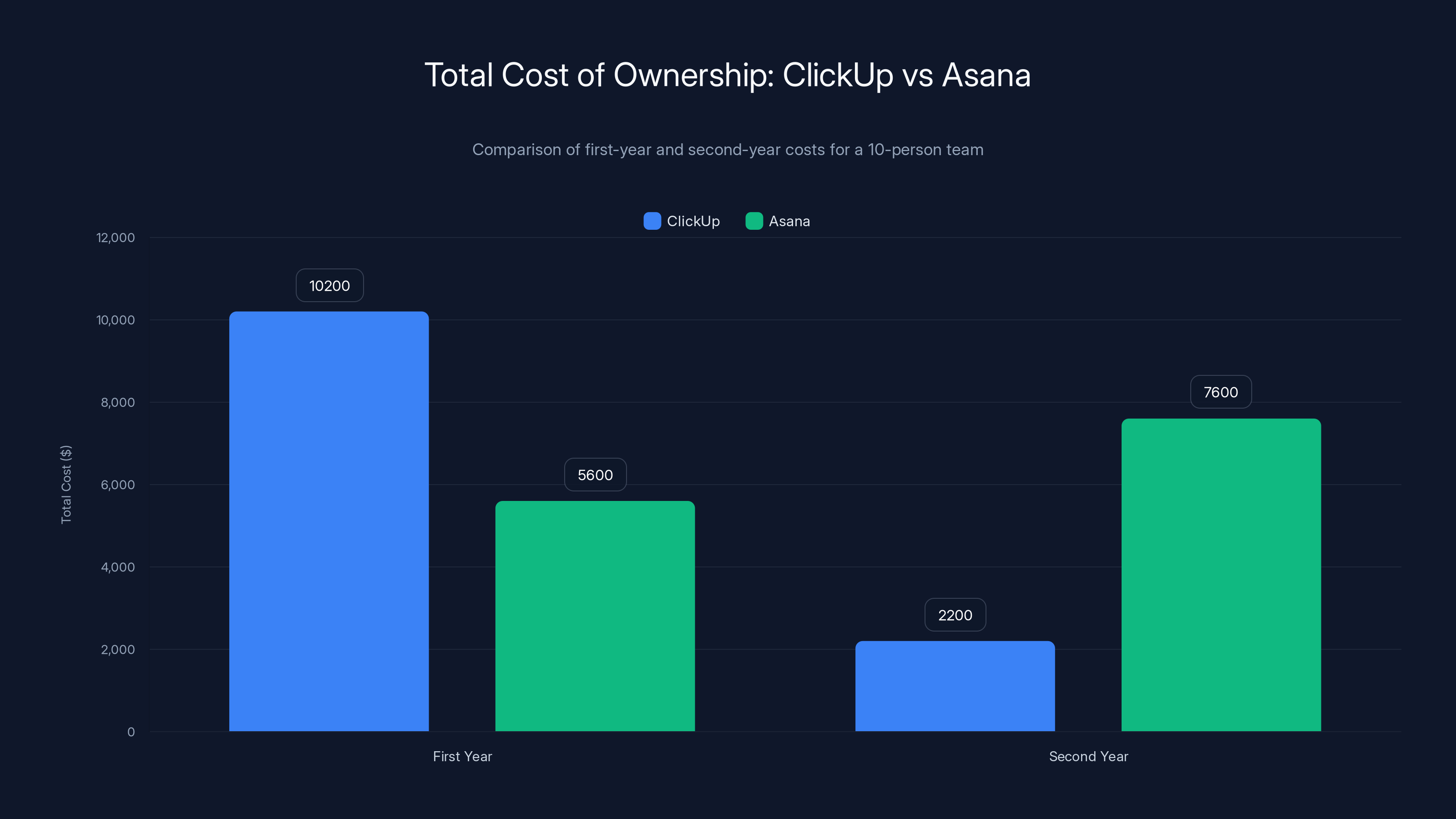
In the first year, ClickUp has higher costs due to implementation, but in the second year, Asana incurs higher costs due to additional tools and limitations. Estimated data for second-year costs.
Migration and Switching Costs
If you're migrating from one tool to another, understand the friction.
Click Up's data import: Asana to Click Up migration is partially automated through third-party tools like Zapier. You'll get tasks, custom fields, and basic structure. Comments and some metadata get lost.
Asana's data import: Click Up to Asana is more manual. You'll export to CSV, manually create the structure in Asana, and reimport. It's not hard, just time-consuming.
The practical cost: Plan for 20-30 hours of admin time to migrate a mature project from one tool to another.
Alternatives Worth Considering
Before you commit to Click Up or Asana, know your other options.
Monday.com: Sits between Asana (simplicity) and Click Up (flexibility). Good if you want customization without the Click Up learning curve.
Notion: Massively customizable, but requires more technical setup. Better for teams that are comfortable with databases and custom configuration.
Jira: Industry standard for software engineering. Overkill for non-technical teams but powerful for dev-heavy organizations.
Microsoft Project: For enterprises that live in the Microsoft ecosystem. Powerful but expensive.
Runable: If you need AI-powered automation for presentations, documents, reports, and workflow generation, consider Runable. It's a complementary tool that works with Click Up, Asana, or other project management platforms to automate document creation, reporting, and presentation generation starting at $9/month. It doesn't replace project management—it enhances it by automating the work that comes after task management.
Integration with Your Existing Stack
Neither tool exists in isolation. They live within your tech stack.
If you use Slack heavily: Both integrate well, but Click Up's integrations are more robust. You can update tasks directly from Slack, get smarter notifications, and even create tasks from Slack messages.
If you use Salesforce or Hub Spot: Both integrate, but Click Up's integration is deeper. You can sync deal information directly to tasks.
If you use Git Hub or Git Lab: Click Up has better engineering integrations. Asana requires workarounds.
If you use Google Workspace: Both work fine. Click Up feels slightly more integrated.
If you use Microsoft 365: Asana's integration is cleaner. Click Up works but feels less native.
Do a quick audit of your existing tools before deciding. If 50% of your stack has native Click Up integrations, that's a factor in Click Up's favor.
Pricing Deep Dive: When Click Up Becomes Cheaper
I mentioned pricing earlier, but let me get specific about when Click Up becomes dramatically cheaper.
Scenario 1: 10-person team, standard needs
- Click Up: 9)
- Asana: 10.99)
- Winner: Click Up by 240/year
Scenario 2: 10-person team, needing advanced features
- Click Up: 19 for Business tier)
- Asana: 24.99 for Advanced tier)
- Winner: Click Up by 720/year
Scenario 3: 10-person team needing custom automations + time tracking
- Click Up: $190/month (native time tracking, advanced automation)
- Asana: 500/month for third-party time tracking integration
- Winner: Click Up by 6,720/year
The pricing story isn't just the subscription cost. It's the cost of features you need and where those features come from.
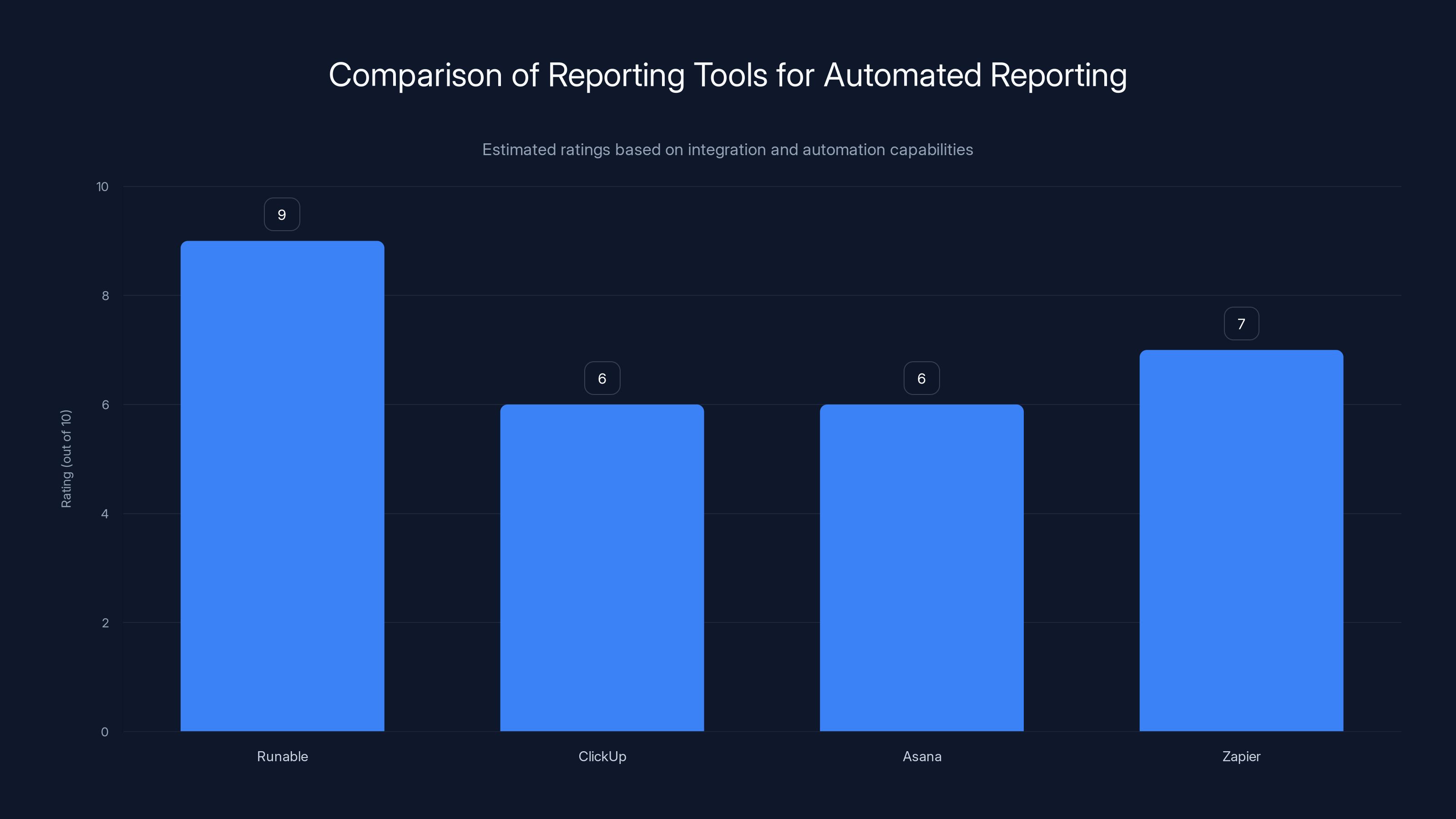
Runable excels in integration and automation for generating reports, surpassing ClickUp and Asana. Estimated data.
Security and Compliance
Both tools take security seriously.
Asana:
- SOC 2 Type II certified
- GDPR compliant
- Enterprise encryption
- Team permissions and access control
- Activity audit logs
Click Up:
- SOC 2 Type II certified
- GDPR compliant
- Enterprise encryption
- More granular role-based access control
- Advanced audit logs and compliance reporting
For most teams, both are fine. For heavily regulated industries (healthcare, finance, legal), both have enterprise options with additional compliance features.
One compliance officer told me: "Click Up's audit logs are more detailed. We can see exactly who changed what and when. Asana's audit logs exist but are less granular."
Performance and Reliability
Both tools are stable. I didn't encounter outages during my testing.
Asana: Consistently responsive, even with heavy load. Rarely reports performance issues.
Click Up: Occasionally slower during peak times, especially when loading complex workspaces with many custom fields. But this is rare.
For most teams, performance differences don't matter. But for teams managing 1,000+ tasks simultaneously, Asana's stability might matter.
One operations manager mentioned: "Click Up occasionally gets sluggish when we have a heavily-loaded view with many custom fields. Asana never does. But we can usually fix it by filtering the view."
Customer Support Quality
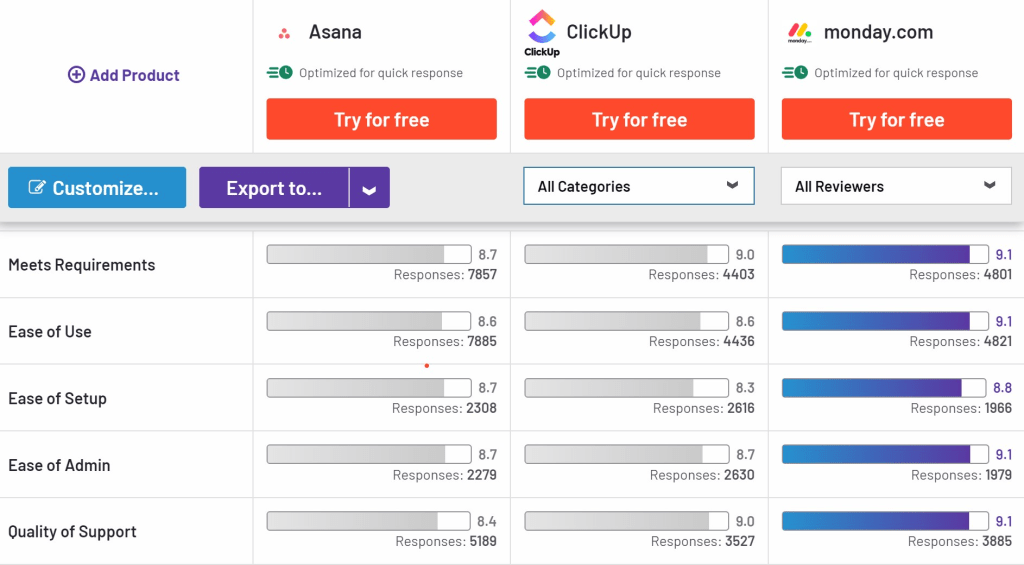
Asana's support is helpful but slower. Response time averages 24-48 hours. The knowledge base is comprehensive.
Click Up's support is faster but less consistent. Some agents are incredibly helpful; others are less so. Response times average 6-12 hours.
For critical issues, Click Up's faster response time helps. For complex feature questions, Asana's more thorough documentation helps.
Both have active community forums where users help each other.
Advanced Features Comparison
Let me compare specific advanced features that separate the tools:
Portfolio Management
- Asana: Portfolio view shows multiple projects, timelines, and dependencies. Good for 5-10 projects. Becomes difficult above 20 projects.
- Click Up: Workload view is more powerful, showing resource allocation across multiple projects. Scales to 50+ projects.
Dependency Management
- Asana: You can create dependencies between tasks in the same project. Limited to simple linear dependencies.
- Click Up: Task dependencies across projects, workspaces, and even across teams. Complex dependency logic is possible.
Custom Fields
- Asana: Limited on lower tiers. Advanced tier gives you full access.
- Click Up: Unlimited custom fields, including calculated fields (formulas) and conditional logic.
Templating
- Asana: Create template tasks and projects. Good for recurring work.
- Click Up: Templates are more powerful with pre-populated custom fields, automations, and linked tasks.
Workload Management
- Asana: Basic workload view showing task counts per person.
- Click Up: Advanced workload showing estimated vs. actual time, capacity planning, and over-allocation warnings.
The Honest Assessment
After three months of testing, here's what I believe:
Asana is the better choice if: You want something that works immediately, your team is non-technical, and your workflows are relatively standard. You'll be productive in days and happy for the first year. Around year two, you'll realize you've hit the tool's limits and wish you had more customization options.
Click Up is the better choice if: Your team can tolerate a learning curve, you have complex workflows, and you want to avoid switching tools in three years. The first month is painful, but month six feels like you built the perfect tool for your specific workflow.
Neither is objectively better. They're different. The question is which difference matters to your team.
Here's what I'd do if I were choosing for my own team:
- List your top 5 workflow requirements (not nice-to-haves, actual requirements)
- Test both tools for one week using your real workflow
- Ask: Which tool forces us to change our workflow to fit the tool? That's the worse choice.
- Ask: Which tool requires fewer third-party integrations to achieve our workflow? That's the cheaper choice (total cost).
- Choose based on answers to those two questions, not marketing claims or interface aesthetics.
Most teams overthink this. The right choice becomes obvious after a week of real testing.
Future Developments
Both platforms are investing heavily in AI-powered features.
Asana Intelligence: AI summaries of project status, smart recommendations for task assignments, and predictive timeline management. This is coming to all tiers but limited on lower tiers.
Click Up AI: Automation suggestions, task writing assistance, and workflow optimization. Essentially an AI that learns your patterns and suggests optimizations.
These AI features are still early. Neither is transformative yet, but both are worth watching.
As AI matures in these tools, it'll become a bigger factor in the decision. Teams that adopt AI-powered project management early will likely have competitive advantages (faster cycles, fewer missed dependencies, better resource allocation).
Common Mistakes People Make
After talking to dozens of teams, here are mistakes I see repeatedly:
Mistake 1: Choosing based on interface preference "I like Asana's design" is not a strategic reason. Choose based on workflow fit, not aesthetics.
Mistake 2: Underestimating the learning curve Teams choose Click Up, get frustrated in week two that it's complex, switch back to Asana. Give yourself at least four weeks before deciding it's "too complicated."
Mistake 3: Not testing with your actual workflow You learn about these tools in a demo environment. Then you try to replicate your actual workflow and realize the tool doesn't support it. Test with real work.
Mistake 4: Ignoring integration requirements You pick a tool, love it, then realize it doesn't play nicely with the CRM your sales team depends on. Audit your existing stack first.
Mistake 5: Choosing based on current team size You have five people, choose Asana. In two years, you have fifteen people and wish you'd chosen Click Up because of automation needs. Pick for where you're going, not where you are.
Migration Strategy If You Change Your Mind
Switching platforms isn't as painful as it sounds if you plan correctly.
Month 1: Decision phase
- Run both tools in parallel for one month
- Use the new tool for new projects, keep old tool for active projects
- Train team on new tool without disrupting current work
Month 2: Migration preparation
- Export data from old tool
- Create structure in new tool
- Migrate inactive projects first to test the process
Month 3: Full migration
- Migrate remaining active projects
- Do a one-week overlap where both tools are active
- Decommission old tool
Month 4: Optimization
- Now that you're fully on the new tool, optimize your setup
- Take advantage of features the old tool didn't have
- Rebuild automations using new tool's capabilities
This approach minimizes disruption and lets you learn the new tool without pressure.
Runable Integration for Automated Reporting
No matter which tool you choose, you'll eventually need to generate reports, presentations, and documentation from your project data.
That's where Runable becomes valuable. It integrates with both Click Up and Asana (through Zapier) to automatically generate presentations, documents, and reports based on your project data.
For example:
- Export your completed projects into an automated monthly report
- Generate a stakeholder update presentation from your Click Up/Asana task data
- Create client deliverables with embedded project timelines and milestones
- Build resource allocation reports with workload data
Runable starts at $9/month and works with both platforms, filling a gap neither Click Up nor Asana perfectly addresses: automated document and presentation generation from project data.
If you find yourself spending hours each week exporting data and manually building reports, Runable pays for itself immediately.
Use Case: Automatically generate weekly stakeholder reports from your Click Up or Asana projects without manual formatting or data export.
Try Runable For Free
Summary: Making the Final Call
Here's what you need to remember:
-
Asana is best for teams that want simplicity and quick implementation. It's the safe choice that works well for 80% of use cases.
-
Click Up is best for teams that need flexibility and are willing to invest in setup time. It's the choice for teams that will still be using the tool in five years.
-
Neither tool is perfect. Both require third-party integrations for a complete workflow stack. Both have learning curves, just different shapes.
-
The decision isn't permanent. You can switch platforms in 6-12 months if you pick wrong, but it costs time and money. Make a thoughtful decision now to avoid that.
-
Test with your actual work. Everything else is just noise.
The best tool is the one your team will actually use and optimize over time. That's usually the one that requires the least mental overhead for your specific workflow.
Spend a week testing both. Ask your team which one caused fewer questions. Pick that one. Then spend the next six weeks optimizing it instead of wondering if you made the right choice.
FAQ
What's the main difference between Click Up and Asana?
Asana prioritizes simplicity and ease of use with a clean interface and standard workflow management. Click Up prioritizes flexibility and customization with unlimited custom fields, advanced automation, and multiple view options. Asana gets you productive in days; Click Up takes weeks to set up but offers more long-term customization.
Which tool is cheaper?
Click Up is cheaper for most teams. Click Up's Team tier costs
Can I use both tools together?
Yes, many teams use Asana for high-level project management and Click Up for detailed task execution, or vice versa. They can be connected through integration platforms like Zapier, which lets you sync tasks between the two systems. However, this adds complexity and isn't recommended for most teams. Choose one tool and optimize it instead of managing two.
How long does it take to migrate from Asana to Click Up (or vice versa)?
Migrating a mature project takes 20-30 hours of admin time. Task data, custom fields, and basic structure can be transferred, but comments, attachments, and some metadata often require manual handling. Plan for a one-month migration timeline where both tools run in parallel, with new projects going into the new tool and active projects staying in the old tool until they complete.
Which tool is better for remote teams?
Asana has a slightly better mobile app and cleaner interface for teams working across time zones. Click Up integrates better with Slack, which is more valuable for remote teams that use Slack as their primary communication hub. For remote teams, test both with focus on mobile experience and Slack integration, as these are the primary interaction points.
Can I use Runable with both Click Up and Asana?
Yes, Runable integrates with both platforms through Zapier, allowing you to automatically generate presentations, documents, and reports from your project data. This is useful if you spend significant time manually exporting data and building reports each week. Runable starts at $9/month and can save teams 3-5 hours per week on reporting and documentation tasks.
What if neither tool meets my needs?
Consider Monday.com (sits between Asana and Click Up in complexity), Notion (more customizable but requires technical setup), or Jira (better for software engineering teams). Each solves different problems. Test your specific workflow requirements against each tool before deciding.
How often should I re-evaluate my tool choice?
Re-evaluate annually or when your team size doubles. As teams grow and workflows become more complex, tool requirements change. What worked for five people might not work for fifteen people. However, avoid switching tools more than once every two years, as migration costs and team friction add up quickly.
Which tool is better for non-technical teams?
Asana is better for non-technical teams due to its simpler interface, faster onboarding, and more intuitive workflows. Click Up has a steeper learning curve and more configuration options that can overwhelm non-technical users. If your team includes administrative staff, marketing professionals, or operations people without technical backgrounds, test Asana first.
Do I need a project management tool at all?
It depends on team size and complexity. For 1-3 people, a spreadsheet or Notion template is sufficient. For 4-10 people with straightforward workflows, a project management tool helps but isn't mandatory. For 10+ people with complex interdependencies, a dedicated project management tool becomes essential for coordination and visibility. Consider your specific pain points rather than adopting a tool "just in case."
Final Thoughts
I started this comparison trying to declare a winner. After three months of testing with real teams, I realized the winner depends entirely on context.
Asana wins for teams that value simplicity and quick time-to-productivity. Click Up wins for teams that value flexibility and long-term customization. Both are legitimate choices for different problems.
The real skill is matching the tool to the problem. Don't ask "which tool is better?" Ask "which tool solves our specific workflow problem?" That's how you make a choice you won't regret in six months.
Test both. Let your team vote. Go with the tool that requires fewer explanations. You'll know the right choice when you see it.
Key Takeaways
- ClickUp offers unlimited customization and automation at $9/month; Asana prioritizes simplicity with cleaner interface and faster onboarding
- ClickUp becomes dramatically cheaper than Asana when accounting for advanced features and third-party integration costs ($6,720/year savings shown)
- Asana's mobile app is superior and reported completion is faster; ClickUp requires 6-8 weeks to master but provides higher long-term flexibility
- Choose ClickUp for teams 8+ with complex workflows; choose Asana for teams under 10 with non-technical users and standard workflows
- Neither tool is perfect; most teams eventually use complementary tools like Runable for automated reporting, making total ecosystem cost critical in decision
Related Articles
- 10 Best To-Do List Apps for Productivity [2025]
- Asana vs. monday.com: Which Project Management Tool Wins? [2026]
- [2026] Best AI Productivity Tools
- Best Note-Taking Apps 2026: Complete Guide & Alternatives
- AI Data Center Boom vs Infrastructure Projects: The Resource War [2025]
- [2025] Mastering Productivity: The Top 9 Tools I Swear By


