
The Reality of Free Project Management Tools in 2026
Your budget is tight. Maybe you're bootstrapping a startup, or your company's pencil-pushing CFO just slashed software spending. Either way, you need a project management tool that doesn't cost you a fortune. The good news? Free project management software has gotten genuinely good.
I'm not talking about stripped-down, barely functional tools that make you want to pull your hair out. I'm talking about legitimate platforms that handle real work, real teams, and real complexity—without asking for your credit card upfront.
The challenge isn't finding free project management tools anymore. It's finding the right one that actually fits how your team works. Because here's the thing: every tool is different. Some excel at visual task tracking. Others shine at documentation and collaboration. A few specialize in automating the repetitive stuff that wastes hours each week.
Over the last few years, I've tested dozens of these tools with real teams, on real projects. I've watched small startups grow from 3 people to 30, then switch platforms when their needs changed. I've seen established teams abandon expensive solutions for something simpler and free. And I've learned what actually matters when you're evaluating this stuff.
In this guide, I'm breaking down the best free project management software available right now. You'll see what each tool does best, where it stumbles, and most importantly, which one actually fits your specific situation. We'll cover everything from traditional task management to AI-powered automation, from kanban boards to timeline views. And yes, we'll talk about the tradeoffs, because there are always tradeoffs.
TL; DR
- Runable offers AI-powered automation for presentations, documents, reports, and slides starting at $9/month, making it ideal for teams that want to automate repetitive work alongside project management
- Asana's free tier supports unlimited projects and up to 15 team members, with excellent timeline and dependency tracking for complex workflows Asana's pricing details
- Monday.com's free plan includes 15 automations per month and works best for visual, collaborative teams that need drag-and-drop simplicity Monday.com review
- Trello remains the gold standard for simple kanban-based workflows and works great for solo projects or small teams avoiding complexity Trello's strengths
- Click Up's free tier is the most feature-rich free option, offering unlimited tasks, documents, and dashboards, though it has a steeper learning curve Click Up vs. Asana comparison
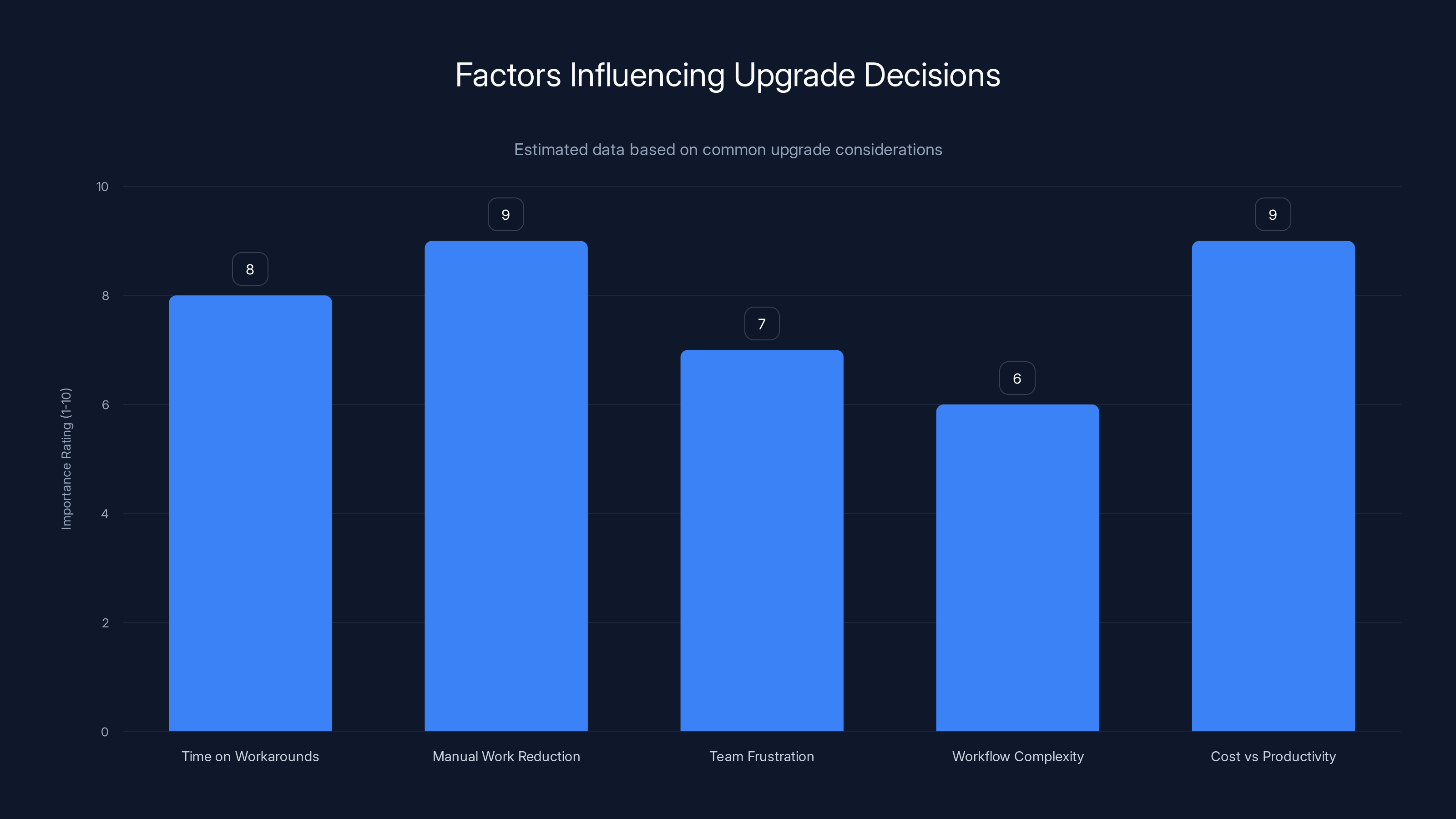
Estimated data suggests that reducing manual work and comparing costs to productivity are the most critical factors when considering an upgrade from a free tier.
Runable: AI-Powered Automation for Project Work
When you think about project management, you probably don't think about automation. But here's where things get interesting.
Runable approaches project work differently. It's built for teams that are tired of manual, repetitive tasks that eat up hours every single week. You know what I'm talking about: updating stakeholder reports, generating presentations from raw data, creating documents from templates, summarizing meeting notes, organizing information from multiple sources.
The core idea is deceptively simple. Runable uses AI to automate these workflows. You describe what you need, and the system creates it for you. Need a weekly status report with charts, metrics, and stakeholder updates? One prompt. Need to turn your project data into a polished presentation? Same thing. Need to generate documentation from your project requirements? Done.
What makes this valuable for project managers is that it reclaims time. When you're not spending 2 hours on Monday morning manually building your weekly status report, you're actually managing projects. You're unblocking your team. You're making decisions. You're doing the work that actually matters.
Key capabilities:
- AI-powered document generation for reports, presentations, and slides
- Automated content creation from project data and notes
- Multi-format output including documents, presentations, images, and videos
- AI agents that handle complex workflows automatically
- Template-based automation for repetitive documentation tasks
I've watched teams use Runable alongside their project management tool to automate the busywork. They manage tasks in Asana or Monday, but use Runable to handle the reporting, the documentation, the presentation generation. It's not a replacement for project management software, but it's a phenomenal complement.
The pricing is straightforward: $9/month for the core AI automation features. That's less than a coffee subscription, and it honestly saves more time than coffee ever will.
The honest assessment: Runable isn't for task management. It's for everything around task management. If your team spends significant time on documentation, reports, presentations, or content creation, it's worth testing. The free tier lets you experiment without commitment.
Use Case: Automate your weekly project status reports in 30 seconds instead of 2 hours
Try Runable For Free
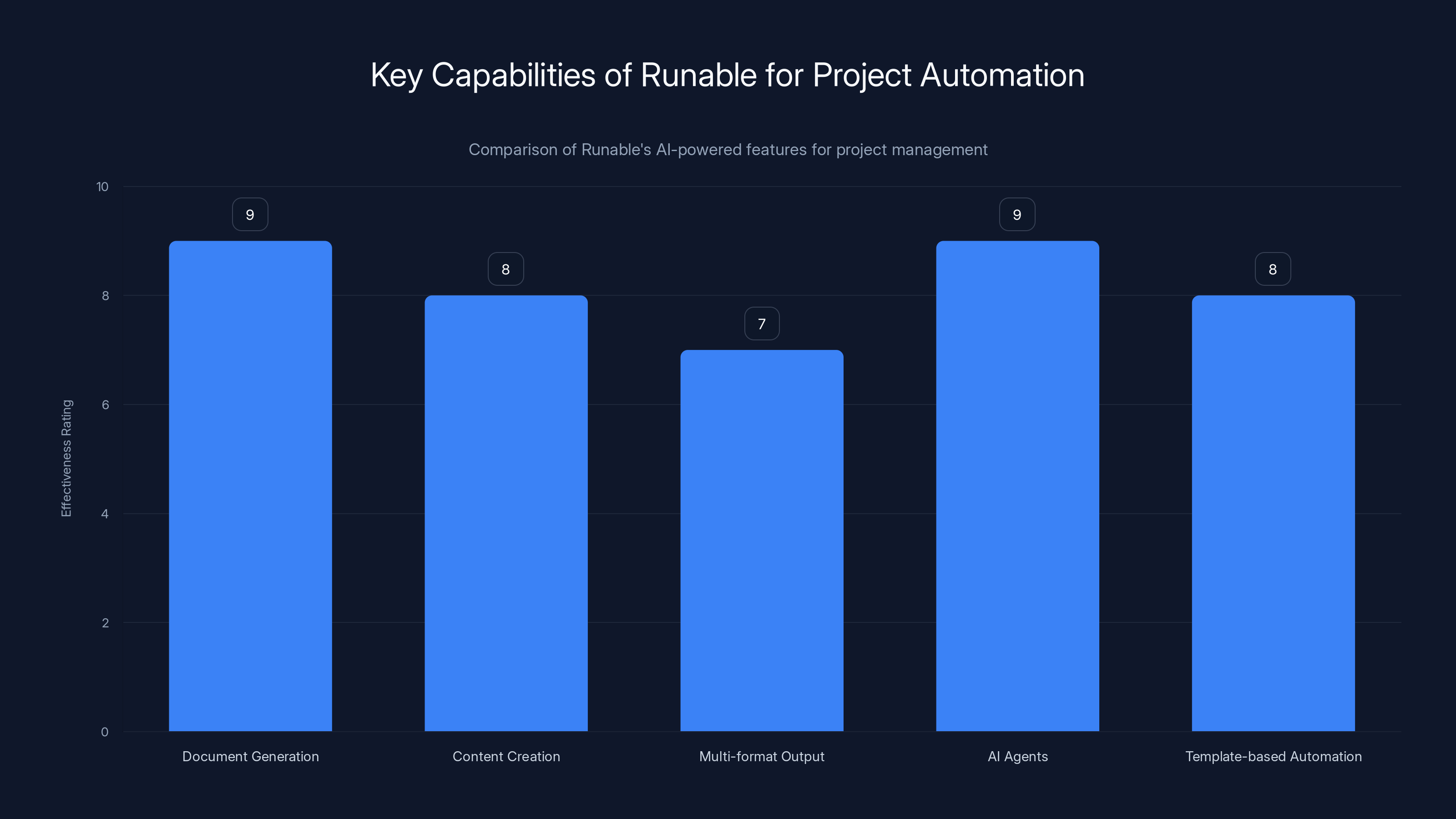
Runable excels in AI-powered document generation and AI agents for automating complex workflows, with high effectiveness ratings across all key capabilities. Estimated data.
Asana: The Swiss Army Knife of Free Project Management
Asana's free tier is honestly one of the most generous in the industry. And it's powerful enough that tons of teams never upgrade.
Here's what you get on the free plan: unlimited projects, support for up to 15 team members, three view options (list, board, calendar), basic project templates, and task dependencies. These aren't stripped-down features either. These are real, functional tools that work for legitimate complex projects.
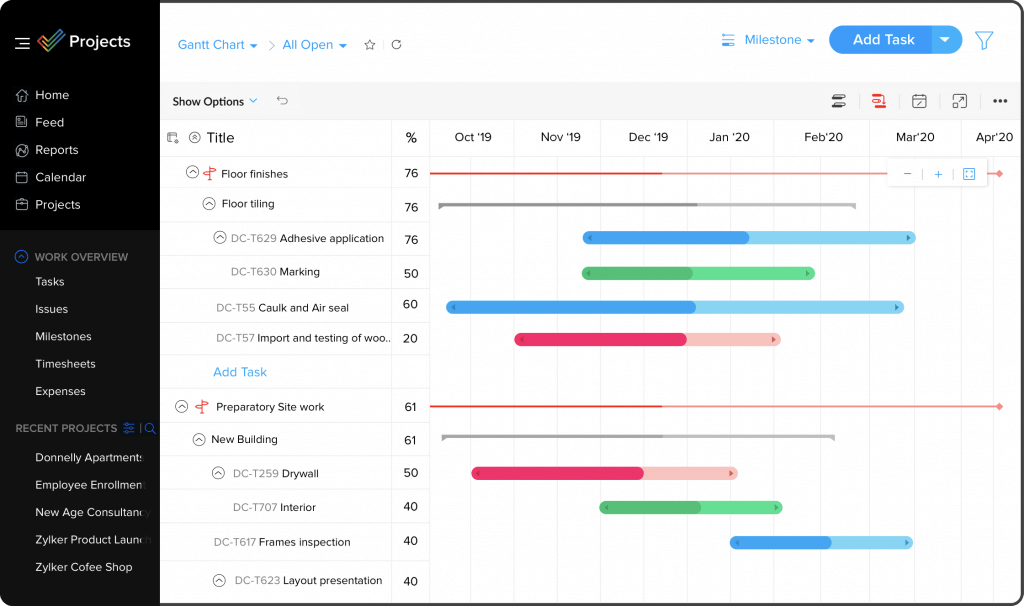
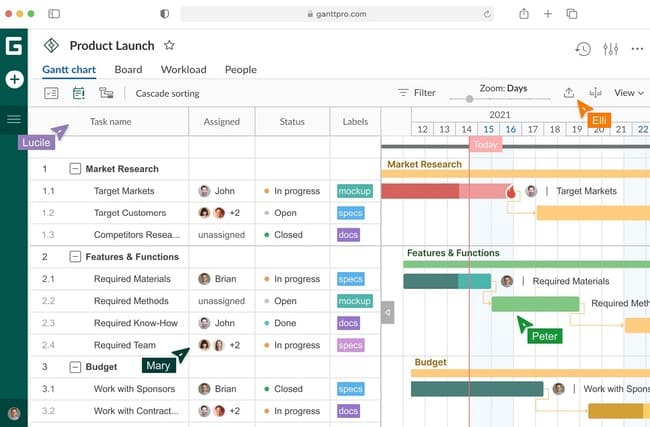
What sets Asana apart is how it handles project structure. You're not just managing isolated tasks. You're building interconnected projects with dependencies, so when Task A gets delayed, everyone automatically knows Task B needs to shift. You can set up milestone dates, critical paths, and timeline views that show the full project landscape at a glance.
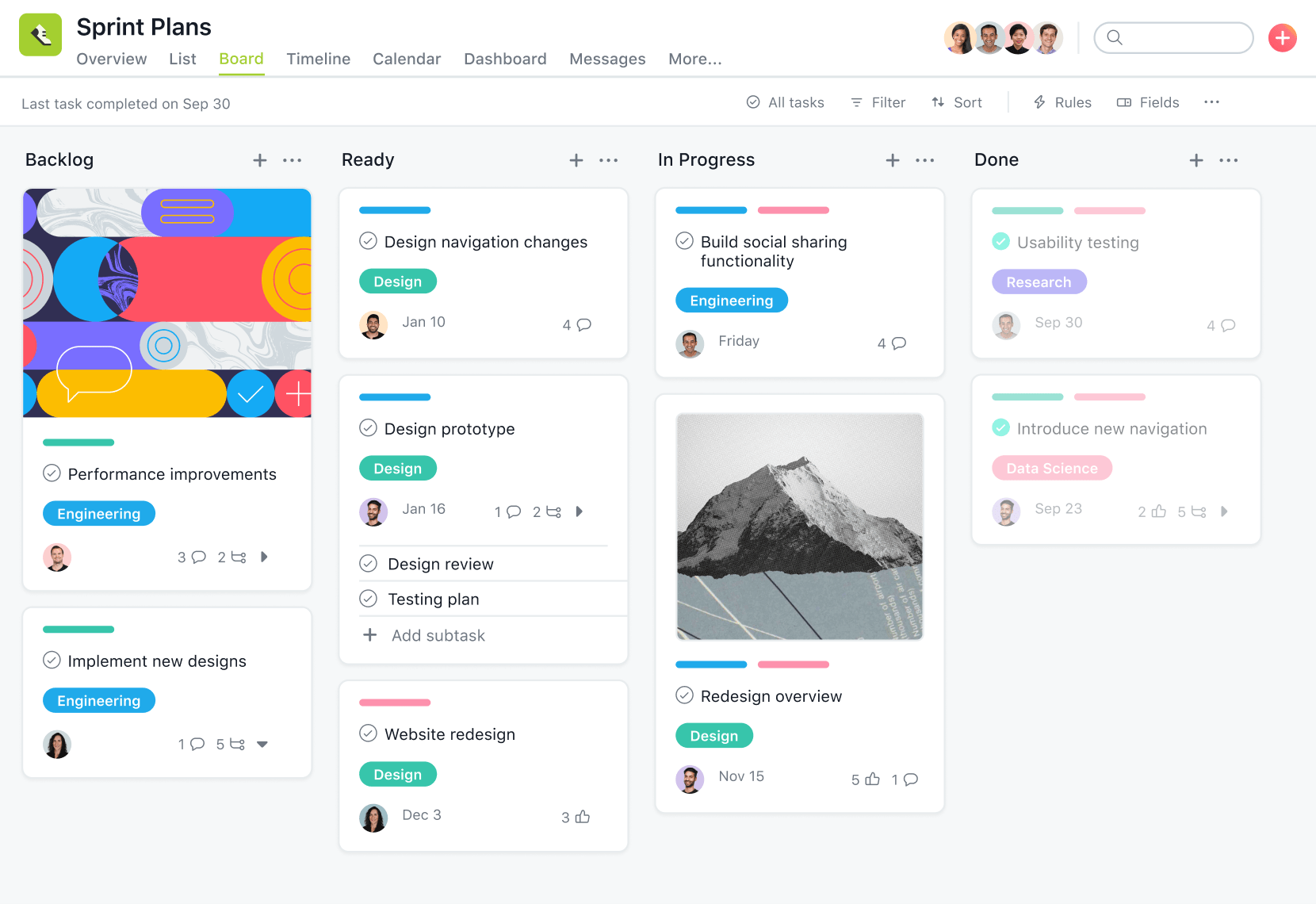
I tested Asana with a marketing team running campaigns, a product team managing sprints, and an operations team coordinating across departments. Each found the free tier sufficient for their actual work. The list view handles straightforward task lists. The board view works for teams that think in stages (backlog, in progress, review, done). The calendar view shows deadlines across projects.
Real strengths:
- Dependency tracking that automatically cascades timeline changes
- Multiple views let different team members see projects the way they think
- Templates for common project types save setup time
- Clean interface that doesn't require a Ph D to operate
- Mobile app for updates and check-ins on the go
- Integration options including Slack, Google Drive, and Zapier
The limitations on the free tier are real, but they only matter if you're a huge team. You can't use custom fields to track metadata, you can't access advanced reporting, and you can't use portfolio management features. But for teams under 15 people managing multiple concurrent projects? You won't feel the limitations.
One gotcha: the free tier doesn't include any automation. If you want to auto-create tasks, auto-update fields, or trigger actions based on task changes, you need the paid tier. That's where automation features live.
The honest take: Asana's free tier is genuinely valuable. It's not a limited trial designed to frustrate you into upgrading. It's an actual product that serves actual teams. If your work is collaborative and relies on clear dependencies and timelines, Asana is worth serious consideration.
Monday.com: Visual Simplicity Meets Functionality
Monday.com's free tier has historically punched above its weight, and the 2026 version continues that trend.
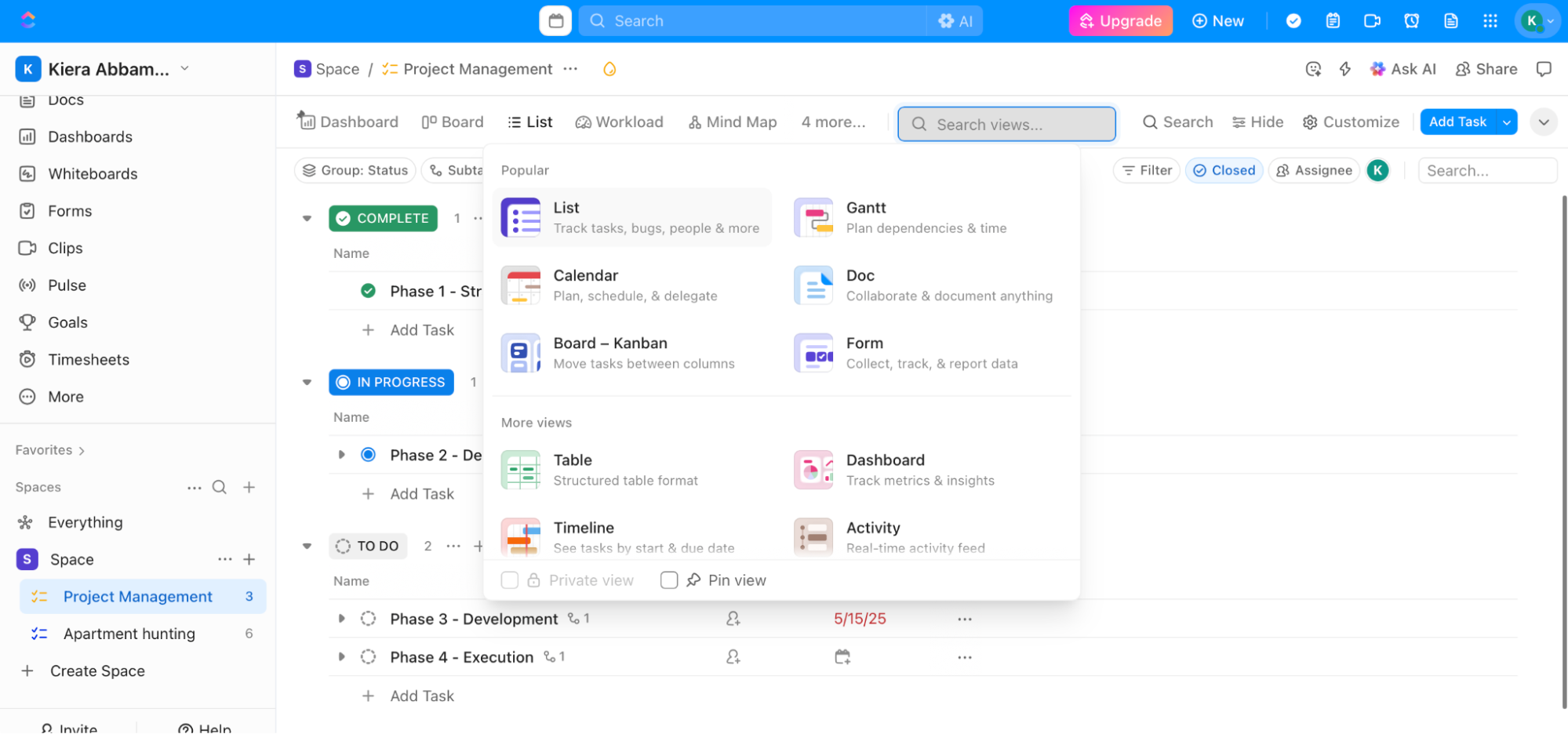
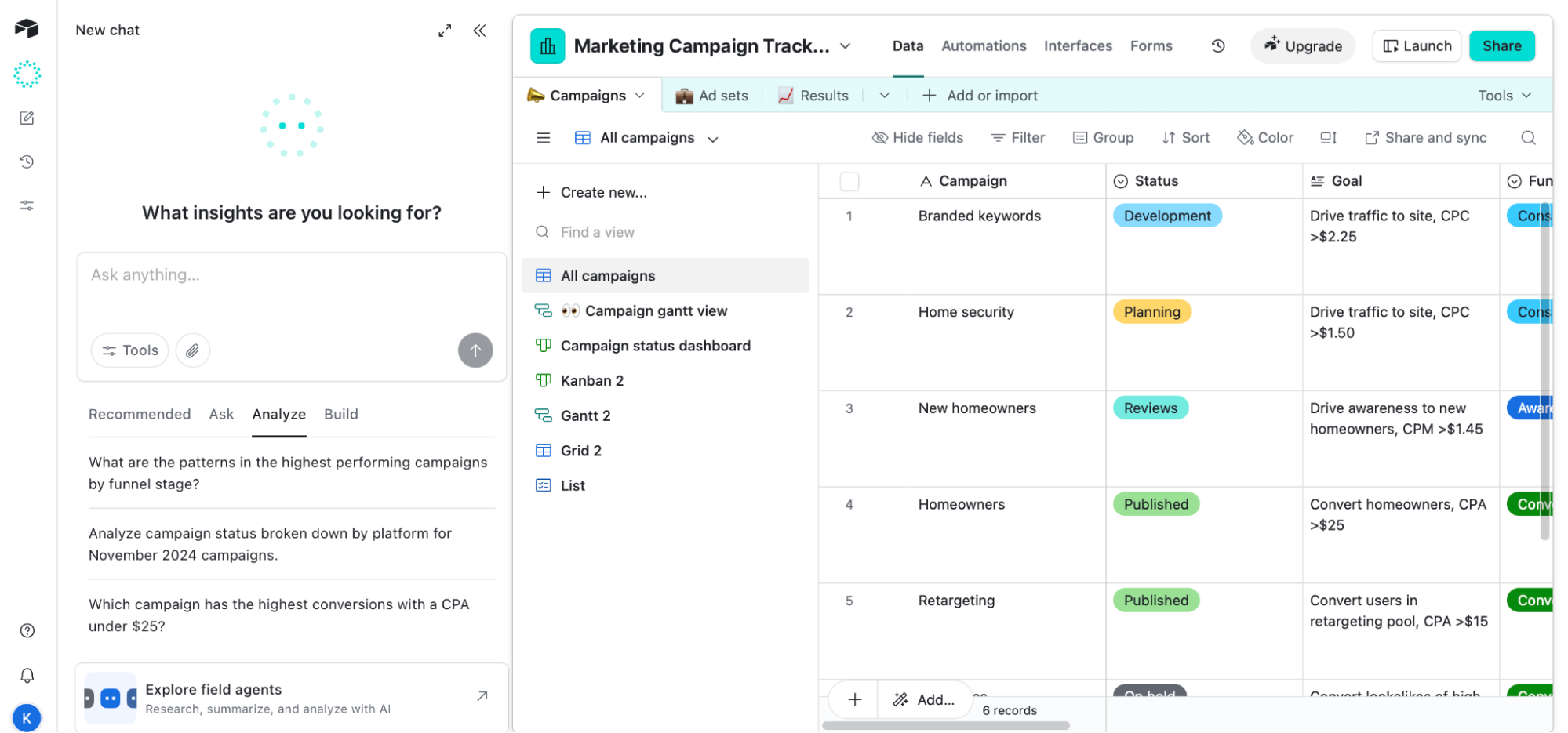
Unlike Asana's text-heavy list views, Monday leans hard into visual project management. Everything is a card you can drag, drop, and customize. Your team probably doesn't need training to figure it out. That drag-and-drop simplicity is actually what makes Monday so dangerous. You can get a functional workspace running in about 15 minutes.
The free plan gives you two team members, unlimited items (tasks), and access to board view plus a few other basic views. Here's the kicker: you get 15 automations per month. That's not unlimited, but it's enough for basic workflow automation. Auto-assign tasks based on status changes. Send notifications when deadlines approach. Create new items when existing ones hit certain conditions.
I've seen small agencies use Monday's free tier with remarkable effectiveness. One person sets up the board structure, and suddenly the whole team has visibility into who's doing what, what's blocked, what's coming next. The automation keeps things moving without manual nudging.
What Monday does well:
- Visual workflows that feel intuitive to non-technical teams
- Customizable templates for different project types
- Basic automations that handle common repetitive tasks
- Simple integration with Slack, email, and common apps
- Mobile experience that's genuinely usable, not just a stripped-down app
The constraints matter more than with Asana. Two team members is tight if you have a small team. If you've got five people, you're paying for upgrades. You also get limited automations, which means you can't go crazy with workflow automation. And advanced views like timeline and resource management are behind paywalls.
But here's the thing: Monday understands something important. Most teams don't need complex features. They need visibility. They need coordination. They need to know what's happening without sending 47 Slack messages. Monday delivers that.
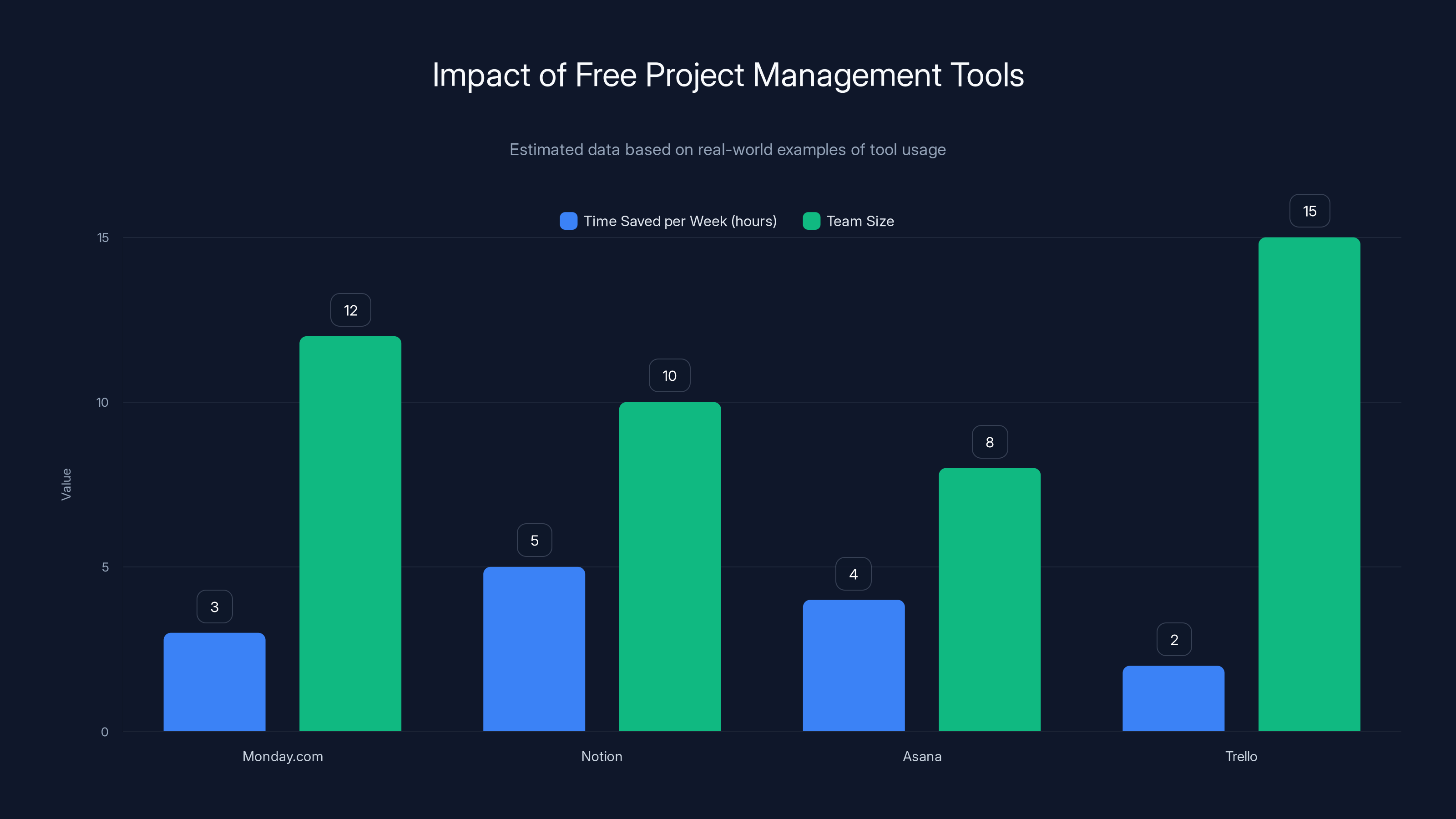
Free project management tools lead to significant time savings and efficient team management. Estimated data reflects typical team sizes and time saved.
Trello: The Kanban Gold Standard
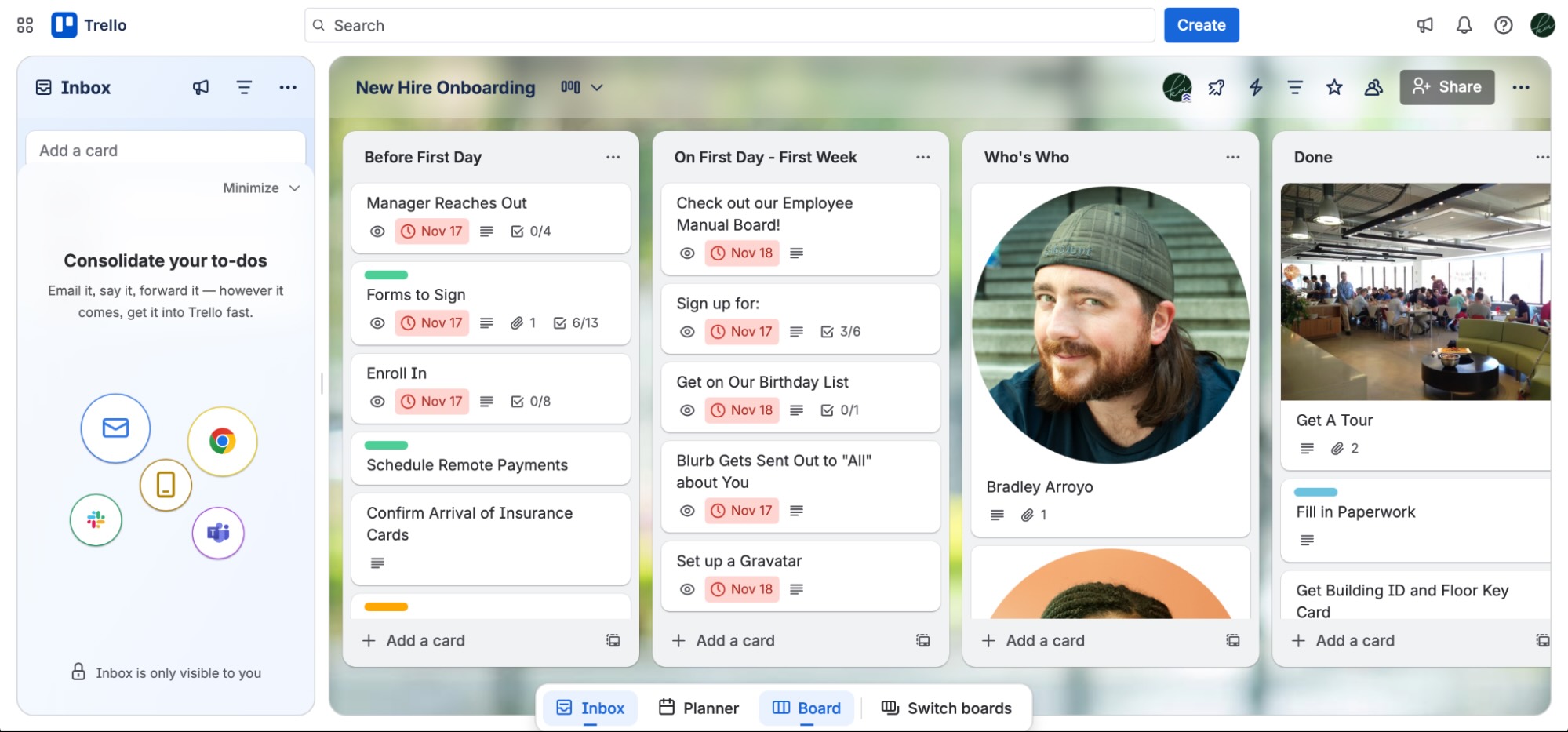
Trello has been around forever, and for good reason. It does one thing incredibly well: kanban-style task management. And you know what? Sometimes that's exactly what you need.
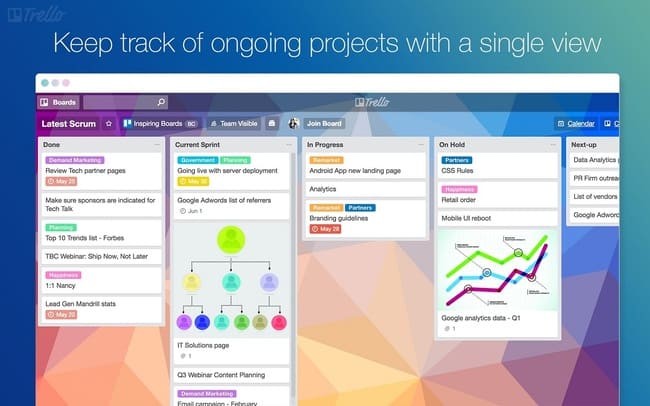
The free tier gives you unlimited cards, unlimited lists, and unlimited board members. You can organize work into columns (To Do, In Progress, Done), move cards between columns, add checklists to cards, and attach files. It's beautifully, intentionally simple.
I've used Trello for everything from managing a book project to coordinating a team of contractors across time zones. The simplicity is its superpower. There's nothing to learn. There's nothing to configure. You create a board, make some lists, and start moving cards around. Done.
Where Trello shines is in scenarios where you don't need complex project structure. You need to track work as it flows through stages. You need visibility into what's coming next. You need a place where the team updates status without needing a tutorial. Freelancers use it for client projects. Small teams use it for product launches. Nonprofits use it for event planning.
Trello's strengths:
- Zero learning curve for new team members
- Unlimited cards and lists on free tier
- Checklists and attachments for storing task details
- Comments and activity so you can see the project history
- Mobile app that actually works well
- Power-Ups (integrations) including some free options
The limitations are worth understanding. Trello doesn't do timeline views, so you can't see the project schedule at a glance. It doesn't do dependencies, so delayed work doesn't automatically cascade. It doesn't do resource allocation. These aren't bugs; they're design choices. Trello is intentionally simple.
For small teams and simple workflows, this is perfect. But if you need to manage complex multi-project schedules with dependencies and resource constraints, Trello will feel limiting.
Real talk: Trello is the right choice if your projects fit the kanban model. Not every project does. Some need timeline views. Some need dependency tracking. But if your work naturally flows through stages, Trello is hard to beat. It's free, it's simple, and it works.
Click Up: Feature Overload (In a Good Way)
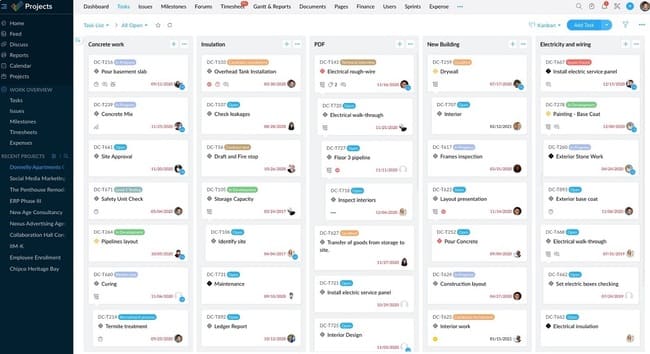
Click Up's free tier is genuinely the most feature-rich free project management tool available. Unlimited tasks, unlimited projects, unlimited dashboards, documents, and even some automation. It's almost absurdly generous.
Here's the thing though: with great features comes great complexity. Click Up isn't picking up your task management tool and using it in 15 minutes. You're probably going to spend a few hours setting it up. Making it do what you want. Customizing views, workflows, and automations.
I spent a week testing Click Up with a product team that had previously used Monday.com. Their initial reaction: "There's so much here. I don't know where to start." By week two: "This is incredible. I'm doing things I couldn't do in our old tool." By week four: they'd stopped using it because the learning curve was steeper than they wanted.
Click Up works best for teams that are willing to invest time upfront. Project managers who want to customize every detail. Teams managing complex work that needs sophisticated tracking. It's also great for existing power users of Monday or Asana who are frustrated by limitations and want an alternative.
What Click Up offers:
- Unlimited tasks, projects, and dashboards on free tier
- Multiple views including list, board, calendar, timeline, and custom views
- Built-in documents for storing project documentation
- Automation including triggers and conditions
- Time tracking to see where effort actually goes
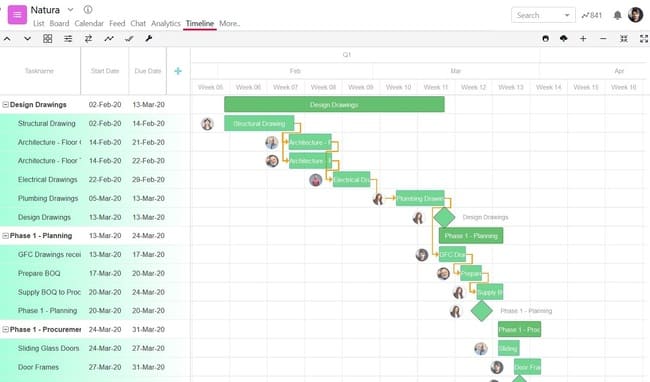
- Gantt charts for timeline visualization
- Custom fields for tracking metadata specific to your work
The learning curve is steep. That's not a bug; it's a feature. You're getting power. Power requires complexity. Some teams love this. Others resent the time investment.
Another consideration: Click Up has more moving parts than other tools, which means more surface area for bugs or performance issues. I've occasionally seen slowness in very large projects with thousands of tasks. It's rare, but it happens.
The honest verdict: If you're a power user who wants complete control over your workflows, Click Up's free tier is phenomenal. If you want simplicity, look elsewhere. This tool assumes you'll invest time to get the most from it.
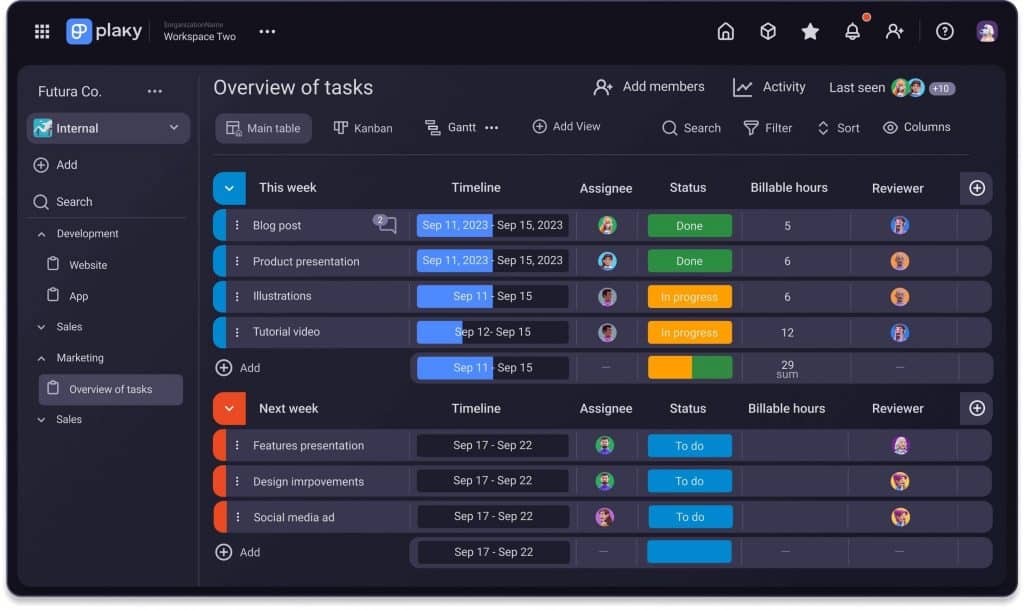
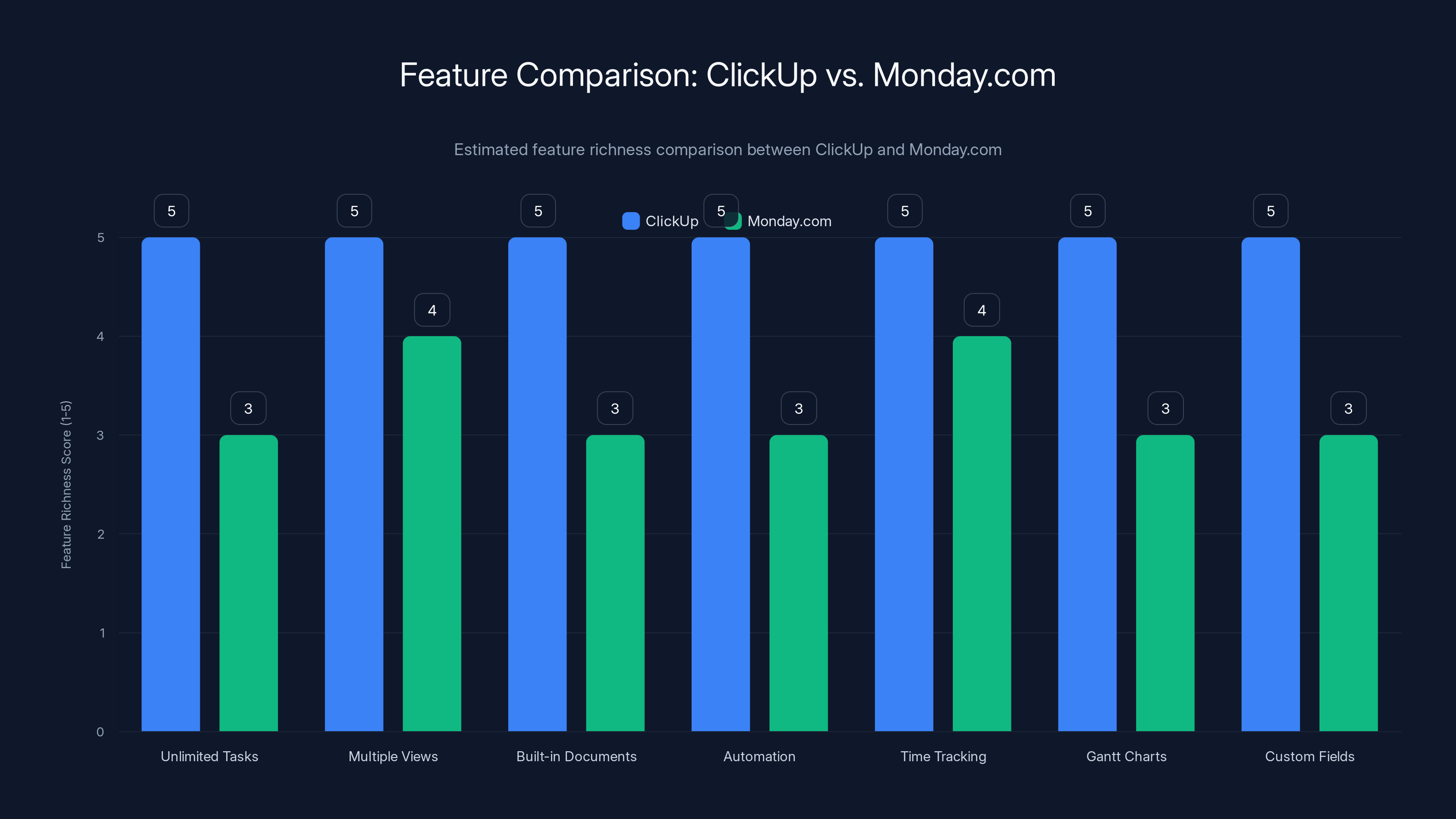
ClickUp offers a more feature-rich experience compared to Monday.com, especially in terms of task management, automation, and customization. Estimated data based on typical feature availability.
Jira: When You Need Enterprise-Grade Power
Jira is the tool used by massive enterprises managing complex software development. It's also available for free, though it's specifically designed for software teams, not general project management.
If you're managing a software development project, Jira's free tier is powerful. You get unlimited users, unlimited projects, issue tracking with customizable workflows, agile boards (scrum and kanban), and integration with other development tools like Git Hub and Bitbucket.
The issue: Jira has an industrial-strength learning curve. It's not designed for simplicity. It's designed for teams managing complex software projects with intricate workflows, integration requirements, and regulatory compliance needs. If that's not you, the overhead isn't worth it.
I've watched non-technical teams try to adopt Jira because it was free and "everyone uses it." Every single time, they got frustrated and switched to something simpler. Jira is a specialist tool. Use it if you're a specialist. Otherwise, you're paying a complexity tax that doesn't benefit you.
When Jira makes sense:
- Software development teams managing sprints and releases
- Complex issue tracking with sophisticated workflows
- Integration needs with version control and CI/CD pipelines
- Regulatory requirements for detailed audit trails
For traditional project management, marketing campaigns, or general team coordination, Jira is overkill.
Notion: The All-in-One Workspace
Notion isn't a project management tool in the traditional sense. It's a workspace. It's a documentation system. It's a database. It's all of these things, and you configure it however you want.
The free tier is genuinely unlimited. Unlimited pages, databases, blocks, team members. You're only constrained by file storage (10GB total) and guest access limits.
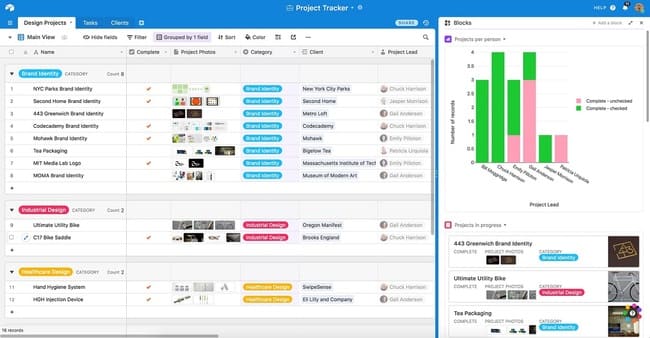
Here's why teams use Notion for project management: it's infinitely customizable. You can build a simple kanban board, a complex portfolio tracker, a timeline view, or something nobody's ever thought of. You can embed databases, pull data from multiple sources, create rollups and formulas. You can turn project data into rich documentation.
I've seen teams build incredible project management systems in Notion. One team at a Saa S company created a portfolio tracker that showed project status, timeline, resource allocation, and risk assessment all on a single dashboard. It was incredible. They built it over three months.
That's the tradeoff: Notion's power comes from customization, which requires time and effort. You're building your own tool. For some teams, that's energizing. For others, it's exhausting.
Notion's project management strengths:
- Completely customizable to your exact workflow
- Database relationships that connect projects, tasks, and teams
- Rich documentation integrated with task tracking
- Formula and rollup options for aggregating data
- Timeline views showing project schedules
- Unlimited members on free tier
The learning curve is steep. You need to understand databases, relations, and views. It's powerful, but not beginner-friendly.
The verdict: If your team is technical or willing to invest time in building custom workflows, Notion is fantastic. If you want something that works out of the box, stick with dedicated project management tools.
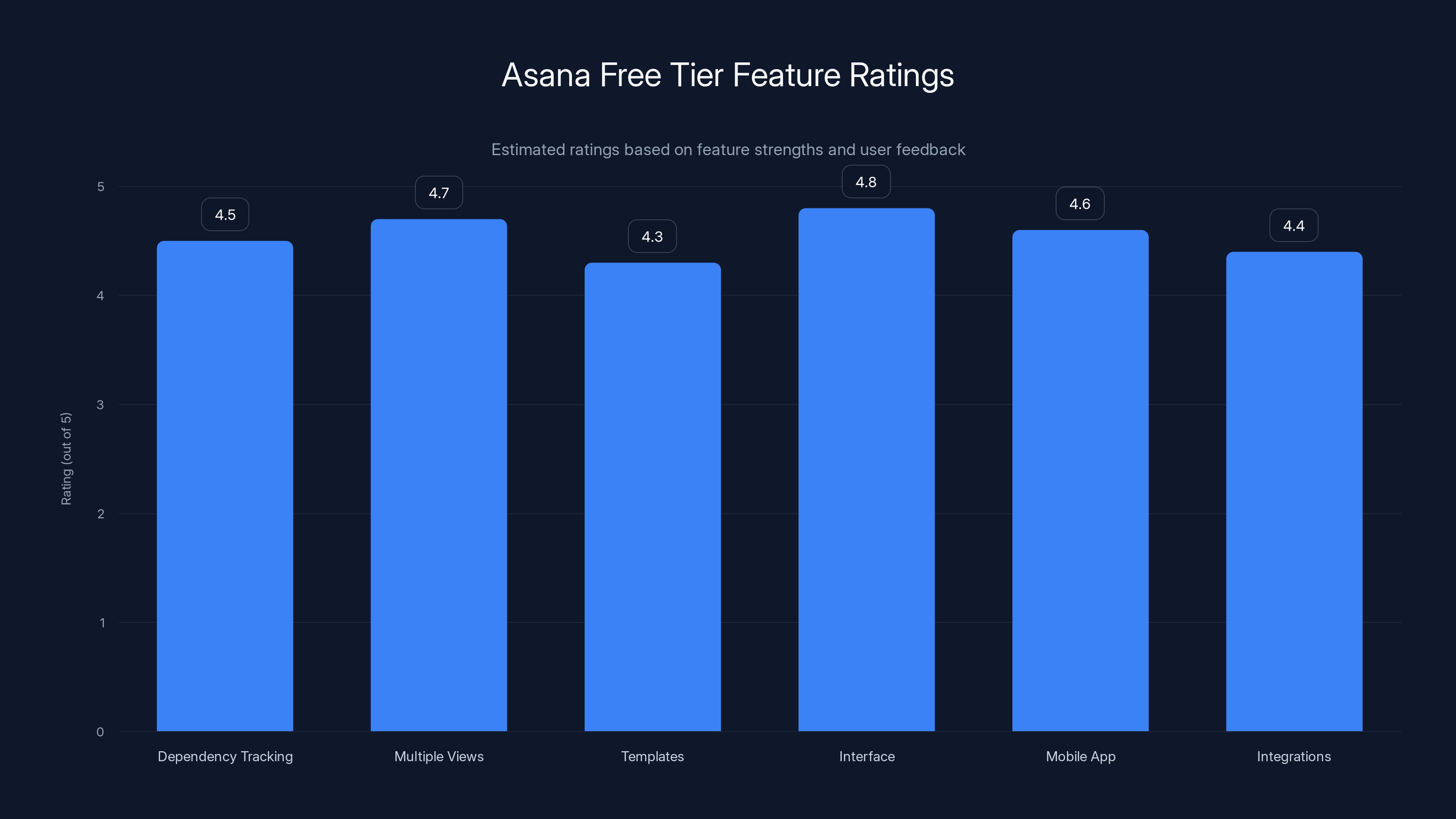
Asana's free tier excels in multiple views and user-friendly interface, making it a top choice for small to medium teams. Estimated data based on feature strengths.
Comparing the Top Free Options
| Tool | Best For | Free Tier Limit | Setup Time | Learning Curve |
|---|---|---|---|---|
| Runable | Automating repetitive project work | Document/report generation | 10 minutes | Very low |
| Asana | Teams with complex dependencies | 15 members, limited fields | 30 minutes | Low |
| Monday.com | Visual, collaborative workflows | 2 members, 15 automations/month | 15 minutes | Very low |
| Trello | Simple kanban workflows | Unlimited | 5 minutes | Minimal |
| Click Up | Power users needing customization | Unlimited tasks & projects | 2-3 hours | High |
| Jira | Software development teams | Unlimited users & projects | 1-2 hours | Very high |
| Notion | Highly customized workflows | Unlimited databases & pages | 3+ hours | High |
How to Choose the Right Free Project Management Tool
Let me give you a framework for actually picking between these options instead of just bouncing between them every three months.
First, understand your team size and structure. How many people are involved? Do they need different permission levels? Are they across time zones or co-located? This determines whether you can use tools with member limits and which communication features matter.
Second, identify your project type. Are you managing software development sprints, marketing campaigns, creative projects, or operational work? Different project types have different needs. Sprints benefit from burn-down charts. Marketing campaigns need timeline tracking. Operational work often needs a simple board. Choose a tool that excels at your specific project type.
Third, assess your team's technical comfort. Be honest here. If your team barely uses technology, you need simplicity. If you have technical people excited to customize workflows, more complexity can be valuable. Trello and Monday work for low-tech teams. Click Up and Notion require more sophistication.
Fourth, consider your integration needs. Do you use Slack? Gmail? Google Drive? Different tools integrate with different platforms. If you need everything talking to everything, check integration options before committing.
Fifth, identify your reporting requirements. Do you need dashboards showing portfolio status? Do you need to track time? Do you need burndown charts? Reporting needs often separate tools. Simple kanban doesn't need fancy reporting. Portfolio management across multiple projects does.
Here's the formula:
If you maximize simplicity and team coordination, Trello or Monday wins. If you need timeline tracking and dependencies, Asana wins. If you want complete customization, Click Up or Notion wins. If you're automating repetitive project work, Runable complements any of these.
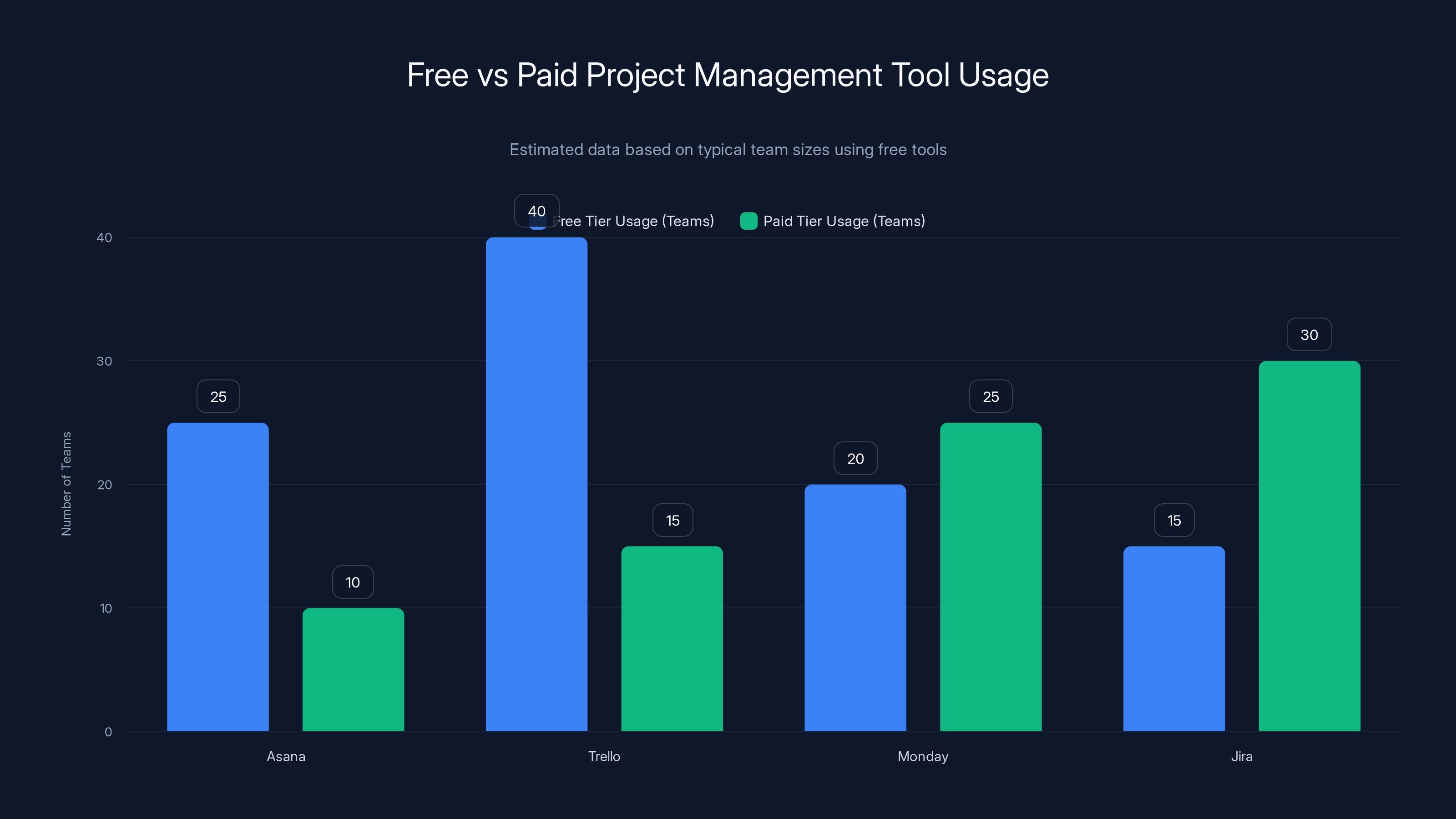
Estimated data shows that many teams, even up to 40 members, effectively use free tiers of project management tools like Trello and Asana. Paid tiers are more common in larger teams or those requiring advanced features.
Why These Free Tools Matter (And When to Upgrade)
Let's be real: free tools have come a long way. Honestly, many small teams never need to pay for project management software. The free tier of Asana, Trello, or Monday can handle your actual work indefinitely.
When do you upgrade? When you're actively paying NOT to upgrade. If you're spending time building workarounds for free tier limitations, upgrade. If you're frustrated by feature restrictions daily, upgrade. If you're managing growth that free tiers can't handle, upgrade.
But the threshold is probably higher than you think. I've worked with 25-person teams running entirely on free Asana. I've seen 40-person agencies on Trello. The tools are good enough for most teams most of the time.
What's changed is that free has become genuinely valuable, not just a limited trial. Companies building these tools understand that free users become paid users if they find value. So they make free useful.
Maybe the bigger insight is this: the tool doesn't matter as much as you think it does. What matters is that your team has visibility into what's happening, knows who owns what, and can coordinate without chaos. You can get that from free tools. The fancy paid features are nice, but they're not essential.

Common Mistakes When Choosing Free Project Management Tools
Mistake #1: Picking based on feature count. Click Up has more features than Trello. That doesn't make it better. It makes it different. More features create more complexity, which slows your team down if they don't need the features. Choose the least powerful tool that solves your actual problem.
Mistake #2: Choosing a tool without team input. A project manager picks Notion because it's customizable, but the team needs something intuitive. They rebel. It fails. Always test with the actual team before committing.
Mistake #3: Treating upgrades as inevitable. Some companies assume they'll hit free tier limits and upgrade. Sometimes you won't. Sometimes your 8-person team can run forever on Trello's free tier. Don't pay for anticipated needs that never materialize.
Mistake #4: Over-customizing. You can spend three weeks setting up the perfect workflow. Your team ignores it because it's too complex. Start simple. Add customization only when the simple setup breaks down.
Mistake #5: Not integrating with existing tools. You pick a tool that doesn't talk to Slack or your email. Your team manually copies information. The tool fails because it creates extra work, not reduced work. Integration matters.
Mistake #6: Switching tools too frequently. Many teams get a new tool every 6-12 months. They switch to something with a different workflow, and productivity drops while everyone relearns. Stick with a tool for 6+ months before deciding it's not working.
Automating Project Management with AI
Here's something that's changed recently: AI tooling is making project management less manual.
Traditionally, project managers spend huge portions of time on meta-work: updating status, creating reports, coordinating between teams, documenting decisions. It's not actual project work. It's overhead.
Now, AI is automating chunks of this. Runable handles the reporting and documentation side. Monday.com and Asana are adding AI assistants that auto-populate fields, suggest task assignments, and create status summaries.
The implication is interesting: your project management tool might not be where you do project management anymore. You might use your tool for visibility and coordination, but use AI for the actual documentation and reporting work.
This is why I'm increasingly recommending a combination approach: pick your project management tool based on how your team coordinates (Asana for timeline work, Monday for visual work, Trello for simplicity), then add AI tooling for the documentation and reporting overhead.
It sounds like extra tools, but it's actually fewer total tools than what most teams are using. You eliminate the 10 spreadsheets and the email status report chains. You consolidate around a project management tool plus AI automation.
The Future of Free Project Management Tools
I expect the next few years to see interesting shifts. Competition is pushing features down the free tier. Asana, Monday, and Click Up all compete on generosity, knowing that free users become paid users if they find value.
I also expect AI integration to become standard. Not AI management (AI deciding what your team should do), but AI assistance (AI handling the routine documentation and reporting work). This will shift how we think about project management. The human work will become more strategic, and the routine work will be automated.
Integration will also become more seamless. Right now, connecting your project tool to your communication tool requires clicking some settings. In the future, it should be automatic, transparent, and bi-directional. You update a task, your Slack is updated. You update Slack, your task is updated.
Finally, I expect specialization. Right now, every tool tries to be everything. Eventually, tools will specialize. One tool will excel at agile development. Another will dominate marketing project management. Another will own timeline-based project management. They'll integrate seamlessly with each other, so you're not forced to choose between best-of-breed tools and an all-in-one platform.
We're getting closer to this world. We're not there yet.
Making Your Decision: A Practical Checklist
Before you commit to a free project management tool, run through this checklist:
Tool Selection:
- I've tested the tool with my actual team, not just by myself
- The tool handles my primary project type (sprints, timelines, marketing, etc.)
- My team understands the core concept (kanban, timeline, database) intuitively
- The free tier isn't hiding limitations I'll discover later
- Integration with Slack, email, or other critical tools works as expected
Team Alignment:
- The team agreed on this tool, not just me
- Everyone can access it (no permission or platform issues)
- The learning curve is acceptable for the least technical person
- We've allocated time for setup before expecting it to work
Operational:
- We have a process for entering new projects and tasks
- We have a rhythm for status updates (daily, weekly, etc.)
- The team knows who reviews and updates what
- We have documentation for onboarding new team members
Evaluation:
- We'll give the tool 4+ weeks before judging it
- We'll check in after 1 month, 3 months, and 6 months
- We'll only switch tools if we're actively paying NOT to (time, frustration)
- We understand the upgrade path if we outgrow the free tier
Integrating Tools for Maximum Productivity
Here's the thing nobody tells you: the best project management setup isn't a single tool. It's a combination of tools that work together.
You might use Asana for core project management and dependencies, Slack for team coordination and notifications, Google Drive for documentation, and Runable for automated reporting. Or you might use Notion as your central database, Slack for communication, and Runable for document generation.
The integration is what matters. When Asana sends a notification to Slack about a deadline approaching, your team doesn't need to check Asana. When Runable generates a report from your project data, you're not manually copying information. When your calendar integrates with your project tool, nobody schedules over project work.
Integration between tools is becoming easier. Zapier connects thousands of tools, so you can automate the connections between your project tool, communication tool, documentation tool, and automation tool.
The modern workflow looks like this:
- Tasks exist in your project management tool
- Status changes trigger notifications in Slack
- Completed work updates documentation in your wiki
- Weekly status reports are auto-generated by AI
- Timeline views keep everyone aligned
This is possible now. Most teams aren't doing it yet. But this is the direction.

Real Results: Teams Using Free Project Management
Let me share some real examples of how teams are using these free tools successfully.
Example 1: A 12-person creative agency They use Monday.com's free tier for project tracking (2 team members in the free tier, but they added all team members and just paid $8/month for the third). Projects come in through a custom Zapier workflow from their website. Team members update status daily. Monday sends daily summaries to Slack. Report generation is automated with AI. Result: 60% reduction in status meeting time.
Example 2: A nonprofit managing volunteers They use Notion because they needed to track volunteer hours, match volunteers to projects, and generate reports for funders. Setup took three weeks, but now volunteers can update their hours directly, and reporting is automatic. Result: volunteers feel more valued (they see the impact), funders get better reports, and the coordinator saves 5 hours per week.
Example 3: A bootstrapped Saa S startup They use Asana's free tier for product development, documentation, and marketing coordination. As they grew from 3 to 8 people, the free tier started feeling limiting (only 15 members), but they negotiated a startup discount instead of upgrading to full-price. They also added Runable for documentation generation, which automated their biggest manual overhead. Result: they didn't hire a project manager; they just improved their tools.
Example 4: A consulting firm with multiple projects They use Trello because simplicity was critical. Different consultants have different workflows, and Trello is so intuitive that there's no resistance to updating boards. They integrated it with Slack so project updates appear in team channels. Result: consultants actually update status because it's not overhead; it's just part of their workflow.
What's common across these examples? Simple tool selection matched to actual needs. Integration with communication channels. Automation of the routine parts. And consistency. These teams didn't switch tools every six months. They stuck with something that worked.
Upgrading From Free: When and How
Eventually, some teams outgrow free. How do you know when?
Signs you should upgrade:
- You're spending 2+ hours per week on workarounds for free tier limitations
- New features in the paid tier would eliminate 5+ hours per week of manual work
- Your team is frustrated daily by limitations
- You're adding complexity to your workflow to fit free tier constraints
- The cost of staying on free (lost productivity) exceeds the upgrade cost
Signs you should NOT upgrade:
- The paid tier has nice features but you don't actually need them
- You're upgrading because "we're a growing company" (but the free tier still works)
- You're upgrading to avoid a different problem (poor planning, unclear communication)
- You think paid features will fix team coordination issues (they won't)
There's a framework for this:
If paid tiers save your 10-person team 3 hours per week, and your average loaded cost is
Most teams upgrade too early, attracted by features they don't need. Be disciplined about tracking actual value before upgrading.
FAQ
What is the best free project management tool for small teams?
There's no universal answer because "best" depends on your workflow. For simple kanban workflows, Trello is unbeatable because it's intuitive and has zero learning curve. For teams managing dependencies and timelines, Asana's free tier is more powerful. For visual-first teams that like drag-and-drop workflows, Monday.com works well. Test each with your actual team for one week before deciding.
How long can a team realistically use free project management tools?
Small teams can use free tools indefinitely. I've seen 20+ person teams running on Asana or Trello's free tier without limitation. The constraint isn't team size; it's complexity. Simple projects and simple workflows stay free-tier viable forever. Complex projects with resource management, portfolio views, and advanced automation may outgrow free tiers. Most teams don't actually need those features.
Can I switch project management tools without losing my data?
Most tools have export options, though they vary in quality. Asana, Monday, and Click Up all export to CSV, which you can reimport into other tools. The challenge is that project structure doesn't always translate. A timeline view in Asana might become a flat list in Trello. Plan your migration carefully. Also, switching tools means retraining your team on a new workflow, which creates productivity loss. Don't switch lightly.
What's the difference between project management and task management?
Task management tracks individual to-do items and who owns them. Project management adds structure, showing how tasks connect, depend on each other, and roll up into larger goals. Trello is primarily task management (cards move through stages). Asana is project management (tasks have dependencies, timelines, milestones). For complex work, project management matters. For simple work, task management might be enough.
Should I use Notion for project management instead of dedicated tools?
Notion is infinitely customizable, which is both a strength and weakness. You can build incredible project management systems in Notion if you're willing to invest 20-40 hours in setup. For teams that want something working immediately, dedicated tools are better. For teams comfortable with customization, Notion might be ideal. There's no wrong answer; it depends on your tolerance for setup complexity.
How do I automate project management work?
Automation happens at several levels. Within the tool: most project management platforms have automations that trigger actions based on task changes (auto-assign when status changes to In Progress, send notifications when deadlines approach). Between tools: use Zapier or other automation platforms to connect your project tool to Slack, email, or other systems. For documentation and reporting: use AI tools like Runable to auto-generate documents from project data. Start with within-tool automation before adding complexity with between-tool automation.
What metrics should I track in my project management tool?
Minimally: project status (on track, at risk, off track), deadline status (how many tasks are overdue or due soon), team capacity (is anyone overwhelmed), and blockers (what's preventing progress). Optional but valuable: time tracking (where does effort actually go), cycle time (how long from idea to done), and burndown charts (for sprints). Don't track metrics just because they're available. Track metrics that change how you make decisions.
Is project management software actually worth it?
Yes, with a caveat. Research shows that teams using any project management tool improve delivery time by 27% compared to teams using spreadsheets and email. But the tool matters less than the discipline. A terrible project management tool with consistent team adoption beats a great tool that nobody uses. So yes, it's worth it, but only if your team actually uses it.
Why do some teams abandon project management tools?
Usually because the tool creates overhead instead of reducing it. The team spends more time updating the tool than they save from coordination. This often happens because the tool is over-customized or over-complex. Simple tools with clear workflows have better adoption. Also, teams abandon tools when the tool doesn't integrate with how they actually work. If your team lives in Slack, but the project tool doesn't integrate with Slack, they'll resist using it. Integration matters.
How should I handle multiple concurrent projects in a free tool?
Most free tools handle this fine at 5-10 concurrent projects. Beyond that, you might hit limitations. Trello and Monday are project-limited on free tiers. Asana and Click Up support unlimited projects on free. If you have 20+ concurrent projects, portfolio management tools (paid versions of Asana, Roadmap, etc.) become more valuable because they show connections between projects. For most teams, free tools handle multiple projects just fine.
Should my team use the same tool for internal projects and client projects?
Not necessarily. Some teams use Asana internally but keep client work in a separate client portal or tool. Others consolidate everything in one tool with permission levels separating internal and client-visible work. There's no right answer. Consolidation is easier to maintain but adds complexity to permission management. Separation is clearer but creates disconnects. Consider your team size and how much client-visible detail you want to show.
Final Thoughts: Choosing Your Project Management Foundation
We've covered a lot of ground here. Let me bring it back to basics.
You don't need the fanciest project management tool. You need visibility into what's happening, clarity about who owns what, and a way to coordinate without 47 Slack messages. Free tools deliver all of that.
The best tool for your team is the one your team will actually use. That's not the one with the most features. It's the one with the lowest friction. The one that feels natural to how you already work.
Here's my honest recommendation: pick one, commit to it for three months, then evaluate. Don't judge after one week. Don't constantly switch. Three months is enough time to get past the learning curve and understand whether it actually works for you.
And remember: the tool is a means to an end. The end is shipping better work, faster, with less chaos. If free tools help you do that, you're done. You don't need anything more.
Use Case: Stop manually building weekly project status reports by hand. Automate them with AI in 30 seconds
Try Runable For FreeGood luck with whatever you choose. Let me know how it goes.
Key Takeaways
- Free project management tools have become genuinely powerful, with Asana, Monday.com, Trello, ClickUp, and Notion all offering substantial free tiers suitable for real teams
- Tool selection depends more on matching your team's workflow thinking than on feature count; simplicity often beats power
- Runable complements project management tools by automating documentation, reports, and presentations that consume hours weekly
- Most teams can run indefinitely on free tiers if they match the tool to their actual workflow needs
- Integration between tools matters more than any single tool's features; automation is reshaping how teams use project management software
Related Articles
- Asana vs. monday.com: Which Project Management Tool Wins? [2026]
- ClickUp vs. Asana: Complete Comparison [2026]
- 10 Best To-Do List Apps for Productivity [2025]
- [2026] Best AI Productivity Tools
FAQ
What is Best Free Project Management Software [2026]?
Maybe you're bootstrapping a startup, or your company's pencil-pushing CFO just slashed software spending
What does the reality of free project management tools in 2026 mean?
Either way, you need a project management tool that doesn't cost you a fortune
Why is Best Free Project Management Software [2026] important in 2025?
Free project management software has gotten genuinely good
How can I get started with Best Free Project Management Software [2026]?
I'm not talking about stripped-down, barely functional tools that make you want to pull your hair out
What are the key benefits of Best Free Project Management Software [2026]?
I'm talking about legitimate platforms that handle real work, real teams, and real complexity—without asking for your credit card upfront
What challenges should I expect?
The challenge isn't finding free project management tools anymore


