
Best IT Management Software 2025: Complete Guide & Alternatives
Introduction: Why IT Management Software Matters More Than Ever
IT management software has become indispensable for organizations of all sizes. Whether you're managing a small startup with a handful of computers or overseeing thousands of endpoints across multiple locations, the right IT management platform can fundamentally transform how your team operates. The complexity of modern IT environments—with cloud services, remote workers, multiple operating systems, and interconnected applications—demands sophisticated tools that can monitor, troubleshoot, and automate with precision.
The IT management software market has evolved dramatically over the past five years. What once meant simple device tracking and basic ticketing systems now encompasses sophisticated AI-powered analytics, predictive maintenance, security monitoring, and intelligent automation. Organizations are discovering that the right platform doesn't just help manage technical infrastructure—it directly impacts business continuity, employee productivity, and security posture.
Modern IT departments face unprecedented challenges. Remote and hybrid work has distributed IT assets across the globe. Cloud adoption has created shadow IT risks and compliance complications. Cybersecurity threats evolve faster than ever. Meanwhile, talent shortages mean IT teams must accomplish more with fewer people. IT management software addresses these pressures head-on by automating routine tasks, providing visibility into complex systems, and enabling rapid response to incidents.
The business case is compelling. Organizations using comprehensive IT management platforms report 42% faster incident resolution times, 38% reduction in unplanned downtime, and significant cost savings through automation and optimization. Beyond these operational metrics, IT management software improves employee experience by reducing disruptions and enabling faster support.
However, choosing the right IT management platform remains challenging. The market offers solutions ranging from specialized point tools to all-in-one platforms, each with different strengths, pricing models, and ideal use cases. This guide examines the landscape of IT management software comprehensively, helping you understand the core capabilities, compare leading solutions, and identify the platform that aligns with your organization's specific needs and budget constraints.
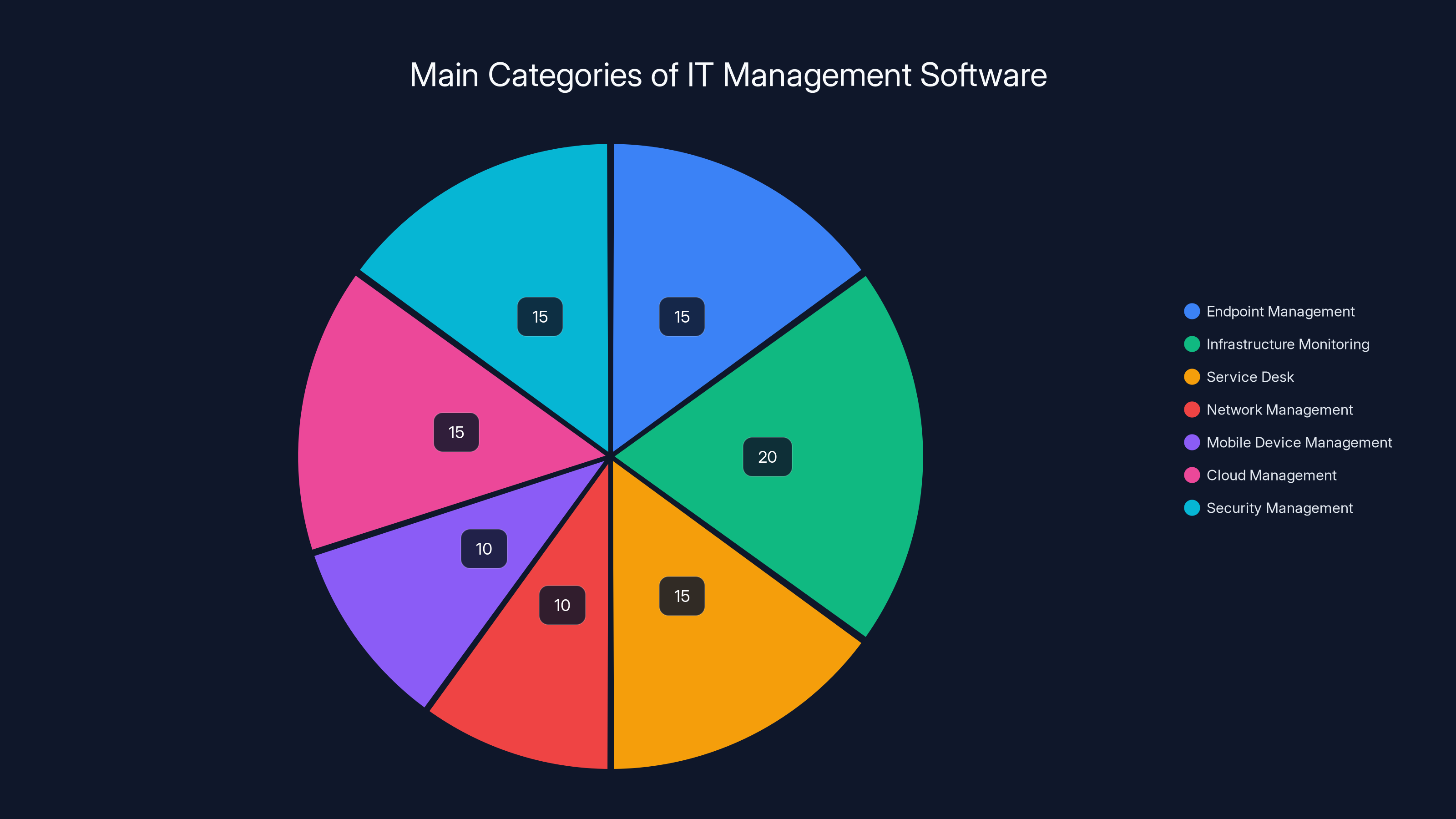
Estimated distribution of IT management software categories shows a balanced focus across various domains, with infrastructure monitoring slightly leading. Estimated data.
Understanding IT Management Software: Core Components and Capabilities
What Constitutes Modern IT Management Software
Modern IT management software represents a convergence of several traditionally separate functions. At its core, IT management platforms provide visibility and control over IT assets and operations. This includes endpoint management (monitoring and controlling computers, servers, and mobile devices), incident management (tracking and resolving technical issues), asset management (maintaining accurate inventory of IT resources), and monitoring (collecting and analyzing performance data).
The evolution toward integrated platforms reflects organizational needs. Rather than juggling multiple disconnected tools, IT teams increasingly expect a single pane of glass where they can see everything happening across their IT environment. This integration reduces context switching, improves incident response, and enables better decision-making. Modern platforms connect these functions through shared data models, unified dashboards, and cross-functional workflows.
Key capabilities found in contemporary IT management software include real-time monitoring and alerting, automated remediation (fixing issues without human intervention), knowledge management systems, reporting and analytics, mobile access, API-first architecture for extensibility, and AI-powered insights. The most advanced platforms now incorporate machine learning for predictive analytics, natural language processing for ticket categorization, and intelligent automation that learns from historical patterns.
The Four Pillars of IT Management
Effective IT management software typically rests on four foundational pillars. Visibility provides comprehensive monitoring of infrastructure, applications, and user experience. Without visibility, IT teams operate reactively, discovering problems only when they impact business operations. Control enables IT teams to manage configurations, enforce policies, update systems, and respond to incidents. Automation transforms manual, repetitive processes into efficient workflows that operate with minimal human intervention. Intelligence converts raw operational data into actionable insights that inform strategic decisions and enable predictive capabilities.
Each pillar supports the others. Visibility provides the data foundation for intelligent analysis. Intelligence reveals which processes should be automated. Automation frees resources for more sophisticated control and analysis. Control ensures compliance and consistency, which improves visibility accuracy. Organizations mature in IT management by progressively strengthening each pillar and improving their integration.
Essential Features to Evaluate
When assessing IT management software, several critical features warrant detailed evaluation. Endpoint Detection and Response (EDR) capabilities detect suspicious activities and respond to threats on individual devices. Service Desk functionality manages the full lifecycle of IT support tickets from submission through resolution. Network Management monitors network performance, identifies bottlenecks, and detects anomalies. Server Management tracks server health, resource utilization, and configuration compliance. Mobile Device Management (MDM) ensures corporate-owned and BYOD devices meet security requirements.
Additionally, evaluate change management features that control modifications to IT systems, asset tracking that maintains inventory accuracy, integration capabilities that connect with existing tools, and reporting features that generate meaningful insights. The specific combination of features you need depends on your organization's size, complexity, industry, and strategic priorities.
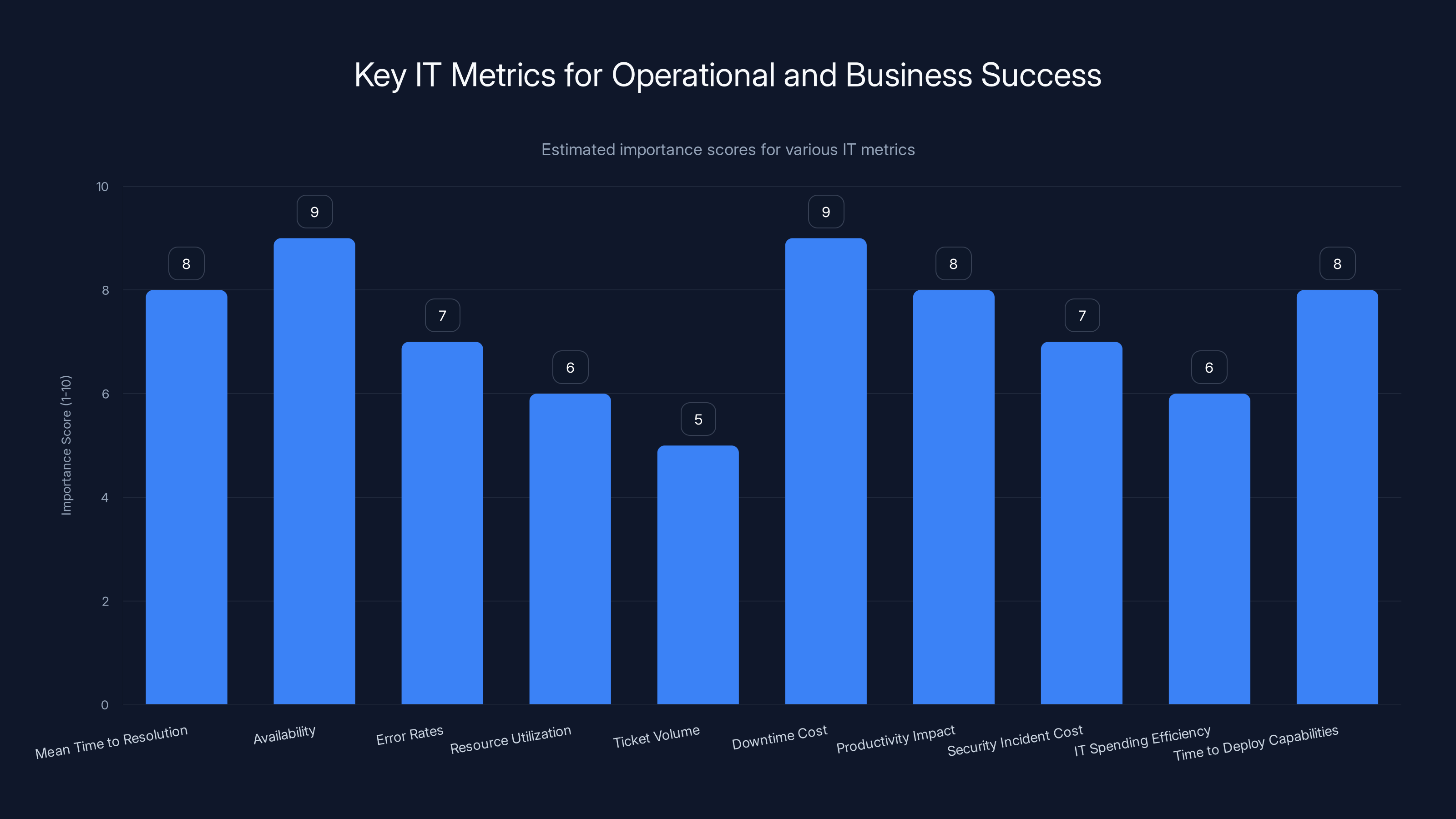
This chart estimates the importance of various IT metrics for operational and business success. Metrics like Availability and Downtime Cost are critical for both IT operations and business leadership. Estimated data.
Endpoint Management: Monitoring and Control at Scale
The Critical Role of Endpoint Management
Endpoint management has become central to IT operations as the number and diversity of connected devices proliferate. An endpoint is any device that connects to your network—computers, servers, mobile devices, printers, and increasingly IoT devices. Modern organizations manage hundreds or thousands of endpoints, often spanning multiple locations, time zones, and network types. Without effective endpoint management, organizations face security vulnerabilities, configuration drift, compliance violations, and operational inefficiencies.
Endpoint management serves multiple purposes simultaneously. Security is paramount—unmanaged or improperly configured endpoints become entry points for attackers. Compliance requirements in regulated industries demand audit trails and enforcement of specific configurations. Productivity depends on devices functioning optimally and users having rapid access to support. Cost control requires understanding and optimizing technology spending. Effective endpoint management platforms balance these competing demands.
The shift toward remote and hybrid work has transformed endpoint management requirements. When all employees worked in central offices, IT teams could maintain tight control over devices. Today's distributed workforce demands remote management capabilities that work reliably over variable network connections, must respect employee privacy expectations, and must support diverse operating systems and device types. Modern endpoint management platforms handle this complexity through cloud-based architectures, intelligent caching, and granular permission controls.
Endpoint Discovery and Inventory Management
Before you can manage endpoints effectively, you must know what endpoints exist. This sounds straightforward but presents significant challenges in practice. Many organizations struggle with endpoint discovery because devices connect and disconnect constantly, new devices appear frequently, rogue devices appear on networks, and inventory data scattered across multiple systems becomes inconsistent. Comprehensive endpoint discovery requires multiple detection methods working simultaneously.
Agentless discovery scans networks to identify connected devices without requiring software installation. This approach identifies devices quickly and captures information visible on the network. Agent-based discovery installs monitoring software on endpoints, enabling much deeper visibility into hardware, software, configurations, and user activities. Hybrid approaches combine both methods for maximum coverage—agentless scanning catches everything on the network, while agents provide detailed data on devices where they're installed.
Accurate inventory management builds on discovery. IT management platforms maintain detailed records of each endpoint including hardware specifications, installed software and versions, operating system details, network configuration, security status, and location information. This inventory becomes the foundation for patch management, license compliance tracking, security policy enforcement, and capacity planning. The most sophisticated platforms correlate inventory data with other information sources—procurement records, help desk tickets, security incidents—to provide comprehensive context.
Configuration Management and Compliance
Configuration management ensures endpoints comply with organizational standards and best practices. Configuration management baselines define the correct state for different device types and user roles. Are automatic updates enabled? Are weak encryption ciphers disabled? Do devices have required security software installed? Are USB ports restricted? Configuration management platforms continuously monitor endpoints, identify deviations from standards, and either alert administrators or automatically remediate issues.
Compliance becomes increasingly critical. Regulatory frameworks like HIPAA, PCI DSS, SOC 2, and ISO 27001 define specific technical requirements. Industry standards like the Center for Internet Security (CIS) benchmarks provide consensus recommendations. Compliance-focused IT management platforms maintain built-in profiles aligned with these frameworks, generate compliance reports, and track remediation of non-compliant devices. The ability to prove compliance through auditable logs and reports becomes essential for regulated organizations.
Policy-based management scales configuration control across large endpoint populations. Rather than configuring each device individually, administrators define policies that apply to user groups or device categories. Policies control settings like password complexity requirements, VPN requirements, application restrictions, and update schedules. Modern platforms apply policies intelligently, considering device type, user role, network location, and risk level. Conflict resolution ensures that when multiple policies apply to a single device, the most restrictive requirements take precedence for security-sensitive settings.
Incident Management and Ticketing: Organizing IT Support Operations
From Chaos to Process: The Service Desk Foundation
IT support operations can quickly descend into chaos without structured incident management. Support requests arrive through multiple channels—phone calls, emails, chat messages, web forms, in-person visits. Users have varying levels of technical sophistication and urgency perception. Without a systematic process, requests get lost, duplicated, or forgotten. Critical issues receive the same attention as minor requests. Support personnel spend time searching for information rather than solving problems.
Modern IT management platforms provide service desk functionality that brings order to support operations. Service desks function as central intake points where all support requests—now called tickets or incidents—are logged and tracked. Each ticket receives a unique identifier, gets assigned a category and priority, and follows a defined workflow toward resolution. This structure ensures nothing gets lost, prevents duplicate work, and enables tracking of support performance metrics.
The best service desk platforms recognize that incident management isn't about tickets—it's about getting users back to productivity quickly. Every minute a user waits for help has business impact. Effective service desks balance speed with quality, ensuring rapid response to critical issues while grouping routine issues for efficient batch handling. Self-service capabilities empower users to solve common problems independently, reducing tickets that require staff attention.
Ticket Creation and Routing Strategies
Ticket creation determines whether incidents are properly logged and routed to capable personnel. Multi-channel intake ensures requests arriving through any method—phone, email, chat, mobile app, web form—all create tickets in the system. Sophisticated intake forms customize questions based on issue category, gathering relevant details that accelerate resolution. For example, a request about email problems should ask different questions than a request about hardware failure.
Intelligent routing automatically assigns tickets to appropriate teams based on expertise and availability. Routing rules might direct network issues to the network team, server issues to the infrastructure team, and application issues to the specific application team. Some routing rules consider current workload—assigning to the least busy team member. Advanced systems use AI to suggest appropriate teams based on ticket content, learning from historical assignments which types of issues resolve best under different team assignments.
Priority assignment determines ticket sequencing and response requirements. Critical issues (system outages affecting many users) demand immediate response. High priority issues (individual users unable to work) need response within hours. Medium priority issues (reduced functionality) can wait somewhat longer. Low priority issues (feature requests, informational questions) are handled when capacity allows. Intelligent priority assignment balances user perception against actual business impact—a user perceiving their issue as critical might actually have a low-impact problem that can wait.
Escalation and Ticket Lifecycle Management
Escalation processes ensure tickets receive appropriate expertise when needed. When a frontline support person can't resolve an issue within their knowledge or time constraints, the ticket escalates to a more specialized team. Escalation can happen automatically based on time without resolution, manually when support personnel recognize the need, or based on specific issue characteristics. Each escalation should include context—what was attempted, what worked and didn't, relevant system information—reducing the need for the escalated team to start from scratch.
Ticket lifecycle management tracks status through defined stages. A typical flow moves from New (just created) to Open (assigned and in progress) to Pending (waiting for user information or external dependencies) to Resolved (solution provided) to Closed (user confirmed resolution). Well-designed systems ensure tickets don't stall in intermediate states. Automation can bump stalled tickets, sending reminders to ticket owners or escalating if no activity occurs within expected timeframes.
Knowledge integration transforms every ticket into an organizational asset. When support personnel solve a ticket, the solution should be captured in the knowledge base, making it available for future similar issues. Self-service portals might surface known solutions immediately when users describe problems, resolving issues without staff involvement. Over time, comprehensive knowledge bases reduce volume and resolution times as organizations capture and reuse solutions to recurring problems.
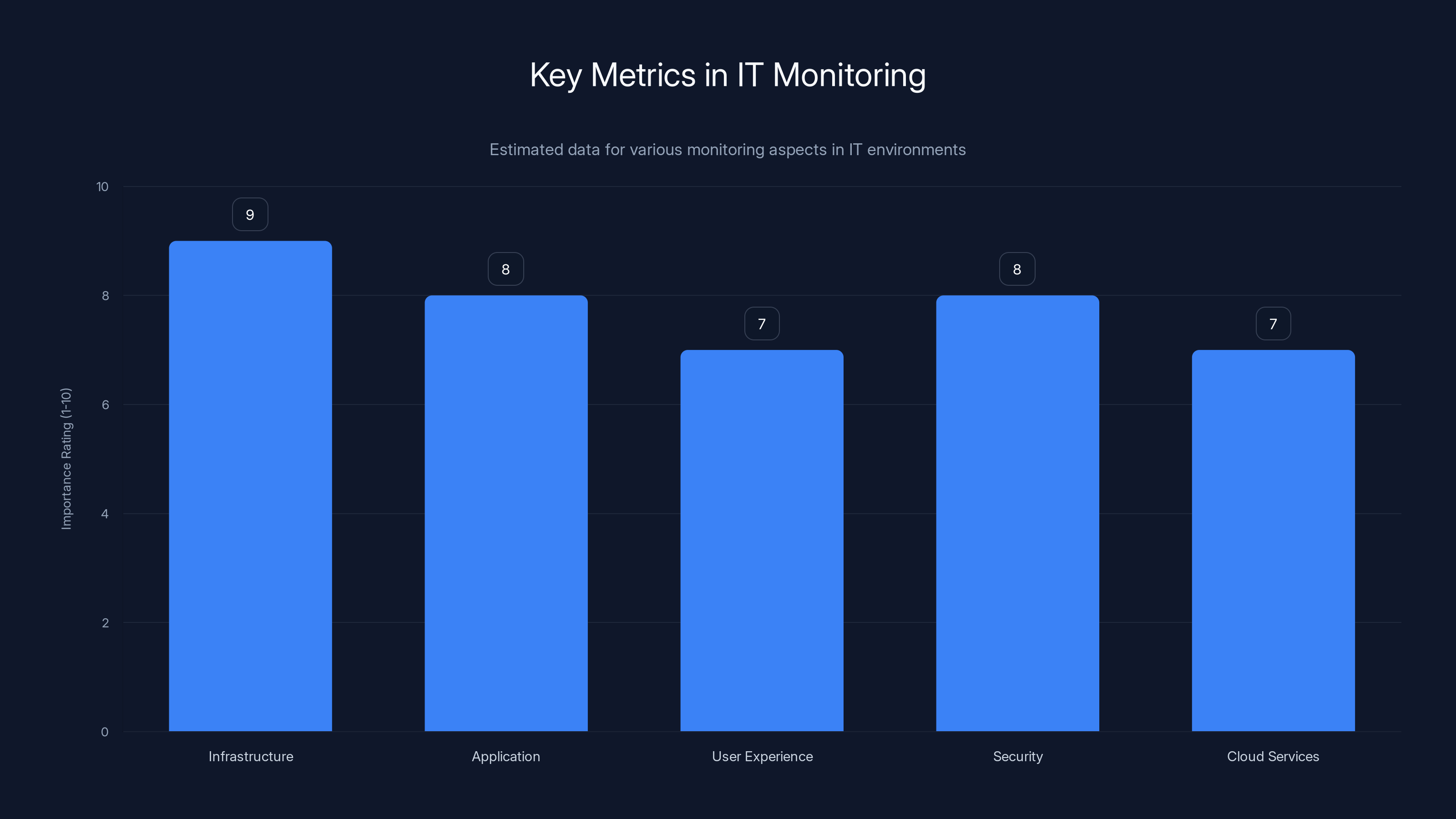
Infrastructure and application monitoring are rated highest in importance for IT environments, highlighting their critical role in maintaining system health. (Estimated data)
Monitoring and Observability: Seeing Your Entire IT Environment
Real-Time Monitoring: Creating the Single Pane of Glass
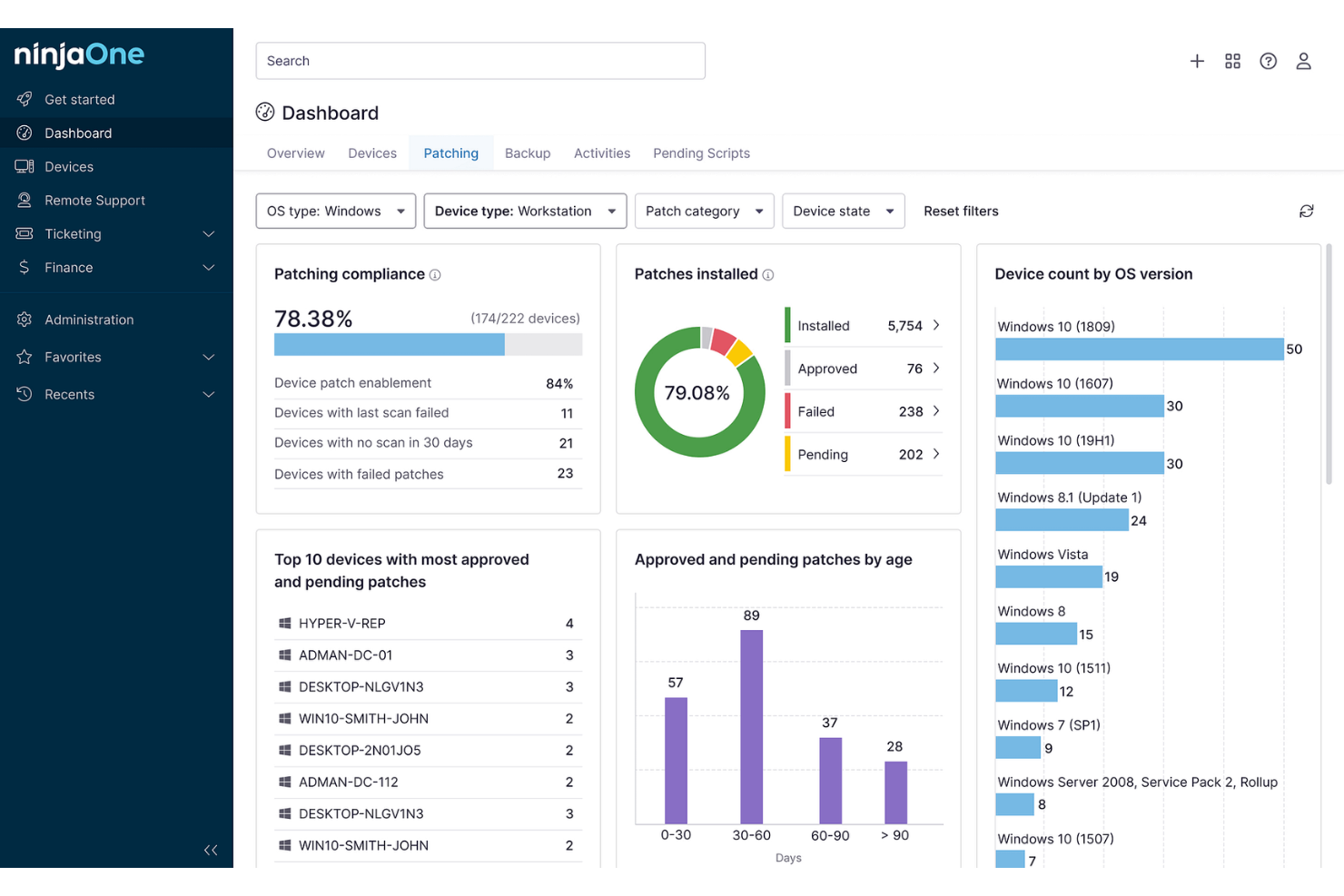
Real-time monitoring provides the visibility foundation for modern IT operations. Without monitoring, IT teams operate blind, learning about problems only when users report them. Effective monitoring continuously collects data from across the IT environment—servers, networks, applications, endpoints, cloud services—and surfaces anomalies before they impact business operations. Real-time dashboards give IT teams immediate visibility into system health.
Monitoring data flows from multiple sources. Infrastructure monitoring collects CPU usage, memory utilization, disk space, and network traffic from servers and network devices. Application monitoring tracks application performance, transaction processing times, error rates, and resource consumption. User experience monitoring measures actual user perception of system performance from different geographic locations and network conditions. Security monitoring detects suspicious activities, unauthorized access attempts, malware signatures, and policy violations. Cloud service monitoring tracks the status of services like Office 365, AWS, and Salesforce.
Thresholds and alerts transform raw monitoring data into actionable signals. Rather than displaying every data point, monitoring systems alert when metrics exceed thresholds indicating problems. These alerts might be immediate for critical issues or batched for non-critical issues. The challenge lies in tuning thresholds to catch real problems while avoiding alert fatigue from false alarms. Well-tuned monitoring systems alert for actual problems requiring attention while ignoring normal fluctuations and expected patterns.
Predictive Monitoring and Anomaly Detection
Moving beyond reactive monitoring, modern platforms employ artificial intelligence for predictive and anomaly-based monitoring. Rather than only alerting when metrics exceed static thresholds, machine learning models learn normal patterns and alert when behavior deviates from these patterns. A server running at 80% CPU might be normal during peak hours but abnormal at 2 AM, so intelligent systems establish context-dependent baselines.
Predictive monitoring goes further, forecasting future problems before they occur. Machine learning models analyze historical patterns to predict disk space exhaustion, identify applications consuming increasing resources, and detect signs of impending failures. For example, certain disk failure patterns predict imminent failure hours or days before it occurs, enabling proactive replacement. Predictive database monitoring detects query patterns that will eventually cause performance issues.
Anomaly detection identifies unusual behavior requiring investigation. Security monitoring might detect unusual login times or geographic locations. Performance monitoring might detect unusual traffic patterns indicating potential attacks. Application monitoring might detect unusual error rates. Rather than requiring administrators to define what's normal, anomaly detection systems establish baselines from historical data and alert on deviations. This approach catches novel problems and attack patterns that wouldn't match predefined rules.
Log Aggregation and Analysis
Every system component generates logs—operating systems, applications, network devices, security tools. Without aggregation, logs remain scattered across systems, difficult to search and correlate. Comprehensive log aggregation collects logs from all sources into centralized repositories where they can be searched, analyzed, and correlated.
Log analysis uncovers insights hidden in massive volumes of data. Correlation analysis connects events across systems—a user login at one time might correlate with file access at another, revealing a timeline of activity. Pattern analysis identifies recurring issues or security threats. Forensic analysis reconstructs sequences of events after incidents, supporting post-incident analysis and improving detection capabilities. Real-time log analysis can detect security threats, application errors, and operational issues as they happen.
Retention and compliance considerations shape log management strategies. Regulatory requirements often mandate retaining logs for specific periods. Security investigations might require logs from months or years past. Storage costs increase with retention periods. Effective log management balances compliance requirements against storage costs through tiered retention—keeping recent logs in fast, accessible storage and archiving older logs to cheaper long-term storage.

Automation and Workflow Orchestration: Eliminating Routine Busywork
The Power of Intelligent Automation
Automation represents the highest-value benefit of IT management software. Routine, repetitive tasks consume enormous amounts of IT staff time without adding strategic value. Automation eliminates this busywork, allowing staff to focus on complex problems and strategic initiatives. The math is compelling: if IT staff spends 20% of their time on routine password resets, a simple automation saves 4 hours per staff member per week, equivalent to an additional full-time person per small team.
Automation ranges from simple to sophisticated. Simple automations execute single actions based on triggers—when disk space exceeds a threshold, send an alert. More complex automations orchestrate multi-step workflows—when a new employee is added to the directory, create user accounts in multiple systems, assign licenses, configure device settings, and send welcome emails. Sophisticated automations make intelligent decisions based on context—when a user requests software, check their department, budget allocation, and user role before approving or routing for approval.
The best automation platforms combine low-code/no-code interfaces for simple automations with powerful programming interfaces for complex scenarios. Non-technical administrators can create simple automations through visual interfaces, while advanced users can write custom scripts for sophisticated logic. This dual approach democratizes automation rather than restricting it to specialized programmers.
Common IT Automation Scenarios
Organizations have identified numerous automation opportunities that generate immediate value. User provisioning automatically creates accounts, assigns licenses, configures device settings, and enables services when new employees join, reducing setup time from days to minutes. User offboarding automatically disables accounts, removes access, removes licenses, and retrieves equipment when employees leave, reducing security risks and preventing unauthorized access.
Password reset automation allows users to reset forgotten passwords through self-service portals rather than contacting support, reducing support tickets and improving user experience. Hardware replacement workflows coordinate device procurement, configuration, data migration, and deployment, reducing both time and errors. Software deployment automatically installs updates, patches, and new applications across the endpoint population, improving security posture and consistency.
Incident response automation orchestrates multi-step responses to detected issues—collecting diagnostic information, notifying appropriate teams, creating tickets, and initiating remediation. Report generation automatically collects data, analyzes it, formats reports, and distributes them to stakeholders on schedules, eliminating manual data collection. Change management automates approval workflows, change scheduling, rollback procedures, and communication of changes.
Integration and Orchestration Platforms
Many organizations combine IT management software with specialized integration platforms that orchestrate complex cross-system workflows. Integration platforms (sometimes called iPaaS or workflow automation platforms) excel at connecting multiple disconnected systems and coordinating workflows across them. They provide hundreds of pre-built connectors to popular business applications, eliminating the need to custom-build integrations.
For example, an employee onboarding automation might involve IT management software (creating accounts and devices), HRIS (reading employee data), email system (creating mailbox), CRM (creating customer account), and project management system (assigning to project). No single system natively integrates with all others, so integration platforms coordinate the workflow. These platforms can operate on their own or integrate with IT management software, depending on organizational preferences.
The choice between native IT management automation and external integration platforms depends on workflow scope. If workflows stay mostly within the IT management platform ecosystem, native automation likely suffices. If workflows extensively involve non-IT systems, an external integration platform may provide more flexibility and reduce overhead on the IT management system.

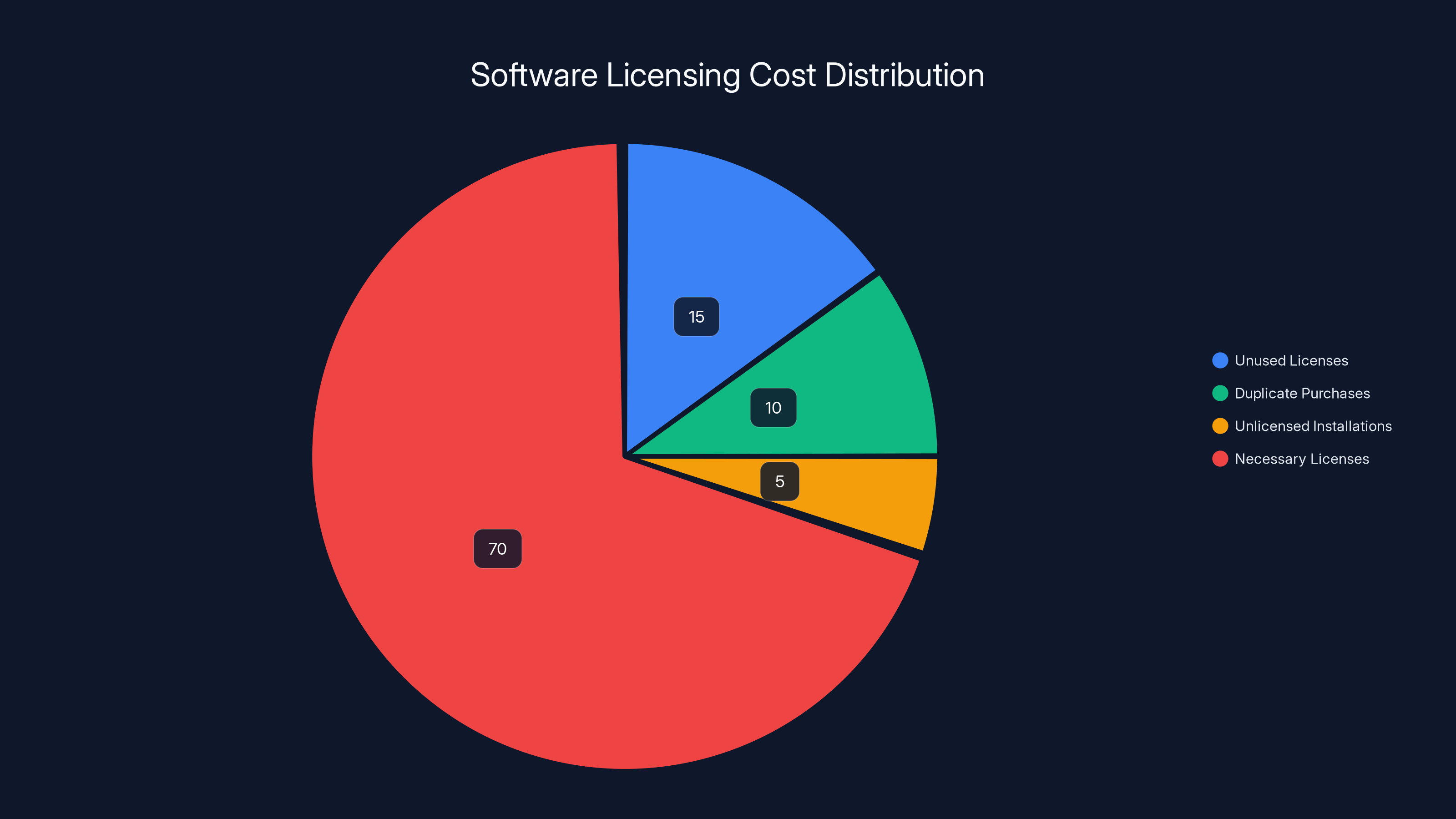
Organizations typically overspend on software by 10-30% due to unused licenses, duplicate purchases, and unlicensed installations. Estimated data.
Security Management and Threat Response Integration
Building Security Into IT Management Foundations
Security has evolved from a specialized domain into a core IT management concern. Effective IT management platforms integrate security considerations throughout their functionality rather than treating security as an add-on. Asset management provides inventory of what needs protection. Endpoint management enforces security policies on devices. Network monitoring detects suspicious traffic patterns. Incident management ensures rapid response to security events.
Security fundamentals in IT management include ensuring all devices run current antivirus and anti-malware software, that operating system and application patches are current, that encryption is enabled on sensitive data, that configuration standards are met, and that access controls restrict privileges to minimum necessary. These fundamentals prevent the vast majority of successful attacks and represent the foundation for more advanced security measures.
Zero-trust security principles increasingly influence IT management design. Rather than trusting anything inside the network perimeter and distrusting everything outside, zero-trust security verifies every access request regardless of origin. This requires comprehensive knowledge of devices (are they properly configured and patched?), users (are they who they claim?), and requested actions (are they appropriate?). IT management software provides the visibility and control necessary to implement zero-trust security.
Endpoint Detection and Response Capabilities
Endpoint Detection and Response (EDR) represents an advanced security capability integrated into modern IT management platforms. EDR continuously monitors endpoint activity (processes, network connections, file operations) looking for suspicious patterns indicating compromise. Rather than waiting for signature-based antivirus to detect known threats, EDR detects anomalous behavior that might indicate unknown threats.
EDR capabilities include threat hunting—proactively searching for indicators of compromise in historical data even if no alert was triggered, forensic investigation supporting detailed analysis of how systems were compromised, and automated response—containing threats automatically by isolating endpoints, killing malicious processes, or blocking network connections. The combination of visibility and response capability enables rapid containment of breaches before widespread damage occurs.
EDR integration with incident management ensures security events create tickets, engage appropriate teams, and are tracked through resolution. Advanced systems automatically gather forensic data when threats are detected, making investigation more efficient. Machine learning models learn characteristics of genuine threats versus false alarms, improving detection accuracy and reducing alert fatigue.
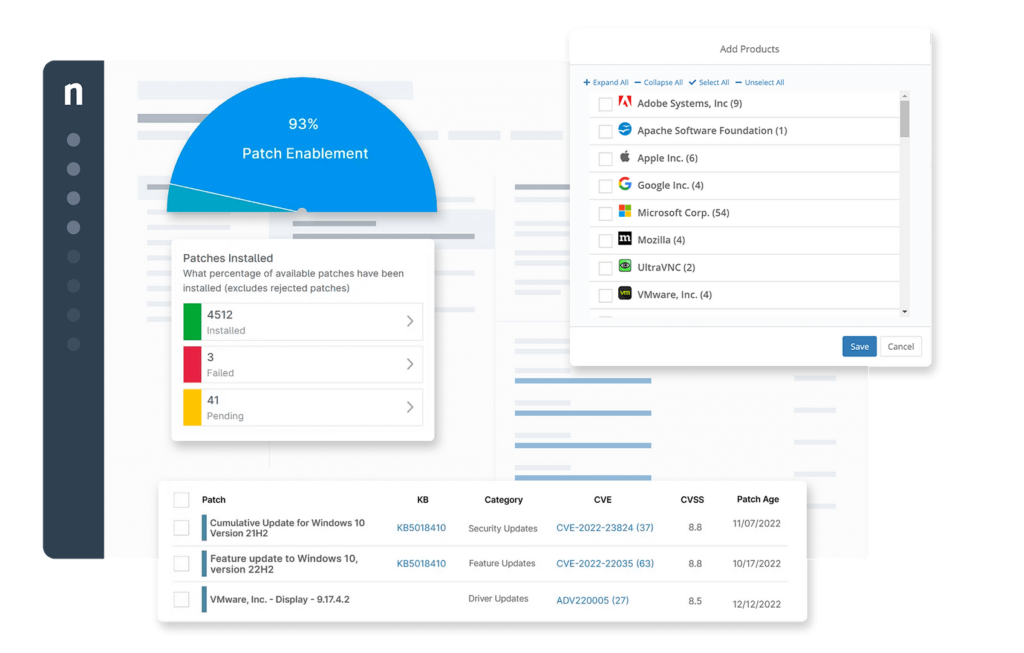
Vulnerability Management and Patch Automation
Vulnerabilities represent perpetual IT challenges. New vulnerabilities are discovered constantly, patches are released regularly, but patch deployment lags significantly behind vulnerability disclosure. This gap creates attack opportunities. Organizations with effective vulnerability management and patch automation maintain shorter windows between vulnerability discovery and patch deployment, reducing breach risk.
Vulnerability scanning identifies security weaknesses in systems. Scans can be agent-based (installed on endpoints, providing detailed local visibility) or network-based (scanning from the network, identifying vulnerabilities visible remotely). Scanning frequency depends on risk—high-risk systems should be scanned frequently or continuously, while low-risk systems can be scanned less frequently. Vulnerability scanning generates massive amounts of data, making prioritization essential. Scans might identify thousands of potential issues, but not all pose equal risk.
Risk-based prioritization focuses remediation efforts on vulnerabilities presenting greatest risk. This requires considering vulnerability severity (how impactful is exploitation), asset criticality (what is the value/importance of the affected asset), and exploitability (how easily can the vulnerability be exploited). A critical vulnerability on a low-value asset might be lower priority than a moderate vulnerability on a critical asset. Effective prioritization significantly improves security outcomes compared to patching everything regardless of context.

Reporting, Analytics, and Business Intelligence
Metrics That Matter: Defining IT Success
IT management platforms generate enormous amounts of data, but raw data doesn't drive decisions. Reporting and analytics transform data into insights that inform decision-making. Effective reporting starts by identifying metrics that align with business objectives. Metrics for IT operations differ from metrics for business leadership, and both matter.
Operational metrics help IT teams manage daily operations. Mean Time to Resolution (MTTR) measures how quickly incidents are resolved. Availability measures percentage of time services function correctly. Error rates indicate application quality. Resource utilization reveals whether infrastructure is efficiently used. Ticket volume and trends show support workload. These metrics help IT teams identify bottlenecks, measure improvement efforts, and ensure service quality.
Business metrics connect IT to organizational objectives. Downtime cost quantifies financial impact of outages. Productivity impact measures how IT issues affect employee productivity. Security incident cost quantifies breach impacts. IT spending efficiency reveals cost per business outcome. Time to deploy new capabilities measures how quickly business can capitalize on technology. Business metrics help demonstrate IT value to leadership and inform investment decisions.
Building Dashboards That Drive Decisions
Dashboards aggregate multiple metrics into visual displays that reveal patterns and trends. Effective dashboards balance information density with clarity—providing sufficient information to understand status without overwhelming viewers. Dashboard design requires understanding audience, objectives, and decision-making processes. An IT manager needs different information than a vice president, and both need different information than a frontline technician.
Real-time dashboards show current status—what problems exist right now that require attention. Historical dashboards show trends and patterns—how have metrics changed over weeks and months, which areas show improvement or degradation. Predictive dashboards forecast future states based on current trends—will disk space be exhausted in 30 days, will this performance trend result in problems, what resource constraints will emerge.
Interactive dashboards enable users to drill into details, filtering by department, location, severity, or other dimensions. A high-level dashboard might show overall incident volume. Clicking might reveal incidents by category. Clicking further reveals specific tickets. This layered approach lets viewers understand trends while enabling deep analysis when needed.
Compliance Reporting and Audit Trails
Regulated organizations require comprehensive documentation of configurations, access, and changes to demonstrate compliance. Compliance reporting automates the evidence collection required for audits. Reporting covers regulatory requirements like HIPAA, PCI DSS, SOC 2, ISO 27001, and CIS benchmarks. Automated compliance reports generate on-demand or on schedules, eliminating manual data collection that consumes significant time.
Audit trails create chronological records of who did what, when, and from where. Every configuration change, user access grant, and sensitive operation should be logged. Comprehensive audit trails enable forensic investigation after security incidents, demonstrating that appropriate controls were in place, and proving compliance during audits. Audit logs must be protected from tampering—if logs can be modified, their evidentiary value disappears.
Configuration baselines provide comparison points showing deviations from standards. Reports can compare current configurations against approved baselines, identifying non-compliant systems. Change reports track modifications over time, showing what changed, who approved it, and what business justification existed. Trend reports show compliance trajectory—are non-compliance issues increasing or decreasing.

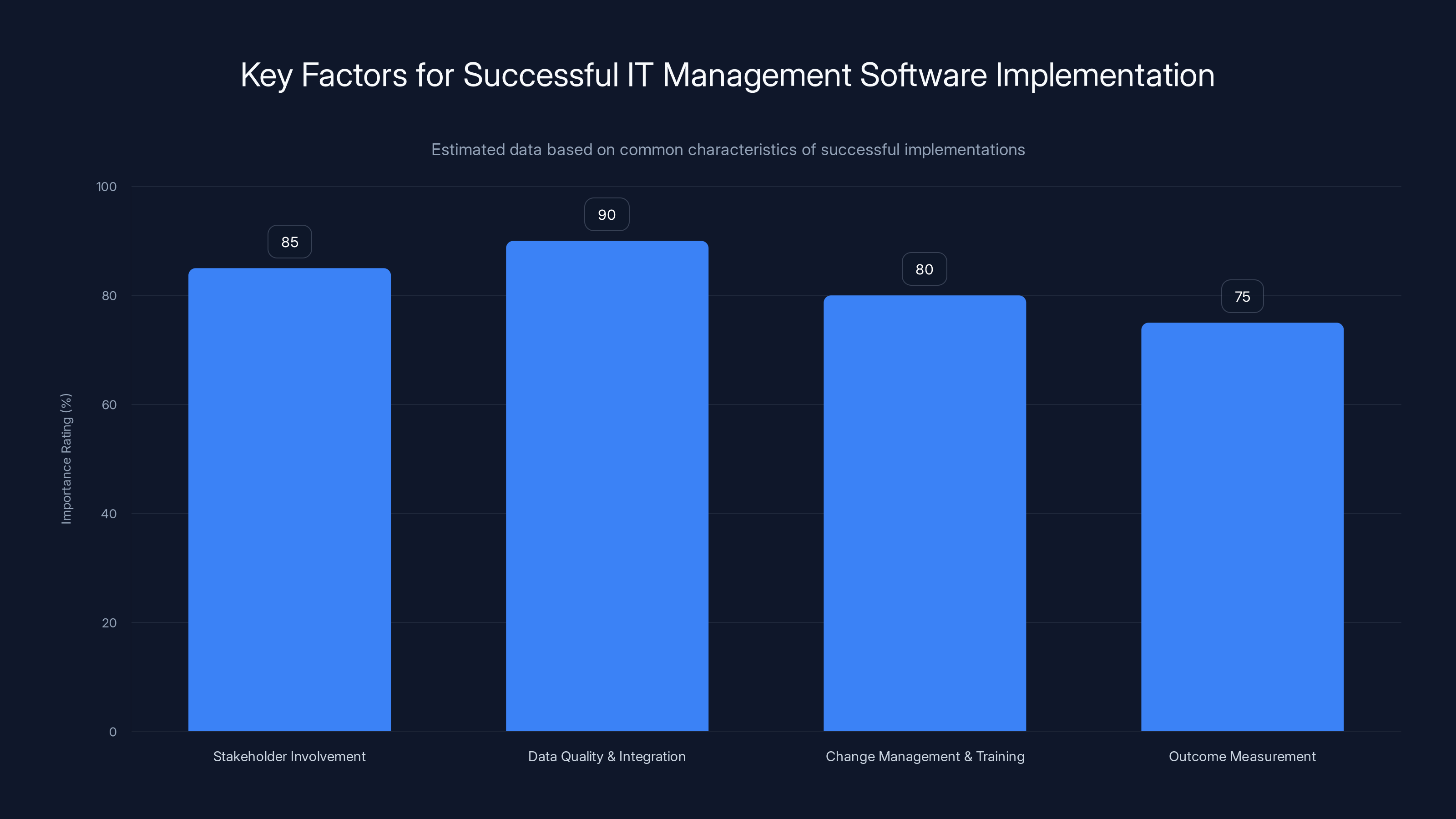
Successful IT management software implementations emphasize stakeholder involvement, data quality, change management, and outcome measurement. Estimated data.
IT Service Continuity and Disaster Recovery Planning
Business Continuity and Disaster Recovery Fundamentals
IT service continuity ensures critical business operations continue despite disruptions. Disasters range from localized (single server failure) to catastrophic (complete data center loss). Effective planning addresses the full spectrum. Disaster recovery planning typically involves backing up critical data and configurations, replicating systems to alternate locations, and establishing procedures for rapid recovery.
Key planning concepts include Recovery Time Objective (RTO) defining acceptable downtime, Recovery Point Objective (RPO) defining acceptable data loss, and recovery procedures documenting step-by-step restoration processes. RTO and RPO vary by application—critical business systems might require RTO of minutes and RPO of seconds, while non-critical systems might tolerate hours of downtime and significant data loss.
IT management platforms support continuity through backup capabilities capturing system configurations and data, monitoring ensuring awareness of disruptions, and automation enabling rapid recovery procedures. Integrated disaster recovery capabilities reduce recovery time and errors compared to manual processes. Regular testing of recovery procedures identifies weaknesses before actual disasters occur.
Backup Strategies and Data Protection
Backup is foundational to disaster recovery. Multiple backup strategies suit different scenarios. Full backups copy everything but consume significant storage and time. Incremental backups copy only changes since the last backup, faster and more efficient. Differential backups copy changes since the last full backup, balancing between full and incremental. Backup rotation schemes (Grandfather-Father-Son or similar) maintain multiple backup versions enabling recovery from various points in time.
Backup location is critical. On-site backups recover quickly but are lost if on-site disasters destroy everything. Off-site backups survive local disasters but require network time for recovery. Modern approaches use 3-2-1 backup strategy: maintain 3 copies of data (original + 2 backups), on 2 different storage types (e.g., disk + tape), with 1 copy off-site. This strategy balances recovery speed (copies on fast disk), diversity (multiple storage types), and disaster protection (off-site copy).
Recovery testing is essential. Untested backups might not restore correctly, leaving organizations unable to recover when needed. Regular recovery testing—actually restoring systems from backups—catches problems while time exists to fix them rather than during disasters. Testing should be realistic, recovering to alternate hardware or locations to simulate actual disaster recovery scenarios.
Failover and High Availability Architectures
For the most critical systems, planned downtime for backup and recovery is unacceptable. High availability architectures maintain continuous service despite component failures through redundancy. Active-active architectures run systems simultaneously on multiple servers, with load balancers distributing traffic. If one server fails, traffic routes to remaining servers without service interruption. Active-passive architectures run systems on primary servers with standby secondaries monitoring primary health. If primary fails, traffic automatically switches to secondary.
Database replication keeps data synchronized across multiple locations. Synchronous replication writes data to all locations before acknowledging writes to applications, ensuring zero data loss at the cost of write latency. Asynchronous replication writes locally then replicates in background, faster writes at the risk of minor data loss if primary fails immediately after writes. Choosing appropriate replication strategy depends on application tolerance for data loss.
Geographic redundancy provides protection against regional disasters. Systems spread across multiple geographic regions survive disasters affecting single regions. However, geographic redundancy introduces complexity and cost, with limited ability to share infrastructure between regions. Organizations typically implement geographic redundancy for the most critical systems where benefits justify costs.
Cost Optimization and IT Financial Management
License Compliance and Software Asset Management
Software licensing represents a significant IT cost that many organizations mismanage. Effective software asset management (SAM) optimizes spending by eliminating unused licenses, detecting unlicensed software, and negotiating volume discounts based on accurate usage data. The average organization spends 10-30% more than necessary on software through a combination of unused licenses, duplicate purchases, and unlicensed installations.
SAM platforms track software inventory, identifying installed software and versions across all endpoints. Comparing installed software against purchasing records reveals discrepancies—both unused licenses (purchasing without deployment) and unlicensed software (deploying without licenses). This visibility enables negotiations with vendors ("we're only using 60% of purchased licenses" vs. "we actually need more licenses than purchased"). Optimization might involve license consolidation, tier downgrades, or negotiating volume discounts.
Compliance risk is equally important. Unlicensed software creates legal liability. Audits by vendors or industry groups might identify non-compliance, resulting in penalties or forced remediation. Effective SAM maintains compliance while optimizing costs. The best approach involves both enforcement (preventing unlicensed software installation) and optimization (ensuring available licenses are fully utilized).
Infrastructure Capacity Planning and Right-Sizing
Capacity planning ensures IT infrastructure can handle expected demand without unnecessary overprovisioning. Underprovisioning causes performance problems and business disruption. Overprovisioning wastes money on unused capacity. Optimal capacity planning maintains sufficient headroom for growth and peaks while minimizing idle resources.
Historical utilization data reveals normal patterns and peaks. Seasonal patterns might show higher demand during certain times. Growth trends might show increasing utilization over time. Capacity planning forecasts future requirements based on these patterns plus anticipated changes (new business initiatives, user growth, etc.). This forecast drives infrastructure investments, upgrades, or decommissioning decisions.
Right-sizing optimizes resource allocation. Sophisticated monitoring reveals which servers are heavily utilized and which are idle. Virtual machines can be right-sized to actual requirements rather than provisioned generously. Consolidated workloads eliminate unnecessary servers. Cloud resources can be dynamically resized in response to demand. These optimizations reduce costs without impacting performance.
Cloud Cost Optimization
Cloud services simplify infrastructure management but introduce cost optimization challenges. Cloud pricing models (pay-per-use, reserved capacity discounts, etc.) offer opportunities to optimize costs that don't exist in traditional infrastructure. Without discipline, cloud costs escalate rapidly as resources accumulate without being monitored or cleaned up.
Cloud cost optimization involves several strategies. Resource cleanup removes unused resources—unattached storage, unassociated network resources, deprecated applications. Instance right-sizing adjusts cloud resource sizes to match actual demand. Commitment discounts leverage reserved instance or savings plans offered by cloud providers, trading flexibility for significant discounts (e.g., 20-40% discounts for committed capacity). Workload placement optimization chooses cost-optimized instance types for different workload characteristics.
Automated cost monitoring surfaces anomalies suggesting misconfiguration or attacks. Alerts trigger when cloud spend deviates from expected patterns. Chargebacks allocate cloud costs to departments or projects, creating incentives for efficient use. FinOps practices apply financial discipline to cloud spending, treating it as seriously as traditional infrastructure budgeting.
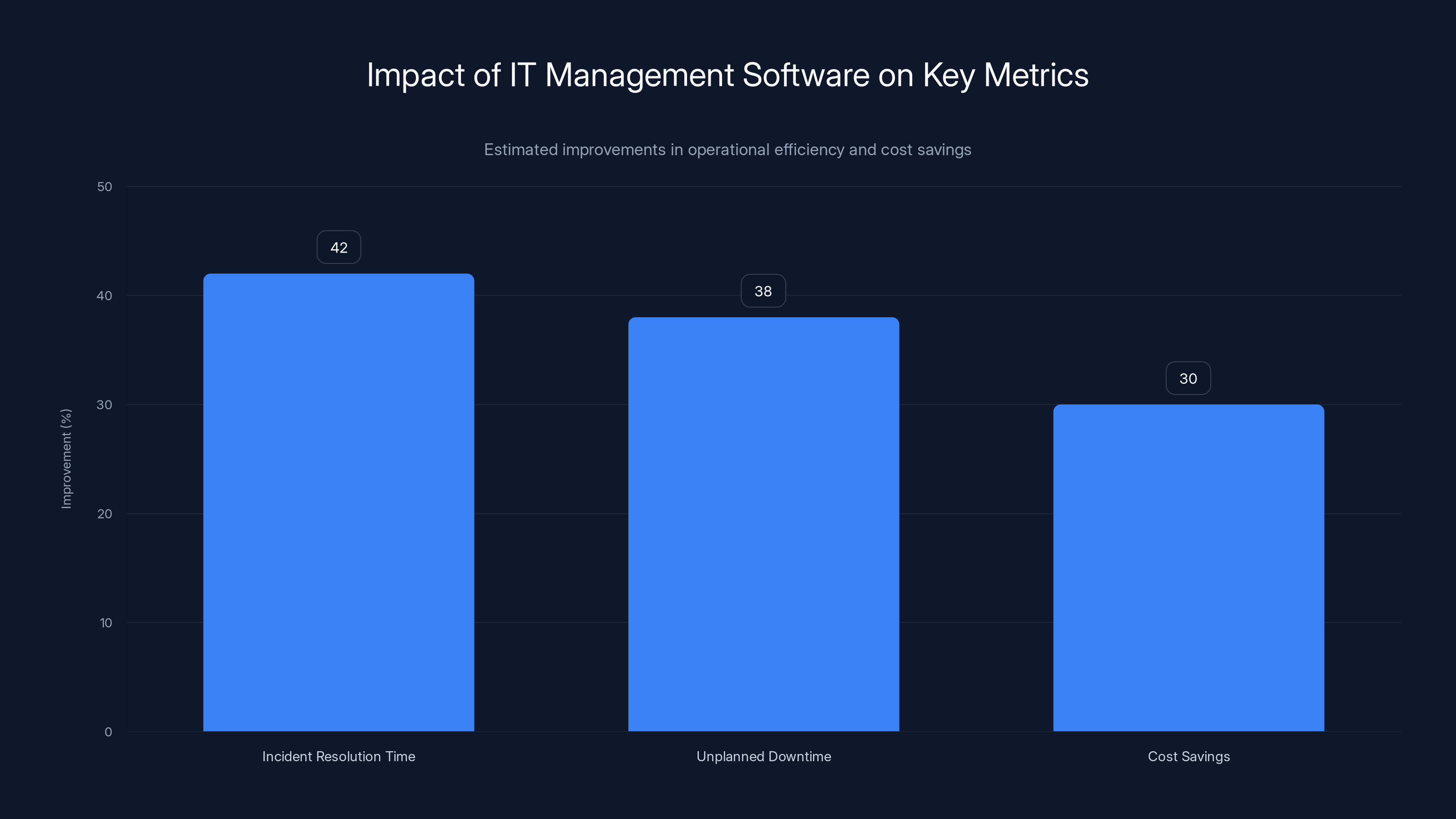
Organizations using IT management software report 42% faster incident resolution, 38% reduction in downtime, and significant cost savings. Estimated data.
User Experience and Help Desk Productivity
Self-Service Portals: Empowering Users and Reducing Tickets
User self-service represents one of the highest-value IT automation opportunities. Many support requests—password resets, software requests, basic troubleshooting—could be handled by users without support staff involvement if appropriate self-service tools existed. Well-designed self-service portals empower users while dramatically reducing support workload.
Effective self-service starts with common request automation. Password resets should be user-initiated self-service, reducing the single largest support request category by up to 30-40%. Software or license requests might follow approval workflows but allow self-service submission. Equipment requests might be self-service ordering from approved vendors. Basic troubleshooting might be guided workflows helping users diagnose and fix common problems.
Knowledge base integration powers intelligent self-service. When users describe problems, the portal can search the knowledge base for similar issues and solutions. AI-powered chatbots can converse naturally, asking clarifying questions and providing solutions. Self-service success depends on knowledge base quality—poorly maintained, inaccurate information frustrates users and drives them back to support staff. Regular pruning removes outdated information. Feedback mechanisms help identify articles requiring updates.
Chatbots and AI-Powered Support
Artificial intelligence increasingly powers support interactions. AI chatbots can handle routine requests—password resets, account unlocks, software requests—automatically. Unlike rigid automated systems, chatbots conduct natural-language conversations, understanding user intent even if requests are phrased differently.
Chatbots handle requests more quickly than human support staff. Users get immediate responses rather than waiting in queues. This speed improves user experience and satisfaction. AI chatbots handle peak demand automatically without requiring staff overtime. As chatbots gain experience, they learn which requests they handle well and which they should escalate to human staff, improving both efficiency and quality.
Effective AI chatbots require continuous refinement. Machine learning models improve as they handle more interactions, learning patterns and improving accuracy. Monitoring identifies problematic interactions—where chatbots misunderstand requests or provide incorrect information. Feedback mechanisms allow users to indicate if responses helped, training systems to improve.
Measuring Help Desk Performance
Support quality metrics guide improvement efforts and demonstrate value. First-contact resolution rate (percentage of tickets resolved without escalation) measures support effectiveness. Average resolution time measures efficiency. Customer satisfaction surveys measure user perception. Ticket volume by category reveals where problems concentrate. Peak and off-peak patterns inform staffing decisions.
Effective performance management uses metrics to drive improvement, not to punish staff. If average resolution time is too long, investigate why—do staff lack knowledge, do systems lack necessary tools, do tickets require research time? Each root cause suggests different improvements. If first-contact resolution is low, improve knowledge management or training rather than pressuring staff to close tickets faster without solving underlying problems.
Benchmarking against industry standards provides context. What does "good" performance look like? Benchmarking reveals whether organization performance is strong or needs improvement. However, avoid excessive focus on meeting benchmarks at the expense of actual service quality. Metrics are useful guides, not absolute targets.

Comparing Leading IT Management Platforms: Feature Deep Dives
Enterprise-Scale Platforms for Complex Environments
Large organizations with thousands of endpoints, complex infrastructure, and rigorous compliance requirements often require enterprise-scale platforms. These solutions offer comprehensive functionality, extensive integration options, and sophisticated administrative controls. However, they typically involve higher complexity, longer implementation timelines, and greater ongoing operational overhead. Enterprise platforms often include extensive configuration options allowing customization to specific organizational needs, comprehensive reporting capabilities supporting complex compliance requirements, and integration capabilities connecting to specialized tools organizations have already implemented.
Enterprise platforms are particularly valuable for organizations with multiple IT teams operating in specialized domains. A large organization might have separate teams managing endpoints, networks, servers, applications, and security. Enterprise platforms with specialized modules, detailed permission controls, and cross-team collaboration features support this structure. Each team operates efficiently while broader visibility prevents silos and ensures coordination.
Implementation of enterprise platforms typically requires significant planning and effort. Organizations might need to modify business processes to align with platform capabilities. Data migration from legacy systems might be complex, especially if data is scattered across multiple systems. Staff require comprehensive training. Phased implementations—deploying platform capabilities in stages—help manage complexity and allow learning from early phases to inform later deployment.
Mid-Market Solutions Balancing Capability and Usability
Mid-market organizations (typically 100-5,000 endpoints) face different needs than enterprises. Comprehensive functionality matters, but equally important are reasonable implementation timeframes, understandable interfaces, and reasonable costs per endpoint. Mid-market solutions balance capability against usability, offering most enterprise functionality while maintaining relative simplicity.
Mid-market platforms often provide pre-configured templates and workflows rather than requiring extensive customization. This approach accelerates implementation while covering most organizations' needs. When customization is needed, it's typically less extensive than enterprise platforms require. Mid-market solutions often excel at specific domains—some specialize in managed services provider (MSP) needs, some in particular industries, some in specific capabilities like mobile device management.
Many mid-market organizations benefit from vendor support and services. Rather than implementing platforms entirely in-house, working with vendor-certified partners can accelerate implementation and improve outcomes. MSP implementations—where vendors manage platforms on behalf of customer organizations—represent another model, particularly for small and mid-market organizations lacking large IT teams.
Specialized Point Solutions Versus Integrated Platforms
Organizations face choices between comprehensive integrated platforms and specialized point solutions in specific domains. Integrated platforms aim for breadth, supporting many different IT management functions through a single platform. Point solutions focus on depth in specific domains—perhaps specialized mobile device management or specialized application performance monitoring.
Integrated platforms offer advantages including unified data models enabling cross-domain visibility, integrated workflows reducing manual coordination, simplified authentication and authorization, and cost advantages through licensing bundling. The disadvantages include potential weakness in specific domains where point solutions excel and complexity implementing and learning comprehensive systems.
Point solutions offer advantages in their specific domains, often providing more sophisticated capabilities than integrated platform modules. Smaller organizations focused primarily on specific problems might find point solutions more cost-effective. However, multiple point solutions create integration challenges, operational complexity, and potentially higher total costs. The choice depends on organizational priorities and existing infrastructure.
Many organizations use hybrid approaches—comprehensive integrated platforms for core IT management plus specialized point solutions in domains where capabilities are particularly important. For example, an organization might use enterprise IT management software for general management while also implementing specialized application performance monitoring software. This approach requires careful integration planning to avoid duplicate data collection and ensure unified visibility.
Exploring Alternative IT Management Solutions: Beyond Traditional Platforms
Modern Automation-First Alternatives
Organizations increasingly recognize that IT management needs extend beyond traditional IT management software capabilities. Rather than implementing large monolithic platforms, some organizations build automation-first approaches combining specialized tools with automation platforms. This approach leverages best-in-class tools for specific domains while using automation to integrate them and orchestrate complex workflows.
Automation-first approaches work particularly well for organizations valuing flexibility and rapid adaptation. Rather than waiting for platform updates to add new capabilities, organizations can quickly add new tools and integrate them through automation. Custom requirements can often be met through automation configurations rather than requiring custom development or waiting for vendor features.
For teams prioritizing developer productivity and workflow automation, platforms like Runable offer AI-powered automation capabilities that can significantly streamline IT operations. Runable provides AI agents for content generation and workflow automation at an accessible $9/month price point, making sophisticated automation capabilities available to smaller organizations that might find traditional enterprise platforms prohibitively expensive. Runable's AI-powered approach can automate documentation, report generation, and routine IT processes, complementing traditional IT management platforms by automating tasks that benefit from AI intelligence.
The hybrid approach of combining traditional IT management platforms with automation tools provides flexibility for teams with diverse needs. Organizations can leverage Runable or similar automation platforms for repetitive documentation and process automation while maintaining traditional IT management software for core infrastructure management and ticketing.
Open-Source and Community-Driven Solutions
Open-source IT management platforms provide alternatives to commercial solutions, offering advantages including lower licensing costs, source code access for customization, and community support. Open-source solutions range from lightweight tools addressing specific needs to comprehensive platforms attempting to rival commercial solutions.
Open-source platforms include full-featured systems capable of supporting large organizations, though often requiring more technical expertise to deploy and maintain compared to commercial alternatives. Community-driven development produces innovations rapidly but might leave gaps if community developers don't prioritize specific features. Choosing open-source often involves accepting trade-offs: lower cost for higher operational complexity.
Open-source solutions work particularly well for organizations with strong technical teams comfortable with system administration, for edge cases where commercial solutions don't quite fit organizational needs, and for organizations prioritizing system understanding over ease of use.
Managed Services Provider (MSP) Platforms
MSP platforms represent a different model—rather than self-managing IT infrastructure, organizations contract with managed service providers who manage IT on their behalf. MSPs typically use specialized platforms optimized for managing multiple customer environments efficiently. This model appeals to organizations lacking IT expertise or wanting to reduce IT overhead.
MSP benefits include avoiding capital investments in infrastructure and staff, accessing expertise of specialized providers, predictable monthly costs, and ability to scale services as organizational needs change. Disadvantages include less direct control, potential vendor lock-in, and challenges with customization for unique organizational needs.
MSP platforms differ from self-managed platforms in optimizing for multi-tenant operation (managing many separate customer environments from a single platform), cost-effectiveness for providers (enabling profitable MSP business models), and often including additional capabilities like billing, client management, and service delivery tracking.

Implementation, Migration, and Change Management
Planning Your IT Management Platform Implementation
Successful IT management platform implementation begins with comprehensive planning. Implementation planning should define project scope (which business processes will the platform support), timeline (how quickly does it need to be operational), resource requirements (what staff and budget are needed), success metrics (how will we measure whether implementation succeeded), and risk mitigation strategies (what might go wrong and how will we respond).
Initial assessment identifies current state challenges. What problems does the current environment create? What processes are inefficient? What visibility gaps exist? What compliance or operational requirements must the platform meet? Assessment reveals organizational needs, driving platform selection. Different organizations have different priorities—some prioritize ease of use, some comprehensive functionality, some cost, some specific capabilities. Assessment clarifies organizational priorities.
Stakeholder engagement ensures implementation addresses actual organizational needs. IT operations staff have different needs than business stakeholders. Frontline support staff have different requirements than IT managers. Engaging diverse stakeholders during planning ensures the platform supports everyone's needs rather than optimizing for one group at the expense of others.
Data Migration and Integration Planning
Migration from legacy systems to new platforms presents significant challenges. Legacy data—inventory records, configuration information, historical tickets, accumulated knowledge—should migrate to new platforms if possible. However, decades of accumulated data often includes inconsistencies, incomplete records, and outdated information. Migration decisions must balance between preserving valuable history and eliminating problematic data.
Data cleansing removes inaccurate or duplicate records before migration. Clean data enables trustworthy platform operation. Bad data migrated into new platforms perpetuates old problems. However, cleansing is labor-intensive and challenging, particularly for large legacy datasets. Organizations must decide how extensively to cleanse—complete cleansing might be impossible before migration, requiring ongoing cleanup after platform deployment.
Integration planning identifies which external systems the new platform must connect with. HRIS systems provide employee information. Network monitoring tools identify devices. Security tools report threats. Accounting systems track costs. Email systems deliver notifications. Comprehensive integration connects all these systems, enabling information flow and coordinated operations. Integration requires technical effort, testing, and ongoing maintenance as integrated systems change.
Change Management and User Adoption
Technology implementation is ultimately about changing how people work. Change management ensures affected staff understand changes, develop required skills, and adopt new ways of working. Without effective change management, even excellent technology implementations fail because people continue old ways of working or resist the new platform.
Change communication should begin early and continue throughout implementation. People respond better to change when they understand why it's happening, what will change, how it benefits them, and what support is available. Multiple communication channels—town halls, team meetings, newsletters, documentation, training—reach different learning styles. Repeating key messages multiple times ensures understanding despite the volume of information.
Training enables people to use new platforms effectively. Training should be tailored to different roles—support staff need different training than administrators. Hands-on training where people actually use platforms is more effective than classroom lectures about abstract concepts. Training should be accessible—recorded sessions for people unable to attend live sessions, reference documentation for people needing to refresh knowledge weeks after training.
Phased Implementation and Quick Wins
Phased approaches reduce risk and enable learning from early phases to inform later deployment. Rather than attempting to implement everything simultaneously, phases deploy specific capabilities, allow organizations to stabilize, then move to next capabilities. For example, a phased implementation might deploy incident management first, then monitoring, then automation. Each phase enables value delivery while reducing implementation risk.
Quick wins demonstrate value early, building momentum and organizational confidence. Quick wins are capabilities delivering visible benefit with relatively low implementation effort. For example, implementing automated password reset (quick win) demonstrates value and generates enthusiasm, supporting implementation of more complex capabilities that might otherwise face resistance. Identifying quick wins during planning helps structure implementation phases effectively.
Future Trends and Emerging Capabilities in IT Management
Artificial Intelligence and Machine Learning Integration
AI and machine learning are transforming IT management software capabilities. Rather than humans making all decisions, AI systems increasingly augment human intelligence. Machine learning models learn from organizational history—which issues recur, how long resolution typically takes, what causes incidents—enabling predictive capabilities and smarter automation.
Predictive analytics forecast problems before they impact operations. Machine learning identifies patterns indicating disk exhaustion, performance degradation, or security threats hours or days in advance, enabling proactive remediation. Anomaly detection identifies unusual behavior suggesting attacks or misconfigurations. Root cause analysis learns relationships between different metrics, helping identify true causes of symptoms rather than addressing symptoms.
AI-powered automation handles increasingly complex decisions. Rather than simple rules (if X then do Y), systems learn decision patterns from historical data. AI might learn that certain types of incidents resolve quickly when escalated to specific team members, improving ticket routing. Chatbots understand natural language and context, handling complex requests. Recommendation engines suggest actions administrators might take based on successful approaches in similar historical situations.
As AI capabilities advance, IT management will increasingly resemble decision support systems that augment human capabilities rather than rigid automated systems following predefined rules. Humans remain responsible for critical decisions, but AI provides analysis, recommendations, and handling routine decisions requiring minimal judgment.
Cloud-Native and Kubernetes-Focused Management
Traditional IT management evolved to manage physical and virtual infrastructure. Cloud-native applications running in containers and Kubernetes clusters present different management challenges. Container management, service mesh management, and application dependency tracking require new capabilities or significant evolution of traditional tools.
Cloud-native monitoring differs from traditional infrastructure monitoring. Rather than monitoring individual servers, cloud-native environments monitor services across dynamic clusters where instances appear and disappear constantly. Traditional configuration management struggles with immutable containers designed to be replaced rather than updated in-place. Identity and access management must align with cloud-native approaches emphasizing identity-based access rather than network-based access.
IT management platforms increasingly add cloud-native capabilities, but dedicated cloud-native platforms often provide superior functionality for organizations heavily invested in cloud-native approaches. Organizations deploying both traditional infrastructure and cloud-native applications often maintain multiple management platforms, requiring integration to provide unified visibility.
Zero-Trust Security Architecture Integration
Zero-trust security principles increasingly influence IT management platform design. Rather than trusting anything within the network perimeter, zero-trust requires verifying every access request regardless of origin. This requires comprehensive visibility into user and device identity, device security state, and requested actions.
Zero-trust integration with IT management means policies increasingly reflect device and user characteristics. Rather than allowing all traffic from internal networks, policies might restrict based on device compliance status (is it patched? is it encrypted? is it running approved software?). Incident response might automatically isolate non-compliant devices from sensitive resources. Continuous verification ensures compliance throughout device lifecycle, not just at login.
Zero-trust approaches are particularly important for organizations supporting remote and hybrid work, where traditional network perimeter security provides minimal protection. Cloud adoption also drives zero-trust adoption, as cloud applications typically exist outside organizational network perimeters.
Integration with Emerging Technologies
IT management platforms increasingly integrate with emerging technologies. IoT device management becomes necessary as organizations deploy IoT sensors and devices. Extended reality (AR/VR) support might enable remote assistance technologies. Quantum computing awareness will eventually matter as quantum-resistant cryptography requirements emerge. Autonomous systems will present novel monitoring and control challenges.
These emerging technologies don't fundamentally change IT management principles but require new capabilities and approaches. IT management platforms must evolve to address new device types, security models, and operational challenges that emerging technologies present. Early adoption of emerging technologies often requires specialized tools, with general IT management platforms catching up as technologies mature.
Industry-Specific IT Management Considerations
Healthcare IT Management Requirements
Healthcare organizations face unique IT management challenges driven by regulatory requirements (HIPAA, HITECH), patient safety considerations, and operational constraints. Healthcare IT must maintain high availability—downtime can literally threaten patient safety. Compliance requirements are stringent, with audit trails and access controls carefully monitored.
Healthcare IT management emphasizes security and compliance. PHI (Protected Health Information) requires encryption, access controls, and audit trails. Legacy medical devices require special handling—many cannot be updated, must remain isolated, or require specialized network approaches. Vendor lock-in is common—changing EMR (Electronic Medical Record) systems is enormously disruptive and expensive, so healthcare organizations often remain with suboptimal systems for decades.
IT management platforms used in healthcare must support healthcare-specific compliance frameworks and integrate with healthcare systems. Some specialized platforms address healthcare needs, while some general platforms offer healthcare-specific modules or professional services to implement healthcare-aligned approaches.
Financial Services IT Management
Financial services organizations operate under intense regulatory scrutiny from banking regulators, securities regulators, and other authorities. IT management requirements emphasize security, audit capabilities, disaster recovery, and fraud detection. Regulatory examinations specifically assess IT management practices, creating strong motivation for mature IT management.
Financial services IT must support extreme uptime requirements—even brief outages disrupt trading, payments, or customer service. Disaster recovery requirements typically mandate rapid recovery with minimal data loss. Compliance documentation must demonstrate controls are in place and operating effectively. Audit trails must support forensic investigation and fraud detection.
Financial services often leads technology adoption, investing in sophisticated IT management platforms and practices. However, the complexity of financial systems and regulatory requirements creates implementation challenges unique to the industry.
Manufacturing and Operations Technology Management
Manufacturing organizations increasingly integrate IT systems with operational technology (OT) systems—industrial controls, robotics, and production systems. This convergence creates management challenges, as IT and OT have traditionally evolved separately with different security models and operational requirements.
OT systems prioritize availability and physical safety above all else. An IT security patch that causes downtime might be unacceptable on a production line where downtime costs thousands per minute. OT systems might be decades old, unable to be updated or patched. OT networks might require different security approaches than IT networks.
Converged IT/OT environments require IT management platforms capable of understanding both IT and OT contexts. Some organizations maintain separate management systems, requiring integration and coordination. Others seek converged solutions understanding both domains. Industry-specific solutions addressing manufacturing IT/OT requirements exist alongside general platforms offering manufacturing modules.

Selecting the Right IT Management Platform for Your Organization
Defining Selection Criteria and Scoring Models
Platform selection requires systematic evaluation of available options against organizational requirements. Begin by defining mandatory requirements (features that must exist), important requirements (features significantly improving value), and nice-to-have requirements (beneficial but not essential). This categorization prevents nice-to-have features from inappropriately driving selection of platforms lacking mandatory capabilities.
Weighting requirements reflects organizational priorities. An organization prioritizing ease of use might weight usability 30% of score. Another prioritizing functionality might weight it 20%. Create scoring models assigning points for meeting requirements at different levels—fully meets requirement, mostly meets, partially meets, doesn't meet. Vendor demonstrations should assess how well platforms meet specific organizational requirements.
Capture both quantitative and qualitative assessments. Cost is quantitative and important. However, qualitative factors like vendor reputation, customer support quality, and platform direction also matter. Talking with current customers provides invaluable perspective that vendor marketing can't replicate. Many vendors arrange customer references willing to discuss their experiences.
Total Cost of Ownership Analysis
Platform selection should evaluate total cost of ownership (TCO) beyond software licensing. Software licensing is only one cost component. Implementation costs (professional services, internal labor) might exceed licensing costs. Operational costs (administration, support, training) continue for years. Migration costs (moving from legacy systems) can be substantial. These costs often determine whether investment makes financial sense.
Calculate TCO over a representative timeframe (typically 3-5 years). Include licensing, implementation, operations, and training costs. Compare platforms on total cost rather than initial licensing cost alone. A more expensive platform with lower implementation costs might have lower TCO than a cheaper platform requiring extensive customization. Consider cost of ongoing support—does the vendor provide strong support or will you need to hire staff or third-party consultants?
Include cost of not implementing—what costs result from manual processes, operational inefficiencies, and security risks if the new platform isn't deployed? Sometimes implementation costs are offset by operational benefits within a year or two. Understanding full economics enables better decision-making.
Vendor Evaluation and Due Diligence
Vendor selection is as important as platform selection. Strong vendors provide better support, invest in product improvement, and maintain financial stability. Weak vendors might discontinue products, reduce support, or be acquired by competitors introducing unwanted changes.
Evaluate vendor financial stability. Is the vendor profitable and growing or struggling? Venture-backed startups might offer innovative products but carry risk if they can't achieve profitability. Established vendors offer stability but might move slowly. Assess vendor commitment to product—is the platform a core product or a peripheral offering the vendor might abandon?
Evaluate vendor support. What support options exist? How quickly do they respond to issues? What is included at different support levels? Talking with current customers provides perspective on real support quality beyond vendor marketing claims. Assess vendor community—do users have forums for peer support, knowledge repositories, etc.?
Evaluate vendor direction. What is on their product roadmap? Do planned features address your requirements? Are they investing in strategic areas like AI and cloud? Are they maintaining legacy capabilities or deprecating features important to you? Conversations with vendor product managers reveal strategic direction more effectively than published roadmaps.
FAQ
What is IT management software?
IT management software provides tools and capabilities for managing IT infrastructure, applications, and operations. This includes monitoring system performance, managing endpoints (computers and devices), ticketing and incident management, automation of routine tasks, and reporting on IT operations. Modern IT management platforms integrate multiple functions that were historically separate, providing unified visibility and control over IT environments.
How does IT management software improve IT operations?
IT management software improves operations through several mechanisms. Automation eliminates routine manual tasks, freeing staff for more valuable work. Monitoring provides early visibility of problems before they impact operations, enabling proactive remediation. Ticketing ensures support requests are tracked and prioritized systematically. Integration connects disparate systems, reducing manual data entry and enabling coordinated workflows. Analytics reveal operational patterns and improvement opportunities. Together, these capabilities reduce downtime, improve support efficiency, and enable better decision-making.
What are the main categories of IT management software?
IT management software categories include endpoint management (managing computers and devices), infrastructure monitoring (tracking system performance), service desk (incident management and support ticketing), network management (managing network performance and security), mobile device management (controlling smartphones and tablets), cloud management (managing cloud services), and security management (threat detection and response). Some platforms provide integrated capabilities across multiple categories, while others specialize in specific domains.
What should I look for when selecting IT management software?
Key selection factors include alignment with your specific needs (does the platform address your requirements?), scalability (can it handle your current and projected future environment?), integration capabilities (can it connect with your existing systems?), ease of use (can your team learn and effectively use the platform?), vendor support quality (will the vendor help you succeed?), total cost of ownership (what is the full financial impact?), and vendor stability (will the vendor remain viable long-term?). Evaluating multiple vendors against consistent criteria helps identify the best fit.
How long does IT management software implementation typically take?
Implementation duration varies dramatically based on platform complexity, organizational size, and scope of implementation. Simple deployments might take a few months. Comprehensive implementations at large organizations often take a year or more. Phased implementations—deploying capabilities in stages—can reduce initial deployment time while extending overall implementation. Budget 3-6 months for typical mid-market implementations, though your specific situation might differ. Discuss timeline expectations with vendors and implementation partners during evaluation.
What is the typical cost of IT management software?
Costs vary widely based on platform, organizational size, and capabilities selected. Small organizations might find solutions at
How does IT management software handle security?
IT management platforms handle security through several mechanisms. Configuration management enforces security baselines across endpoints. Vulnerability management identifies security weaknesses. Endpoint detection and response detects suspicious activities and responds to threats. Audit logging tracks access and changes for forensic investigation and compliance. Policy enforcement ensures devices meet security requirements. Integration with security tools amplifies visibility and response capabilities. The best platforms treat security as foundational rather than bolt-on, integrating security considerations throughout rather than as specialized modules.
Can IT management software integrate with our existing tools?
Most modern IT management platforms provide integration capabilities through APIs, webhooks, or pre-built connectors. However, integration capabilities and quality vary. Some platforms integrate easily with common business applications. Others require custom development. Before selecting a platform, verify that integration exists or can reasonably be developed for critical existing tools. Integration requirements should influence platform evaluation—platforms easily integrating with your existing environment reduce implementation costs and complexity compared to platforms requiring extensive custom development.
How do we measure success after implementing IT management software?
Successful measurement requires defining success metrics before implementation. Common metrics include mean time to resolution (how quickly issues are resolved), availability (percentage of time systems function correctly), user satisfaction (support satisfaction scores), ticket volume trends (are support requests increasing or decreasing?), and operational metrics like patch compliance or security incident detection. Track these metrics before and after implementation to quantify improvement. Include business metrics—did implementation reduce downtime cost, improve productivity, or improve security posture? Demonstrating business value maintains organizational support for the platform.
What training and change management support does the vendor provide?
Vendor training and change management support varies. Some vendors provide extensive training and implementation support. Others provide minimal support, expecting customers to handle training independently. Quality vendor support significantly improves implementation success. Before selecting a vendor, clarify what training and support they provide, what additional support is available at extra cost, and what you'll need to provide yourself. For complex implementations, professional services from the vendor or implementation partners might be essential for success.
Conclusion: Making Your IT Management Software Investment Count
IT management software represents substantial organizational investments, both in financial terms and in the effort required for successful implementation. The best outcomes result from thoughtful platform selection, realistic implementation planning, and ongoing commitment to using the platform effectively. Organizations that treat IT management software as a strategic initiative rather than a technology checkbox achieve the greatest value.
The competitive landscape offers options ranging from comprehensive all-in-one platforms to specialized point solutions, from expensive enterprise software to budget-friendly alternatives, from self-managed deployments to fully managed services. No single platform serves all organizations equally well. Your organization's specific needs, existing technology ecosystem, staffing capabilities, and budget constraints all influence which platform represents the best value.
Successful IT management software implementations share common characteristics. They begin with clear understanding of current-state challenges and desired future state capabilities. They involve stakeholders from affected areas, understanding diverse needs rather than optimizing for single constituencies. They emphasize data quality and integration over fancy features, recognizing that accurate, well-integrated data enables good decision-making while fancy features with poor data provide little value. They invest in change management and training, recognizing that technology adoption depends on people understanding and embracing new ways of working. They measure outcomes against clear success metrics, adjusting approaches when actual results diverge from expectations.
Beyond traditional IT management platforms, organizations increasingly find value in complementary tools addressing specific needs. For teams seeking to streamline routine documentation, reporting, and workflow automation, solutions like Runable offer AI-powered automation at cost-effective pricing points. Runable's AI agents for content generation, workflow automation, and developer productivity tools can complement traditional IT management platforms by automating documentation tasks, generating reports, and orchestrating cross-system workflows. This kind of hybrid approach—combining traditional IT management platforms with modern AI automation tools—enables organizations to leverage best-in-class capabilities across domains rather than forcing all needs through a single monolithic platform.
The IT management landscape continues evolving rapidly. Cloud adoption, remote work, emerging technologies, and increasing security threats constantly create new challenges and requirements. Platforms that evolve to address new challenges remain valuable long-term. Platforms that stagnate become obsolete. When selecting IT management software, consider not only current capabilities but also vendor commitment to innovation and responsiveness to emerging requirements.
IT management software, implemented well, delivers compelling returns. Organizations report 40% improvements in incident resolution times, significant reductions in unplanned downtime, improvements in security posture, and substantial cost savings from automation and optimization. These benefits compound over years, with the platform becoming more valuable as organization knowledge and experience grow. Organizations that invest thoughtfully in IT management software reap dividends for years.
Your organization's IT management capabilities directly influence business success. Technology disruptions directly impact productivity, security, and customer experience. By investing in comprehensive IT management capabilities—whether through all-in-one platforms, specialized solutions, or hybrid approaches—you enable your IT team to focus on strategic initiatives rather than firefighting. You improve visibility and control over critical assets. You enable rapid detection and response to problems. You reduce security risk and compliance violations. These benefits extend throughout the organization, improving everyone's relationship with technology.
The path forward depends on your organization's specific situation. Take time to assess current-state challenges and future needs. Evaluate available options against your requirements and constraints. Select platforms and approaches aligned with your organization's priorities, budget, and capabilities. Implement thoughtfully, engaging stakeholders and investing in training and change management. Measure outcomes and continuously optimize. Monitor the evolving landscape, remaining aware of new capabilities and approaches that might provide additional value.
IT management software has evolved from purely technical tools into strategic platforms enabling business outcomes. Organizations that leverage these capabilities effectively gain competitive advantages through superior operational reliability, security, and efficiency. By thoughtfully selecting and implementing IT management software aligned with your needs, you invest in organizational success.

Key Takeaways
- IT management software integrates monitoring, ticketing, endpoint management, and automation into unified platforms
- Real-time monitoring and predictive analytics enable proactive problem detection before business impact
- Automation of routine tasks creates significant productivity gains, with typical organizations saving equivalent of 1+ FTE per team
- Service desk platforms streamline support operations and enable rapid incident resolution through systematic processes
- Platform selection should evaluate total cost of ownership including implementation and operational costs beyond licensing
- Integration capabilities with existing systems significantly impact implementation effort and long-term value
- Hybrid approaches combining traditional IT management platforms with specialized automation tools (like AI-powered solutions) offer flexibility for diverse organizational needs
- Change management and user training are critical success factors, often more important than technology selection alone
- Compliance reporting capabilities are essential for regulated organizations, enabling audit trails and automated evidence collection
- Vendor stability, support quality, and product roadmap should influence selection as much as current features
Related Articles
- Best Time Blocking Apps & Tools for Productivity [2026]
- How to Type an Em Dash on Mac or Windows [2025]
- ClickUp vs. Asana: Complete Comparison [2026]
- Best Free CRM Software 2026: Complete Guide & Alternatives
- 10 Best To-Do List Apps for Productivity [2025]
- Asana vs. monday.com: Which Project Management Tool Wins? [2026]


