
Best Free CRM Software 2026: Complete Guide & Alternatives
Introduction: Why Free CRM Software Matters in 2026
Customer relationship management has transformed dramatically over the past five years. What was once an exclusive tool for enterprises with six-figure budgets is now accessible to solo entrepreneurs, small teams, and growing startups at absolutely no cost. The free CRM software landscape in 2026 represents a genuine democratization of business tools—a shift that fundamentally changes how organizations of all sizes manage customer relationships, track sales pipelines, and nurture leads.
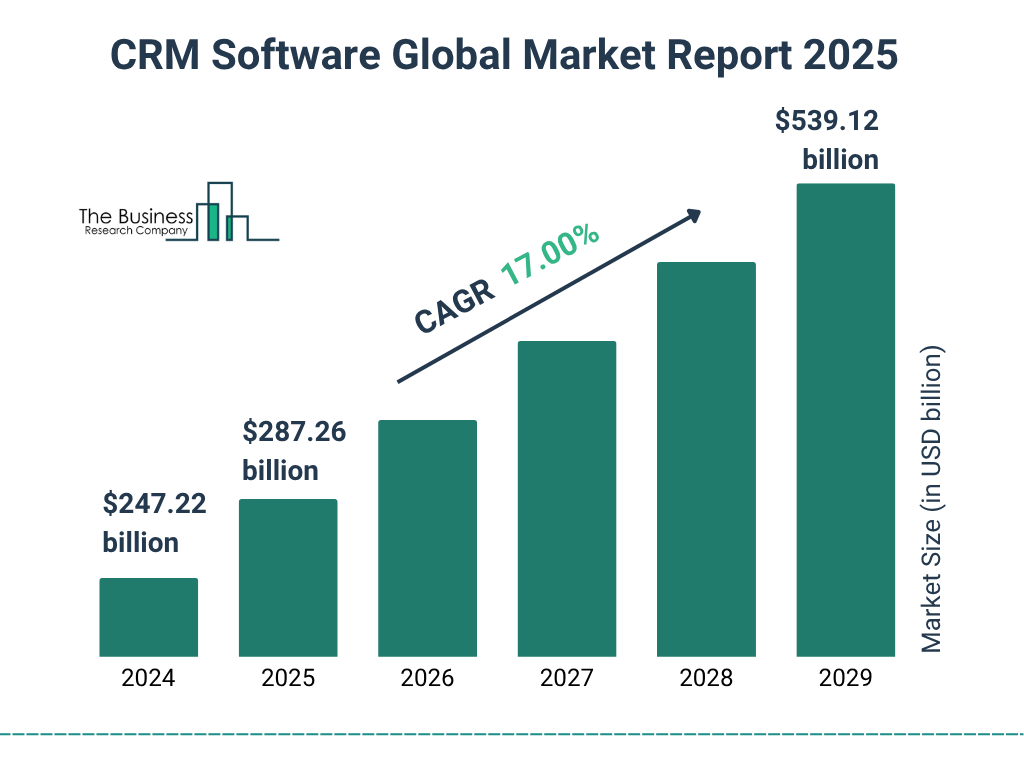
The rise of free CRM platforms isn't simply about cost reduction. It's about removing barriers to professional-grade customer management. According to recent industry data, 73% of small businesses recognize the critical importance of CRM systems but historically avoided implementation due to perceived complexity and expense. Today's free options eliminate both objections, providing comprehensive contact management, activity tracking, and pipeline visibility without subscription fees.
But here's the reality: "free" doesn't mean "limited" anymore. Modern free CRM solutions now include features that rival mid-tier paid platforms from just five years ago—artificial intelligence capabilities, advanced automation, integrations with hundreds of third-party applications, and mobile access. The distinction between free and paid increasingly comes down to scale, user count, and specialized features rather than fundamental functionality.
This comprehensive guide explores the best free CRM options available in 2026, analyzing their capabilities, limitations, ideal use cases, and how they compare to both paid alternatives and each other. Whether you're a solo consultant managing your first ten clients, a growing sales team of fifteen people, or a nonprofit organization operating on a shoestring budget, you'll find detailed insights to guide your CRM selection.
The question isn't whether your organization can afford a CRM anymore—it's which free CRM best matches your specific workflow, team structure, and growth trajectory. We'll help you answer that question with precision.
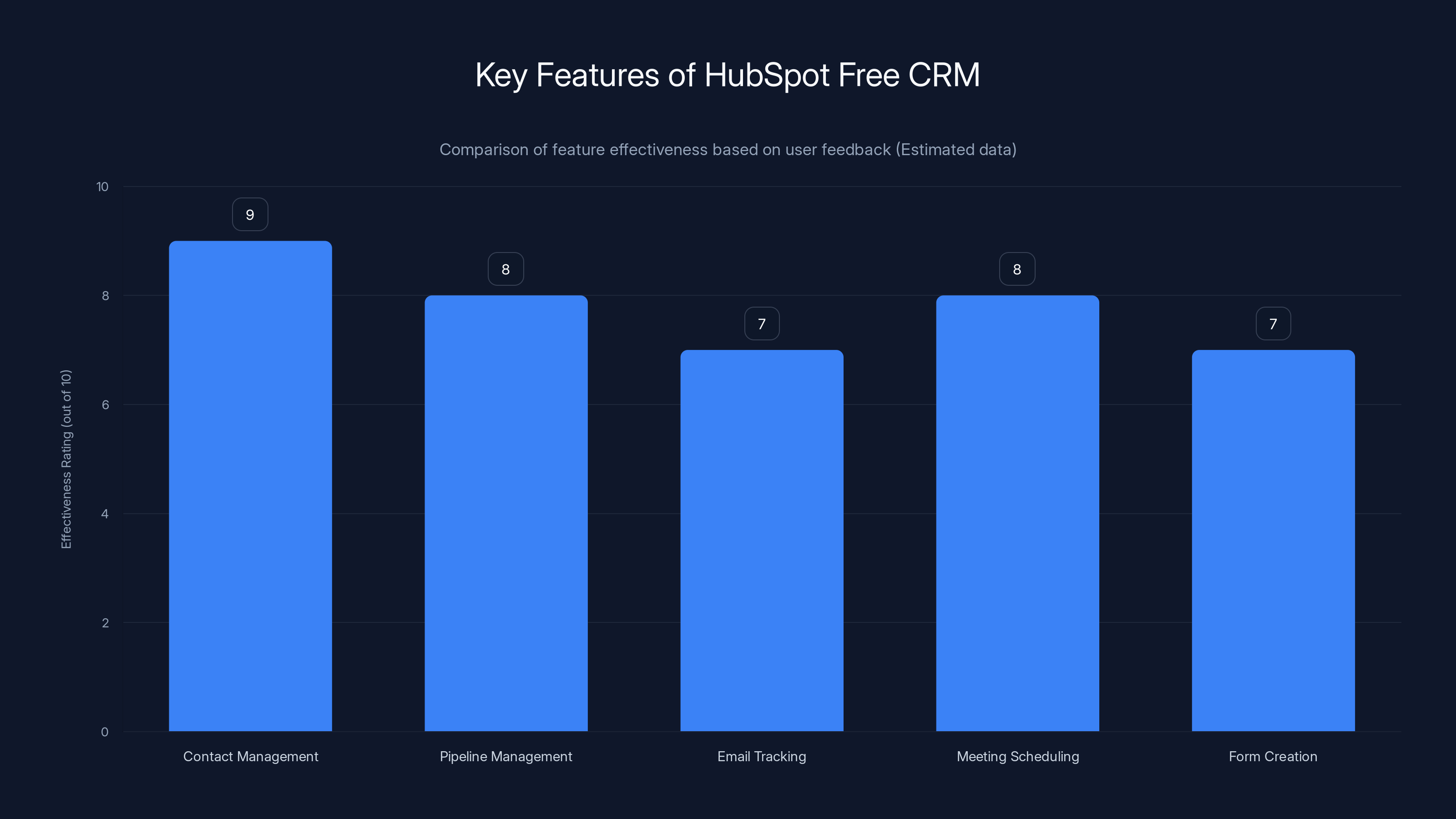
HubSpot Free CRM excels in contact and pipeline management, with high effectiveness ratings across its key features. Estimated data based on typical user feedback.
What Defines a Free CRM in 2026?
Core Features That Matter
A genuine free CRM platform must provide several foundational capabilities to justify consideration. Contact management remains the baseline—the ability to store, organize, and access customer information in a centralized database. But in 2026, this has evolved significantly. Modern free CRMs offer sophisticated contact profiles that include custom fields, detailed interaction histories, and relationship mapping that shows how different contacts connect within target accounts.
Activity tracking has become equally essential. Free platforms now record emails, calls, meetings, and task completions automatically or with minimal manual input. This creates an audit trail and ensures no customer interaction falls through the cracks. Pipeline management represents another critical feature—the ability to visualize sales stages, track deal progression, and identify bottlenecks in your sales process.
Automation capabilities separate today's free CRMs from yesterday's contact databases. Whether through workflow automation, email sequences, or lead scoring, modern free platforms handle repetitive tasks intelligently. Integration capabilities matter tremendously—the ability to connect with email clients, calendar systems, communication tools, and data platforms ensures your CRM becomes the central hub rather than an isolated system.
Freemium vs. Completely Free Models
Understanding the distinction between freemium and completely free models is crucial. Freemium platforms offer a robust free tier with unlimited contacts and core features, but charge for premium capabilities like advanced automation, additional users, or specialized modules. Completely free platforms typically limit contact counts or user numbers but never charge for additional features—though they may offer optional paid integrations or support tiers.
Freemium models work exceptionally well for growing organizations that expect to expand beyond free tier limitations. You gain exposure to the platform's full feature set and can make informed decisions about upgrading. Completely free models suit organizations committed to operating permanently on a bootstrap budget or with minimal customer bases.
Data Security and Compliance Considerations
Free doesn't mean untrustworthy. Legitimate free CRM platforms implement enterprise-grade security measures including encryption, regular security audits, compliance with GDPR and CCPA regulations, and robust access controls. In 2026, any CRM worth considering—free or paid—must demonstrate clear security certifications and transparent privacy policies.
Nevertheless, you should verify specific security practices before entering customer data. Look for platforms that explicitly state their encryption methods, backup frequency, disaster recovery procedures, and compliance certifications. The most reputable free CRM providers document these details prominently because security represents a competitive advantage.
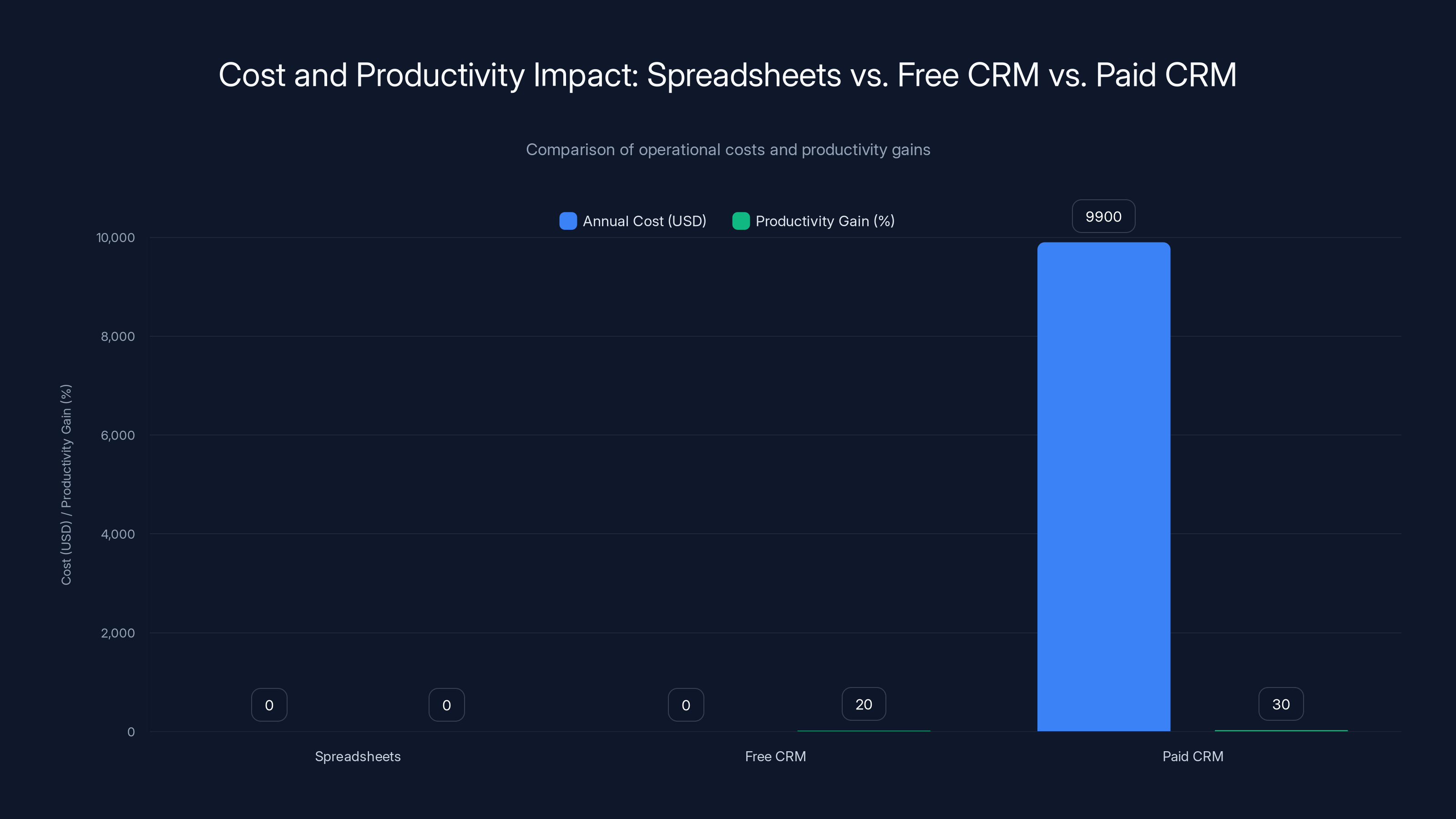
While spreadsheets have no direct cost, they offer no productivity gain. Free CRMs provide a 20% productivity boost at no cost, whereas paid CRMs like Salesforce can cost $9,900 annually for a team of five but offer a 30% productivity increase.
Hub Spot Free CRM: The Industry Standard
Overview and Core Capabilities
Hub Spot's free CRM tier represents the gold standard for freemium offerings, providing remarkable functionality without charging a penny. The platform manages unlimited contacts with unlimited users, making it accessible to teams of any size. Founded in 2006, Hub Spot has evolved from a marketing automation platform into a comprehensive business operating system, with the free CRM forming the foundational layer.
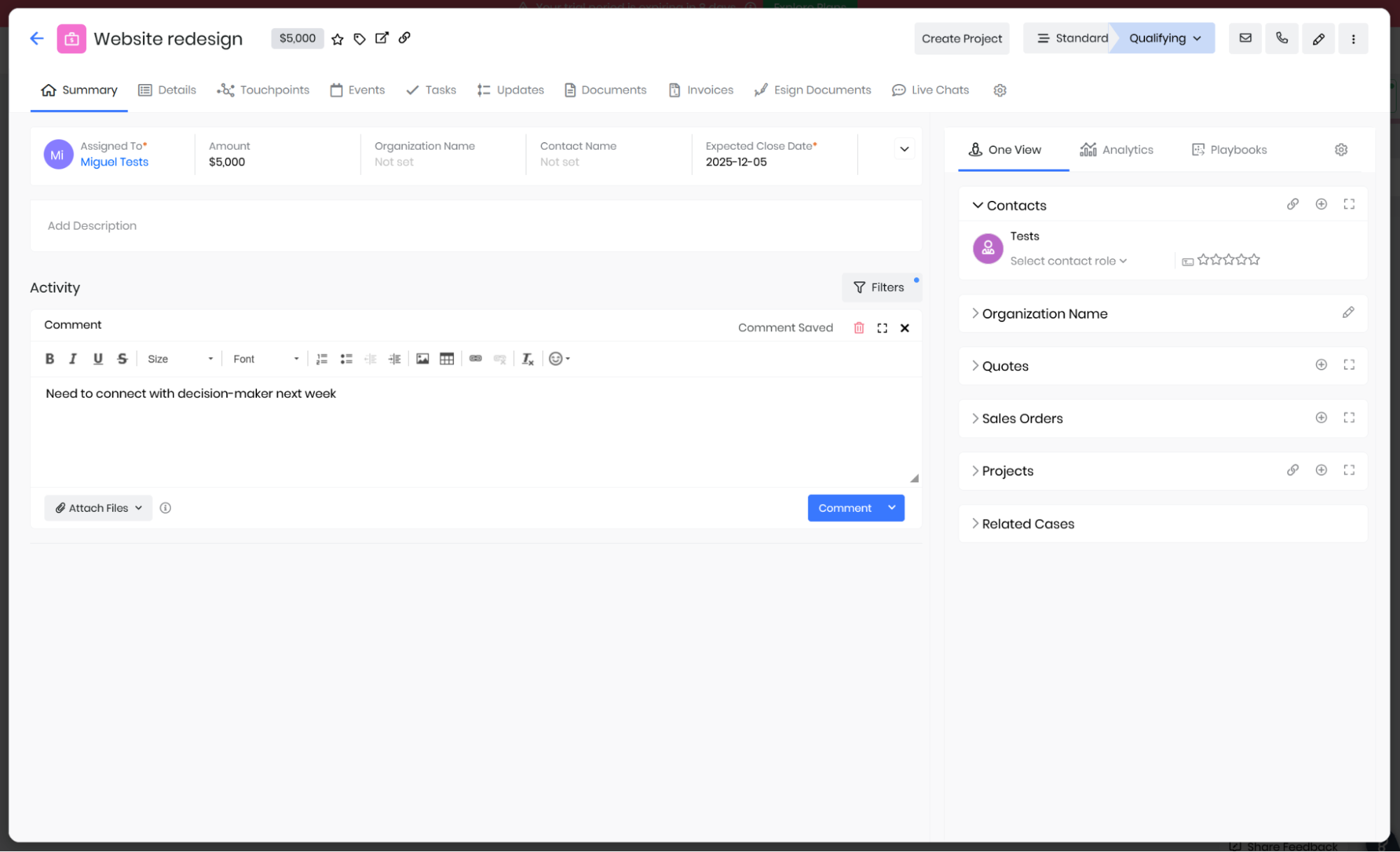
The contact management interface provides exceptional flexibility. Each contact record can include custom properties tailored to your specific business needs—whether tracking customer lifetime value, preferred communication method, or proprietary data points relevant to your industry. Hub Spot's activity timeline automatically logs emails, calls, meetings, and tasks, creating a complete interaction history without requiring users to remember to log activities manually.
Hub Spot's pipeline management deserves special mention. The visual kanban board shows deals at each sales stage, with drag-and-drop functionality for updating progress. You can customize pipeline stages to match your actual sales process, then track deal value, probability, and closing dates. This visualization alone justifies Hub Spot's position as the free CRM benchmark.
Key Features and Integrations
The free tier includes native integration with Google Workspace and Microsoft 365, allowing email synchronization and calendar blocking directly from Hub Spot. The email tracking feature notifies you when contacts open messages and click links—valuable insight for sales professionals. Meeting scheduling tools embedded within Hub Spot let you share your availability, reducing back-and-forth email exchanges.
Hub Spot's form creation and capture tools let you build contact forms for your website, automatically populating your CRM when prospects submit information. The live chat feature enables real-time website visitor engagement. These tools extend beyond simple contact management into genuine lead generation and conversion optimization.
One particularly powerful feature is the integration marketplace. Hub Spot connects with Zapier, allowing connections to thousands of external applications. This means you can automatically create Hub Spot contacts from other services, update records across multiple platforms, and trigger actions in Hub Spot based on activities in connected tools.
Pricing Structure and Limitations
The completely free tier genuinely requires no payment. Hub Spot operates on a freemium model where advanced capabilities live behind paid tiers—paid email marketing, advanced automation, predictive analytics, and specialized sales features. However, the free tier offers such comprehensive functionality that many small teams operate indefinitely without upgrading.
For teams seeking additional users, Hub Spot's free tier remains unusual in allowing unlimited seats. This means you can add team members infinitely without encountering typical per-user licensing costs. When you're ready to upgrade, Hub Spot's paid tiers ($600+ annually) unlock features like custom workflows, advanced reporting, and predictive scoring.
Best Use Cases
Hub Spot Free CRM excels for early-stage startups, small sales teams (up to 20 people), freelancers and consultants, and organizations seeking an all-in-one platform without specialized requirements. The intuitive interface minimizes training overhead—most teams can set up and start using Hub Spot within hours rather than weeks.
Teams with straightforward sales processes appreciate Hub Spot's simplicity. If you need advanced features like territory management, complex custom workflows, or specialized industry configurations, you'll eventually bump against free tier limitations. But for baseline CRM functionality, Hub Spot's free offering is genuinely difficult to beat.
Zoho CRM Free: Feature-Rich Indian Alternative
Comprehensive Feature Set
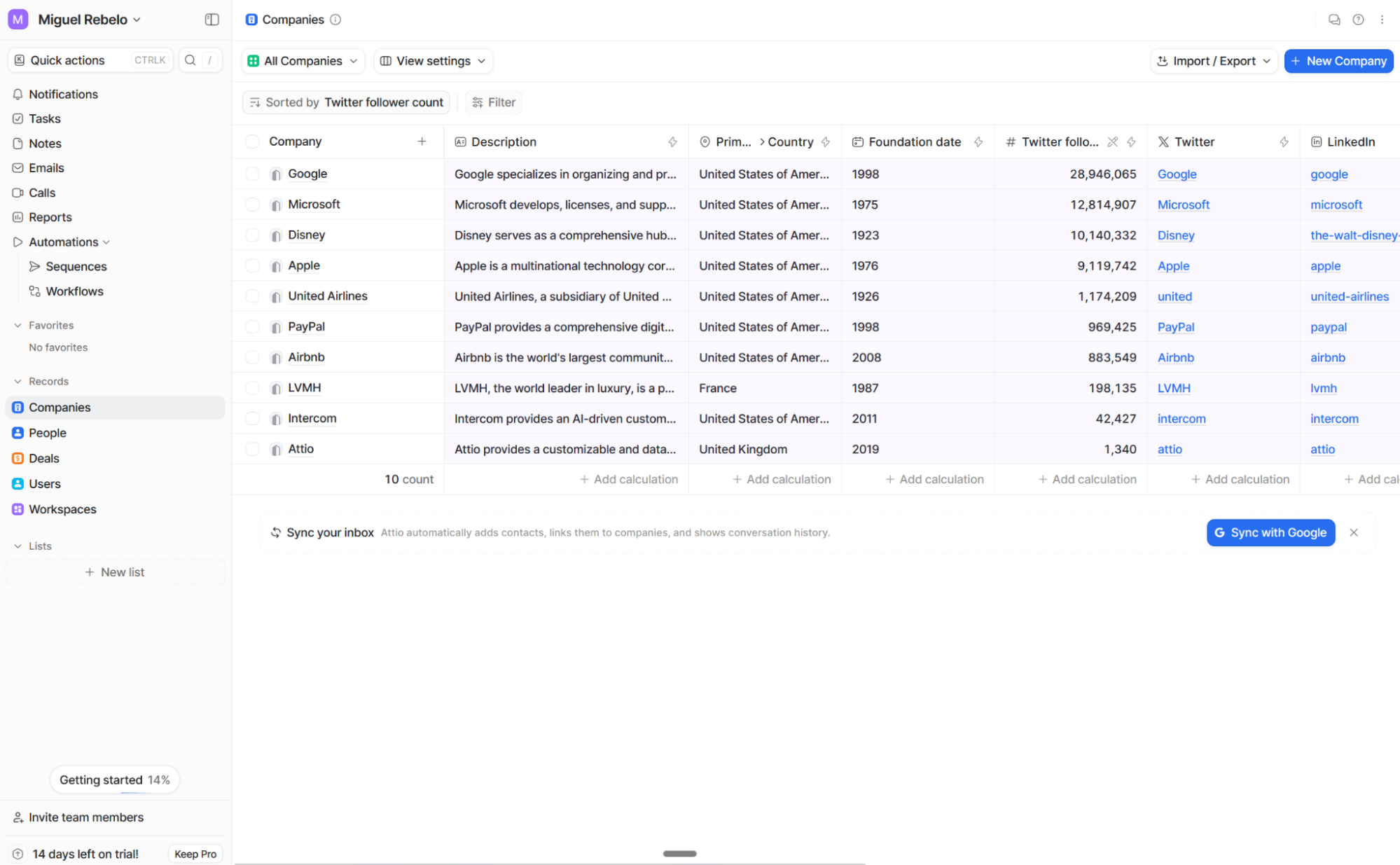
Zoho CRM represents the most feature-complete free CRM option available. Unlike many competitors, Zoho doesn't artificially restrict free tier capabilities—instead, they limit contact count and user seats. The free tier supports up to 1,000 contacts with 3 users maximum, providing genuine CRM functionality for small organizations.
Zoho's contact management includes sophisticated relationship mapping, allowing you to visualize account hierarchies and connection networks. The activity timeline tracks interactions across email, meetings, calls, and custom activities. Territory management divides contacts geographically or by department, enabling organizations to structure their CRM around actual business units rather than forcing teams into standardized structures.
The sales pipeline module in Zoho rivals paid competitors. You can create multiple pipelines for different business units or products. Sales stages customize to your process, and deal tracking includes probability estimates, revenue projections, and customizable fields for capturing relevant information. The visual pipeline board provides real-time status visibility.
Automation and AI Capabilities
Zoho includes workflow automation in the free tier—rules-based actions that execute automatically when specific conditions occur. For example, you might automatically assign new leads to team members based on territory, create follow-up tasks when deals reach critical stages, or update contact records when specific interactions occur. This automation reduces manual data entry and ensures consistent processes.
The platform includes Zia AI, Zoho's artificial intelligence assistant. In the free tier, Zia helps with data enrichment (supplementing your contact records with company information), lead scoring (identifying high-potential prospects), and predictive insights. While not as sophisticated as AI capabilities in paid tiers, Zia provides meaningful value for organizations seeking intelligence beyond basic contact management.
Zoho's email integration synchronizes your email client, automatically logging outbound messages and creating contacts from email signatures. This passive activity tracking reduces manual logging while maintaining accurate interaction histories.
Integration Ecosystem
Zoho operates as part of a larger suite of business applications—email, invoicing, accounting, HR management, and more. If you currently use other Zoho products, integration is seamless and automatic. Beyond Zoho's ecosystem, the platform connects with major applications through Zapier integration, allowing connections to thousands of external services.
Zoho's marketplace includes pre-built integrations with popular services like Slack, Microsoft Teams, Mailchimp, and numerous industry-specific applications. These native integrations typically offer richer functionality than Zapier connections because they're built specifically for those platforms.
Limitations and User Experience
The 1,000-contact limit presents genuine constraints for growing organizations. Once you exceed this threshold, upgrading becomes necessary. Similarly, the three-user maximum can frustrate teams that need more concurrent access. These limitations are intentional—Zoho's freemium strategy encourages organizations to upgrade as they scale.
Zoho's user interface, while powerful, carries more complexity than Hub Spot. The learning curve is steeper, particularly for teams accustomed to consumer-grade applications. However, once mastered, Zoho's interface provides more granular control and customization options than many competitors.
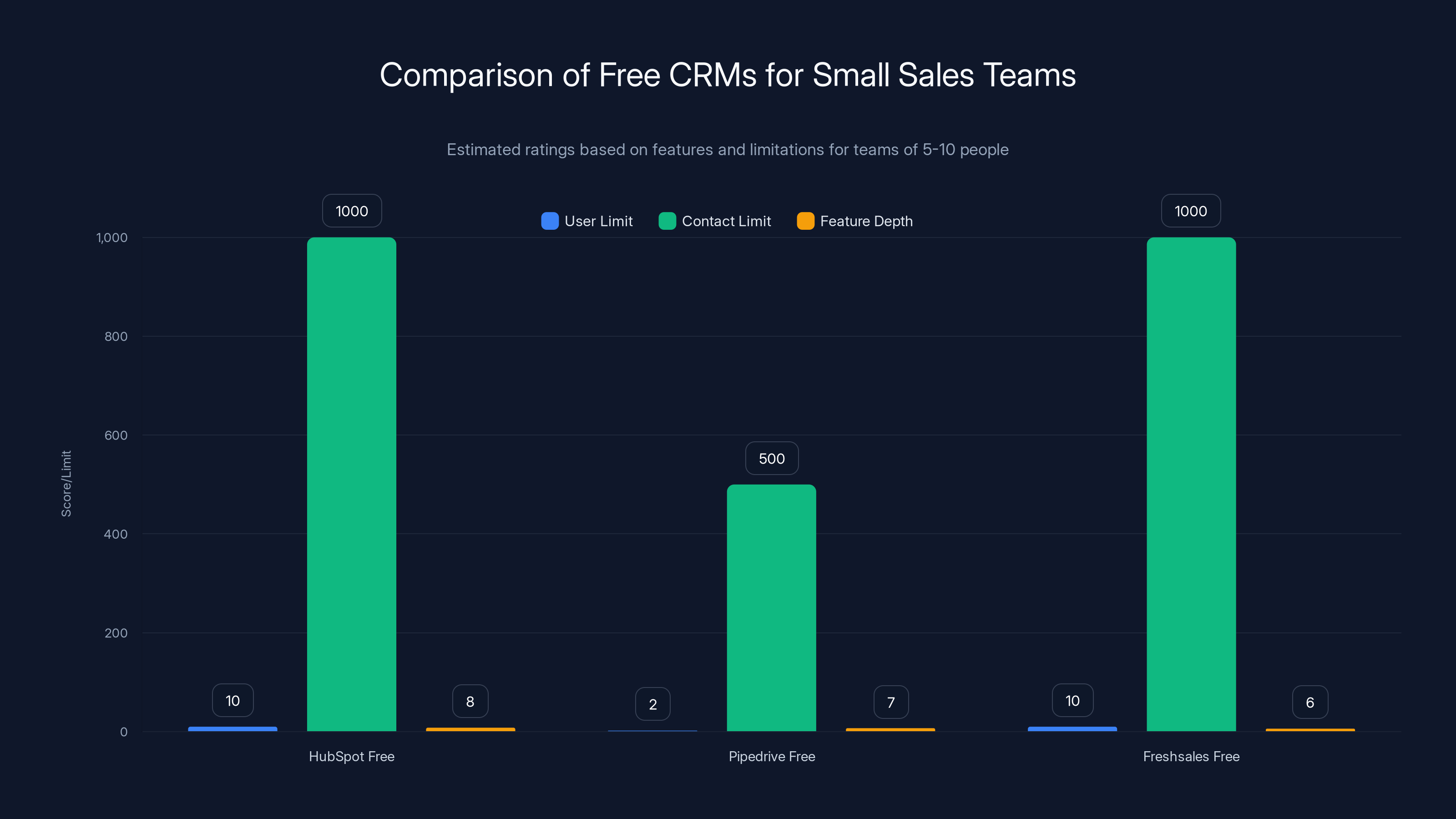
HubSpot Free offers the most flexibility with unlimited users and contacts, making it ideal for small teams. Pipedrive Free is limited by user count but strong in pipeline management. (Estimated data)
Pipedrive Free: Sales-Focused Alternative
Pipeline-First Design Philosophy
Pipedrive approaches CRM from a distinctly different angle—the entire platform centers on sales pipeline visualization. Rather than treating pipelines as one feature among many, Pipedrive makes the pipeline the primary interface, with contact management and activity tracking supporting pipeline management.
This philosophy resonates deeply with sales-driven organizations. As soon as you open Pipedrive, you see your sales pipeline graphically. Deals appear as cards across sales stages, allowing you to drag and drop for status updates. Pipeline value displays immediately, showing total value at each stage and calculating expected revenue based on deal probability.
The free tier includes unlimited contacts, unlimited deals, and 2 users. The generous contact and deal limits reflect Pipedrive's belief that pipeline management shouldn't be restricted by contact count. Instead, the primary limitation is user count—you get two team members on the free plan.
Activity Management and Automation
Pipedrive's activity calendar views upcoming tasks, meetings, and calls across your team. This visibility ensures nothing falls through the cracks and team members understand upcoming commitments. The platform supports automatic activity logging through email integration, reducing manual data entry.
Workflow automation in Pipedrive free tier includes basic rules—automatic activity creation, status updates, and notifications. While not as sophisticated as enterprise automation tools, these workflows automate common repetitive tasks. For example, you might automatically create a follow-up task when a deal enters a specific stage or notify team leads when deals exceed a certain value.
Pipedrive's reporting provides sales visibility. Key metrics include pipeline value, win rate, average deal size, and sales cycle length. These reports help you understand performance trends and identify coaching opportunities with individual sales team members.
Mobile-First Experience
Unlike many CRM platforms that treat mobile as an afterthought, Pipedrive designs with mobile-first principles. The native i OS and Android applications provide nearly full functionality, allowing sales professionals to manage deals, log activities, and access contact information while away from their desk.
This mobile capability becomes crucial for field sales teams or organizations with remote workers. Sales representatives can update deal status, create activities, and send emails directly from their phone—ensuring information stays current even when the team operates outside traditional office environments.
Ideal Team Structures
Pipedrive Free serves sales teams of 2-5 people exceptionally well. The focus on pipeline management appeals to organizations with straightforward sales processes where tracking deal progression remains the primary CRM objective. The platform works well for B2B sales organizations, consulting firms, and professional services where deal-based revenue tracking matters most.
Organizations with complex, multi-stage sales processes or those requiring sophisticated marketing features might find Pipedrive limiting compared to Hub Spot. But for teams whose core question is "Where are our deals?" and "When will they close?", Pipedrive's free offering proves exceptionally valuable.
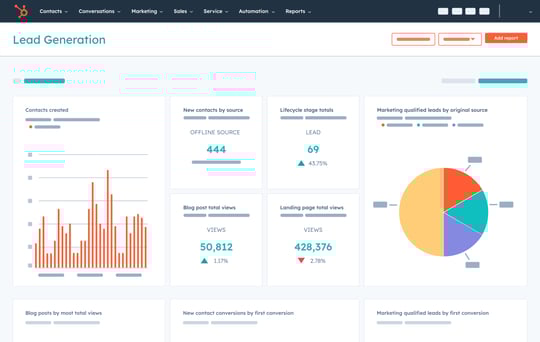
Keap Free: Small Business Automation Focus
All-in-One Business Platform
Keap (formerly Infusionsoft) has evolved from a small business marketing platform into a comprehensive business operating system. The free tier, while limited compared to paid versions, still provides genuine CRM functionality focused on small business needs. Keap supports unlimited contacts and emphasizes automation and customer journey management.
Keap's distinctive strength lies in automation sequences. Unlike basic workflow rules, Keap's automation enables sophisticated multi-step customer journeys. You can create campaigns that execute based on customer behavior—sending specific emails when someone completes an action, automating task creation for follow-ups, and orchestrating complex business processes. This capability serves small businesses seeking to operate efficiently without dedicated marketing teams.
The contact management system includes custom fields and detailed interaction tracking. You can segment contacts based on behaviors, purchases, or engagement, then target those segments with specific communications. This segmentation capability enables personalized customer experiences despite limited team size.
Email Marketing and Communication
Keap integrates email marketing directly into the CRM. Rather than managing email through a separate platform, you create and send emails within Keap, maintaining complete contact history and engagement tracking. The email templates help ensure professional communications, while automation features enable triggered emails based on customer actions.
The email sequences allow you to create sophisticated drip campaigns—multiple messages sent over time based on specific triggers or time delays. For example, you might send an initial welcome email, wait three days, send a follow-up with additional information, and finally send a promotional offer. These sequences execute automatically, nurturing leads and customers without manual intervention.
Integration with Business Operations
Keap integrates with payment processing (Stripe, Square, Pay Pal), allowing you to track customer purchases directly within the CRM. This purchase history informs segment targeting and enables behavior-based automation. The integration with popular accounting and invoicing tools means financial data syncs automatically.
Keap also connects with appointment scheduling, ecommerce platforms, and business applications. For service-based businesses, the appointment integration proves particularly valuable—scheduling becomes part of the CRM workflow rather than a disconnected system.
Limitations and Learning Curve
Keap's powerful automation capabilities come with complexity. The platform requires more configuration than Hub Spot and a steeper learning curve than Pipedrive. Small business owners typically benefit from training resources or working with implementation partners to properly set up automation sequences.
The free tier, while genuinely functional, represents more of an entry point for Keap's paid ecosystem. Many users eventually upgrade to access advanced features, higher contact/user limits, or specialized modules. However, the free tier proves sufficient for solo entrepreneurs or very small teams willing to invest in platform mastery.
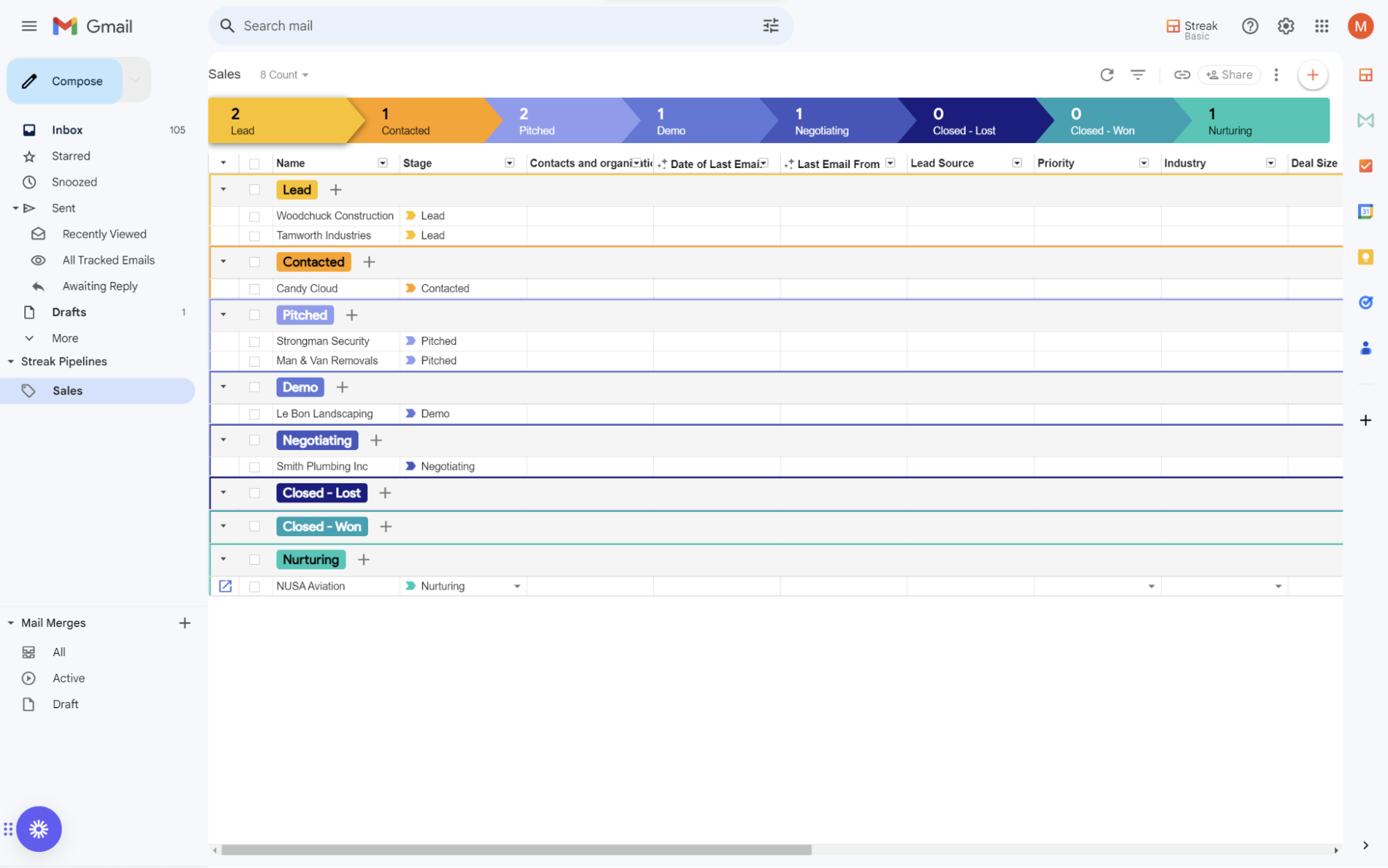
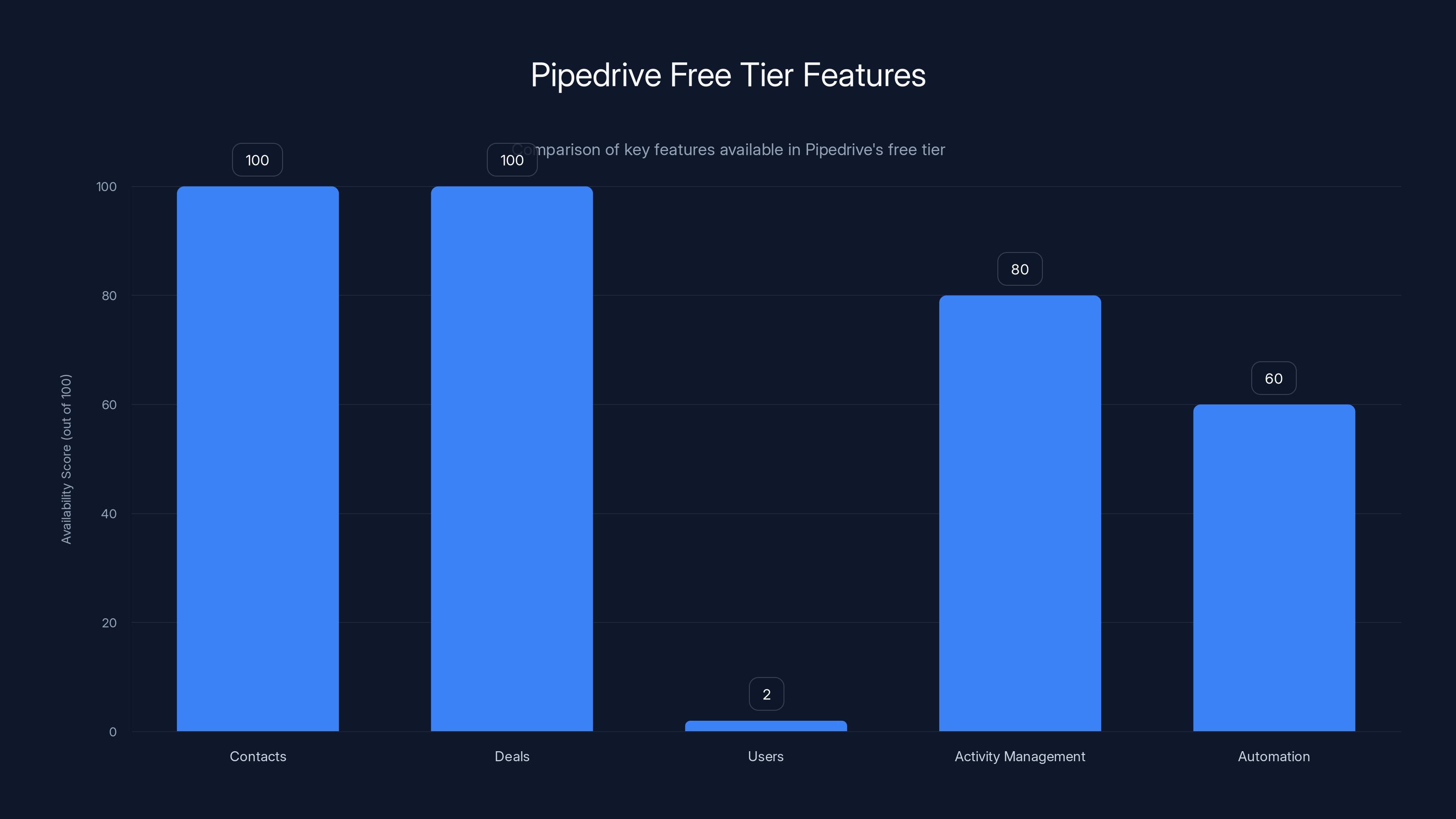
Pipedrive's free tier offers unlimited contacts and deals, but limits users to two. Activity management and automation are available but with basic functionalities.
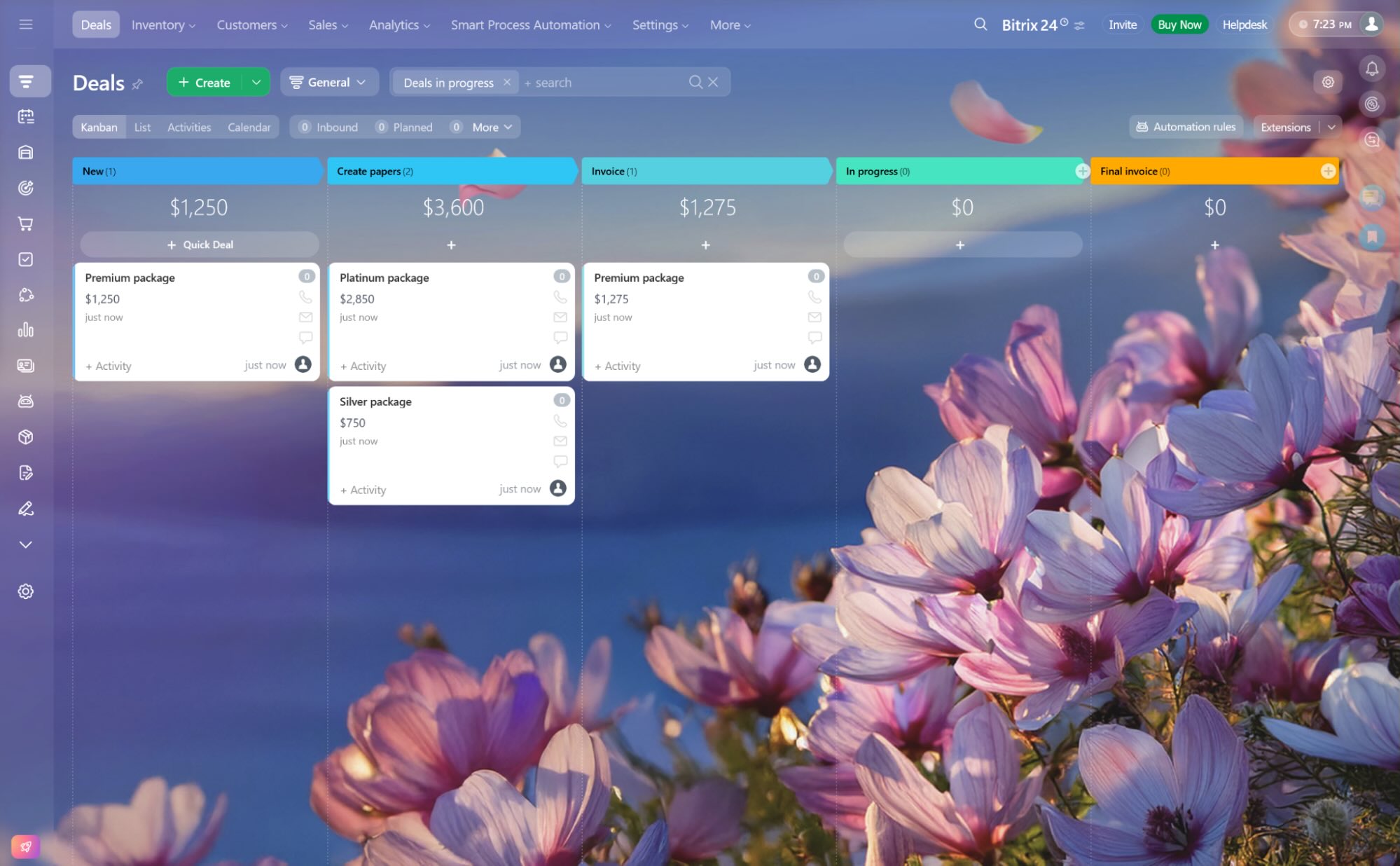
Bitrix 24 Free: Enterprise-Grade Free Option
Full-Featured Comprehensive Platform
Bitrix 24 stands alone as a truly comprehensive business platform offering genuine CRM functionality in its free tier. The platform bundles CRM with project management, communication tools, document collaboration, and human resources features into a unified system. The free version genuinely competes with paid CRM platforms across most dimensions.
The free tier supports unlimited contacts, unlimited users, and up to 5GB storage. This generosity with user seats and contacts means organizations of virtually any size can use Bitrix 24 without hitting limitations. This contrasts sharply with competitors who restrict users or contacts in free tiers.
Bitrix 24's contact management includes detailed profiles, activity tracking, and custom fields. The CRM module tracks interactions across email, calls, meetings, and tasks. Deal management provides visual pipeline tracking with customizable stages. What's remarkable is that all of this functionality exists in the free tier—no artificial restrictions.
Integrated Communication and Collaboration
Bitrix 24 integrates real-time communication directly into the CRM platform. Team members can message each other, participate in video calls, and collaborate on documents without switching contexts. This integrated approach to communication means customer interactions inform all team communication, and team discussions inform customer relationships.
The document collaboration tools allow teams to create, edit, and share documents within the CRM. You might attach proposals to deals, share customer information with team members, or maintain shared documentation about account strategies. These collaboration features transform the CRM from a data repository into a true team workspace.
Task management and workflow automation in Bitrix 24 free tier includes sophisticated rules. You can create custom workflows that move records through stages automatically based on conditions, create tasks for team members based on customer actions, and send notifications when important events occur. These automation capabilities rival many paid platforms.
Customization and Extensibility
Bitrix 24 allows exceptional customization through custom fields, custom pipelines, and custom workflows. You can structure the CRM to match your exact business processes rather than forcing your processes into a predefined mold. This customization capability appeals to organizations with non-standard requirements or specialized industries.
The platform includes a marketplace of extensions and integrations. Third-party developers contribute solutions that extend functionality beyond the core platform. While some extensions require payment, many free options address specialized needs like industry-specific features or integrations with vertical-specific applications.
Implementation Complexity
Bitrix 24's comprehensive nature creates a trade-off—the platform requires more setup and configuration than simpler competitors. Implementation typically takes weeks rather than hours. Organizations benefit from working with Bitrix 24 implementation partners or investing significant time in training to properly configure the system.
Once configured appropriately, Bitrix 24 provides remarkable value. But the initial setup burden means the platform suits organizations willing to invest implementation effort. For teams seeking immediate, minimal-configuration solutions, simpler alternatives might prove more practical.
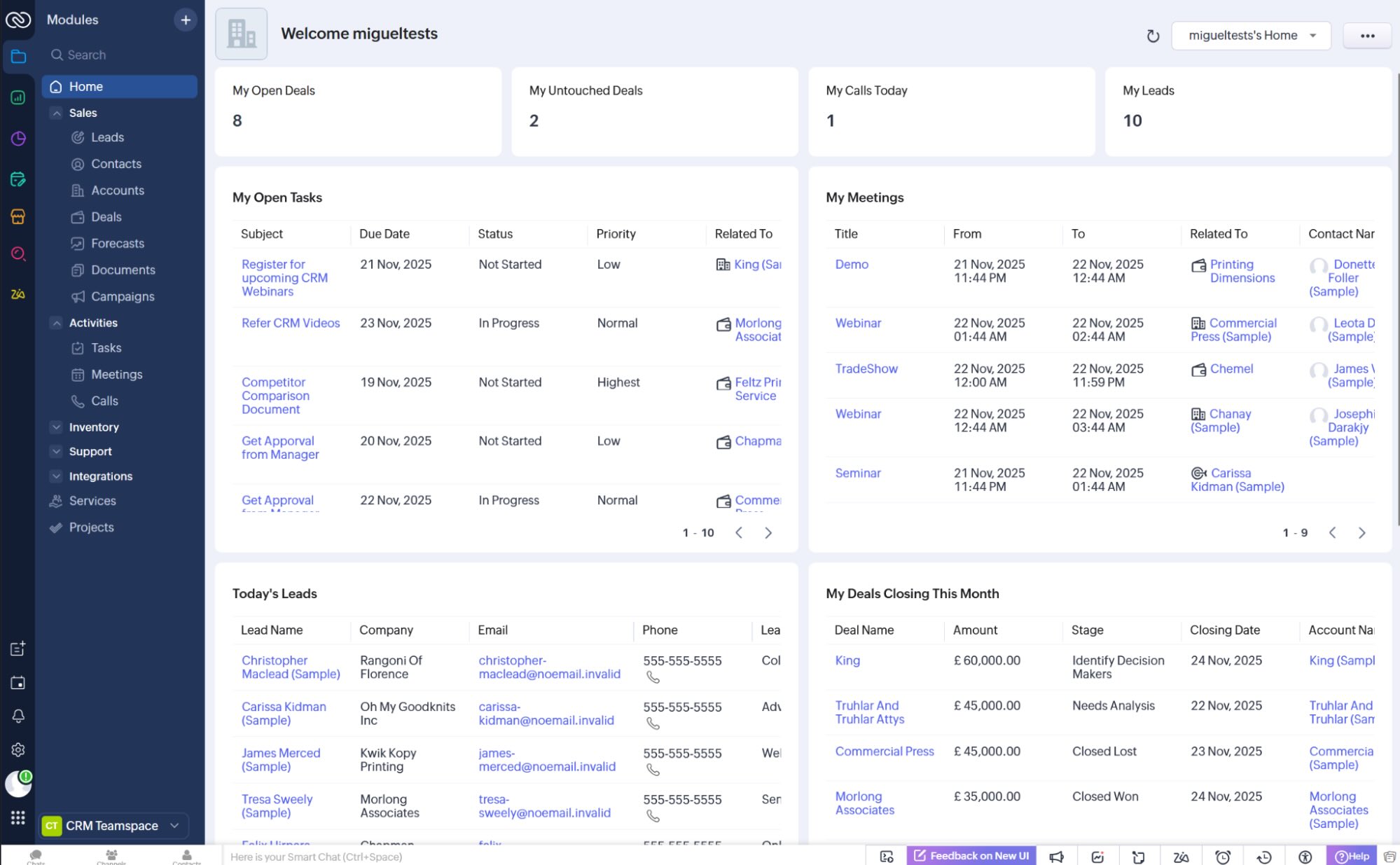
Freshsales Free: Lightweight CRM Option
Simple, Intuitive Interface
Freshsales takes a simpler approach than comprehensive platforms. The free tier includes up to 5 users and up to 250,000 contacts, making it accessible to growing organizations. The interface emphasizes simplicity—essential features without overwhelming complexity.
The contact management system captures critical information without unnecessary complexity. Activity tracking logs emails, calls, and meetings automatically through integrations. The sales pipeline provides visual deal tracking with customizable stages. While not as feature-rich as some competitors, Freshsales delivers reliable core CRM functionality.
Freshsales' heat maps visually show which sales representatives require attention or coaching. These insights help managers identify performance issues and coaching opportunities. The reporting, while basic, provides sufficient visibility for small teams to understand sales performance and pipeline health.
Mobile App and Accessibility
Freshsales' mobile application provides excellent field sales support. The native i OS and Android apps allow representatives to access information, update deals, and log activities while away from their desk. The mobile experience mirrors the web interface, ensuring consistency across devices.
The accessibility of Freshsales extends beyond mobile. The platform works well for organizations without extensive CRM expertise. The user interface guides teams through common workflows. The learning curve remains gentle—most team members become productive within days rather than weeks.
When Freshsales Makes Sense
Freshsales Free serves small sales teams, startups, and organizations building their first formal sales process. The straightforward interface and limited configuration options appeal to teams seeking reliable CRM without overwhelming feature sets. The generous contact limit (250,000) supports significant growth before upgrading becomes necessary.
Organizations with straightforward sales processes, limited automation needs, and small team sizes find Freshsales sufficiently powerful. Teams requiring sophisticated automation, complex workflows, or extensive customization typically need more robust platforms.
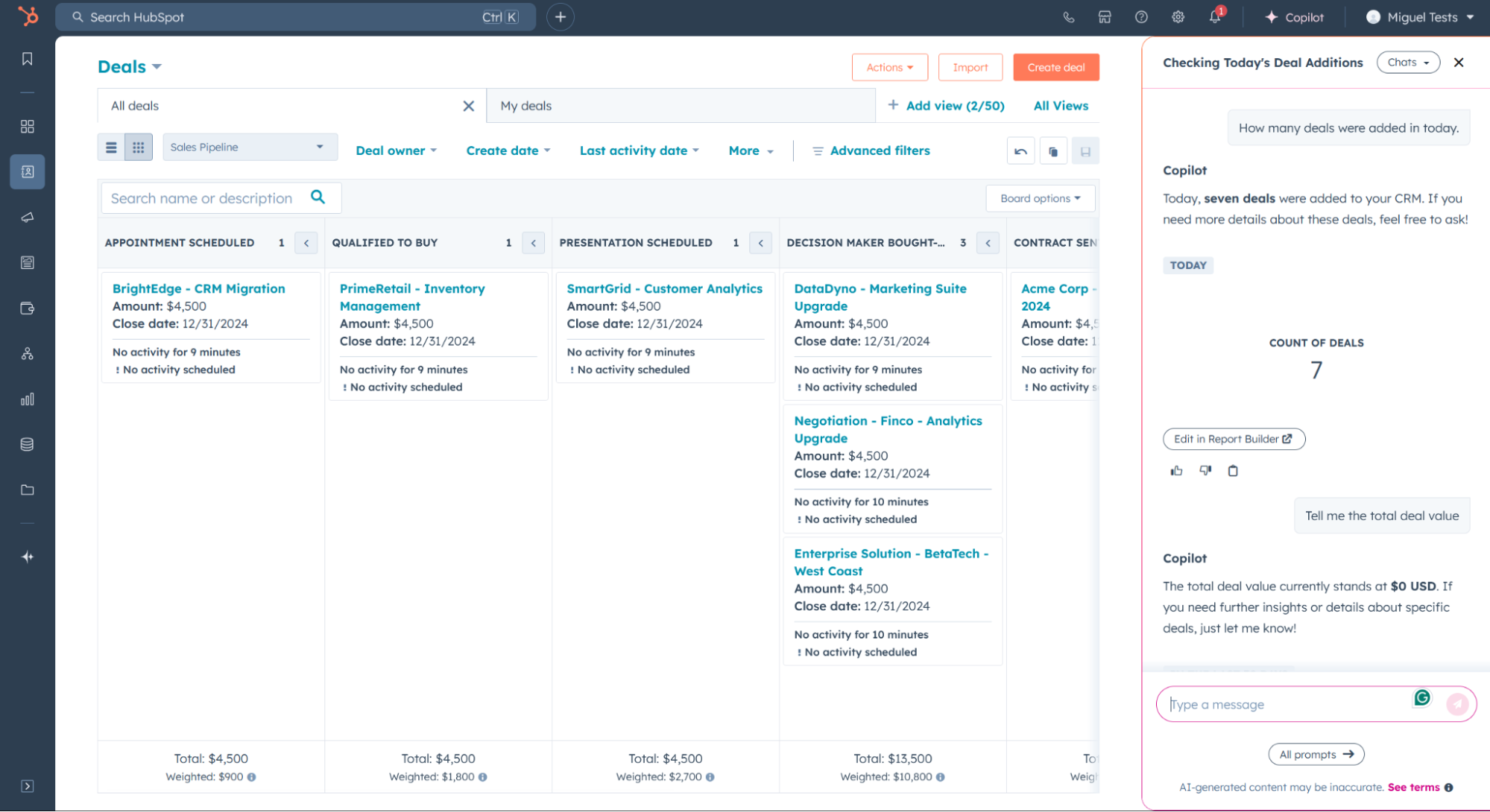
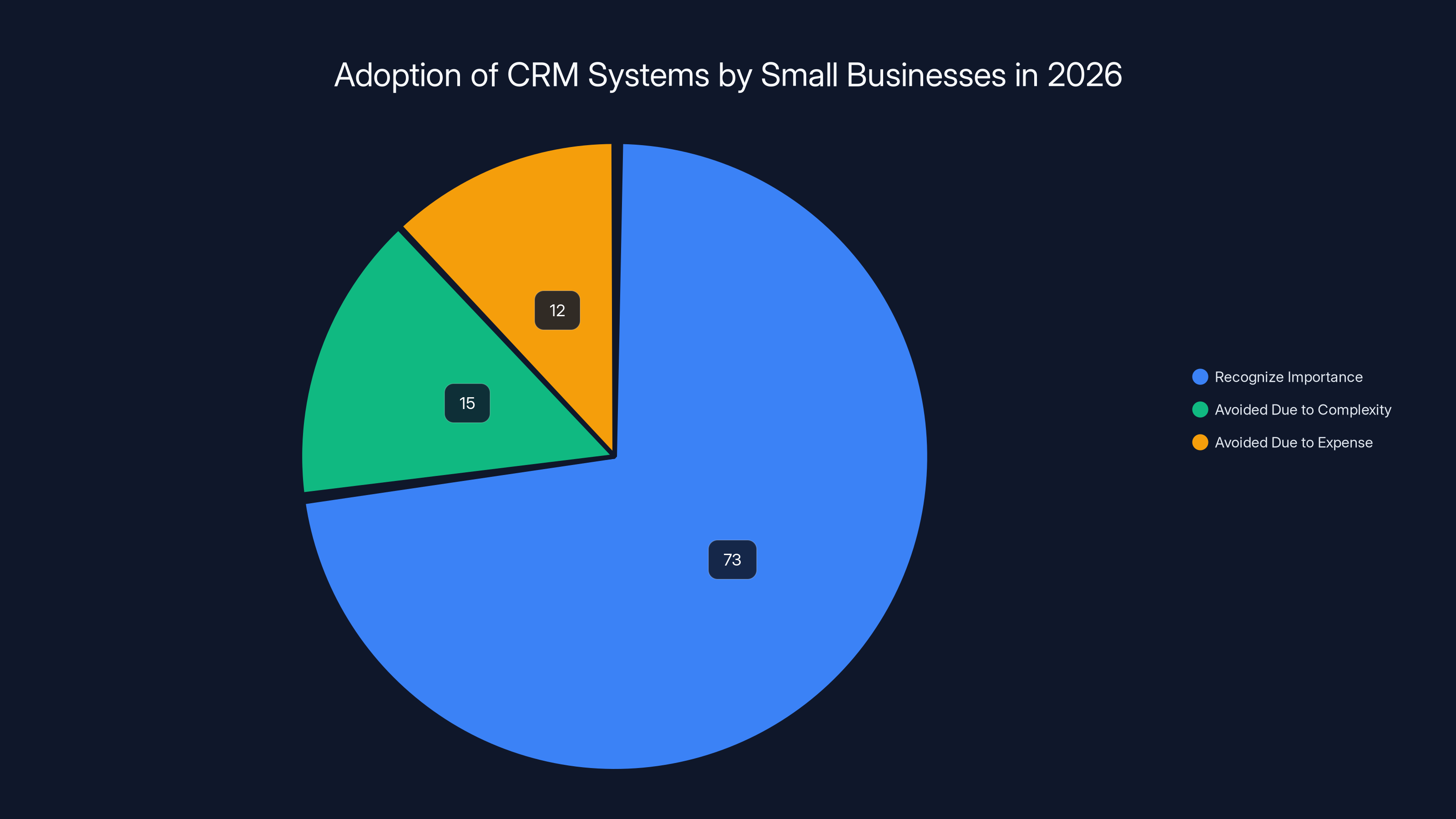
73% of small businesses recognize the importance of CRM systems, but many previously avoided them due to complexity and expense. Free CRM options in 2026 address these barriers.
Monday.com Free: Project-Centric Approach
Beyond Traditional CRM
Monday.com approaches customer relationship management from a project and team management perspective rather than sales-centric direction. The free tier provides up to 2 users and emphasizes visual boards for managing work. While not a traditional CRM, Monday.com serves organizations managing customer relationships through projects and deliverables.
The kanban board interface visualizes customer engagement through project stages. You might create projects for customer implementations, manage onboarding workflows, or track service delivery. The board view provides immediate status visibility across all customer engagements.
Customization Through Templates
Monday.com's power lies in template customization. The platform includes pre-built CRM templates that establish basic customer management structures. You can then customize these templates extensively—adding fields, modifying workflows, and adjusting automation to match your exact processes.
The automation builder enables sophisticated workflows without coding. When specific conditions occur, Monday.com can automatically update records, send notifications, create tasks, or modify timelines. These automations orchestrate team coordination around customer relationships.
Team Collaboration Emphasis
Monday.com emphasizes team collaboration more than traditional CRMs. Team members comment on customer records, share updates, and coordinate activities directly within the platform. This transparency ensures everyone on the team understands customer status and upcoming commitments.
The integration with communication tools (Slack, Microsoft Teams) means customer-related notifications reach team members through channels where they already work. Rather than requiring team members to check the CRM separately, updates come directly to communication tools.
Ideal Use Cases
Monday.com suits service delivery organizations, implementation teams, consulting firms, and customer success teams more naturally than pure sales organizations. If your primary customer relationships revolve around delivering projects or providing services, Monday.com's project-centric approach might prove more intuitive than traditional CRMs.
Organizations with deep project-based customer relationships and teams coordinating around deliverables find Monday.com's approach exceptionally useful. Sales-focused organizations with straightforward deals might find Monday.com's project emphasis less relevant.
Comparison Table: Free CRM Features Matrix
| Feature | Hub Spot | Zoho | Pipedrive | Keap | Bitrix 24 | Freshsales |
|---|---|---|---|---|---|---|
| Free Contact Limit | Unlimited | 1,000 | Unlimited | Unlimited | Unlimited | 250,000 |
| Free User Seats | Unlimited | 3 | 2 | Unlimited | Unlimited | 5 |
| Pipeline Management | Excellent | Very Good | Exceptional | Good | Very Good | Good |
| Email Automation | Good | Very Good | Good | Exceptional | Good | Basic |
| Workflow Automation | Good | Very Good | Basic | Exceptional | Very Good | Basic |
| Mobile App | Very Good | Very Good | Excellent | Good | Good | Very Good |
| Integration Ecosystem | Excellent | Very Good | Very Good | Very Good | Good | Very Good |
| AI Capabilities | Basic | Good | Basic | Good | Basic | Basic |
| Learning Curve | Gentle | Moderate | Gentle | Steep | Steep | Very Gentle |
| Best For | Startups | Growing Orgs | Sales Teams | Small Biz | Enterprises | Simple Needs |
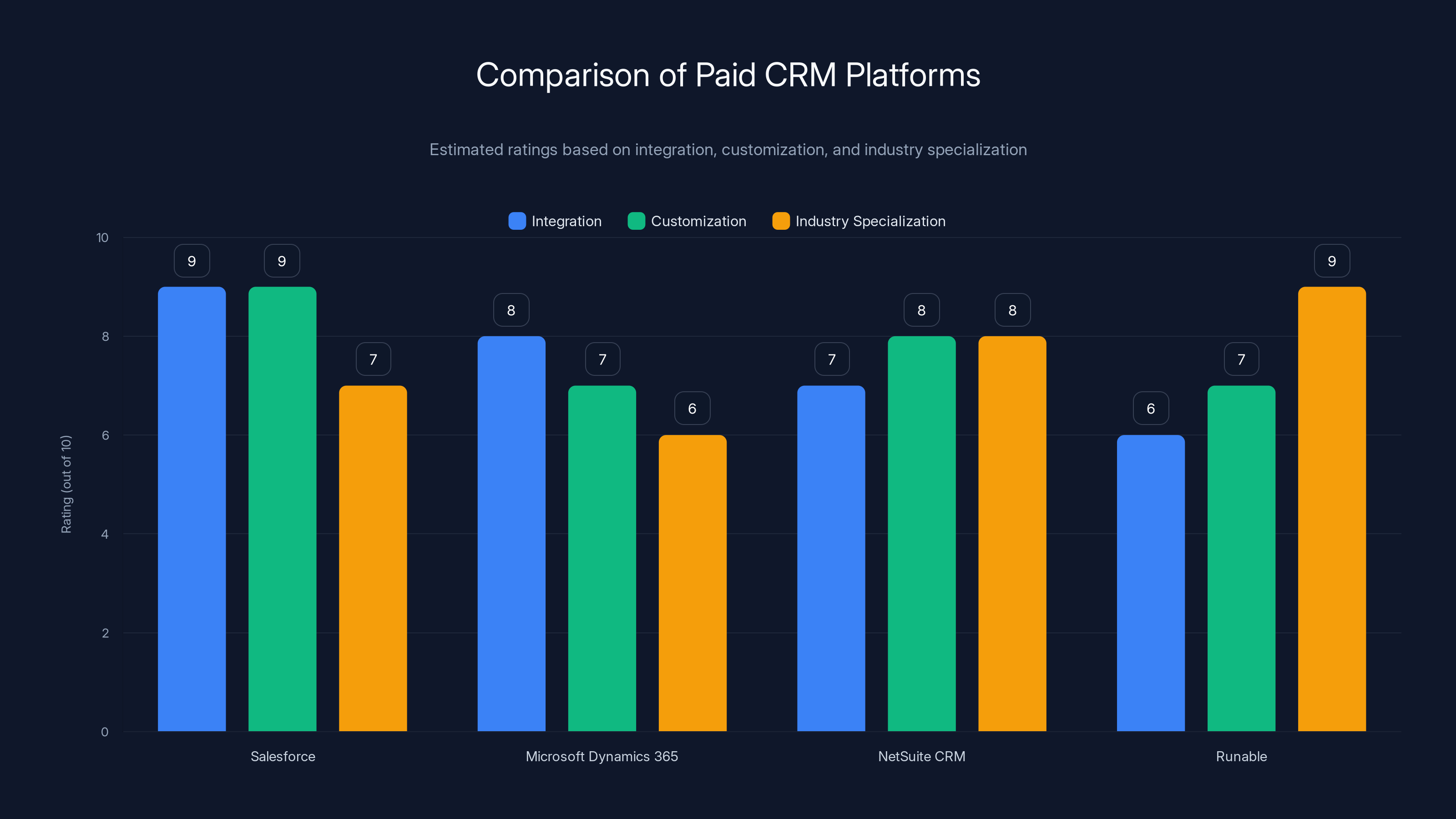
Salesforce excels in integration and customization, while Runable leads in industry specialization with AI automation. Estimated data based on typical CRM capabilities.
Key Considerations When Choosing a Free CRM
Growth Trajectory and Scaling Needs
Your organization's growth pattern significantly influences CRM selection. If you expect rapid growth, freemium platforms with clear upgrade paths (Hub Spot, Pipedrive, Freshsales) make sense—you'll eventually upgrade but enjoy free access during early stages. If you expect slow, steady growth or plan to remain small indefinitely, platforms with generous free tiers (Zoho, Bitrix 24) minimize future costs.
Consider when you'll likely hit free tier limitations. If your growth trajectory suggests you'll exceed contact limits within 12 months, a more feature-rich free option might delay expensive upgrades. However, if you expect to remain under limits indefinitely, simple platforms might serve more effectively.
Team Structure and User Count
User seat limits vary dramatically. Hub Spot allows unlimited users, Bitrix 24 allows unlimited users, Zoho limits 3 users, and Pipedrive limits 2 users. If you have a five-person sales team, you absolutely cannot use Pipedrive free—you'd need to upgrade immediately. Hub Spot or Bitrix 24 would serve better.
Consider not just current team size but anticipated growth. Will you add team members within the next year? If so, choose platforms with generous or unlimited user allocation. Team expansion should not force immediate paid upgrades if alternatives exist.
Integration Requirements
Your existing technology stack significantly influences CRM choice. If you heavily use other Zoho products (email, accounting, HR), Zoho CRM integrates seamlessly. If you're a Google Workspace shop, Hub Spot's native integration appeals. If you need to connect with dozens of applications, Zapier integration becomes essential—both Hub Spot and Zoho support Zapier, while some competitors don't.
Think beyond current integrations to anticipated future needs. Are you planning to implement new tools? Will those tools need to exchange data with your CRM? Selecting a platform with strong integration support prevents costly migrations later.
Complexity vs. Simplicity Tradeoff
More powerful platforms require more setup. Hub Spot's simplicity means immediate productivity but less customization. Bitrix 24's comprehensiveness enables custom configurations but demands implementation effort. Freshsales's simplicity suits teams avoiding complexity. Zoho's power suits organizations willing to configure extensively.
Honestly assess your team's technical comfort. Will team members embrace a complex platform? Or do they need simple, intuitive tools? Underestimating this factor causes frustration and underutilization—selecting a simpler platform that your team actually uses beats choosing sophisticated tools gathering dust.
Automation Capabilities
If your primary CRM need involves automating repetitive tasks, some platforms shine brighter than others. Keap specializes in sophisticated email automation sequences. Zoho provides robust workflow automation. Bitrix 24 enables extensive custom workflows. Pipedrive and Freshsales offer simpler automation. Hub Spot provides moderate automation in the free tier.
Consider what processes you want to automate. Will you automatically assign leads to team members? Automatically create follow-up tasks? Trigger specific emails based on customer actions? More ambitious automation needs demand more sophisticated platforms.
Beyond Free CRM: When to Consider Alternatives
Paid CRM Platforms Worth Considering
While free CRM options serve many organizations excellently, some situations demand paid solutions. Salesforce remains the enterprise standard for large organizations with complex sales processes, multiple divisions, and deep customization needs. Though more expensive than free options, Salesforce's power justifies costs for organizations managing hundreds of millions in pipeline value.
Microsoft Dynamics 365 integrates deeply with Microsoft ecosystem products, making it ideal for organizations standardized on Microsoft technologies. The tight integration with Office 365, Teams, and Power Platform reduces integration friction compared to standalone CRM systems.
Net Suite CRM combines CRM with full enterprise resource planning, making it invaluable for organizations needing unified business systems. If you require tight integration between sales management and financial systems, Net Suite's integrated approach provides advantages over standalone CRMs.
Specialized CRM Solutions
Beyond general-purpose platforms, specialized CRMs serve specific industries. Real estate CRM systems include property management, transaction coordination, and MLS integration unsuitable for general CRMs. Insurance CRM platforms manage policy information and compliance requirements. Healthcare CRM solutions maintain HIPAA compliance and manage patient relationships distinctly.
If your industry has specialized requirements, general-purpose free CRMs might lack crucial features. Evaluating specialized solutions sometimes provides better value despite costs because they address your industry's specific needs more effectively.
For Teams Seeking AI-Powered Automation
If advanced AI capabilities represent priority criteria, Runable offers an interesting alternative worth considering. Runable provides AI-powered automation for teams seeking intelligent workflow management and content generation capabilities. While not a traditional CRM, Runable's AI agents automate documentation, reporting, and data processing tasks that complement CRM usage. For teams managing complex data workflows or seeking AI-enhanced productivity, Runable's $9/month tier provides cost-effective automation alongside your CRM choice.
The combination of a free CRM for customer relationship management plus Runable for AI-powered automation and documentation can provide comprehensive business tooling at minimal cost. This hybrid approach appeals particularly to technical teams and developers accustomed to combining best-of-breed tools rather than relying on monolithic platforms.
Implementation Best Practices for Free CRM Success
Data Migration Strategy
Successful CRM implementation begins with clean, organized data. Before importing contact information, audit your existing data sources. You likely have customer contacts scattered across spreadsheets, email clients, and various applications. Creating a single, authoritative contact list prevents duplicate records and ensures data integrity in your new CRM.
Implement a naming convention for custom fields across your CRM. Define standard values for common fields (status options, lead sources, company types) to ensure consistent data entry. Train team members on proper data entry practices—complete information, standard formatting, and appropriate classification prevent downstream problems.
Team Training and Adoption
CRM platforms succeed when teams actually use them. Allocate time for proper training before go-live. Most platforms provide training resources—video tutorials, documentation, webinars, and setup guides. Dedicate several hours for team members to explore the platform before relying on it for critical business processes.
Identify an internal champion—someone particularly enthusiastic about the CRM who can answer team questions and model proper usage. Champions prove invaluable for driving adoption and troubleshooting issues without requiring external support.
Process Definition Before Configuration
Before configuring your CRM, explicitly define your business processes. What stages does a typical customer journey include? When do you typically follow up? How do you qualify leads? Answering these questions informs CRM configuration—creating pipeline stages matching your actual process, setting automation triggers at decision points, and establishing workflows ensuring nothing falls through the cracks.
Document your processes visually if possible. Create flowcharts showing decision points, actions, and outcomes. These visual representations help team members understand how the CRM should support your operations.
Regular Monitoring and Optimization
CRM success requires ongoing attention. Schedule monthly or quarterly reviews to assess platform usage. Are team members actually logging activities? Is the pipeline accurate? Are automation rules working as intended? Regular reviews identify problems before they become significant issues.
Be willing to adjust processes based on what you learn. Often, initial CRM configurations require refinement once teams start using the platform. Your team will discover optimizations and workarounds. Building these improvements into formal configurations ensures everyone benefits.
Future Trends in Free CRM Software
Artificial Intelligence Integration
AI capabilities are rapidly becoming standard even in free tiers. Lead scoring, which was once an enterprise-only feature, now appears in free platforms. Predictive insights about deal closure probability, customer churn risk, and next best actions increasingly come from free CRM systems. Expect more sophisticated AI capabilities including natural language processing that extracts insights from email communication and conversation analytics that identifies customer sentiment.
CRM platforms will increasingly use AI to suggest actions. Rather than requiring users to remember follow-up activities, AI will recommend next steps based on historical patterns, customer engagement level, and seasonal factors. This autonomous suggestion layer transforms CRM from a recording system into an intelligent advisor.
Mobile-First and Mobile-Only Usage
The distinction between desktop and mobile CRM experiences continues blurring. Increasingly, especially for field sales and customer success teams, mobile applications become the primary interface, with web applications serving primarily for reporting and configuration. Expect free CRM platforms to prioritize mobile experience even more dramatically.
Voice commands and voice logging will become more prevalent—speaking observations or deal updates rather than typing represents the ultimate efficiency gain for mobile-first users. This voice integration will particularly benefit sales representatives managing multiple customer interactions throughout the day.
Vertical-Specific Solutions Within Horizontal Platforms
Rather than forcing specific industries into generic CRM structures, platforms increasingly offer pre-built configurations for specific verticals. Instead of choosing between a generic CRM and expensive industry-specific solutions, you might choose Hub Spot configured specifically for real estate, insurance, professional services, or healthcare—with appropriate fields, workflows, and integrations built in.
This trend makes horizontal platforms (like Hub Spot and Zoho) increasingly competitive with vertical-specific solutions because the horizontal platforms offer both the generic capabilities plus industry-specific configurations.
Privacy and Compliance as Competitive Advantages
With regulatory landscapes increasingly complex (GDPR, CCPA, industry-specific regulations), privacy and compliance built into core platform features will become differentiating factors. Free CRM platforms that make it easy to maintain compliance, manage consent, and demonstrate regulatory adherence will gain competitive advantages. Look for platforms that automate compliance workflows rather than requiring manual efforts.
Cost Benefit Analysis: Free CRM vs. Spreadsheets vs. Paid CRM
Why Spreadsheets Fall Short
Many small organizations consider spreadsheets as free alternatives to CRM platforms. While spreadsheets impose no monetary cost, they create substantial operational costs. Spreadsheets lack automated activity tracking—nothing captures when you sent an email or when a customer replied unless someone manually records it. This manual logging creates inaccuracy and consumes time that could drive revenue.
Spreadsheets provide no automation. Workflows that should execute automatically require manual intervention or complex, fragile formulas. Spreadsheets create no visibility—team members maintain separate spreadsheets or update shared sheets sporadically, creating inconsistent information. Spreadsheets offer no integration—connecting spreadsheet data with other business applications requires manual processes or expensive automation tools.
The hidden cost of spreadsheets appears over time as lost business opportunities, sales pipeline mismanagement, and reduced sales productivity. Switching from spreadsheets to proper CRM systems typically improves sales productivity by 20-30% because representatives spend less time managing information and more time selling.
Free CRM vs. Paid CRM Cost Analysis
The financial choice between free and paid CRM becomes clear when comparing total cost. A five-person sales team using Hub Spot Free for two years incurs zero cost. If those same five people use Salesforce at
However, once organizations exceed free tier limitations, the cost comparison changes. If your organization grows beyond Hub Spot's free tier capabilities, upgrading to Hub Spot's Professional tier ($720/month) still costs significantly less than Salesforce. The economic argument for free CRM remains compelling until you reach specific organizational scale.
The optimal decision point for upgrading involves calculating the productivity value gained from advanced features. If upgrading to a paid tier provides $5,000+ in incremental monthly value through improved efficiency, better decision-making, or increased revenue, the upgrade makes economic sense. If incremental value remains modest, staying on free tiers longer remains financially prudent.
Common Free CRM Mistakes to Avoid
Incomplete Data Entry
The most common mistake with free CRM adoption involves incomplete or inconsistent data entry. Teams create contact records but fail to log activities consistently. Deals sit in pipelines without being updated. Contact fields remain blank because entering information "takes too long." This inconsistency causes the CRM to become unreliable—team members stop trusting system data and revert to alternative methods.
Preventing this requires establishing clear data governance. Define required fields and train team members on proper entry. Implement automation to pre-populate information when possible. Monitor data quality monthly and address issues promptly. Remember: a CRM with 80% complete data is dramatically more valuable than a CRM with sporadic data entry.
Over-Customization Relative to Needs
Teams often customize CRM systems far beyond actual needs. You create custom fields "just in case," establish complex automation "in theory," and configure multiple pipelines that complicate rather than clarify workflow. This over-engineering makes systems confusing and difficult to maintain.
Approach customization with restraint. Implement only customizations addressing genuine business needs. You can always add features later—avoid adding premature complexity. Many successful CRM implementations use 20% of platform features remarkably well rather than struggling with 80% of features configured inadequately.
Failing to Align CRM with Actual Processes
Teams frequently configure CRM systems around idealized processes rather than actual workflows. You might configure seven-stage pipelines when your actual sales process typically includes four stages. You might create automation for scenarios that rarely occur while ignoring automation opportunities in your actual sales rhythm.
Before configuration, observe how your team actually works. Document your existing process, then configure your CRM around that reality. Your processes will evolve, and the CRM should support those evolutions.
Insufficient User Adoption and Change Management
Technology implementation without proper change management consistently fails. Team members resist new tools—partly from habit, partly from disrupted workflows, partly from not understanding how tools benefit them personally. Even excellent CRM systems fail when users don't adopt them.
Invest in change management. Explain specifically how the CRM benefits each person. Train thoroughly. Address concerns and resistance directly. Celebrate early wins and successes. Make clear that CRM usage is non-optional. Many CRM failures reflect inadequate change management rather than platform inadequacy.
Migration Path: Starting Free and Upgrading When Ready
Strategic Upgrade Triggers
When should you upgrade from free to paid CRM tiers? Several objective signals suggest upgrade readiness. If you consistently hit contact limits, upgrading becomes necessary. If your team grows beyond user seat limits, upgrading enables proper scaling. If you need features genuinely unavailable in free tiers, upgrading provides those capabilities.
However, emotional dissatisfaction or platform frustration represents poor upgrade triggers. Many unnecessary upgrades occur because teams expected different tools or failed to properly implement existing systems. Before upgrading, honestly assess whether limitations reflect genuine platform insufficiency or incomplete configuration and adoption.
Selecting Upgrade Paths
Most platforms provide clear upgrade paths from free to paid tiers. Hub Spot free → Professional → Enterprise → Premium provides a natural progression. Zoho free → Standard → Professional → Advanced offers similar graduated progression. Pipedrive free → Essential → Advanced → Professional structures similar scaling.
Evaluate upgrades based on your specific needs. You might skip tiers if mid-tier features don't align with your requirements. Many organizations leap directly from free to upper-tier plans when specific features matter more than sequential feature progression.
Data Continuity in Upgrades
When upgrading within a platform, data continuity remains automatic. Your contacts, deals, activities, and configurations transfer seamlessly to paid tiers. This data continuity represents enormous value—you don't lose historical information or need to reconfigure systems.
However, if you change platforms entirely, data migration becomes complex. You must extract data from your original platform, transform it into formats compatible with the new system, and load it into the new platform. This migration often reveals data quality issues that required manual correction. This migration burden creates strong incentive to choose correctly initially.
Industry-Specific Free CRM Considerations
Saa S and Software Companies
Software companies benefit particularly from CRM platforms with strong integration capabilities and development-focused features. Hub Spot's free tier appeals to Saa S companies seeking marketing and sales management. Pipedrive serves Saa S sales teams well. For teams requiring extensive customization, Zoho or Bitrix 24 provide more flexibility.
Saa S companies frequently benefit from combining their CRM with business intelligence tools to analyze customer health metrics, churn prediction, and customer lifetime value. Ensuring your CRM integrates well with analytics platforms matters significantly.
Services and Consulting Organizations
Services organizations managing client projects benefit from CRM systems emphasizing project management and service delivery. Bitrix 24's integrated project management capability serves service-based businesses well. Hub Spot's integration with project management tools (Monday.com, Asana) works effectively. Keap's appointment and project tracking features appeal to service organizations.
Consultants managing multiple concurrent client projects appreciate visibility into billable hours, project status, and client communication. Ensure your CRM choice integrates with project accounting and time tracking systems.
Real Estate Organizations
Real estate requires specialized CRM features unsuitable for generic platforms—property management, transaction workflows, document management, and compliance tracking. While generic free CRMs can technically manage real estate leads, specialized real estate CRM systems provide purpose-built capabilities. Generic CRMs often underserve the real estate industry despite being technically functional.
If you operate in real estate, evaluate both specialized real estate CRM solutions and whether generic free CRMs can meet your specific needs. Often, specialized tools prove more valuable despite cost.
Nonprofits and Donor Management
Nonprofits managing donor relationships and campaigns have specialized needs around donation tracking, campaign management, and grant administration. Hub Spot offers specific nonprofit pricing with sufficient features for donor management. Zoho provides nonprofit-specific solutions. Some platforms like Donorbox specialize in donor management.
Nonprofits typically operate under tight budget constraints, making free CRM solutions particularly attractive. Ensure your choice integrates with fundraising tools and donation platforms.
FAQ
What is a free CRM and how does it differ from paid alternatives?
A free CRM is customer relationship management software available at no cost, typically operating on a freemium model where core features remain free while advanced functionality requires payment. Free CRMs maintain contact records, track customer interactions, manage sales pipelines, and automate basic workflows without subscription costs. They differ from paid alternatives primarily in feature depth, user seat limits, and contact limits rather than core functionality—modern free CRMs rival paid competitors on many dimensions, making the choice increasingly about specific needs rather than capability gaps.
How can a free CRM actually be profitable for the company offering it?
Free CRM providers sustain their business through multiple monetization strategies. The freemium model generates revenue when users upgrade to paid tiers for advanced features, higher contact limits, or additional user seats. Many users start with free tiers and eventually upgrade as their organizations grow—the free tier serves as customer acquisition. Additionally, free tiers gather valuable product usage data that informs development roadmaps. Some platforms offer paid add-ons (advanced integrations, premium support, specialized modules) that free tier users can optionally purchase. Enterprise customers using the platform extensively subsidize free tier offerings through their significant paid commitments.
Which free CRM works best for small sales teams of 5-10 people?
For small sales teams, Hub Spot Free excels because it allows unlimited users and contacts, providing complete CRM functionality without upgrade pressure. Pipedrive Free works well if your primary focus is pipeline management, though its two-user limit forces quick upgrades. Freshsales Free serves teams seeking simplicity with straightforward pipeline management. The optimal choice depends on your team's specific needs—if pipeline visualization dominates, Pipedrive excels; if you need marketing capabilities alongside sales, Hub Spot serves better; if you want email automation, Keap provides more sophisticated sequences. Evaluate based on your team's actual workflow rather than generic recommendations.
How can I migrate my existing customer data into a free CRM platform?
Data migration involves extracting information from your current system (spreadsheets, email, prior CRM, business documents), transforming it into formats compatible with your new CRM, and loading it into the new platform. Most CRM platforms provide CSV import functionality—you prepare your data in spreadsheet format with columns matching the CRM's contact fields, then import through the platform's data import tool. For complex migrations involving multiple systems, data deduplication, and field mapping, hiring a migration specialist prevents costly errors. Key best practices include auditing your data quality before migration, removing duplicate records, standardizing data formats, and testing imports with small datasets before migrating everything.
What features should I prioritize when selecting among free CRM options?
Prioritization depends entirely on your business model and specific challenges. If your primary need involves tracking sales deals through pipeline stages, prioritize exceptional pipeline management (Pipedrive excels here). If you need sophisticated automation of customer journeys and follow-up sequences, prioritize automation capabilities (Keap specializes here). If you need to connect your CRM to numerous other business applications, prioritize integration ecosystem (Hub Spot and Zoho shine). If you expect team growth, prioritize generous user allocations (Hub Spot and Bitrix 24 allow unlimited users). Create a feature priority list reflecting your actual business needs, then evaluate platforms against those specific priorities rather than assuming all features matter equally.
Can I truly use a free CRM indefinitely, or will I eventually be forced to upgrade?
Yes, you can genuinely use free CRM tiers indefinitely if your organization remains within free tier limitations. However, "indefinitely" depends on your growth. If you limit your organization to the contact counts, user seats, and features available in free tiers, no upgrade is necessary. Most organizations never hit these limits—solo consultants, small service teams, and organizations managing under 5,000 contacts can use free CRMs indefinitely. However, growing organizations eventually hit limitations. Zoho's 1,000-contact limit becomes constraining for rapidly growing companies. Pipedrive's two-user limit forces upgrades when hiring second sales representatives. Plan for eventual upgrades if growth is expected, but plenty of sustainable organizations operate on free CRM tiers indefinitely.
How does Runable fit into my CRM strategy, and when would I use it alongside a free CRM?
Runable complements free CRM platforms by handling AI-powered automation and content generation tasks that traditional CRMs don't manage well. While your free CRM tracks customer relationships and pipeline progression, Runable automates documentation, report generation, content creation, and complex workflow processing. For example, you might use Hub Spot Free for customer relationship management, then use Runable's AI agents to automatically generate customer reports, create meeting summaries, update documentation, and automate data processing tasks. This combination provides comprehensive business automation—relationship management through CRM plus intelligent automation through AI—at minimal cost (
What's the typical timeline for implementing and seeing ROI from a free CRM?
Basic CRM implementation takes two to four weeks—initial setup, data migration, team training, and process configuration. Teams typically achieve first ROI within 30-60 days as they recognize eliminated manual processes, reduced administrative overhead, and improved sales visibility. However, deeper value emerges over months and quarters as teams optimize processes, refine automation, and leverage accumulated historical data for insight. The short implementation timeline means you can justify CRM selection experimentally—try a platform for 90 days, evaluate results, then decide whether to upgrade, switch, or continue. Most organizations see clear value within 90 days if they properly implement and use their chosen platform.
Conclusion: Making Your Free CRM Decision
The free CRM landscape in 2026 represents genuine sophistication and functionality, not compromise or limitation. Organizations across all sizes can access professional-grade customer relationship management without significant financial investment. The proliferation of high-quality free options means your decision should focus on optimal fit rather than cost—you're essentially choosing between multiple excellent free solutions aligned with different business models and team structures.
Your optimal choice depends on answering specific questions about your organization. What represents your primary CRM use case—pipeline management, marketing automation, customer success, or something else? How large is your team, and how rapidly do you expect growth? What integrations matter most for connecting your CRM to existing business applications? How much platform complexity can your team comfortably absorb? What automation capabilities would most meaningfully improve your operations?
If you prioritize ease of use and comprehensive free functionality, Hub Spot Free remains the safest choice—it delivers exceptional value, serves organizations indefinitely at no cost, and provides clear upgrade paths when you eventually need advanced capabilities. If pipeline visualization dominates your CRM needs, Pipedrive Free offers unmatched focus on sales deal management. For organizations seeking automation sophistication, Keap Free or Zoho CRM Free provide more robust automation than simpler competitors.
Don't overthink platform selection. The differences between free options matter less than actually implementing something and using it consistently. A well-executed implementation on a simpler platform outperforms a feature-rich platform that your team underutilizes. Choose the platform that aligns best with your team's skills and your use case, then commit to proper implementation with clear data governance, team training, and process definition.
Remember that CRM selection isn't permanent. Most modern platforms make migration reasonably straightforward—you can start with one platform, evaluate your experience, and switch if you discover better alternatives. This low-risk experimentation means you can confidently select based on research and analysis rather than paralysis from wanting perfect certainty.
Your competitive advantage doesn't come from CRM platform sophistication—it comes from actually using whatever platform you choose to deepen customer understanding, improve sales efficiency, and deliver better customer experiences. Start now, even if imperfectly, rather than delaying indefinitely seeking the perfect platform. Your first 90 days of real-world usage will teach you more about your actual needs than any amount of research.
The best free CRM is the one your team will actually use, properly maintained with clean data, intelligently configured around your actual processes, and regularly monitored for optimization opportunities. That CRM exists freely for your organization right now—the decision is simply choosing which one and committing to excellence in implementation.
Key Takeaways
- HubSpot Free offers unlimited contacts and users, making it ideal for startups and growing organizations
- Pipedrive excels for sales teams prioritizing pipeline visualization and deal tracking
- Zoho CRM provides the most feature-complete free option with sophisticated automation and AI capabilities
- Consider your specific use case—pipeline focus, marketing automation, or project management—before choosing
- Runable complements free CRMs by handling AI-powered automation, documentation, and reporting tasks
- Data quality and team adoption matter more than platform sophistication for CRM success
- Most free CRM platforms serve indefinitely unless your organization exceeds contact or user limits
- Free CRM selection should prioritize optimal fit over cost since quality options exist at zero price
Related Articles
- Obsidian Notes: Complete Guide to Getting Started [2025]
- Best Note-Taking Apps 2026: Complete Guide & Alternatives
- Best Journaling Apps in 2025: Complete Guide to Digital Reflection [2025]
- Best AI Presentation Makers 2026: Complete Guide & Alternatives
- Celsius to Fahrenheit Conversion: Complete Guide with Formulas [2025]
- Thanos in Squid Game Season 2: A Brilliant Antagonist [2025]


