
![Obsidian Notes: Complete Guide to Getting Started [2025]](https://runable.blog/blog/obsidian-notes-complete-guide-to-getting-started-2025/image-1-1765664564621.jpg)
Introduction: Why Obsidian Has Become the Note-Taking Choice for Knowledge Workers
In the digital age, note-taking has evolved far beyond simple text capturing. What was once a simple notebook function has transformed into a sophisticated system for managing knowledge, organizing thoughts, and building interconnected information networks. Obsidian stands at the forefront of this revolution, offering a unique approach to digital note-taking that prioritizes local storage, markdown-based formatting, and powerful linking capabilities.
The note-taking market has exploded with options. From cloud-based platforms to specialized tools, users today face unprecedented choice in how they capture and organize information. Yet Obsidian has carved out a distinctive niche by focusing on what many users actually need: a tool that keeps their data in their hands, works offline seamlessly, and grows more powerful as their note collection expands.
Understanding why Obsidian appeals to researchers, writers, developers, students, and knowledge workers requires looking at both its foundational philosophy and its practical capabilities. The application represents a philosophy shift from proprietary, cloud-dependent solutions toward open standards and user-controlled data. This appeals particularly to professionals who work with large volumes of interconnected information.
The journey from casual note-taker to power user in Obsidian doesn't require deep technical knowledge. However, it does benefit from understanding core concepts like vaults, markdown syntax, and linking strategies. This comprehensive guide walks you through everything from basic setup to advanced workflows, revealing why thousands of professionals have made Obsidian central to their productivity systems.
What makes Obsidian particularly compelling isn't just its current feature set, but its extensibility. The plugin ecosystem transforms a solid note-taking application into a customizable platform that can adapt to virtually any workflow. Whether you're building a second brain, managing research projects, or documenting complex systems, Obsidian provides the scaffolding upon which to build.
Understanding Obsidian: The Fundamentals of Local-First Note-Taking
What Is Obsidian and Why the Philosophy Matters
Obsidian is a markdown-based note-taking application that prioritizes local storage and interconnectivity. Unlike cloud-first alternatives, Obsidian stores all notes in a folder structure on your computer, giving you complete control over your data. This "local-first" philosophy represents a fundamental shift in how digital notes are stored and managed.
The philosophy matters because it addresses real concerns about data ownership and long-term accessibility. In a world where services shut down and terms of service change unexpectedly, owning your data outright provides peace of mind. Obsidian's founders recognized this concern and built the application around the principle that your notes belong to you, not to a service provider.
The application supports markdown, a lightweight text formatting language that's become an industry standard. Markdown files remain readable in any text editor, ensuring your notes never become trapped in proprietary formats. This future-proofs your investment in note-taking, ensuring accessibility decades down the line.
Obsidian operates on a freemium model with powerful free features and optional paid add-ons. The core application itself never requires payment, though features like Sync (cloud synchronization) and Publish (hosting public notes) operate on subscription models. This pricing approach attracts both individual users and teams across various budgets.
The Core Architecture: Vaults and Folders
Every Obsidian installation begins with creating a vault—essentially a folder on your computer that contains all your notes. Think of a vault as a self-contained knowledge repository. You can create multiple vaults for different purposes: one for professional work, another for personal projects, perhaps one for a specific research initiative.
Within vaults, you organize notes using folders. This hierarchical structure remains optional—Obsidian's power lies in linking rather than folder depth. Many experienced users maintain relatively flat folder structures, relying on tags and backlinks rather than extensive nested folders. This flexibility appeals to users with various organizational preferences.
The vault structure also matters for syncing and collaboration. Different vault structures suit different workflows. A researcher might create separate vaults for each major project, while a student might maintain one comprehensive vault divided into subject folders. Understanding how vault structure impacts your workflow prevents reorganization headaches later.
Obsidian automatically indexes everything in your vault, enabling instant full-text search across all notes regardless of folder location. This indexing happens locally on your device, preserving privacy while enabling powerful search capabilities that rival cloud-based alternatives.
Markdown: The Universal Language of Obsidian
Markdown forms the foundation of Obsidian's formatting system. Unlike proprietary formats, markdown uses simple text characters to indicate formatting—asterisks for emphasis, hash marks for headings, square brackets for links. This simplicity makes markdown notes readable even when rendered as plain text.
For users new to markdown, the learning curve is remarkably shallow. Basic formatting takes minutes to master: **bold** for emphasis, # Heading for titles, - bullet point for lists. Complex formatting rarely requires leaving your keyboard or memorizing arcane syntax. This accessibility contributes significantly to Obsidian's appeal among non-technical users.
Markdown's universality means your notes remain compatible with countless other tools. You can copy markdown notes into writing applications, move them to other markdown editors, or process them programmatically. This flexibility prevents lock-in and enables integration with broader workflows.
Obsidian extends markdown with custom syntax for linking, embedding, and metadata. While standard markdown handles basic formatting, Obsidian-specific features like [[Wiki Links]] enable the powerful interconnectivity that distinguishes the application from simpler markdown editors.
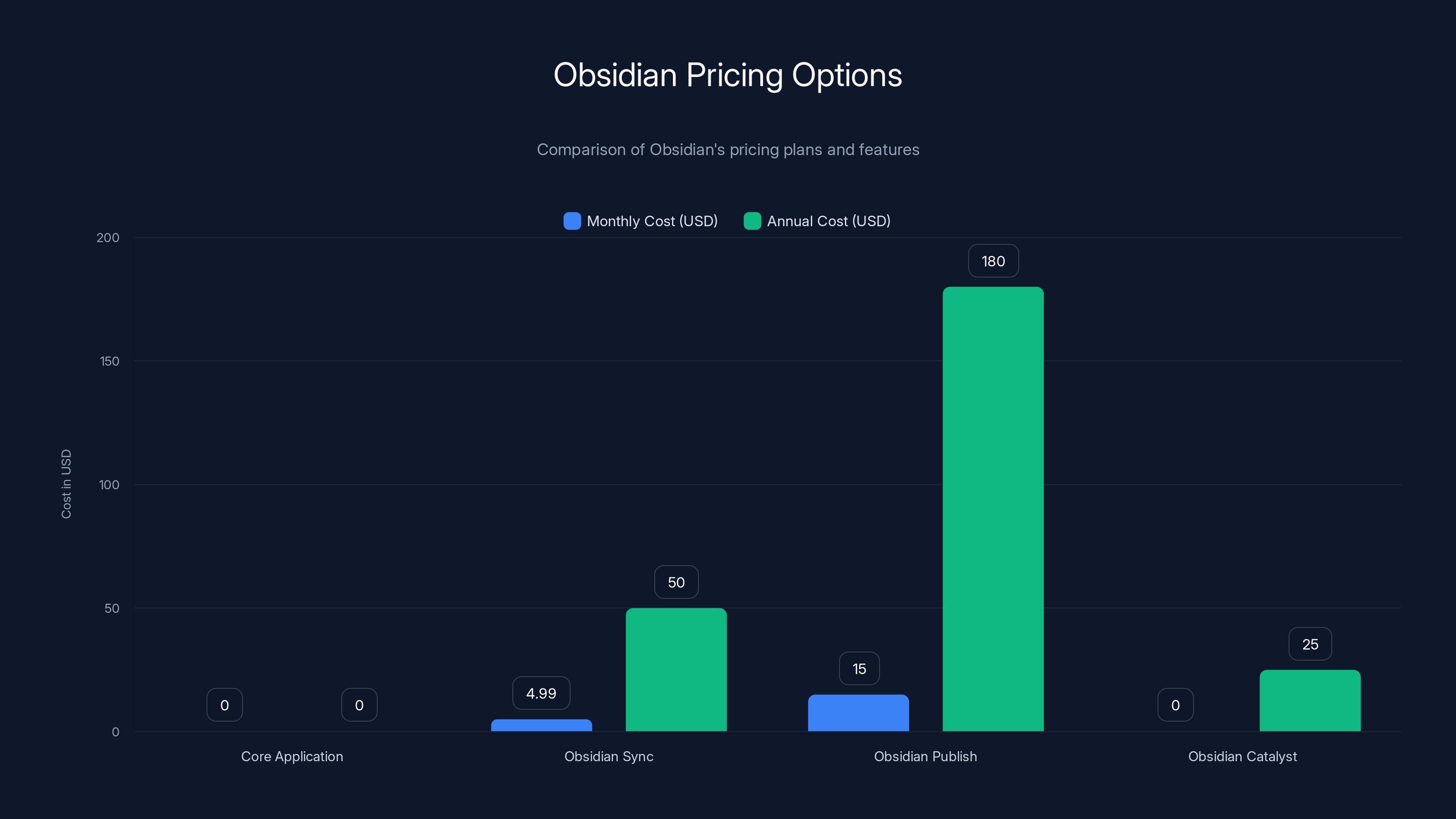
Obsidian offers a free core application with optional paid services for cloud sync, publishing, and early access features. Estimated data for Obsidian Publish is based on average usage.
Getting Started: Installation and Initial Setup
System Requirements and Compatibility
Obsidian's technical requirements are remarkably modest, reflecting its local-first design. The application runs on Windows, mac OS, and Linux, with separate builds optimized for each platform. Even older computers can run Obsidian efficiently—the application rarely consumes significant processor resources or memory.
Mobile apps extend Obsidian to i OS and Android, though these require separate purchases (approximately $10-15 per platform). The mobile apps maintain full compatibility with notes created on desktop, enabling synchronization through either Obsidian's paid Sync service or third-party solutions like i Cloud, One Drive, or Dropbox.
Minimum storage requirements depend on your note volume. Most users function comfortably with several gigabytes available for their vault. However, users maintaining decades of notes or including embedded media might require more substantial storage. Local storage remains the limiting factor rather than computation power.
Backward compatibility remains excellent—Obsidian maintains compatibility with older vault formats, allowing seamless upgrades across years without format migration. This commitment to long-term compatibility reinforces the philosophy of ownable, future-proof notes.
Creating Your First Vault
Vault creation happens on first launch. The application presents straightforward options: create a new vault, open an existing folder, or start with a sample vault. For first-time users, starting with a new vault provides a clean environment for experimentation without overwhelming choices.
Choosing vault location matters for syncing and backup strategies. Placing your vault in a cloud-synced folder like i Cloud Drive or One Drive enables automatic backup and multi-device synchronization without Obsidian's paid Sync service. This approach trades some features for cost savings and data redundancy.
The sample vault provides excellent onboarding, demonstrating core features through practical examples. Walking through the sample vault before creating your own prevents common configuration mistakes and builds familiarity with the interface.
Once created, your vault appears as a folder in your system file explorer. You can manually add markdown files by creating them directly in the folder—Obsidian automatically recognizes and indexes new files. This interoperability means your vault never depends entirely on the Obsidian application.
Configuring Your Workspace
Obsidian's interface follows a three-pane layout: a file browser on the left, the editor in the center, and a properties panel on the right. This layout can be customized extensively. Users can adjust pane widths, hide unnecessary panels, or rearrange elements according to preferences.
Theme selection affects both aesthetics and functionality. The default theme works well for most users, but the community provides dozens of alternative themes optimized for different reading preferences. Some themes prioritize readability for extended writing sessions, while others emphasize visual organization of complex link networks.
Font choices deserve careful consideration, particularly for users spending hours daily in Obsidian. The application supports system fonts plus any installed typefaces. Many users prefer serif fonts for reading existing notes but switch to monospace fonts when writing code or technical content.
Initial settings can be revisited anytime. New users benefit from accepting defaults initially, then customizing as specific needs emerge. This approach prevents configuration paralysis while ensuring sensible baseline settings.
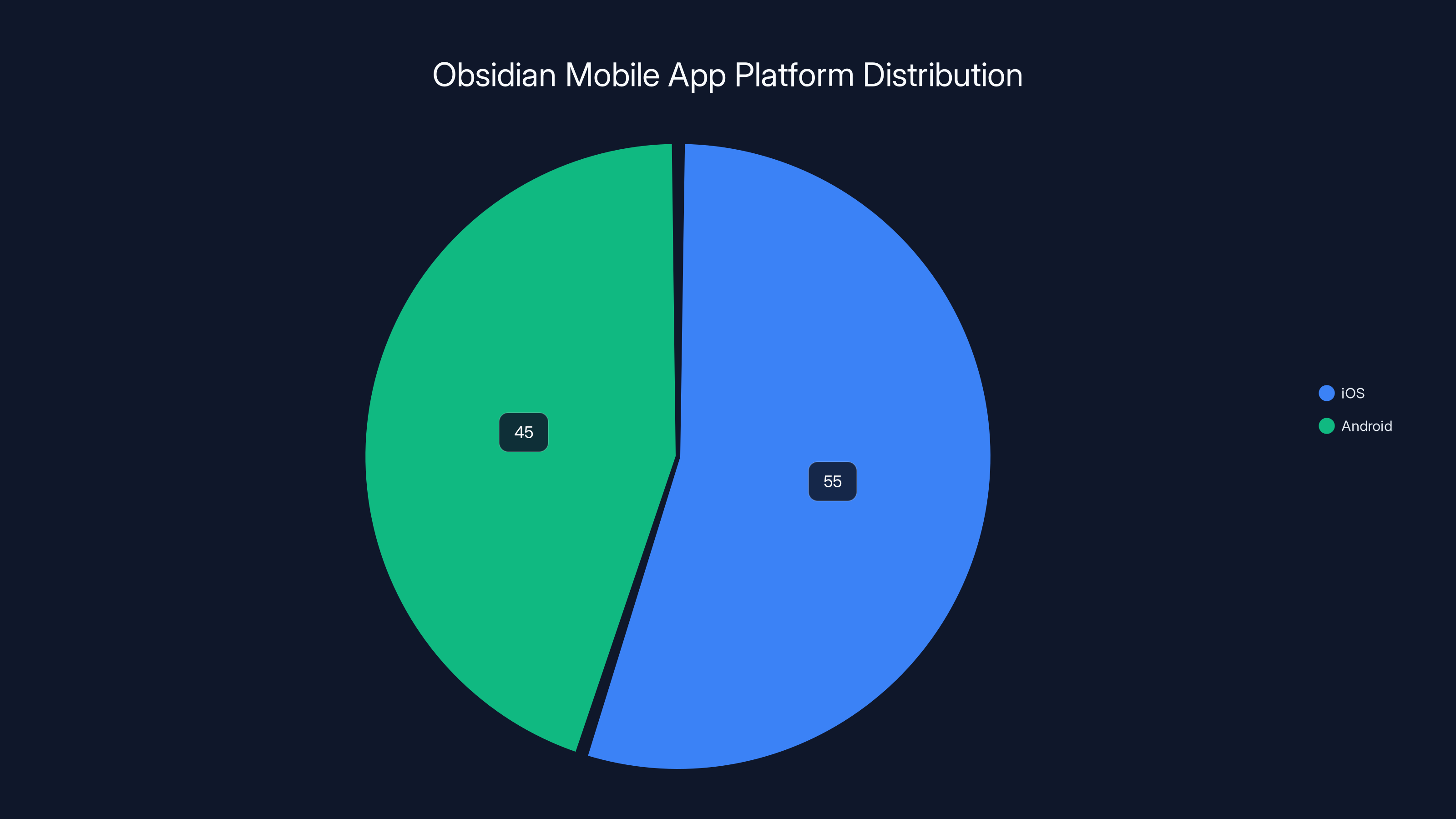
Estimated data suggests a slightly higher installation rate for Obsidian on iOS compared to Android, reflecting typical market trends for productivity apps.
Core Features: What Makes Obsidian Powerful
Linking and Backlinking: Building Your Knowledge Graph
Linking represents Obsidian's defining feature. Using wiki-style syntax [[Note Name]], you create connections between notes that form a knowledge network. These aren't one-directional references—Obsidian automatically tracks backlinks, showing which notes reference the current note. This bidirectional linking creates a web of interconnected knowledge rather than a linear hierarchy.
The power of linking emerges over time. Initially, a few links seem modest improvements. As your vault grows to hundreds or thousands of notes, backlinks become invaluable for discovering connections you'd forgotten. You might revisit a note and realize it connects to fifteen other concepts you didn't consciously remember linking. This serendipitous discovery enables creative thinking and more comprehensive understanding.
Link syntax supports several variations. [[Note Name]] creates a basic link, while [[Note Name|Display Text]] allows custom link labels. File links using paths like [[Folder/Note Name]] help in larger vaults with multiple folders. Heading-level links like [[Note Name#Section]] enable referencing specific sections within notes.
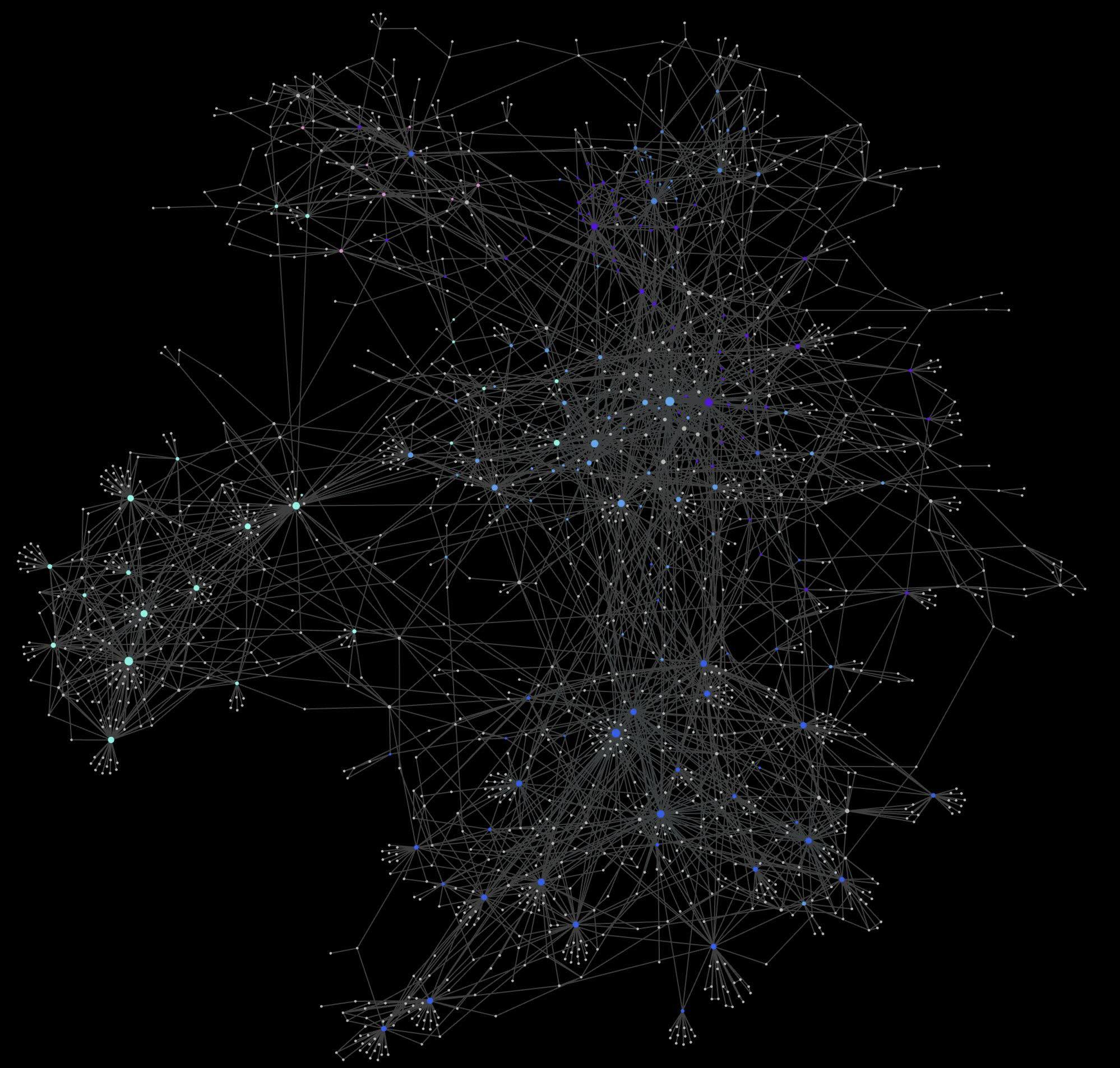
Obsidian's graph view visualizes your note network, showing notes as nodes and links as edges. This visualization reveals the structure of your knowledge, identifying central concepts (notes with many links) and isolated ideas (orphaned notes). Interacting with the graph—zooming, filtering, clicking nodes—provides intuitive navigation through large vaults.
Search Capabilities: Finding Information Instantly
Obsidian's search indexes every note automatically. The search function supports simple keyword matching plus advanced operators for precise queries. Searches execute locally in milliseconds, enabling rapid iteration through results.
Advanced search operators enable sophisticated queries. The file: operator finds notes matching filename patterns, while content: searches only note content. The tag: operator filters by metadata tags, and boolean operators like AND, OR, and NOT enable complex combinations. Users can save search results as saved searches—essentially creating dynamic note collections.
Regular expression support enables pattern-based searching, useful when looking for specific formatting or data structures. While regex requires additional learning, the investment pays dividends for power users managing complex vaults.
Inline search within the editor finds text in the current note, with features like case-sensitive matching and regex support. This functionality handles simple text replacement, making batch edits across notes straightforward.
Tags and Metadata: Organizing Without Folders
Tags provide flat organizational structures that cross folder boundaries. Unlike folders which impose hierarchy, tags enable multiple organizational schemes simultaneously. A single note might be tagged #project, #urgent, and #technical, appearing in multiple organizational contexts.
Frontmatter—metadata at the top of notes using YAML syntax—enables sophisticated organization. Custom fields like status: in-progress, priority: high, or topics: [python, automation] become queryable. Combined with the Dataview plugin, frontmatter enables generating dynamic lists of notes matching specific criteria.
Tag hierarchies like #project/personal and #project/work create sub-categories within tags. This approach maintains the flexibility of flat tags while providing organizational depth when desired. Unlike folders, tag hierarchies don't force a single organizational scheme—you can maintain multiple classification systems simultaneously.
Embed and Include: Composing Notes from Fragments
Embedding allows including content from one note within another without duplication. The syntax ![[Note Name]] embeds an entire note's content, while ![[Note Name#Section]] embeds only specific sections. This enables maintaining canonical versions of information while referencing them throughout your vault.
Embeds work with images and PDFs too. ![[image.png]] displays an image inline, supporting standard markdown image syntax. This enables rich documents combining text, images, and embedded notes—all maintained separately for reusability.
The distinction between links and embeds matters for document composition. Links create references to other content, while embeds actually include other content. For a comprehensive research document, you might link to detailed notes while embedding brief definitions or key findings.
Transclusion—including notes that include other notes—creates complex compositions from reusable components. A research document might embed section overviews, which themselves embed definitions, which reference detailed analyses. This hierarchical composition maintains clean separation of concerns while enabling sophisticated output.
Advanced Organization Strategies
Building Your Second Brain: The Progressive Summarization Method
Progressive summarization, popularized by productivity expert Tiago Forte, represents a powerful organizational philosophy that works exceptionally well in Obsidian. The method involves taking raw notes, then gradually distilling them into increasingly refined summaries. This process surfaces key insights while maintaining raw notes for reference.
The first pass involves capturing raw information—full transcripts, complete quotes, detailed observations. This raw layer requires no curation; the goal is complete capture. In Obsidian, you might create a note labeled Raw - Interview with [Person] containing full text.
The second pass highlights key information within the raw notes. Using highlight formatting (typically ==highlighted text== in Obsidian), you mark the most valuable content. This pass happens days or weeks after initial capture, enabling perspective on what proved actually important.
The third pass creates a summary note, capturing only the highlighted excerpts plus a brief synthesis. This distilled version captures the insight without requiring readers to navigate raw notes. A complex interview might yield a single page of key learnings.
Progressive summarization works because it leverages time and perspective. Information captured in the moment differs from information evaluated days later. This temporal gap enables cleaner signal-to-noise separation than immediate summarization allows.
The Zettelkasten Method: Atomic Note-Taking
Zettelkasten, German for "slip box," represents a note-taking method developed by sociologist Niklas Luhmann. The method emphasizes atomic notes—each note capturing one specific idea with sufficient context to stand alone. This atomic structure enables powerful recombination and discovery.
In the Zettelkasten approach, you avoid large essay-style notes. Instead, you write concise notes exploring single concepts. A note might capture one definition, one argument, one observation. The brevity forces clarity while enabling flexible recombination into larger pieces.
Linking becomes central in Zettelkasten. Rather than folder structures, hierarchy emerges from link patterns. You might have a hub note aggregating related ideas, with individual atomic notes feeding into it. Over time, link patterns reveal conceptual relationships invisible in folder structures.
Obsidian's linking and graph features make it exceptionally well-suited to Zettelkasten methods. The backlink panel immediately shows other notes referencing the current idea. The graph view visualizes conceptual relationships. Combined, these features enable the emergent organization that makes Zettelkasten powerful.
Zettelkasten note-taking requires discipline and structure. Each note needs an ID (typically timestamp-based like 202501151430), a descriptive title, and explicit connections to related notes. The structural investment yields powerful benefits for long-term knowledge development and complex research projects.
Daily Notes and Journal Integration
Daily notes—a separate note created each day for capturing thoughts, tasks, and observations—serve as an entry point into your vault. Rather than deciding where information belongs, you write it in today's daily note. Later, during reviews, you move content to permanent notes.
This capture-then-organize approach reduces friction during active work. Instead of deciding where a thought belongs in your vault structure, you write it in the daily note, confident you'll organize it later. This separation prevents decision paralysis that impedes capture.
Obsidian's templater plugin enables creating daily note templates automatically. Your template might include sections for gratitude, task review, next-day priorities, or specific projects. Each new daily note automatically includes this structure.
Daily notes create an interesting temporal dimension in your vault. Combined with other notes, they form a chronicle of your thinking, capturing what was important on specific dates. Reviewing weekly or monthly, you see patterns in your thinking and priorities. This meta-awareness often drives valuable changes in how you spend time.
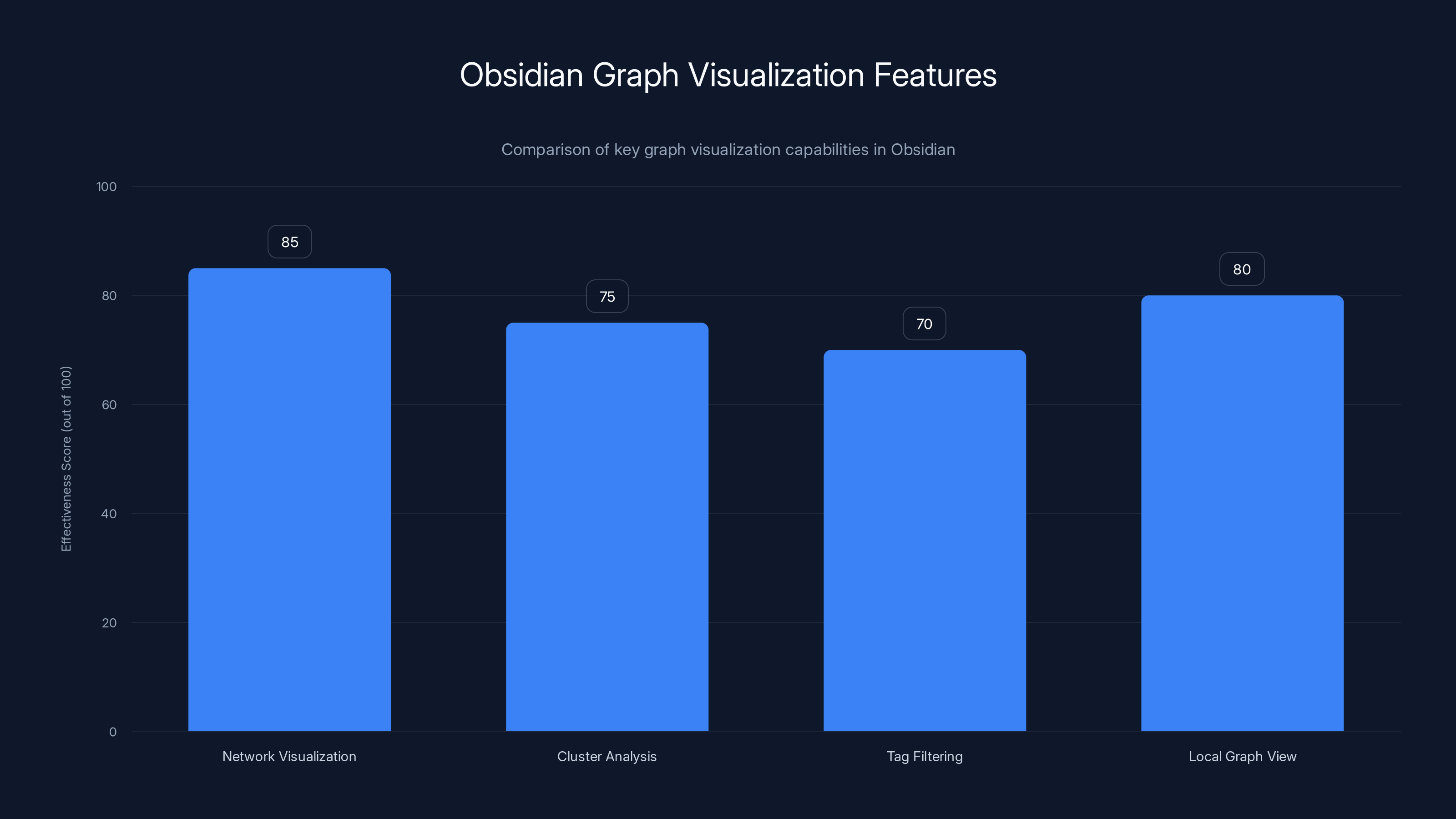
Obsidian's graph visualization is highly effective in network visualization and local graph views, aiding in understanding and context switching. Estimated data.
Customization and Plugins: Extending Obsidian's Capabilities
Understanding the Plugin Ecosystem
Obsidian's plugin system transforms the base application into an extensible platform. The official plugin library contains hundreds of community-created plugins, each extending functionality in specific ways. The plugin architecture enables significant customization without modifying Obsidian itself.
Plugins range from modest utilities to comprehensive feature additions. Some plugins add single features like improved table formatting or advanced search options. Others implement entire workflows—project management systems, book tracking, habit monitoring, or cryptocurrency portfolio tracking.
The plugin ecosystem benefits from active community development. New plugins launch regularly, addressing emerging needs and iterating on existing functionality. While not all plugins receive equal attention or support, the overall ecosystem remains vibrant and responsive to user needs.
Plugin quality varies considerably. Official plugins and popular community plugins typically receive careful maintenance. Newer or niche plugins might receive less attention. Installing plugins carries minimal risk—you can easily disable or remove plugins, and the underlying vault structure never changes based on plugin choice.
Essential Plugins for Every User
Certain plugins provide such universal utility that nearly every experienced Obsidian user installs them. Dataview enables querying your vault like a database, filtering and displaying notes matching specific criteria. This enables generating dynamic tables listing all projects with deadline dates, or all notes tagged with specific topics.
Templater extends Obsidian's built-in template system, enabling dynamic content generation. While Obsidian includes basic templating, Templater adds date variables, conditional logic, and template interoperability. Creating complex templates that populate based on context becomes possible.
Calendar displays a calendar in the sidebar, enabling quick navigation to daily notes and visualization of when you wrote notes. This proves particularly useful for reviewing past daily notes and identifying productive or introspective periods.
Periodic Notes manages daily, weekly, monthly, and yearly notes automatically. Rather than manually creating notes at different time intervals, Periodic Notes generates them automatically with customizable templates. This enables sophisticated time-based organization without manual maintenance.
Advanced Tables dramatically improves markdown table support, enabling sorting, filtering, and formula calculations. For users working with tabular data, Advanced Tables transforms markdown tables from basic static structures into functional data tools.
Specialized Plugins for Specific Workflows
Beyond universal utilities, specialized plugins address specific needs. Researchers might install Zotero Integration to manage bibliographic data, or PDF Highlight to annotate PDFs directly within Obsidian. Writers might use Longform to manage chapters and structure complex writing projects.
Project managers benefit from Projects plugin, which enables managing tasks and timelines within Obsidian. Knowledge managers might install Knowledge Graph Analysis to identify central concepts and relationships in their vault. Developers might use Code Editor for syntax highlighting and better code block support.
The diversity of specialized plugins means almost any workflow has plugin support available. The key involves identifying your specific needs, then searching the plugin library for solutions. Most workflows can be substantially enhanced through 3-5 carefully chosen plugins.
Creating Your Plugin Strategy
While plugins extend Obsidian's capabilities dramatically, indiscriminate plugin installation creates complexity and maintenance burden. Experienced users adopt a measured approach, starting with essential plugins, then adding specialized plugins addressing specific needs.
When evaluating new plugins, consider several factors: Does the plugin address a genuine workflow limitation? What's the plugin's maintenance status? Does it interfere with existing plugins? Can the functionality be achieved through other means? Adding a plugin should solve concrete problems, not add features for novelty.
Documenting your plugin choices and configurations creates valuable knowledge. Taking notes on which plugins you've installed, why you chose them, and how you configured them enables quick restoration if you reinstall Obsidian or migrate to a new computer.
Workflows and Best Practices
Building an Effective Research Vault
Researchers represent one of Obsidian's primary use cases. Managing sources, extracting insights, and synthesizing information into coherent arguments requires structured approaches that Obsidian supports exceptionally well.
An effective research vault typically includes several note types: Source notes capture bibliographic information and key quotes from research materials. Literature notes synthesize findings from single sources into your own language. Permanent notes articulate original ideas, often synthesizing insights from multiple sources. Topic notes aggregate related ideas, often linking to dozens of permanent notes on related subjects.
This multi-tier structure prevents conflating source material with original thinking. Source notes remain largely unchanged, preserving exact citations. Literature notes bridge source and original material, translating source concepts into your framework. Permanent notes represent your actual thinking, grounded in sources but expressed in your voice.
Zotero integration streamlines source management. Rather than manually creating source notes, Zotero integration automatically creates notes from your Zotero library, populating them with citations and configurable metadata. This automation eliminates tedious data entry while ensuring consistent formatting.
How you link these notes matters significantly. Rather than creating monolithic topic notes attempting to cover entire fields, create atomic permanent notes exploring specific questions or arguments. Then create aggregator notes that link to related atomic notes. This structure remains scalable—adding insights to a mature research vault involves writing new atomic notes and updating aggregator links.
Project Management in Obsidian
While Obsidian isn't a dedicated project management tool, its flexibility enables effective project tracking for individual contributors and small teams. The approach involves creating a project note containing task lists, timelines, and linking to relevant documentation.
Each project gets a main note containing overview information and links to subordinate notes covering specific aspects. Subtasks link to detailed notes exploring specific problems or deliverables. This structure maintains one authoritative project document while enabling infinite depth on specific topics.
Combined with the Projects plugin, Obsidian enables kanban-style task boards directly within your notes. Tasks can be moved between columns, tagged with status, and linked to related notes. For individuals managing multiple projects simultaneously, this integrated approach proves more effective than switching between separate tools.
Monthly and weekly reviews of project notes enable identifying blockers, reprioritizing work, and adjusting timelines. These review sessions typically involve updating project notes with progress, creating new task notes for next-week priorities, and linking new notes to project documents.
Knowledge Management for Teams
While Obsidian emphasizes local storage, team collaboration remains possible through shared vaults and structured synchronization. Several approaches exist for team usage, each with different advantages and limitations.
The simplest approach uses shared cloud storage (i Cloud, One Drive, Dropbox) to synchronize a vault folder. Multiple team members access the same vault, with cloud storage handling synchronization. This works well for small teams with modest collaboration needs, though concurrent editing of the same note can cause conflicts.
Obsidian's paid Publish feature enables hosting notes publicly or with restricted access, enabling teams to share knowledge without requiring everyone to install Obsidian. You can designate which notes to publish, creating an internal knowledge base accessible through a web interface.
For teams requiring sophisticated collaboration, dedicated knowledge management systems might prove more suitable than Obsidian. Obsidian's local-first design, while powerful for individuals, creates complexity in multi-user editing scenarios. Understanding these limitations helps teams make appropriate tool choices.
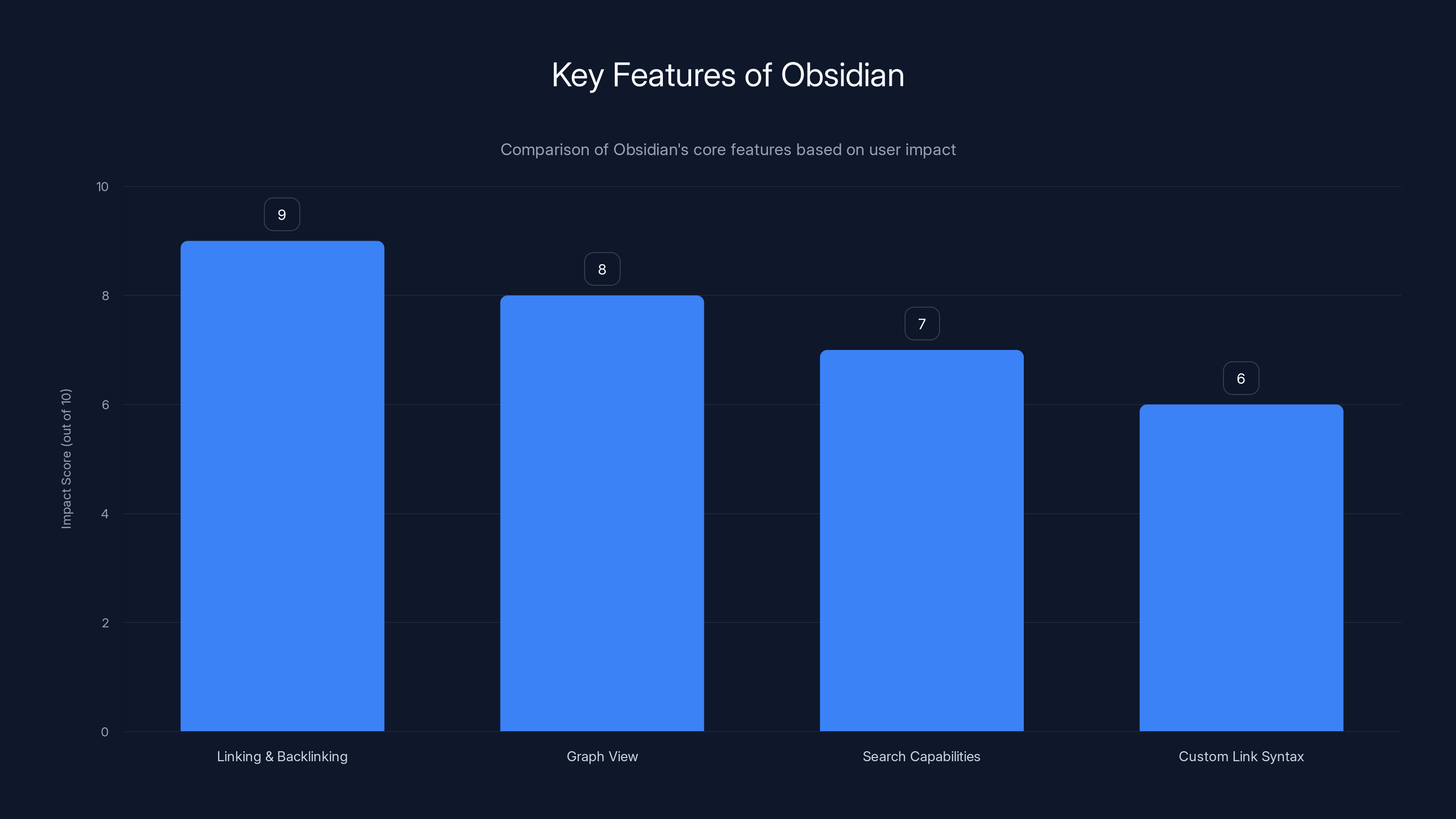
Linking and backlinking are the most impactful features of Obsidian, significantly enhancing user experience by creating a dynamic knowledge graph. (Estimated data)
Advanced Features and Hidden Capabilities
Graph Visualization and Relationship Analysis
Obsidian's graph view transforms vault structure into a visual representation. Notes appear as nodes, links as edges, creating a network visualization. This visualization immediately reveals vault structure—central concepts with many connections appear as busy hubs, while isolated notes appear as distant nodes.
The graph isn't merely decorative; it serves analytical purposes. Clusters of densely connected notes reveal topic concentrations. Sparse areas reveal gaps in your knowledge. Following connection chains through the graph enables discovering conceptual relationships invisible in linear organization.
Filtering the graph by tags or file paths enables examining specific vault sections. You might display only notes tagged #research, revealing the structure of your research knowledge specifically. Or filter by folder, showing how ideas within specific projects interconnect.
The local graph view shows connections only for the current note and nearby notes (within 1-2 links). This local view proves particularly useful for context switching—quickly understanding what information relates to your current focus.
Themes and Customization
Obsidian's appearance can be customized extensively through themes and CSS snippets. The official theme library provides polished alternatives to the default theme, each optimized for different preferences. Some themes prioritize readability for extended writing, while others emphasize visual organization and aesthetics.
CSS customization enables fine-grained control over appearance. Users with CSS knowledge can create custom styles addressing specific needs—adjusting font sizes, colors, spacing, or component appearances. While CSS knowledge isn't required, it opens powerful customization possibilities.
The focus mode feature hides interface elements, presenting notes in a distraction-free environment. This proves useful during writing sessions when interface complexity distracts from content creation. Regular switching between focused and normal modes adapts the interface to current activities.
Automation and Scripting
For power users, automation capabilities extend Obsidian's functionality significantly. The Templater plugin enables date-based automatic note generation using Java Script templates. Creating a daily note automatically generating the previous day's incomplete tasks proves useful for continuity.
The Dataview plugin includes query language enabling dynamic content generation. You can create a query listing all notes modified in the past week, or all notes tagged with multiple specific tags, or even calculating statistics across notes. These dynamic queries update automatically as you modify notes.
Shell scripts can interact with your vault from outside Obsidian. You might create scripts that process notes, generating summaries or reports. The local file structure enables scripting approaches impossible with cloud-only systems.
Offline Functionality and Syncing Strategies
Obsidian's local-first design means complete functionality offline. Whether you're on an airplane, in a location with no internet, or experiencing connectivity issues, Obsidian functions normally. This reliability appeals particularly to users who work in varying connectivity contexts.
Syncing notes across devices requires strategy. Obsidian's paid Sync service handles this automatically, but alternatives exist. Cloud storage services like Dropbox, One Drive, or i Cloud provide automatic synchronization if you store your vault in cloud-synced folders.
Using third-party sync services requires understanding version control and conflict resolution. If multiple devices modify the same note simultaneously, cloud services might create conflicting copies. Understanding your service's conflict handling prevents surprises.
Migrating to Obsidian: Importing Existing Notes
Data Import from Other Applications
Moving existing notes into Obsidian requires understanding your current format and planning the migration. If your notes exist as markdown files, migration is trivial—simply copy them into your vault folder. Obsidian immediately recognizes and indexes them.
Notes in proprietary formats require conversion. Tools exist for importing from popular platforms: Notion 2 Obsidian converts Notion exports, Evernote 2 Markdown handles Evernote exports, and various other converters exist for specific platforms. These tools typically output markdown files ready for vault import.
Approach migration strategically. Rather than attempting to migrate everything at once, consider importing your most active notes first. This enables adjusting your workflow with familiar material before importing your complete archive. Migrating in waves also distributes the organizational work across time.
Document your migration process. Taking notes on what worked, what challenges arose, and how you resolved them creates valuable knowledge for referring back or helping others migrate. Your experience might surface gaps in conversion tools or structural improvements to your vault.
Restructuring During Migration
Migration offers an opportunity to reconsider your organizational structure. If your previous system used deep folder hierarchies, migration to Obsidian might involve flattening structure and implementing link-based organization. Making these changes during migration prevents reorganizing everything later.
Consider whether your current organization maps well to Obsidian's capabilities. Deep folder hierarchies designed for file browsing might not serve you as well in Obsidian's search and link-based environment. Thinking through organizational improvements during migration reduces future restructuring.
Partial migration often works better than complete migration. Migrating active notes while leaving archives in original systems provides flexibility. You can always migrate archived material later, or leave it permanently in original locations while maintaining active notes in Obsidian.
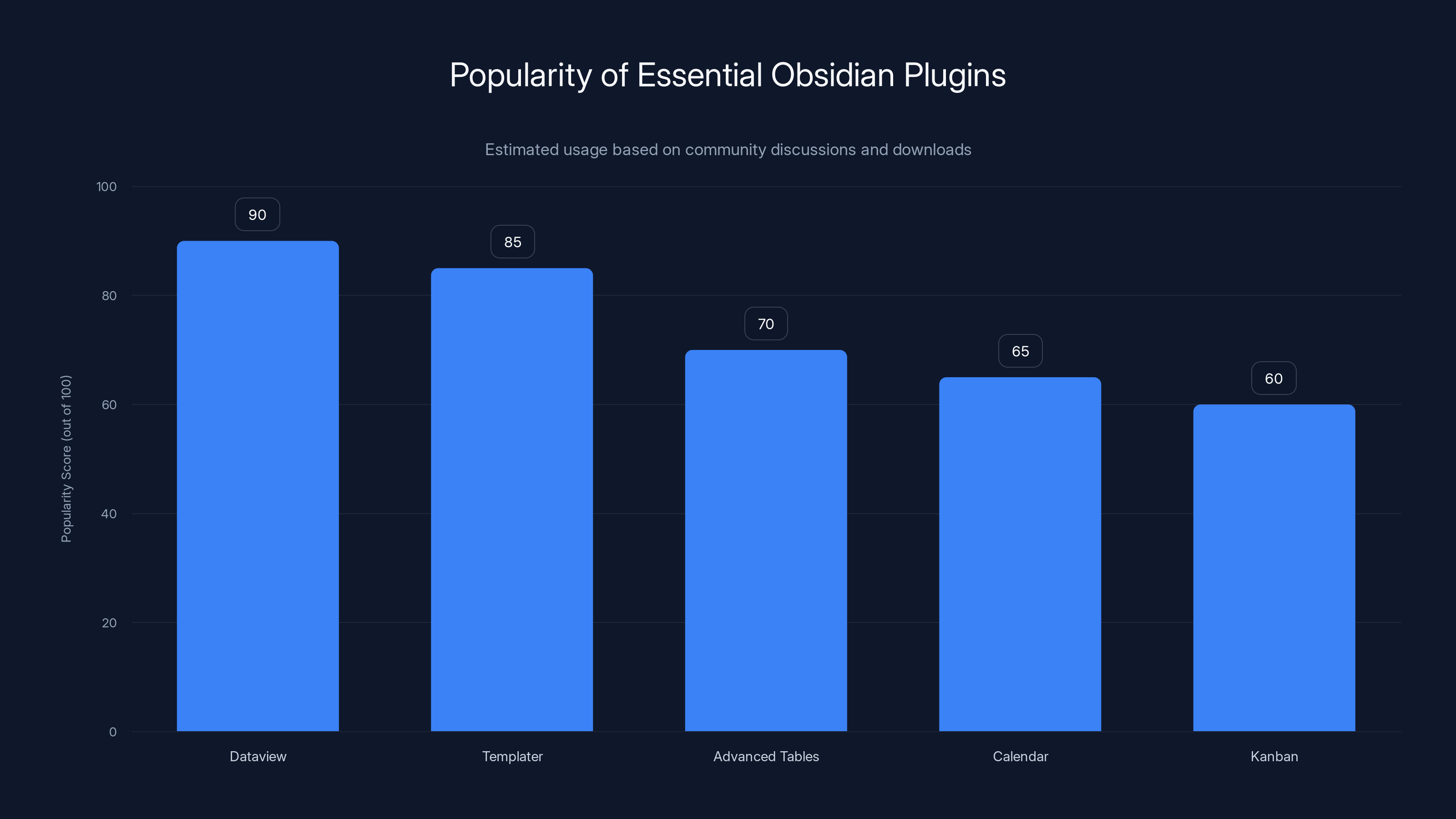
Dataview and Templater are among the most popular plugins, widely used for their powerful functionalities. Estimated data based on community feedback.
Comparing Obsidian to Alternatives
Obsidian vs. Notion
Notion and Obsidian represent different philosophies applied to note-taking. Notion prioritizes cloud-first operation and database features, enabling sophisticated organizational structures and team collaboration. Notion works exceptionally well as a unified workspace combining notes, databases, wikis, and project management.
Obsidian prioritizes local storage, markdown format, and flexibility. Notes remain in your hands, readable in any text editor. This appeals to users valuing data ownership and long-term accessibility. Obsidian's linking capabilities, while powerful, differ from Notion's relational database approach.
For individuals managing personal knowledge, Obsidian often proves superior due to lower cost (free for core features), offline functionality, and simpler interface. For teams requiring shared workspaces and collaborative editing, Notion's advantages become more apparent despite higher cost.
Obsidian's learning curve varies by use case. Basic note-taking requires minutes to learn. Leveraging advanced features like Zettelkasten methods or sophisticated linking strategies requires more investment. Notion presents similarly—basic operation is straightforward, but sophisticated database structures require learning.
Obsidian vs. Roam Research
Roam Research pioneered backlinking for note-taking, directly inspiring many of Obsidian's core features. Roam emphasizes daily notes and outline-based note structure, with automatic backlinking across your entire vault. Both applications implement remarkably similar core concepts with different implementation philosophies.
Obsidian's primary advantage is cost—free for core features versus Roam's subscription requirement. Obsidian also emphasizes local storage and data ownership, while Roam operates cloud-first. For users concerned about vendor lock-in or long-term costs, Obsidian proves more economical.
Roam's advantages include superior mobile experience, cloud-first operation, and team collaboration built into the core product. Roam's outline-based approach appeals to some users more than markdown-based alternatives. Roam's social features and published graphs enable knowledge sharing in ways Obsidian requires separate tooling.
Choosing between them often hinges on whether you prioritize cost and data ownership (Obsidian) or integrated collaboration and cloud convenience (Roam). Both applications effectively support knowledge management workflows; your priorities determine which better suits your needs.
Obsidian vs. Logseq
Logseq represents an open-source alternative implementing similar core concepts to Roam and Obsidian. Like Obsidian, Logseq emphasizes local storage and supports markdown. Logseq's distinct feature is its outline-first approach—notes organize as hierarchical lists rather than flat documents.
Obsidian's advantages include larger ecosystem (more plugins, more templates, more community resources), more polished interface, and more sophisticated graph visualization. Obsidian's development cycle moves faster, with regular feature releases and community engagement.
Logseq's advantages include open-source licensing (enabling transparency and community modification), outline-first structure (appealing to users thinking in hierarchical lists), and lower cost (completely free). For users embracing open-source philosophy, Logseq represents a compelling choice despite smaller ecosystem.
Both applications store notes as markdown files, enabling migration between them. Trying both reveals which organizational approach better matches your thinking style. Some users thrive with outline-first thinking; others prefer flat documents with linking. Neither approach is objectively superior—the choice depends on individual cognitive preferences.
When to Consider Alternatives to Obsidian
For teams requiring seamless collaboration and version control, Google Docs or Microsoft One Drive might prove more suitable than Obsidian. These applications handle concurrent editing naturally while Obsidian, with local-first design, requires careful synchronization strategies.
For users seeking AI-powered features like automated summarization or intelligent note suggestions, alternatives like Runable offer AI agents for content generation and workflow automation that might enhance your knowledge management process. Platforms like Runable enable automating routine documentation and content creation tasks, freeing time for deeper analytical thinking.
For students prioritizing visual organization and database features, Notion often provides better out-of-the-box functionality for academic workflows. College students managing coursework across multiple classes benefit from Notion's flexibility in creating assignment trackers, reading lists, and collaborative study materials.
For writers focused on long-form content production rather than knowledge management, dedicated writing applications like Ulysses or Bear might prove more suitable. These applications optimize for writing rather than linking and knowledge graphs.
Obsidian in Professional Contexts
Academic Research and Knowledge Development
Academics represent one of Obsidian's most enthusiastic user bases. The application's strengths—managing large volumes of sources, synthesizing across materials, discovering unexpected connections—directly address core academic needs.
Graduate students building dissertation knowledge bases benefit significantly from Obsidian's structure. Rather than reading papers and noting key points in scattered documents, students create comprehensive literature networks capturing every author, theory, and finding encountered. This evolving network becomes increasingly valuable as research progresses.
Obsidian enables managing bibliography seamlessly through Zotero integration. Rather than separate bibliography management and note-taking tools, both functions integrate into single system. Extracting quotes while ensuring proper citations prevents the common academic problem of quotes detached from sources.
The collaborative limitations of Obsidian require workarounds for group research projects. Some academic groups create shared vaults accessible to all contributors, while others maintain individual vaults on specific research aspects, sharing only output rather than entire knowledge bases.
Software Development and Technical Documentation
Developers appreciate Obsidian's markdown basis and support for code syntax highlighting. Rather than segregating documentation into separate systems, developers maintain documentation within Obsidian alongside analysis notes, architecture decisions, and project knowledge.
The application enables creating living architecture documentation—descriptions of system design that remain linked to design decisions, relevant code examples, and deployment strategies. Unlike static documentation that diverges from reality over time, linked documentation in Obsidian maintains consistency through connection density.
For Dev Ops and infrastructure teams, Obsidian provides a natural home for runbooks, incident postmortems, and deployment procedures. Linking related runbooks and procedures creates a web of operational knowledge accessible during high-stress incident response.
Content Creation and Editorial Workflows
Content creators—bloggers, journalists, technical writers—benefit from Obsidian's outline and editing capabilities. Rather than writing directly in blog platforms or word processors, writers can develop content in Obsidian, maintaining versions and creating networks of related articles.
Linking related articles enables discovering writing topics and identifying gaps in coverage. If you notice a concept appearing across multiple articles without dedicated coverage, you've identified a missing article. This systematic approach to content planning prevents redundancy and ensures comprehensive topic coverage.
Template systems enable maintaining consistent formatting across articles. Article templates might include sections for outline, key points, related links, and metadata. Starting each article from a template ensures consistent structure while reducing setup overhead.
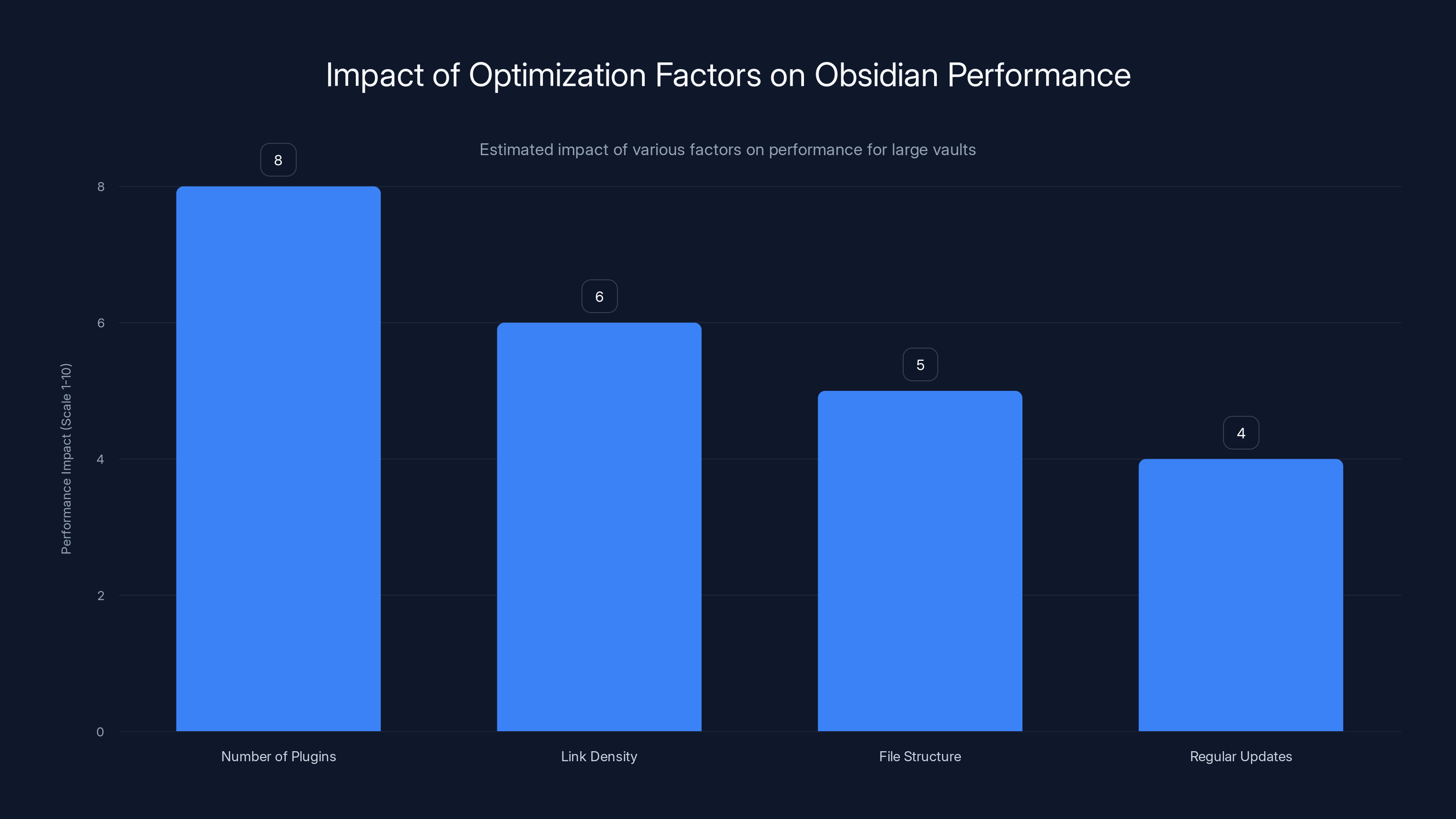
Disabling unnecessary plugins has the highest impact on improving Obsidian's performance, followed by managing link density and file structure. Regular updates contribute to sustained performance. Estimated data.
Security, Privacy, and Data Management
Understanding Obsidian's Security Model
Obsidian's local-first approach inherently provides stronger privacy than cloud-based alternatives. Your notes never leave your device unless you explicitly sync them, upload them, or use Obsidian's optional cloud services. This means your data never passes through Obsidian's servers without explicit opt-in.
For notes containing sensitive information—financial details, health information, personal observations—local storage provides significant security advantages. You control which devices hold your data, enabling encryption at device level without depending on third-party security practices.
The tradeoff involves management responsibility. Rather than relying on Obsidian to backup your data, you manage backups. This requires discipline to ensure your vault remains protected against hardware failure, theft, or accidental deletion.
Encryption and Syncing
If you enable Obsidian's paid Sync service, data encrypts before transmission using encryption keys you control. Even Obsidian's servers cannot read your data—they store encrypted blobs they cannot decrypt. This model preserves privacy while enabling cloud synchronization.
Alternatively, storing your vault in cloud-storage services like i Cloud Drive or Dropbox provides free synchronization with some privacy tradeoff. These services encrypt in transit and usually at rest, but can theoretically access your data. The tradeoff between cost and privacy control depends on your threat model.
For maximum security with minimum cost, using a private VPN with your cloud storage service provides encryption and privacy without Obsidian's subscription. This hybrid approach balances cost, convenience, and security for most individual users.
Backup Strategies
Unlike cloud-based services providing automatic backup, Obsidian requires explicit backup management. Regular backups protect against hardware failure, accidental deletion, or malware. Establishing backup routines—daily automatic backups, weekly cloud storage backups—prevents catastrophic data loss.
Version control systems like Git enable sophisticated backup and history tracking. For technical users, storing their vault in a Git repository enables complete history tracking and recovery from any point in time. This proves particularly valuable for research vaults where understanding how ideas evolved matters.
Multiple backup locations provide redundancy. Backing up locally to external drives, then syncing to cloud storage ensures protection against local hardware failure and catastrophic device loss simultaneously.
Troubleshooting and Optimization
Performance Optimization for Large Vaults
As vaults grow to thousands of notes, Obsidian's performance remains excellent, though optimization becomes increasingly relevant. Several factors impact performance: number of plugins (more plugins slow operation), link density (highly interconnected notes process more slowly), and file structure (extreme folder nesting affects navigation speed).
Disabling plugins you don't regularly use improves performance more than almost any other optimization. Identify plugins providing genuine value versus nice-to-have conveniences, then disable the latter. This tradeoff between features and speed often favors performance.
Regularly updating Obsidian and plugins ensures you're running optimized code. Developers frequently improve performance, particularly for large vaults. Updating every few months captures these performance improvements.
The relationship between vault size and performance is roughly linear rather than exponential. Even vaults with tens of thousands of notes remain responsive with modern hardware. If you experience significant slowdowns, investigating plugin interactions or vault structure usually reveals solvable issues.
Common Issues and Solutions
Plugin conflicts occasionally cause crashes or unexpected behavior. If Obsidian becomes unstable after installing plugins, disabling recently added plugins often resolves issues. Most plugin conflicts resolve through updating or removing problematic combinations.
Sync conflicts occur when multiple devices modify the same note simultaneously. Most cloud storage services create conflict copies rather than attempting merge. Resolving conflicts involves identifying which version you want to keep, then deleting the unwanted conflict copy.
Searching failing to find content might indicate indexing issues. Clearing Obsidian's cache forces a complete reindex of your vault. This rare situation typically occurs after vault corruption or extremely large vault imports.
UI freezing during operations usually indicates a plugin consuming excessive resources. Disabling plugins systematically often identifies the culprit. Plugin developers typically respond to performance issues when reported.
Future-Proofing Your Obsidian Setup
Planning for Long-term Use
Obsidian's architecture enables long-term use in ways proprietary platforms cannot. Your notes exist as markdown files on your device—readable in any text editor, portable to any new tool. This ensures you'll never lose access to your data due to service discontinuation or platform changes.
However, relying on specific plugins creates dependency. If a plugin you rely upon stops being maintained, you might experience compatibility issues with future Obsidian versions. Reviewing plugin dependencies and maintaining awareness of plugin maintenance status prevents surprise problems.
Documenting your vault structure, custom configurations, and important plugin settings creates portable knowledge. Should you need to rebuild your Obsidian setup on a new device, having documentation accelerates the process.
Evolving Your System
Your note-taking approach will naturally evolve as your experience deepens. What works during month one might prove inefficient by month twelve. Remaining flexible and willing to reorganize or reconfigure prevents your system from becoming rigid.
Monthly or quarterly reviews of your vault and organization offer opportunities for intentional evolution. Identifying patterns—consistently used organizational structures, abandoned organizational attempts, recurring problems—guides improvements.
Sharing your system with others accelerates learning. Discussing approaches with other Obsidian users in communities exposes you to techniques you might not independently discover. Explaining your system to others reveals assumptions and inefficiencies.
Obsidian for Different User Types
Student Use Cases
Students benefit enormously from Obsidian's linking and knowledge development capabilities. Rather than siloed notes in separate files for each class, students can create comprehensive knowledge networks connecting concepts across courses. Physics principles learned in one class illuminate chemistry concepts in another—linking enables discovering these connections.
During exam preparation, students can query their vault for all notes containing specific topics, generating comprehensive study guides. Using Dataview, students might create queries showing all concepts marked as "needs_review" across their entire vault, enabling systematic preparation.
Group projects benefit from shared vaults stored in cloud drives. Team members contribute notes on their research, which automatically appear to teammates. Assigning topics to team members via notes enables coordination and prevents duplicate effort.
Professional Knowledge Workers
Professionals managing complex information benefit from Obsidian's organizational flexibility. Consultants might maintain vaults documenting client knowledge, best practices, and case studies. Lawyers might document precedent and research for cases. Doctors might maintain medical knowledge bases with symptoms, treatments, and case histories.
The ability to rapidly access related information improves decision-making under time pressure. Having documented your learning across years, making rapid decisions grounded in comprehensive knowledge becomes natural.
Cross-domain learning emerges naturally when managing large knowledge networks. Insights from one domain often illuminate problems in another. The serendipity enabled by browsing related notes reveals these connections.
Writers and Journalists
Writers benefit from Obsidian's outline capabilities, linking features, and template support. Maintaining personal archives of writing ideas, stylistic references, and research ensures material is available when needed. Rather than chasing inspiration, writers can examine their archive of accumulated ideas.
Journalists can maintain comprehensive background research on beats, including interviews, data, previous articles, and source contacts. Searching for topic-related notes reveals comprehensive background instantly.
Templates enable consistent article structure, tone, and formatting. Starting each article from a template ensures professional consistency while reducing setup overhead.
Integration with Broader Workflows
Zapier Integration and Automation
While Obsidian itself doesn't offer native Zapier integration, creative users have developed workarounds. Email to Obsidian services enable capturing emails as notes. API webhooks can trigger note creation based on external events. These indirect integrations enable connecting Obsidian to broader automation workflows.
For users managing complex workflows involving multiple tools, automation platforms can create structured Obsidian notes based on events in other applications. A new task in your project management tool could automatically create a linked note in Obsidian, ensuring comprehensive information capture.
Connecting to AI Tools and Automation Platforms
For teams seeking to enhance their note-taking with AI-powered automation, platforms like Runable offer complementary capabilities. Runable's AI agents can automate content generation, documentation creation, and workflow automation that enhance knowledge management systems. Rather than replacing Obsidian, Runable could automate generating structured notes, creating documentation from raw content, or managing routine note maintenance tasks.
Integrating AI-powered automation with your knowledge management system enables scaling your thinking. While Obsidian handles linking and organizing knowledge, AI tools can help with initial drafting, summarization, and organization of raw material into your vault.
For developers, combining Obsidian with automation platforms enables creating sophisticated workflows. Building a system that automatically processes new information, organizes it according to your schema, and surfaces relevant connections leverages both Obsidian's strengths and automation platform capabilities.
Mastering Obsidian: Common Mistakes to Avoid
Over-Engineering Your System
New Obsidian users often create elaborate organizational schemes that become burdensome to maintain. Deep folder hierarchies, extensive tagging systems, and complex metadata schemas work well initially but become obstacles as vault size grows. Simple systems scale better than complex ones.
Start with minimal organization, adding structure only as needs emerge. Your vault's organization should simplify work, not complicate it. If maintaining your organizational system consumes energy better spent on actual note-taking, simplification is overdue.
Neglecting Regular Review
Notes created but never reviewed provide minimal value. Without regular review, you develop vaults containing thousands of notes you've forgotten about. Periodic reviews—weekly, monthly, or quarterly—maintain engagement with your vault and surface insights.
Review sessions involve reading older notes, updating relevant ones, and identifying connections to recent thinking. These sessions prove valuable for both knowledge development and refreshing memory of previously researched topics.
Creating Poorly-Connected Notes
While not every note requires connections, deliberately ignoring linking reduces Obsidian's primary advantage. When creating notes, consider how they relate to existing notes. Adding even three relevant links transforms isolated notes into integrated networks.
Backlinks indicate whether your notes are well-connected. Frequently reviewing backlinks identifies notes that might benefit from additional connections, or conversations you'd otherwise forgotten about.
Insufficient Documentation
Your vault's organization, custom configurations, and plugin setup should be documented. This documentation becomes invaluable if you need to rebuild your setup or help others understand your system. Maintain a README note describing your vault's purpose, organization scheme, and key plugins.
Conclusion: Building Your Knowledge Management System
Obsidian represents more than a note-taking application—it's a platform for developing and managing knowledge systematically. The application's combination of local storage, markdown foundation, linking capabilities, and extensibility creates an environment where knowledge naturally organizes and reveals unexpected connections.
Getting started requires understanding only core concepts: vaults as organized repositories, markdown as formatting language, and linking as knowledge organization mechanism. These fundamentals suffice for basic usage and provide scaffolding upon which advanced capabilities build.
Becoming proficient with Obsidian involves deliberately developing practices: capturing information thoroughly, reviewing regularly, considering connections when creating notes, and gradually refining your organizational approach. Unlike applications providing sophisticated features immediately, Obsidian's power emerges gradually as your vault grows and your practice deepens.
The choice to invest time in Obsidian yields compounding returns. Early time spent learning core concepts and establishing good practices multiplies in value as your vault grows. A well-organized vault with hundreds of interconnected notes becomes increasingly valuable over time.
For individuals committed to developing knowledge systematically, whether through research, professional development, creative work, or personal growth, Obsidian provides ideal scaffolding. The application respects your data, supports your thinking, and enables building something genuinely personal—a second brain containing your accumulated knowledge.
Whether you're capturing research for academic work, documenting professional expertise, organizing creative projects, or developing personal knowledge, Obsidian adapts to your needs while maintaining elegant simplicity. Begin with fundamentals, remain patient with the learning process, and watch as your vault transforms from scattered notes into an integrated knowledge network supporting deeper thinking and meaningful work.
FAQ
What is Obsidian and how does it differ from typical note-taking apps?
Obsidian is a local-first markdown-based note-taking application that prioritizes data ownership and interconnected knowledge management. Unlike cloud-based alternatives like Notion or One Note, Obsidian stores all notes as markdown files directly on your device, ensuring your data remains in your control. The primary differentiator is Obsidian's powerful linking system and "second brain" philosophy, which emphasizes building networks of interconnected ideas rather than organizing notes into rigid folder hierarchies.
How much does Obsidian cost and what are the pricing options?
Obsidian's core application is completely free, making it one of the most affordable note-taking solutions available. Optional paid services include Obsidian Sync (
What are the main benefits of using Obsidian for knowledge management?
Obsidian offers several significant advantages including complete data ownership (notes stored locally, never on cloud servers), offline functionality (work seamlessly without internet), longevity (markdown format ensures accessibility even if Obsidian disappears), powerful linking capabilities enabling discovery of knowledge relationships, and extensive customization through plugins and themes. For researchers, students, and knowledge workers, the ability to build comprehensive knowledge networks where insights emerge from dense interconnections provides substantial benefits for creative thinking and complex problem-solving. The free core offering with optional premium services also ensures accessible pricing across budget levels.
How does the linking system in Obsidian enhance note organization?
Obsidian's bidirectional linking system creates dynamic knowledge networks beyond traditional folder hierarchies. Using wiki-style syntax like [[Note Title]], you create connections that automatically generate backlinks, enabling discovery of related concepts you may have forgotten. The graph view visualizes these connections, revealing central concepts (highly connected notes) and isolated ideas. Unlike static folder structures, linking enables simultaneous organization across multiple dimensions—one note can appear in multiple conceptual relationships without duplication, supporting how actual knowledge networks develop naturally in human thinking.
Can I use Obsidian for team collaboration and shared vaults?
While Obsidian is primarily designed for individual use, team collaboration is possible through several approaches. You can create shared vaults using cloud storage services like i Cloud Drive, One Drive, or Dropbox where multiple team members access the same vault. Obsidian's paid Publish feature enables creating shared knowledge bases accessible through web browsers without requiring everyone to install Obsidian. For teams requiring sophisticated concurrent editing and real-time collaboration, cloud-first alternatives like Notion may better serve your needs, though Obsidian's local-first model remains attractive for teams prioritizing data ownership and offline functionality.
What plugins should I install as a beginner in Obsidian?
Beginners benefit from starting with essential plugins including Dataview (enabling database-like queries), Templater (creating dynamic templates), Calendar (navigating daily notes), and Advanced Tables (improving markdown table functionality). Most beginners function effectively with the core application and these 3-4 essential plugins before exploring specialized additions. The plugin ecosystem is vast—resist the temptation to install numerous plugins immediately. Instead, start simple and add plugins as specific needs emerge. Each plugin adds complexity, so maintaining minimal plugin counts improves performance and reduces learning burden.
How do I migrate my existing notes into Obsidian from other platforms?
Migration approaches vary by your current platform. If your notes exist as markdown files, simply copy them into your Obsidian vault folder and they're immediately available. For proprietary formats, conversion tools exist: Notion 2 Obsidian for Notion exports, Evernote 2 Markdown for Evernote, and various others for specific platforms. Rather than attempting to migrate everything at once, consider migrating active notes first, allowing workflow adjustment with familiar material before importing archives. Many users benefit from reviewing and restructuring notes during migration, using the opportunity to shift from hierarchical folder organization to linking-based structures better suited to Obsidian's strengths.
Is my data secure in Obsidian and how do I protect my notes?
Obsidian's local-first architecture provides strong privacy—your notes never leave your device unless you explicitly enable cloud services. For maximum security, maintain regular backups using external drives or cloud services. If enabling Obsidian Sync, your data encrypts before transmission using keys you control, preventing even Obsidian from reading your notes. Alternatively, storing your vault in encrypted cloud storage maintains privacy with service provider encryption. For sensitive information, local encryption at device level through operating system features adds additional protection. The responsibility for security shifts from Obsidian to you, requiring active management of backups and access controls.
How does Obsidian compare to alternative note-taking platforms like Notion, Roam Research, or Logseq?
Each platform emphasizes different priorities. Notion provides superior database functionality and team collaboration features but requires paid subscriptions and cloud storage. Roam Research pioneered backlinking features (which Obsidian emulates) but prioritizes cloud-first operation and expensive subscriptions. Logseq offers open-source alternatives with outline-first organization but smaller ecosystem and community. Obsidian combines local storage, free core functionality, extensive plugin ecosystem, and powerful linking—making it ideal for individuals prioritizing data ownership and cost. Your choice depends on whether you prioritize local data ownership (Obsidian), team collaboration (Notion), outline-based thinking (Logseq), or integrated cloud features (Roam).
What's the best way to organize a large vault with thousands of notes?
Large vault organization balances structure with flexibility. Most power users employ flatter folder structures than hierarchical systems, relying on linking and tagging for multi-dimensional organization. Atomic note-taking—each note capturing single concepts—enables flexible recombination. Many successful users employ hub notes aggregating related atomic notes, enabling deep dives without requiring monolithic topic notes. The Zettelkasten method emphasizes unique note IDs and explicit linking, creating emergent organization that scales beautifully. Rather than designing perfect structure upfront, allow organization to evolve organically as your vault grows. Monthly reviews identifying organizational patterns guide intentional improvements.
Can Obsidian be used with automation tools and AI for enhanced productivity?
Obsidian's local-first design limits native integrations, but creative approaches exist. Automation platforms and AI tools like Runable can complement Obsidian by automating content generation, documentation creation, and workflow tasks that feed into your vault. Rather than replacing Obsidian, these tools handle routine automation—processing raw information into structured formats, generating initial drafts for refinement, or managing repetitive documentation. Developers can use webhooks and APIs to trigger note creation from external events. Combining Obsidian's knowledge management strengths with automation platforms' efficiency enables scaling your thinking and knowledge organization beyond what either system provides independently.
Key Takeaways
- Obsidian is a local-first, markdown-based note-taking application prioritizing data ownership and offline functionality with powerful bidirectional linking capabilities
- The application remains completely free for core functionality, with optional paid services for cloud sync and publishing providing flexibility across budgets
- Obsidian's strength emerges from linking and knowledge network building, distinguishing it from folder-based alternatives and enabling serendipitous discovery of connections
- The extensive plugin ecosystem transforms Obsidian from simple note-taker into customizable platform supporting specialized workflows from academic research to software development
- Getting started requires understanding only three core concepts: vaults as local folders, markdown as formatting language, and linking as knowledge organization—with advanced capabilities building on these foundations
- Common mistakes include over-engineering organizational systems, creating disconnected notes without linking, and neglecting regular review—addressed through simplicity and consistent practice
- For team collaboration and database features, alternatives like Notion may prove superior, though Obsidian excels for individuals prioritizing data control and cost efficiency
- Obsidian integrates with broader automation platforms and AI tools to enhance productivity, complementing rather than replacing its core knowledge management strengths
Related Articles
- Best AI Presentation Makers 2026: Complete Guide & Alternatives
- Celsius to Fahrenheit Conversion: Complete Guide with Formulas [2025]
- Thanos in Squid Game Season 2: A Brilliant Antagonist [2025]
- iPhone 17 Pro Max Review: Design, Performance & Real-World Usability [2025]
- AI Data Center Boom vs Infrastructure Projects: The Resource War [2025]
- Angel Number 111 Meaning: Love, Career & Spirituality [2025]


