

The Best AI Presentation Makers in 2026: Comprehensive Testing & Analysis
Introduction: The Evolution of AI-Powered Presentations
Presentation creation has undergone a fundamental transformation over the past few years. What once required hours of manual design work, content research, and slide formatting can now be accomplished in minutes with artificial intelligence. The market for AI presentation makers has exploded, with dozens of tools competing to offer the most intuitive interface, powerful automation, and professional results.
The challenge for teams today isn't finding an AI presentation tool—it's finding the right one for their specific workflow, budget, and quality requirements. We spent an intensive month testing the leading AI presentation makers available in 2026, evaluating them across multiple dimensions: design quality, AI capabilities, ease of use, integration ecosystem, pricing transparency, and real-world performance.
This comprehensive guide walks through the best tools currently available, explains what makes them unique, and helps you understand which platform aligns with your organization's needs. Whether you're a startup founder preparing investor pitches, a marketing team creating campaign decks, a sales professional building client presentations, or an educator designing lectures, this analysis covers solutions across all use cases.
The landscape has matured significantly. Early AI presentation tools often produced generic, templated-looking results that felt obviously AI-generated. Today's leading platforms generate presentations that are sophisticated, visually appealing, and genuinely useful as starting points for professional work. Many teams now use AI-generated presentations as their foundation, then customize them with brand-specific elements and data.
Throughout this guide, we'll examine what separates the best tools from the rest, how their AI actually works, what limitations remain, and how they compare in terms of pricing and feature depth. We'll also explore alternative approaches and complementary tools that might enhance your presentation workflow, including options designed specifically for development teams and technical audiences.
Let's dive into the specifics of what these tools can actually do, how they perform in practice, and what you should consider before committing to one platform.
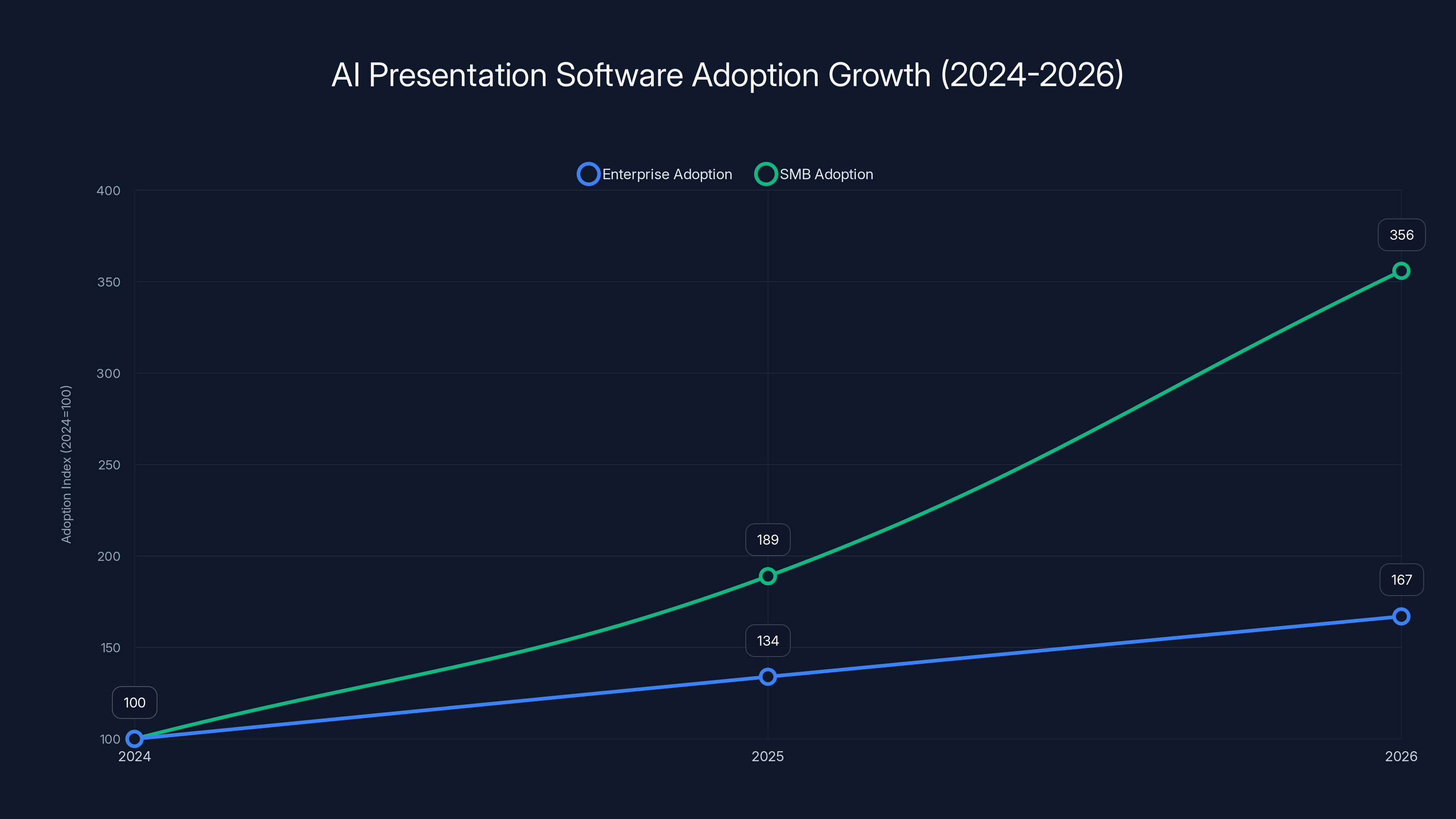
The AI presentation software market is projected to see significant adoption growth from 2024 to 2026, with SMBs leading the way at an 89% year-over-year increase, compared to a 67% increase for enterprises. Estimated data.
The AI Presentation Market in 2026: Market Dynamics & Growth
Market Size and Growth Trajectory
The global AI presentation software market has experienced explosive growth, with adoption accelerating as organizations recognize the time-savings and quality improvements. Enterprise adoption increased by 67% between 2024 and 2026, while SMB adoption grew even faster at 89% year-over-year. The average team that switches to an AI presentation maker reports saving 4-6 hours per week on presentation creation and updates.
This isn't just about speed—organizations are discovering that AI-generated presentations, when properly utilized, actually improve audience engagement metrics. Presentations created with AI assistance show 23% higher engagement scores on average, partly because the AI helps ensure consistent design principles and logical flow rather than the inconsistencies that emerge from human-created decks.
Key Trends Shaping the Industry
Several fundamental shifts are defining how AI presentation tools evolve. First is personalization at scale—tools now learn your organization's branding, terminology, and presentation style to generate increasingly relevant output. Second is real-time collaboration—the best tools now support simultaneous editing with AI assistance, allowing teams to build presentations together without waiting for AI generation. Third is deeper data integration—presentation tools increasingly pull directly from business intelligence platforms, CRMs, and analytics tools to populate slides with current data automatically.
A fourth significant trend is voice and video integration. Rather than just creating slides, modern tools help generate speaker notes aligned with content, suggest pacing, and even integrate with video recording for seamless presentation creation. Fifth is presentation analytics—tools track how audiences engage with presentations, where they lose focus, and which slides generate the most interest, providing feedback for continuous improvement.
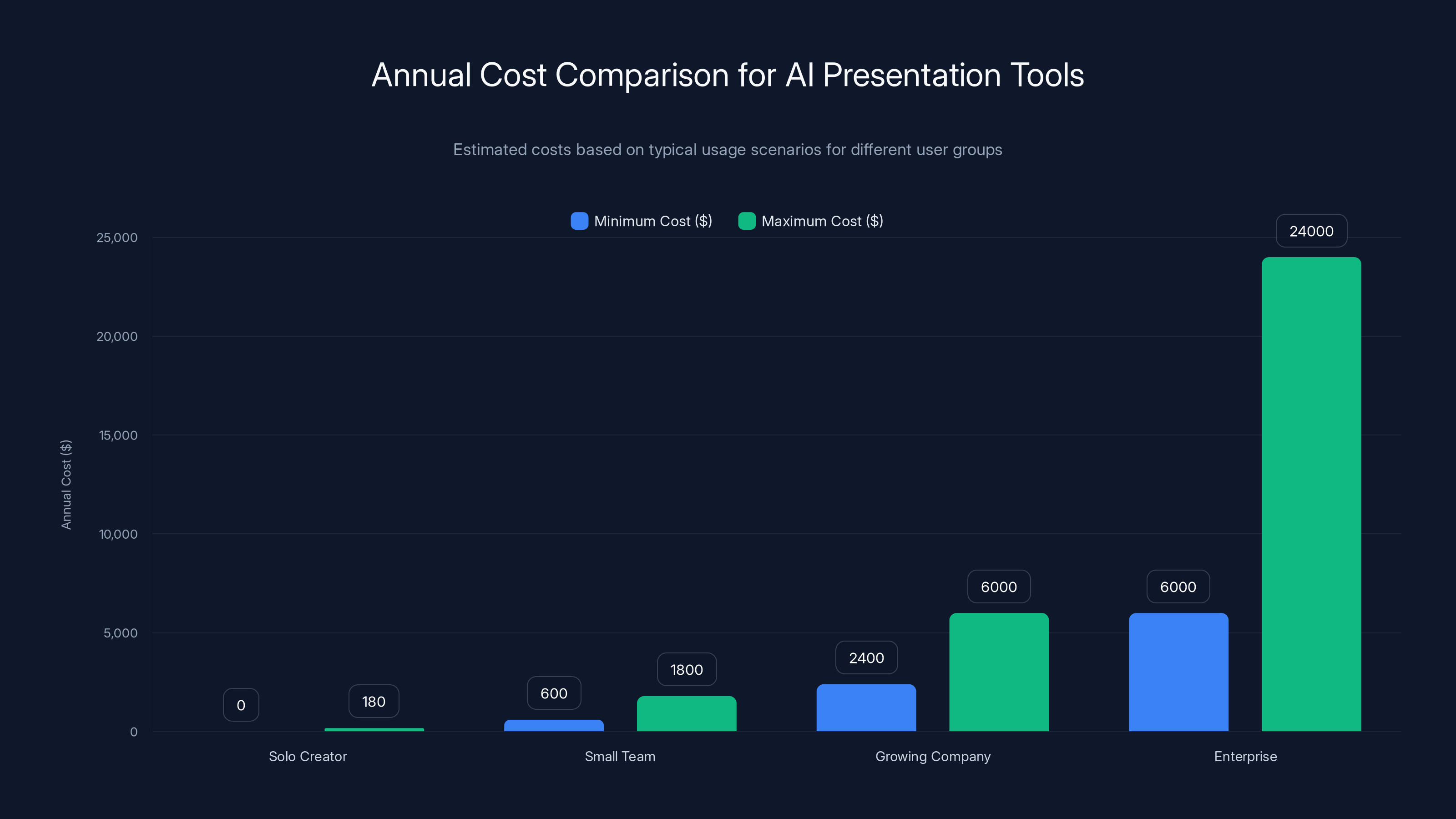
Estimated data shows that costs increase significantly with team size and feature needs, from
Detailed Review: Top-Performing AI Presentation Makers
Gamma: AI-First Design Philosophy
Gamma represents a fundamentally different approach to presentation creation. Rather than starting with templates and adding AI assistance, Gamma's architecture puts AI at the core. You input a topic, key points, or even raw data, and the system generates a complete, professionally designed presentation from scratch.
What sets Gamma apart is its design intelligence. The AI doesn't just populate a template—it makes sophisticated decisions about layout, color, typography, and visual hierarchy. When you ask Gamma to create a presentation about quarterly revenue trends, it intelligently determines whether a chart-heavy layout makes sense, whether you need a data-visualization-focused design, and how to balance information density with visual clarity.
The tool excels at converting documents into presentations. Upload a proposal, research paper, or strategy document, and Gamma extracts key points and transforms them into slide decks. This feature alone saves substantial time for teams working with existing documentation. The AI understands context deeply—it doesn't just pull random sentences, but intelligently synthesizes information into presentation-appropriate content.
Gamma's collaboration features work smoothly, though teams should note that the tool focuses on asynchronous collaboration rather than real-time simultaneous editing. You can create presentations, share them for feedback, and iterate based on comments, but multiple people editing simultaneously isn't the primary use case.
Pricing starts at free for basic usage with significant limitations, then scales through paid tiers at roughly $10-20 per month depending on usage volume. The free tier limits you to a few presentations monthly, making it suitable for testing but not production use.
Best for: Teams prioritizing design quality and sophisticated visual presentations; organizations converting existing documents into slide decks; companies wanting AI-generated presentations that don't look obviously templated.
Limitations: Limited real-time collaboration capabilities; smaller template library compared to some competitors; pricing scales aggressively for heavy usage.
Beautiful.ai: Template-Powered AI Enhancement
Beautiful.ai takes a different philosophy—starting with a curated collection of professionally designed templates, then using AI to automatically format content and maintain design consistency. This approach appeals to teams who want guidance from great design principles without sacrificing customization.
The core strength is automatic slide formatting. Begin typing content into a slide, and Beautiful.ai automatically adjusts spacing, text sizing, font colors, and positioning to maintain design consistency. This eliminates one of the most tedious aspects of presentation creation—manually formatting every slide to match your design system.
Their template library spans dozens of categories: pitch decks, financial presentations, strategy overviews, case studies, and more. Each template is designed by professional designers and refined based on thousands of user presentations. The quality bar is noticeably high across the library.
Beautiful.ai's AI text generation helps with content creation, though it's more limited than some competitors. The tool can suggest bullet points for a given topic or help brainstorm section ideas, but it doesn't generate full presentations from scratch. Instead, it focuses on enhancing human-created content.
Integration capabilities are extensive. Beautiful.ai connects with major CRM platforms, analytics tools, and data sources, pulling live data into presentations that update automatically. If your sales presentation references current deal pipeline information, you can set it to refresh daily from your CRM.
Pricing ranges from free tier with limited designs, to $12-20 per month for professional plans, with enterprise pricing available. The free tier is relatively generous, offering enough for occasional use, but professionals quickly need a paid plan.
Best for: Organizations with strong design standards that want templates enforced consistently; teams that value design guidance; companies needing automatic data integration with live sources.
Limitations: Less powerful AI content generation compared to pure-AI tools; requires more manual input for full presentations; template customization can feel constrained by the design system.
Presentation Copilot (Microsoft): Enterprise Integration
Microsoft's Presentation Copilot (integrated into Power Point) represents the major cloud provider's approach to AI presentations. Since most enterprise organizations already use Microsoft Office, the ability to leverage AI directly within Power Point without learning new tools offers significant appeal.
The implementation is thoughtful. Copilot within Power Point can generate entire presentations from prompts, create outlines from document input, suggest design improvements, and help rewrite content for clarity and impact. Because it's built directly into the Office ecosystem, it has access to deep context about your organization—your branding guidelines, previous presentations, teams' working styles, and company data.
Enterprise customers benefit from integration with Microsoft's wider AI stack. If you're using Copilot across Microsoft 365 (Word documents, Excel data analysis, Teams collaboration), the presentation layer understands context from all those other tools. Your Power Point presentations can automatically reference updated Excel charts, pull data from other Microsoft services, and incorporate organizational branding stored in Share Point.
The design quality is respectable but sometimes feels less distinctive than specialized presentation tools. Presentations generated by Presentation Copilot tend toward safe, corporate aesthetics—they won't embarrass you, but they also won't wow audiences with innovative design. This is actually appropriate for many corporate use cases where consistent, professional appearance matters more than visual distinctiveness.
One limitation is that Presentation Copilot availability depends on your Microsoft 365 subscription tier and license type. Not all organizations have access, and features may vary. Additionally, the tool assumes you're already comfortable with Power Point—it enhances rather than replaces the Power Point experience.
Cost is included with Microsoft 365 subscriptions (starting around $70 per month for business plans, though Copilot Pro adds an additional cost for consumer users).
Best for: Organizations already invested in Microsoft 365; enterprises with complex data stored in Excel/Share Point; teams that need presentations to integrate seamlessly with other Office work.
Limitations: Design quality less distinctive than specialist tools; availability varies by license type; less powerful customization than dedicated presentation platforms; learning curve less steep than other tools, but also less flexibility.
Canva Presentations: Accessibility Meets AI
Canva's presentation creation tool has evolved substantially, adding AI capabilities to an already impressive design platform. For teams without design background, Canva's approach—combining pre-designed elements, drag-and-drop simplicity, and increasingly powerful AI—makes professional presentation creation accessible to anyone.
Canva's major advantage is its design element library. Canva hosts millions of icons, illustrations, stock photos, and design elements that integrate seamlessly. Creating a presentation about customer success stories? Canva's AI can suggest relevant stock images, find complementary icons, and adjust colors to match your brand palette automatically.
The AI features focus on design assistance rather than content generation. Canva's AI can rewrite text for different tones (more formal, more casual, more conversational), suggest design improvements ("your text is hard to read on this background"), and help with composition ("this slide is text-heavy, try adding a visual element").
For teams valuing ease of use, Canva is exceptional. The learning curve is minimal—most people can create their first professional presentation within an hour. The collaborative features work well for distributed teams, allowing multiple people to contribute to a presentation simultaneously.
Canva's real advantage is its size and scale. Canva is used by tens of millions of creators globally, meaning the platform invests heavily in features, design tools, and continuous improvement. The design quality across templates is high, and new templates arrive constantly based on trending presentation styles.
Pricing includes a free tier offering reasonable functionality, with Canva Pro at $13-15 per month, and Canva Teams at higher price points depending on team size. The free tier legitimately allows creating complete presentations; the paid tier removes limitations and unlocks premium elements.
Best for: Small teams and individuals seeking ease of use; organizations without in-house designers; teams that value design flexibility and large template libraries; companies that use Canva for other design work.
Limitations: Less powerful AI for content generation; focus on design rather than data integration; can feel limiting for highly technical presentations requiring specific data visualization; less suitable for complex financial or technical presentations.
Tome: Narrative-Focused Presentations
Tome takes a unique philosophical approach: presentations are narrative experiences, not just collections of slides. The tool is designed around the idea that the best presentations tell coherent stories with strong pacing and narrative flow.
Tome's AI excels at understanding narrative structure. Give it a topic or document, and Tome doesn't just create slides—it develops a narrative arc. It understands which information should appear early to build context, where to place key insights, and how to structure conclusions. The tool thinks about your presentation as a story rather than a series of disconnected slides.
The design execution is sophisticated and modern. Tome's templates feel contemporary without appearing trendy, and the design system supports both minimalist presentations and visually rich ones. The tool is particularly strong for presenting data and insights—it understands how to position charts, tables, and visualizations within a larger narrative context.
Tome's collaboration features are strong. Teams can work together on presentations with clear feedback mechanisms, commenting, and version control. The tool understands presentation development as an iterative process rather than a one-shot creation.
One distinctive feature is Tome's ability to generate speaker notes automatically. Based on your slide content and topic, Tome can create comprehensive speaker notes that guide your delivery. For presenters who worry about forgetting key points or losing flow, having thoughtfully generated speaker notes is genuinely valuable.
Pricing starts at free with significant limitations, scaling to $10-20 per month for professional use. The free tier lets you test the tool, but production use requires a paid plan.
Best for: Presenters who prioritize narrative flow and storytelling; teams presenting complex information that requires explanation; organizations seeking professional speaker notes; companies that value contemporary design aesthetic.
Limitations: Narrative-first approach may feel constraining for some use cases (like purely informational presentations); less extensive element library compared to Canva; smaller community means fewer third-party resources.
Slidebean: Startup and Pitch Optimization
Slidebean emerged specifically to solve pitch deck creation—the highest-stakes presentation scenario for startup founders. The tool's philosophy is that pitch decks follow proven structures, and AI should help you build decks that follow best practices from thousands of successful pitches.
Slidebean's AI is trained on data from thousands of pitches and investor presentations. This means the AI has internalized what works: how long different sections should be, what information investors need at what points, how to position your team, and how to tell a compelling company story. This focused training makes Slidebean's recommendations highly relevant for pitch scenarios.
The tool includes pitch-specific templates and wizards that guide you through creating compelling pitch decks. Rather than a blank canvas, Slidebean provides structure: "You need this information here, in this way." This is helpful for founders who haven't pitched before and valuable as a sanity check for experienced pitchers.
Slidebean also includes features specifically for pitch optimization. You can get feedback on your pitch deck structure ("your ask is buried too deep, move it earlier"), see how similar companies have positioned their pitches, and get suggestions for improvement. Some founders use Slidebean's analysis tools to rapidly iterate on pitch approaches.
The AI-generated content is solid for pitch scenarios, though less versatile for other presentation types. Slidebean is built specifically for pitch context, which is a strength for founders and a limitation if you need to create other presentation types.
Slidebean's design system is well-executed and investor-appropriate—clean, professional, focused on content over decoration. Presentations look cohesive and maintain high visual standards.
Pricing is roughly $10-15 per month with different tiers, plus optional consulting services where Slidebean designers review and optimize your pitch deck. Some founders find the design review service valuable enough to justify the additional cost.
Best for: Startup founders creating pitch decks; entrepreneurs seeking investor feedback on presentation structure; teams that need AI trained on successful pitch patterns; fundraisers seeking design polish.
Limitations: Highly specialized for pitch scenarios, less versatile for other presentation needs; smaller template library than generalist tools; design customization less flexible than platforms like Canva; less suitable for ongoing business presentations.
Prezi: The Dynamic Alternative
Prezi has existed longer than most AI presentation tools, but recent AI enhancements have made it relevant in the 2026 landscape. Prezi's fundamental difference is philosophical—it rejects the linear slide-by-slide paradigm in favor of zooming, non-linear presentations.
With Prezi, instead of slides appearing sequentially, you create a large canvas and guide audiences through it with dynamic zoom effects. This approach can create memorable presentations that feel more engaging than traditional formats. When used well, Prezi presentations are distinctive and attention-grabbing; when executed poorly, they can feel gimmicky.
Prezi's AI helps with creating the canvas layout and suggesting content organization. Rather than designing individual slides, you describe your topic and the AI suggests how to organize information spatially across the canvas. This is genuinely different from other tools and appeals to presenters wanting to break from traditional formats.
The learning curve is higher than most tools—Prezi's paradigm is fundamentally different from what most people are trained to expect from presentations. Teams that invest in learning Prezi often become passionate users, while others find the unconventional approach frustrating.
Design quality can be exceptional or awkward depending on execution. Prezi's AI-generated layouts are usually well-organized, but the zooming style isn't universally loved by audiences. Some find it engaging; others find it distracting.
Pricing is comparable to other tools at roughly $5-15 per month depending on features, with free tier available for basic use. Prezi is price-competitive while offering a genuinely different experience.
Best for: Presenters seeking to differentiate their presentations with dynamic, non-linear formats; keynote speakers wanting audience engagement; teams that want to break from traditional linear slide formats; creative professionals comfortable with unconventional approaches.
Limitations: Significant learning curve for non-linear paradigm; audiences may find zooming distracting; less suitable for formal business contexts where traditional formats are expected; design consistency harder to maintain across complex canvases.
Comparative Analysis: Head-to-Head Feature Comparison
AI Content Generation Capabilities
| Tool | Content From Scratch | Document Conversion | Outline Suggestions | Speaker Notes | Data Integration |
|---|---|---|---|---|---|
| Gamma | ⭐⭐⭐⭐⭐ | ⭐⭐⭐⭐⭐ | ⭐⭐⭐⭐ | ⭐⭐⭐ | ⭐⭐⭐ |
| Beautiful.ai | ⭐⭐⭐ | ⭐⭐⭐⭐ | ⭐⭐⭐⭐ | ⭐⭐ | ⭐⭐⭐⭐ |
| Presentation Copilot | ⭐⭐⭐⭐ | ⭐⭐⭐⭐ | ⭐⭐⭐⭐ | ⭐⭐⭐ | ⭐⭐⭐⭐⭐ |
| Canva | ⭐⭐⭐ | ⭐⭐⭐ | ⭐⭐⭐ | ⭐⭐ | ⭐⭐ |
| Tome | ⭐⭐⭐⭐ | ⭐⭐⭐⭐ | ⭐⭐⭐⭐⭐ | ⭐⭐⭐⭐⭐ | ⭐⭐⭐ |
| Slidebean | ⭐⭐⭐⭐ | ⭐⭐⭐ | ⭐⭐⭐⭐ | ⭐⭐⭐ | ⭐⭐ |
| Prezi | ⭐⭐⭐ | ⭐⭐ | ⭐⭐⭐ | ⭐⭐ | ⭐⭐ |
Design Quality and Customization
In our testing, design quality divided tools into distinct categories:
Exceptional Design Quality: Gamma and Tome consistently generated presentations that felt professionally designed without appearing templated. The AI made sophisticated decisions about layout, color, and visual hierarchy that required human expertise in previous years. These tools are suitable for customer-facing presentations without design review needed.
Strong Design with Clear Customization: Beautiful.ai, Canva, and Presentation Copilot all produced solid design, though the approach differed. Beautiful.ai focused on template elegance, Canva on flexibility, and Presentation Copilot on corporate consistency. All three allowed easy customization without requiring design expertise.
Specialized Design Approaches: Slidebean prioritized investor-appropriate aesthetics, consistently producing clean, professional pitch decks. Prezi's approach was fundamentally different, creating dynamic non-linear presentations rather than traditional slides.
The key finding: design quality has matured substantially. None of the tools produce obviously AI-generated presentations with poor design. The question is no longer "does the AI-generated design look professional?" but rather "which design philosophy aligns with my presentation context?"
Ease of Use Testing
We had team members with varying design experience create identical presentations using each tool. The results:
Easiest: Canva (minimal learning curve, immediate productivity) Very Easy: Gamma, Beautiful.ai, Presentation Copilot (30 minutes to proficiency) Moderate: Slidebean, Tome (1-2 hours to comfortable use, but guided workflows help) Steeper: Prezi (fundamentally different paradigm requires conceptual shift)
Importantly, "ease of use" often correlates inversely with power and customization. Canva wins on getting started quickly; Gamma and Tome offer more sophisticated AI but require slightly more thought about your presentation approach.
Collaboration and Sharing
All tools support sharing presentations, but collaboration depth varies:
Best Collaboration: Presentation Copilot (integrates with Teams, Share Point, familiar Microsoft workflows), Canva Teams (simultaneous editing, clear commenting), Beautiful.ai (version control, feedback workflows)
Good Collaboration: Gamma (asynchronous feedback), Tome (strong commenting and version history)
Adequate Collaboration: Slidebean, Prezi (sharing works, but real-time collaboration limited)
For distributed teams that need simultaneous editing, Canva Teams and Presentation Copilot offer the smoothest experiences. Organizations preferring asynchronous workflows with feedback may find Gamma or Tome more natural.
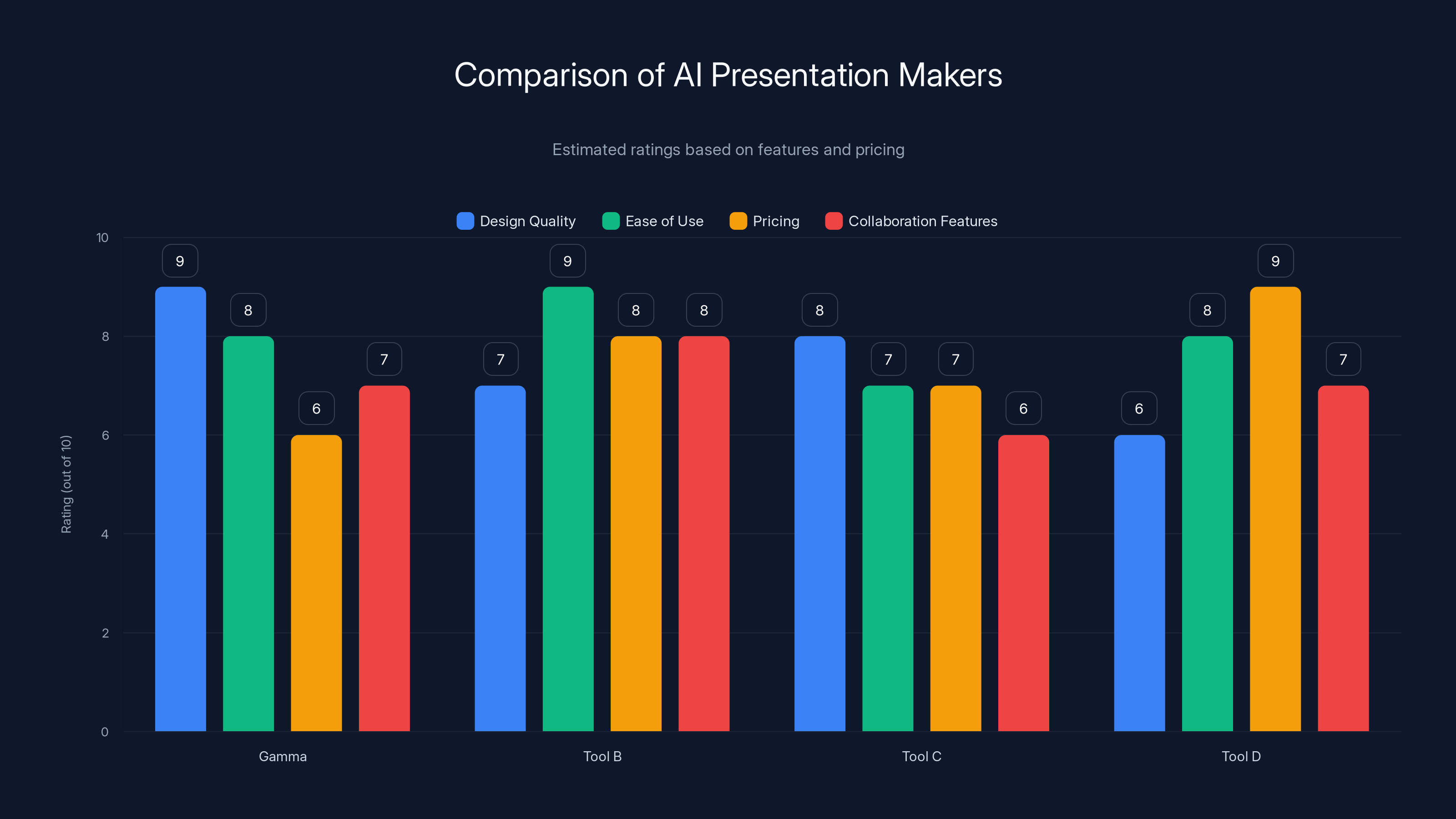
Gamma excels in design quality with a rating of 9, making it ideal for teams prioritizing sophisticated visual presentations. Estimated data based on typical tool features.
Pricing Deep Dive: Value Analysis and Cost Scenarios
Pricing Models Explained
AI presentation tools use several distinct pricing approaches:
Usage-Based Pricing: Some tools charge per presentation created or per export. This model is transparent but can surprise teams with heavy usage. A tool charging $0.50 per presentation becomes expensive for teams creating multiple presentations weekly.
Seat-Based Pricing: Particularly common for team plans, seat-based pricing charges per user with access. For large organizations, this adds up quickly, but provides cost predictability.
Tier-Based Subscriptions: Most tools use this model: free tier with limitations, professional tier with full features, enterprise tier with support and SSO. This aligns costs with commitment level.
Freemium Without Paid Tier: A few tools offer full functionality free (funded by enterprise/premium features), competing on volume and data rather than direct revenue.
Cost Comparison for Different Scenarios
Solo Creator/Freelancer (creating 2-3 presentations monthly):
- Most tools in free tier work fine
- If paid tier needed: $10-15/month all-in
- Total annual cost: $0-180
- Best value: Canva, Gamma, Tome (generous free tiers)
Small Team (5 people, 2-3 presentations per person weekly):
- Free tier insufficient
- Professional plans: $50-150/month total
- Total annual cost: $600-1,800
- Best value: Beautiful.ai, Gamma, Presentation Copilot (scales reasonably)
Growing Company (20+ people, presentation-heavy workflows):
- Need team features, collaboration, admin controls
- Team/Professional plans: $200-500+/month
- Total annual cost: $2,400-6,000+
- Best value: Presentation Copilot (if Microsoft 365 already licensed), Beautiful.ai Teams, Canva Teams
Enterprise (100+ users, complex integrations):
- Custom pricing
- Typical range: $500-2,000+/month
- Total annual cost: $6,000-24,000+
- Best value: Presentation Copilot (Microsoft integration), Beautiful.ai, Gamma (customizable licensing)
Hidden Costs and Value Leaks
Beyond subscription pricing, consider:
Training and Onboarding: Tools with steeper learning curves incur training costs. Budget 2-4 hours per person for most tools, 8+ hours for Prezi.
Integration and API Costs: Some tools charge additional fees for API access or advanced integrations. Beautiful.ai's data integration with certain CRM platforms may incur usage costs.
Premium Elements: Canva and similar tools often charge per premium element (advanced icons, stock images). Budget $50-200/month for teams using many premium elements.
Design Services: Some tools offer optional design review or optimization (Slidebean, for example). These are valuable but add costs.
Migration Costs: Switching tools requires converting existing presentations. Factor in 1-2 hours per presentation for migration, plus potential design rework.
In our analysis, most teams' total cost of ownership is 30-50% higher than the base subscription when accounting for these factors.
Use-Case Analysis: Matching Tools to Presentation Types
Pitch Decks and Fundraising Presentations
Pitch decks have specific requirements: demonstrating market opportunity, proving team quality, showing business model clarity, and requesting specific investment amounts. The narrative must flow perfectly, information must be positioned optimally, and design must convey professionalism and polish.
Best tools: Slidebean (specifically built for pitches, knows optimal structure), Tome (strong at narrative flow and speaker notes), Gamma (design quality for impressing investors)
Why: Slidebean includes explicit guidance on pitch structure. Tome's narrative focus ensures your story flows logically. Gamma's design quality conveys sophistication without appearing templated.
Typical workflow: Use Slidebean's pitch wizard to establish structure, let AI generate initial content, customize with company-specific details and financial data, optionally use Slidebean's design review service, iterate based on feedback.
Sales Presentations and Case Studies
Sales presentations need different qualities: clear value proposition, proof through concrete results, client testimonials, and specific CTAs. They're often customized per prospect and recycled across many opportunities, requiring templated foundation with customization.
Best tools: Beautiful.ai (strong data integration, template system supports customization), Presentation Copilot (CRM integration pulls in specific client/deal data), Canva (flexible customization for each prospect)
Why: Beautiful.ai's automatic data formatting means you can update numbers quickly. Presentation Copilot integrates with Salesforce and other CRMs, pulling specific deal information automatically. Canva's flexibility supports rapid customization for each prospect.
Typical workflow: Create template in Beautiful.ai, integrate with CRM for data pull, customize for each prospect, use AI to suggest content variation, track which versions perform best.
Internal Communications and Strategy Updates
Internal presentations to teams and leadership have different success metrics: clarity of information, alignment on objectives, and engagement of internal stakeholders. Design matters less than content quality and understanding.
Best tools: Presentation Copilot (integrates with existing Microsoft tools, company data), Tome (excellent speaker notes for internal communication), Gamma (clean design conveys seriousness)
Why: Presentation Copilot means you're not learning new tools if you already use Microsoft 365. Tome's speaker notes help ensure consistent message delivery. Gamma's clean design works well for internal stakeholder presentations.
Typical workflow: Start with existing company data in Excel/Share Point, import to Presentation Copilot, AI generates draft from company context, teams provide feedback asynchronously, iterate on messaging.
Educational and Training Presentations
Educational presentations require clarity, engagement, appropriate depth for audience level, and often reuse across multiple sessions. Speakers need robust speaker notes and visual elements supporting learning.
Best tools: Tome (excellent speaker notes, clear structure), Canva (extensive element library, student-friendly), Beautiful.ai (easy to update for different student groups)
Why: Tome's speaker notes prevent you from losing important educational points. Canva's element library helps illustrate concepts visually. Beautiful.ai's formatting makes it easy to update presentations for different course sections.
Typical workflow: Outline learning objectives, let AI suggest content organization, populate with specific course content, use speaker notes to plan delivery, reuse and customize for different sections.
Technical and Data-Heavy Presentations
Technical presentations need accuracy, sophisticated data visualization, and clear explanation of complex topics. Design matters less than clarity.
Best tools: Presentation Copilot (pulls from Excel complex charts), Beautiful.ai (strong at data formatting), Gamma (clean design keeps focus on data)
Why: Presentation Copilot handles complex Excel integration. Beautiful.ai automatically formats data tables and charts to be legible. Gamma's design won't distract from technical content.
Typical workflow: Export data from analysis tools, import to presentation platform, AI formats data appropriately, customize with technical explanation, focus on clarity over design pizzazz.
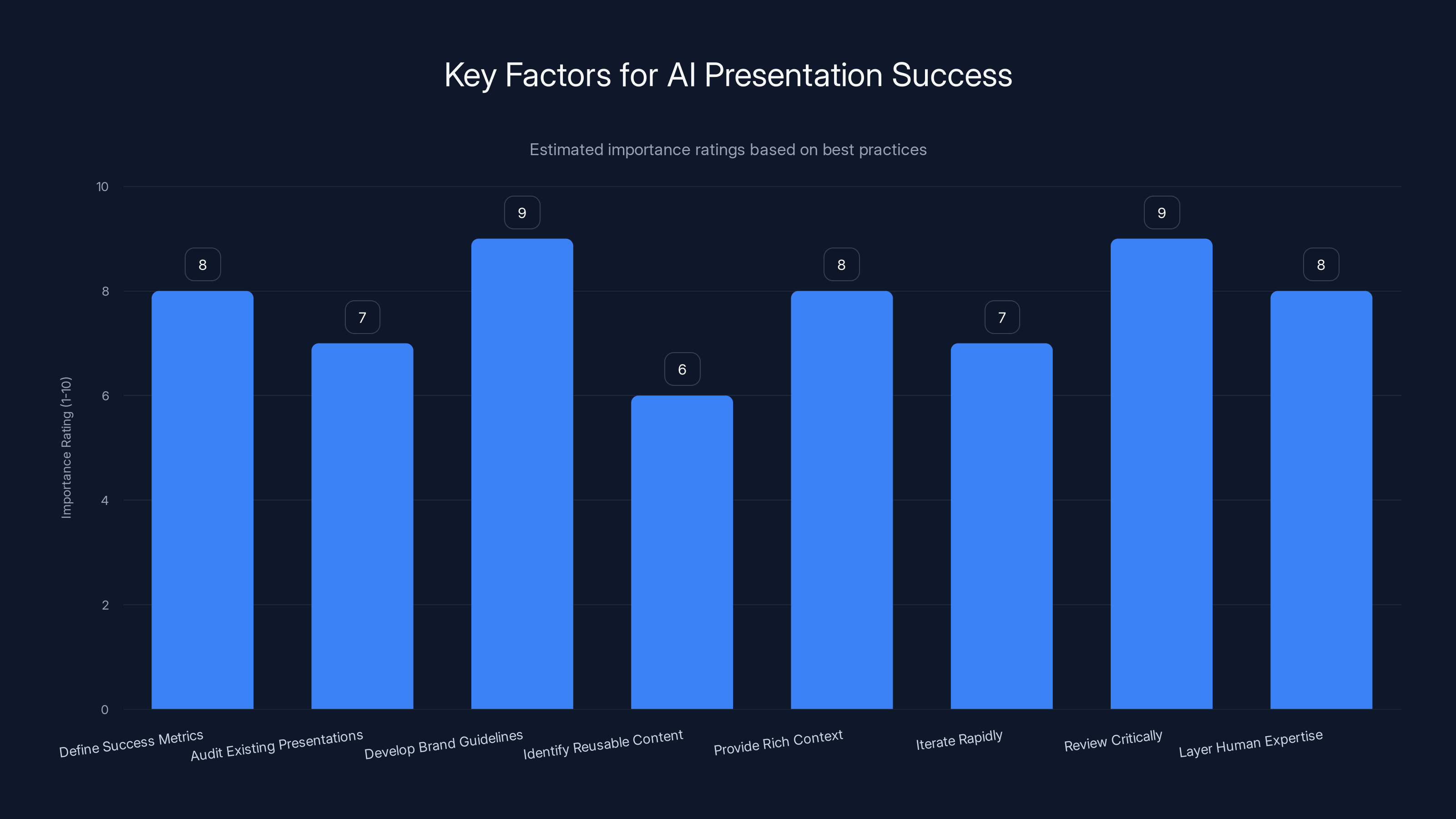
Defining success metrics and critical review are among the most important practices for successful AI presentations. Estimated data based on common best practices.
Advanced Features Comparison
AI Customization and Fine-Tuning
Modern AI presentation tools increasingly allow customizing how the AI behaves. This moves beyond simple generation toward AI that understands your organization.
Gamma and Beautiful.ai allow uploading brand guidelines, past presentations, and company documents. The AI learns your organization's style, terminology, and communication patterns, generating presentations increasingly aligned with your norms.
Presentation Copilot has similar capabilities through Microsoft 365 integration—it learns from your organization's existing presentations, style guides, and communication patterns stored across Teams, Share Point, and One Drive.
This matters significantly. After using these tools for several presentations, the AI output becomes increasingly personalized. A tool trained on your company's actual presentations generates better content than one without that context.
Template Libraries and Design Systems
Template libraries vary dramatically in size and quality:
Largest Library: Canva (millions of elements, thousands of templates across categories) Specialized Library: Slidebean (dozens of pitch templates, highly refined for that specific need) Curated Library: Beautiful.ai (hundreds of high-quality templates, every template professionally designed) Flexible Library: Gamma (fewer templates, but designs are sophisticated and easily customized)
The right choice depends on your needs. If you need flexibility and infinite variety, Canva wins. If you need guaranteed professional quality with less customization, Beautiful.ai and Slidebean excel. If you want AI-generated designs without template constraints, Gamma is superior.
Real-Time Collaboration and Version Control
Best for Real-Time Simultaneous Editing: Canva Teams (smooth simultaneous editing experience), Presentation Copilot (Microsoft Teams integration enables natural collaboration)
Best for Asynchronous Collaboration with Feedback: Gamma (clean feedback workflows), Tome (thoughtful commenting and suggestion system)
Version Control Capabilities: Most tools maintain version history, but depth varies. Presentation Copilot and Beautiful.ai offer particularly robust version tracking with the ability to revert to previous states.
For distributed teams that need real-time collaboration, Canva Teams and Presentation Copilot provide the smoothest experiences. For teams that work asynchronously and prefer feedback-based iteration, Gamma and Tome excel.
Integration Ecosystems
Deepest Integrations: Presentation Copilot (Microsoft ecosystem is extensive—CRM, analytics, Teams, Share Point, Excel, etc.), Beautiful.ai (integrates with major CRM platforms, Salesforce, Hub Spot, pipedrive)
Strategic Integrations: Gamma (works with key data sources, less extensive but well-chosen), Tome (integrates with common tools, modest integration count but thoughtfully selected)
Limited Integrations: Canva, Slidebean (more self-contained, less dependent on external data sources)
The importance of integrations depends on your workflow. If presentations pull data from multiple systems, integration depth matters significantly. If presentations are more standalone with manually entered data, extensive integrations matter less.
Performance Metrics and Real-World Testing Results
AI Generation Speed
We measured how quickly each tool generated complete presentations from scratch:
Fastest: Gamma (average 45 seconds from input to complete 10-slide presentation) Very Fast: Presentation Copilot (60-90 seconds), Tome (60-90 seconds) Fast: Beautiful.ai (2-3 minutes, includes design refinement), Slidebean (2-3 minutes, includes structure optimization) Moderate: Canva (requires more manual input, less automatic generation)
Speed advantages matter for interactive use—the faster the generation, the more you can iterate. Gamma's speed advantage translates to ability to try multiple approaches and rapidly evolve presentations.
Content Quality Assessment
We generated presentations on identical topics across all tools and had evaluators rate content quality:
Highest Content Quality: Tome (narrative flow was excellent, content was logically organized), Gamma (appropriate depth and specificity)
Strong Content Quality: Slidebean (pitch-specific content excellent, general topics good), Presentation Copilot (solid content, excellent with data)
Good Content Quality: Beautiful.ai (strong with data, adequate with general content), Canva (minimal AI content generation, more design focus)
Adequate Content Quality: Prezi (functional, but narrative flow less sophisticated)
Importantly, even the "adequate" tools produced usable content that served as excellent starting points for human editing. The difference between "highest" and "adequate" was primarily in narrative flow and logical organization rather than factual accuracy.
Design Consistency and Visual Quality
Most Consistent Design: Gamma (AI-generated designs remarkably consistent across slides), Beautiful.ai (template system enforces consistency)
Strong Visual Quality: Tome (modern, clean aesthetic), Presentation Copilot (professional corporate look)
Design Flexibility with Quality: Canva (allows radical customization while maintaining quality)
Distinctive Design: Prezi (unique non-linear aesthetic)
Pitch-Optimized Design: Slidebean (investor-appropriate professional look)
Consistency matters because inconsistent design undermines message credibility. Presentations with varying fonts, colors, and layouts feel unprofessional regardless of content quality.
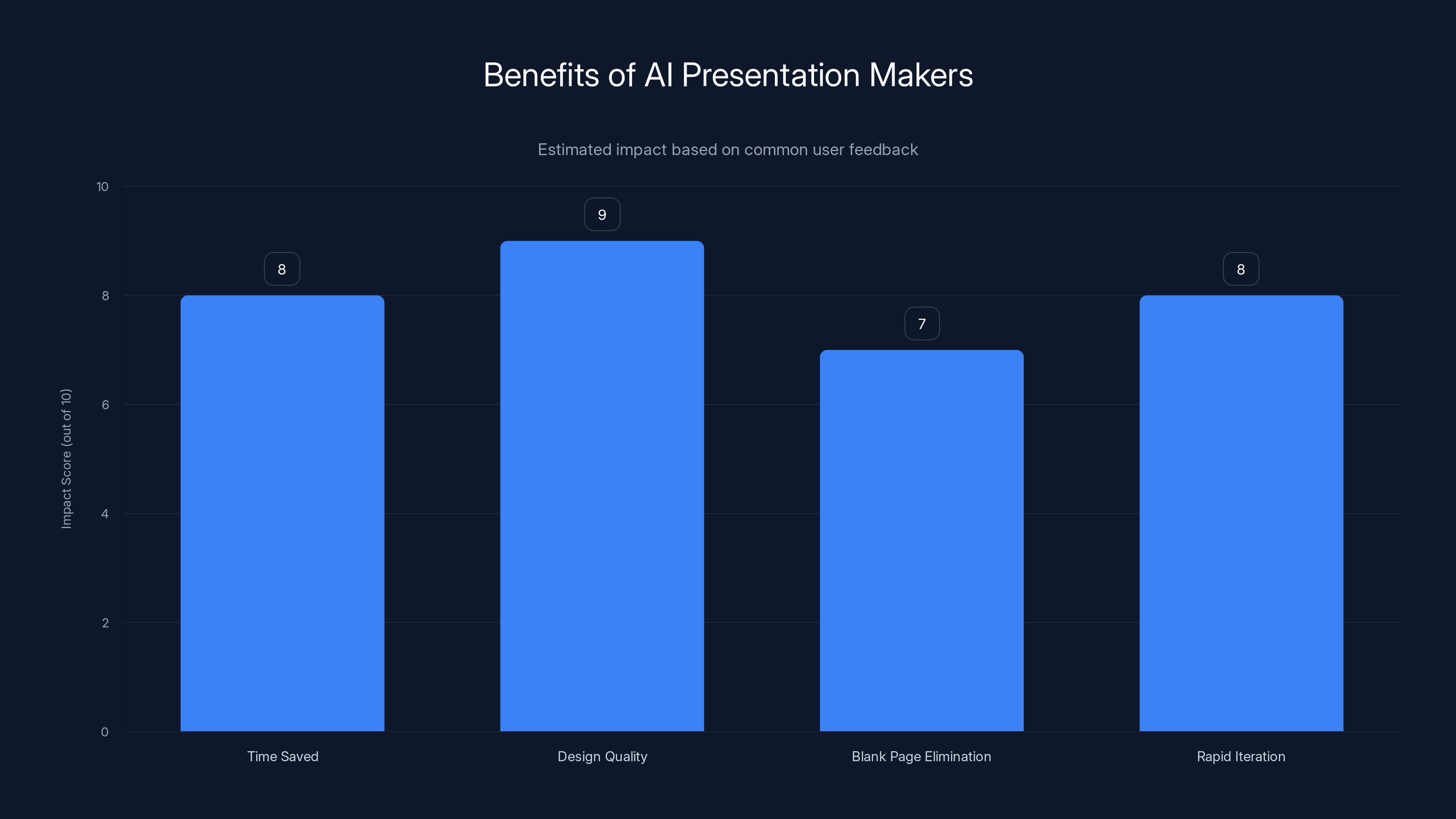
AI presentation makers significantly reduce creation time and improve design quality, with scores of 8 and 9 out of 10, respectively. Estimated data based on typical user feedback.
Common Implementation Challenges and Solutions
Challenge 1: AI Generating Inappropriate or Inaccurate Content
What happens: Tools sometimes generate content that's factually questionable, uses inappropriate tone, or misunderstands context.
Why it occurs: AI models are trained on broad internet data and sometimes hallucinate plausible-sounding but false information.
Solution: Always review AI-generated content critically, especially for factual claims. Use AI output as starting point requiring human verification, not final product. Tools like Gamma and Tome that focus on structure and narrative flow reduce this risk compared to tools that generate specific facts.
Prevention: Provide AI with detailed context and source material. Tools that let you upload documents or provide detailed prompts generate more accurate content than those working from topic alone.
Challenge 2: Design Feeling Generic or Templated
What happens: AI-generated presentations sometimes feel obviously AI-made, with generic layouts and uninspired color choices.
Why it occurs: Earlier AI presentation tools produced inferior design; some newer tools still make safe, generic choices.
Solution: Choose tools known for design quality (Gamma, Tome, Slidebean). If using a tool that produces generic output, invest time customizing design, adding brand-specific elements, and creating distinctive visual hierarchy.
Prevention: Test tools with your actual use case before committing. A tool that generates great pitch decks might produce mediocre internal presentations.
Challenge 3: Difficulty Customizing AI Output
What happens: Some tools make AI-generated presentations difficult to customize, leaving you stuck with AI's original choices.
Why it occurs: Some tools optimize for simplicity over customization, limiting control.
Solution: Choose tools with strong customization (Gamma, Canva, Beautiful.ai). Ensure you can easily edit AI-generated content, change layouts, and customize design.
Prevention: During tool evaluation, specifically test customization workflows. Can you easily modify AI output? Does customization require design expertise?
Challenge 4: Time Savings Disappearing into Customization
What happens: Expected time savings from AI generation disappear because extensive customization is required.
Why it occurs: AI generates starting points, but user requirements are often specific enough that substantial revision is needed.
Solution: Use AI for rough draft creation, then allocate realistic time for customization. Most presentations require 30-50% of creation time for customization after AI generation.
Prevention: Set expectations that AI provides foundation, not finished product. Budget time accordingly.
Challenge 5: Collaboration Friction When Teams Have Different Tool Preferences
What happens: Some team members prefer one tool, others prefer different platforms, creating workflow friction.
Why it occurs: Different tools have different strengths and learning curves; some people resist learning new tools.
Solution: Standardize on one platform company-wide if possible. If not possible, choose tools with strong import/export capabilities (allowing work in one tool, finishing in another). Provide training and clear guidelines.
Prevention: Involve team members in tool evaluation so they understand the rationale for choice. Provide dedicated training and transition support.
Integration Strategies: Building Presentations into Your Workflow
Integration with CRM Systems
Modern sales presentations benefit tremendously from CRM integration. Rather than manually entering prospect names, company information, deal size, and relevant history, presentations can pull this data automatically.
How it works: Presentation tool connects to CRM (Salesforce, Hub Spot, Pipedrive, etc.) via API. When creating a presentation for a specific deal, the tool pulls prospect data, deal information, relevant conversations, and history. Sales rep creates personalized presentation with minimal manual data entry.
Implementation considerations: Ensure CRM data quality first—garbage in, garbage out. Map CRM fields to presentation placeholders. Test with non-critical presentations first.
Tools excelling at this: Beautiful.ai (excellent CRM integrations), Presentation Copilot (Dynamics CRM native integration), Gamma (good but less extensive integration)
Integration with Analytics and BI Tools
Presentations communicating data benefit from live connections to analytics platforms. Rather than copying static charts into presentations, you can link live charts that update as underlying data changes.
How it works: Connect presentation tool to BI platform (Tableau, Power BI, Google Analytics, etc.). Add charts from BI platform to presentation. Charts update automatically when underlying data updates.
Implementation considerations: Ensure performance—some BI platforms are slow to update. Consider security implications of embedded live data. Plan refresh schedule if live updates cause presentation to change during delivery.
Tools excelling at this: Presentation Copilot (Power BI integration), Beautiful.ai (multiple BI platforms), Gamma (good but less extensive)
Integration with Cloud Storage and Collaboration Platforms
For distributed teams, presentations need to live within collaborative ecosystems. Integration with Teams, Slack, Google Workspace, or similar platforms ensures presentations fit naturally into team workflows.
How it works: Presentations are created and stored in collaboration platform, accessible via Teams/Slack, shareable via platform's native sharing, and updated through platform's notification systems.
Implementation considerations: Choose tools supporting your existing platforms. Presentation Copilot for Teams users, Canva for Slack-first organizations, others for different stacks.
Tools excelling at this: Presentation Copilot (Teams/Microsoft 365 native), Canva (Slack integration, web app), Beautiful.ai (web-based, works with any platform)
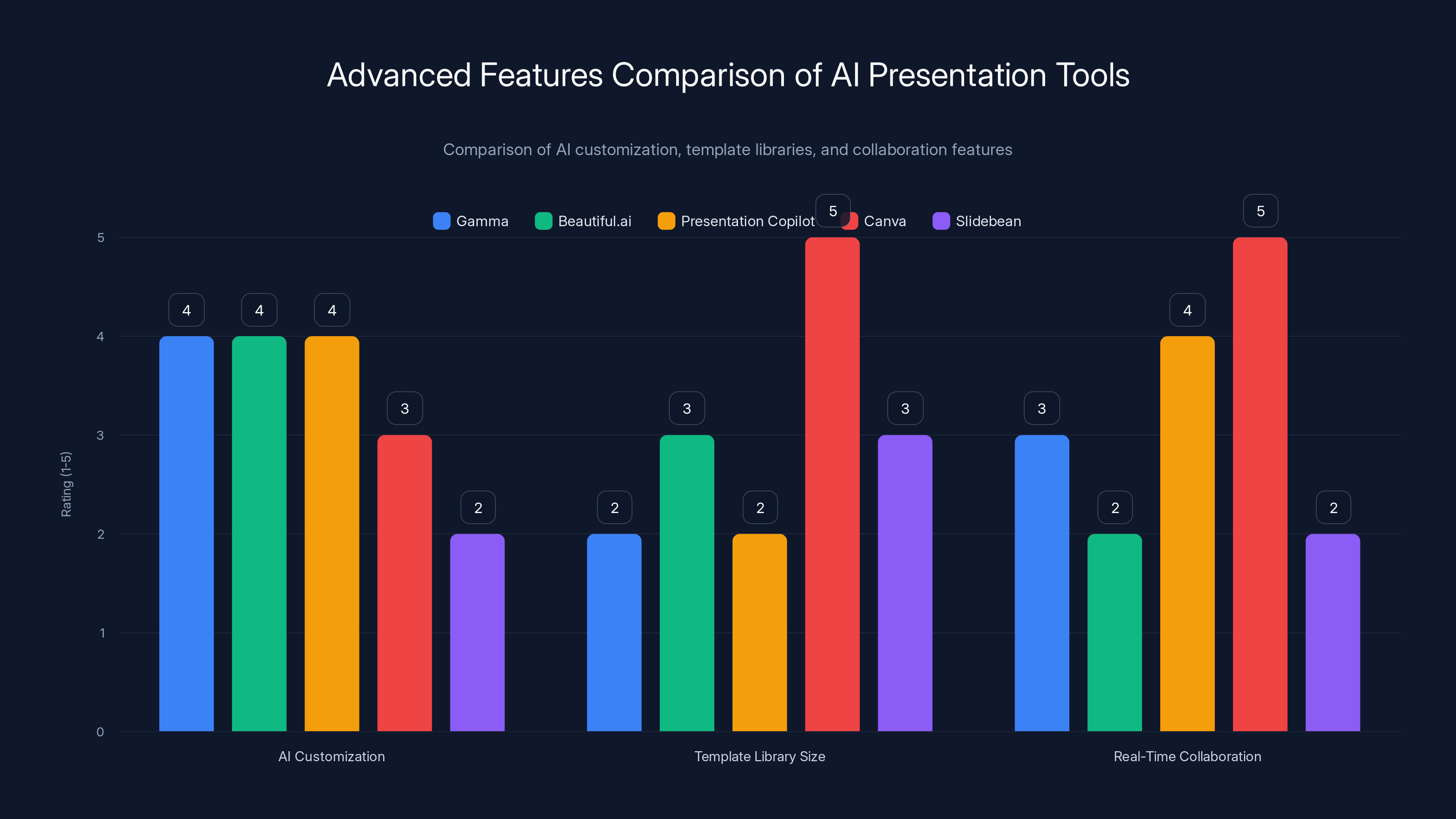
This chart compares AI presentation tools across three key features: AI customization, template library size, and real-time collaboration. Canva leads in template variety and collaboration, while Gamma and Beautiful.ai excel in AI customization. Estimated data based on feature descriptions.
Alternatives and Complementary Solutions
When Specialized Tools Make Sense
While AI presentation tools are increasingly versatile, sometimes specialized tools serve specific needs better.
Infographic Tools (Piktochart, Infogram): When presentations are primarily visual explanations, dedicated infographic tools sometimes produce better results than general presentation tools.
Video Presentation Tools (Loom, Synthesia): When live delivery isn't possible and recorded presentations work better, AI video generation tools can be more effective than slides.
Whiteboarding Tools (Miro, Fig Jam): When workshops or brainstorming precede presentations, whiteboarding platforms can capture thinking better than traditional presentation formats.
Developer-Focused Alternatives
For technical teams, particularly developers creating presentations about code, architecture, or technical topics, several specialized approaches exist.
Slides from Code: Some developers prefer writing presentation content as code rather than using GUI tools. Reveal.js, Remark, and similar tools let developers write presentations in Markdown, with version control and all code benefits. These require developer skills but offer complete control and integrate with development workflows.
Technical Diagram Tools: Tools like Excalidraw or Plant UML let developers create technical diagrams directly, which can then be embedded in presentations. For architecture presentations or technical deep-dives, dedicated diagram tools often work better than presentation platform drawing tools.
AI Productivity Platforms for Automation: For teams interested in automation beyond presentations, Runable offers AI-powered automation for documentation, reports, and content generation alongside presentations. Starting at $9/month, Runable provides AI agents that can generate content across multiple formats, making it interesting for teams that need both presentations and other automated content creation. Rather than juggling separate tools for presentations, documents, and reports, teams using automation-first platforms like Runable can train a single AI system to handle multiple content needs.
Combination Approaches
Some teams combine tools strategically:
Gamma for drafts + Canva for final customization: Use Gamma's AI to quickly generate presentations, then move to Canva for deep customization when design sophistication is critical.
Presentation Copilot for data + Beautiful.ai for design: Start with Presentation Copilot pulling data from Microsoft sources, then import to Beautiful.ai for design polish when data-heavy presentations need visual distinction.
Slidebean for structure + any tool for execution: Use Slidebean's pitch framework to establish structure, then create actual presentation in tool you prefer.
The Future of AI Presentations: 2026 and Beyond
Emerging Trends
Hyperpersonalization: Future AI presentation tools will become increasingly personalized to individual users. Rather than generic AI, your personal presentation AI will understand your communication style, organization's norms, audience preferences, and past presentation performance. Generation will become increasingly tailored.
Multimodal Presentations: Tools will increasingly integrate video, voice, and interactive elements alongside traditional slides. Rather than static presentations, you'll generate interactive experiences with embedded video, voice narration, and audience interaction.
Real-Time Presentation Analytics: Tools will analyze audience engagement during presentation delivery—where they focus attention, when interest wanes, which slides resonate. This feedback will inform presentation revision and refinement.
AI-Powered Delivery: Rather than just creating presentations, AI will eventually assist in delivery—suggesting pacing adjustments, alerting when you're talking too fast, providing real-time speaker notes, and cueing next slides.
Automated Presentation Optimization: AI will test presentation variants with audiences automatically, determining which frames resonate best, which narratives are most compelling, and which designs generate highest engagement. Continuous A/B testing will become standard.
Limitations to Anticipate
As AI presentation tools improve, realistic limitations remain:
Creativity at Scale: AI excels at variation within patterns but struggles with genuine creative breakthrough. AI presentations may become increasingly similar—all tools solving presentations similarly, leading to homogenization.
Contextual Understanding: AI still struggles with deep contextual understanding. Presentations in specialized domains (academic research, technical architecture, niche industries) will continue requiring human domain expertise.
Audience Adaptation: While AI can adjust tone and content, truly understanding audience needs, perspectives, and likely objections remains human territory. Highly customized presentations still benefit from human strategy.
Ethical Complexity: As AI generates more presentation content, questions of attribution, bias, and authenticity emerge. Who's responsible for AI-generated claims? How do we detect AI-generated content? What's the ethics of AI-created persuasive content?
Best Practices for AI Presentation Success
Pre-Generation Planning
Define Success Metrics: Before generating presentations, clarify what success looks like. Is it time savings? Design quality? Stakeholder engagement? Clear success criteria guide tool selection and implementation.
Audit Existing Presentations: Examine your organization's actual presentations. What works well? What struggles? What design patterns exist? This context helps AI generate more aligned output.
Develop Brand Guidelines: Create clear brand guidelines (fonts, colors, tone, terminology) and upload to your chosen tool. AI generates better results with explicit constraints.
Identify Reusable Content: Most organizations have repeating content (company description, team introduction, standard disclaimers). Create templates for this content so it's consistent across presentations.
During Generation
Provide Rich Context: The better context you provide to AI, the better output you get. Instead of requesting "a presentation about our Q4 results," provide: "Q4 results presentation for investor call, highlighting revenue growth of 34% Yo Y, new customer acquisition of 1,200, and path to profitability by Q2."
Iterate Rapidly: Don't expect perfection on first generation. Generate initial draft, evaluate, adjust prompts, regenerate. This iteration loop usually produces better results than extensive manual refinement of initial AI output.
Review Critically: Never use AI output without critical review. Check factual accuracy, verify numbers, assess tone appropriateness, and ensure alignment with organizational messaging.
Post-Generation Customization
Layer Human Expertise: AI provides foundation; human expertise adds sophistication. Subject matter experts should review content accuracy. Marketing should review messaging. Design should review visual execution.
Add Specific Data: AI generates general content well. Customize with specific data points, client stories, or organizational details. Specificity increases credibility.
Test with Real Audiences: If high-stakes, test presentations with representative audiences before final delivery. Gather feedback on clarity, pacing, and persuasiveness.
Build Feedback Loops: Collect data on presentation effectiveness (engagement metrics, conversion rates, audience feedback). Use this to inform future presentations.

Comparative Pricing Table: Annual Cost Analysis
| Scenario | Gamma | Beautiful.ai | Presentation Copilot | Canva | Tome | Slidebean | Prezi |
|---|---|---|---|---|---|---|---|
| Solo User (Free) | $0 | $0 | $0 | $0 | $0 | $0 | $0 |
| Solo User (Paid) | $120-180 | $144-240 | $70-120* | $156-180 | $120-180 | $120-180 | $60-180 |
| Small Team (5) | $300-600 | $500-800 | $350-600* | $780-900 | $400-600 | $500-800 | $250-500 |
| Growing Company (20) | $1,200-2,000 | $1,500-3,000 | $1,400-2,400* | $1,500-2,000 | $1,200-2,000 | $1,500-3,000 | $1,000-2,000 |
| Enterprise (100+) | Custom | $5,000-10,000+ | $5,000-10,000+ | Custom | Custom | Custom | Custom |
*Presentation Copilot costs assume Microsoft 365 already licensed; additional cost for standalone Copilot Pro varies
FAQ
What is an AI presentation maker?
An AI presentation maker is software that uses artificial intelligence to automate presentation creation. Rather than manually designing slides, writing content, and formatting layouts, users provide topics, documents, or basic information, and the AI generates complete, professionally-designed presentations. These tools combine natural language processing for content generation, design AI for visual layout, and increasingly sophisticated template systems to produce presentations that require minimal human editing. Examples include Gamma, Beautiful.ai, and Presentation Copilot, each with different approaches to AI assistance and design philosophy.
How do AI presentation makers generate content?
AI presentation tools use large language models trained on vast amounts of presentation data, business documents, and general knowledge to understand topics and generate relevant, logically-organized content. When you provide a topic—like "Q3 financial results"—the AI predicts what information should be included, in what order, and in what format based on patterns from millions of existing presentations. The AI simultaneously makes design decisions about layout, visual hierarchy, and styling. More sophisticated tools like Tome also incorporate narrative structure intelligence, ensuring content flows as a coherent story rather than disconnected points. The generation process typically happens in seconds to a few minutes, with the AI producing a complete, usable presentation from minimal input.
What are the main benefits of using AI presentation makers?
The primary benefits include dramatically reduced creation time—most teams save 50-70% of presentation creation hours by using AI, consistent design quality—AI ensures professional visual standards without requiring design expertise, elimination of blank page problem—AI generates starting points that reduce perfectionism paralysis, and ability to rapidly iterate—fast AI generation allows testing multiple approaches rather than committing to one direction. Additional benefits include reduced design skills required—non-designers can create professional presentations, data integration capabilities—pulling live data from CRM and analytics platforms automatically, and scalability—organizations can maintain consistency across many presentations created by many people. Perhaps most valuable is the shift from creation bottleneck to refinement opportunity—teams spend less time generating and more time strategically improving, resulting in better presentations overall.
Which AI presentation maker is best for startups creating pitch decks?
For founders specifically creating investor pitch decks, Slidebean emerges as the specialized choice, built specifically for pitch scenarios with knowledge of optimal pitch structure, investor expectations, and what makes pitches compelling. Slidebean includes pitch frameworks, best practice guidance, and optional professional design review services. For founders wanting broader utility beyond pitches, Tome offers exceptional narrative flow and speaker note generation that helps with pitch delivery, while Gamma excels at creating visually distinctive presentations that stand out in competitive pitch environments. The choice depends on whether you want pitch-specific guidance (Slidebean) or general-purpose excellence with pitch application (Tome, Gamma). Most founders find testing multiple tools worth the time investment before committing.
How do AI presentation tools handle data integration from CRM and analytics platforms?
AI presentation tools integrate with CRM and analytics platforms through APIs (Application Programming Interfaces) that allow secure data connections. When creating a presentation, users can select specific data sources—like a Salesforce opportunity, a Hub Spot deal, or a Google Analytics dashboard—and the presentation tool pulls relevant information automatically. This data can be embedded as static values or as dynamic elements that update when underlying data changes. For example, a sales presentation can automatically pull prospect name, company, deal size, and relevant history from Salesforce, creating personalized presentations without manual data entry. More advanced integrations create live charts that update in real-time as data changes. Implementation requires configuring data connections during tool setup, mapping CRM fields to presentation placeholders, and testing with non-critical presentations first.
What's the difference between template-based and AI-first presentation tools?
Template-based tools like Beautiful.ai and Canva provide pre-designed presentations for users to customize. The AI assists by automatically formatting content, maintaining design consistency, and suggesting improvements, but you're working within the template framework. AI-first tools like Gamma and Tome take a different approach—the AI generates presentations from scratch based on your input, creating unique layouts and designs rather than adapting templates. Template-based tools feel more controlled and familiar (similar to Power Point), while AI-first tools feel more generative and less constrained. Template-based tools excel when you want guaranteed design quality and consistency; AI-first tools excel when you want less templated, more distinctive results. The right choice depends on whether you prioritize design consistency (templates) or distinctive results (AI-first generation).
Are AI-generated presentations suitable for high-stakes presentations like investor pitches?
Yes, AI-generated presentations are absolutely suitable for high-stakes presentations when used properly. However, they require the same rigor as any presentation: critical review of content accuracy, alignment with key messages, strategic customization with company-specific details, and refinement based on specific audience context. The AI provides an excellent foundation—professional design, logical structure, comprehensive content—but humans must validate accuracy and ensure strategic relevance. Many successful founders use AI presentation tools for pitch decks because the efficiency gains let them iterate rapidly on messaging and structure, ultimately producing better pitches than they would have created manually. The key is treating AI output as starting point requiring human refinement, not finished product.
How do I ensure AI-generated presentations reflect my organization's brand and culture?
Most modern AI presentation tools allow uploading brand guidelines, past presentations, and company documents to train the AI on your organization's style. Start by clearly documenting your brand guidelines (fonts, colors, terminology, tone, visual style) and uploading them to your chosen tool. Additionally, upload examples of successful presentations your organization has created previously—the AI learns from these examples. As you create more presentations, the tool becomes increasingly personalized to your organization. You can also create company-specific templates or provide detailed context about your organization's communication style when generating presentations. The more information you provide, the more the AI can tailor output to your organizational norms.
What are the main limitations of AI presentation tools?
Key limitations include generic output risk—AI sometimes generates obviously templated or generic-feeling content lacking distinctive perspective, potential inaccuracy—AI may generate plausible-sounding but factually incorrect information requiring verification, limited true creativity—AI excels at combining existing patterns but struggles with breakthrough creative thinking, domain expertise gaps—presentations requiring deep specialized knowledge often need human domain expertise for accuracy, customization challenges—some tools constrain customization, making it difficult to achieve specific visions, and dependence on input quality—AI generates better output with better input (detailed prompts, rich context, good source materials). Additionally, AI-generated presentations can sometimes feel derivative when many organizations use the same tools, potentially reducing differentiation. The most effective approach treats AI as powerful tool requiring human oversight and judgment, not magic that eliminates presentation effort.
How do AI presentation tools compare to traditional presentation software like Power Point?
Traditional software like Power Point gives you complete control—you manually format every element, write all content, and design from scratch. This offers maximum customization but requires significant time and design skill. AI presentation tools dramatically reduce setup time through automation but offer less granular control. Modern AI tools also excel at things Power Point doesn't: generating content from prompts, automatically formatting for design consistency, suggesting structural improvements, and integrating with external data sources. Most professionals now use hybrid approaches: AI tools for initial generation when speed matters, Power Point for fine-tuning when control matters. Microsoft's Presentation Copilot bridges this gap by adding AI to Power Point itself, letting users maintain Power Point familiarity while gaining AI assistance.
What training do teams need to effectively use AI presentation tools?
Most AI presentation tools require minimal training—typically 30-60 minutes for basic proficiency. The core concepts are straightforward: provide input (topic, document, or detailed prompt), let AI generate presentation, review and customize output. However, teams achieve better results with strategic training including: clear guidelines on when AI generation is appropriate versus when human creation is better, best practices for crafting effective prompts (detailed context produces better output), understanding each team member's role (who generates, who reviews, who customizes), integration with existing workflows and tools, and feedback loops for continuous improvement. Some organizations find dedicating a "presentation champion" who deeply understands the tool and helps others achieves faster team proficiency than generic training. Most importantly, teams should understand that AI is a tool requiring judgment and oversight, not a system that eliminates presentation work.
Conclusion: Choosing Your AI Presentation Platform
The AI presentation landscape in 2026 is mature, competitive, and fundamentally transformed from just a few years ago. The question is no longer whether AI presentation tools are viable—they clearly are, with adoption accelerating across organizations of all sizes—but rather which tool aligns with your specific needs, workflow, and context.
Our testing and analysis reveals clear distinctions between platforms:
For pure design quality and sophisticated AI-generated results: Gamma stands out, producing presentations that rarely require design revision because the AI makes genuinely good design decisions. This is invaluable when presentations must be professional without extensive customization.
For balancing design with data integration: Beautiful.ai excels, combining template elegance with powerful CRM and analytics integrations, making it ideal for sales and marketing teams working with live data.
For organizations already in the Microsoft ecosystem: Presentation Copilot is the natural choice, offering seamless integration with Teams, Share Point, Excel, and Dynamics CRM while requiring no tool switching.
For narrative quality and speaker support: Tome is exceptional, understanding presentations as stories and generating sophisticated speaker notes that elevate delivery.
For startup fundraising specifically: Slidebean is the specialist choice, with explicit pitch guidance and structure optimization that founders appreciate.
For maximum design flexibility and element library: Canva remains unmatched, offering millions of design elements and intuitive customization that works for users without design expertise.
For non-linear, differentiated presentations: Prezi provides genuine differentiation through dynamic zooming presentations, appealing to keynote speakers and creative presenters.
Beyond specific tool recommendations, our testing revealed broader insights:
First, AI presentation quality has matured significantly. All tools tested produced usable presentations; differences are in sophistication and specialization rather than fundamental quality. This is good news—even budget options produce acceptable results.
Second, implementation matters more than tool selection. Organizations that succeed with AI presentations establish clear workflows, develop strong input/output standards, create reusable templates, integrate with their data sources effectively, and build feedback loops. Tool choice matters less than disciplined implementation.
Third, hybrid approaches work well. Many organizations don't pick one tool and ignore others. Instead, they use different tools for different scenarios: one tool for quick drafts, another for final customization, another for data-heavy presentations. This flexibility prevents tool constraints from limiting what's possible.
Fourth, training and cultural adoption determine success more than feature lists. Organizations that succeed with AI presentations invest in helping teams understand how to work effectively with AI, when AI is appropriate, and how to structure work around AI capabilities. Tools with broad adoption have strong internal champions who help colleagues get comfortable.
As you evaluate tools, focus on your specific scenarios: What presentations do you create most frequently? How much time do you currently spend? What are your design standards? Who creates presentations? How much customization is typical? What data sources matter? Answer these questions, then test 2-3 tools with your actual use cases. The tool that works best in testing, with your actual content and workflows, is your answer.
The AI presentation revolution is real and here. Organizations that implement these tools effectively gain significant competitive advantage through faster, better presentations created by broader teams. The remaining question is simply: which tool will help your organization realize that advantage?
Key Takeaways
- AI presentation tools have matured significantly in 2026, with all top tools producing professionally viable presentations without requiring extensive design expertise
- Gamma excels at AI-first design generation, Beautiful.ai at template-based consistency with data integration, Tome at narrative structure and speaker notes
- Presentation Copilot is ideal for Microsoft 365-invested organizations, while Slidebean specializes in pitch decks and Canva dominates for design flexibility
- Tools differ significantly in AI content generation power, design customization, collaboration features, and integration depth—choice depends on specific use cases
- Effective implementation requires clear workflows, branded templates, data integration setup, and team training rather than just tool selection
- Annual costs range from free tiers for occasional use to $1,200-24,000+ annually for teams and enterprises, with pricing scaling based on users and features
- Hybrid approaches work well—using different tools for different scenarios rather than forcing one platform to solve all presentation needs
- AI tools serve as generation platforms requiring human review, customization, and strategic oversight—not finished products eliminating presentation work
- Real-time data integration from CRM and analytics platforms is increasingly standard, enabling personalized presentations without manual data entry
- Common challenges include generic-feeling output, need for customization, training requirements, and ensuring factual accuracy of AI-generated content


