
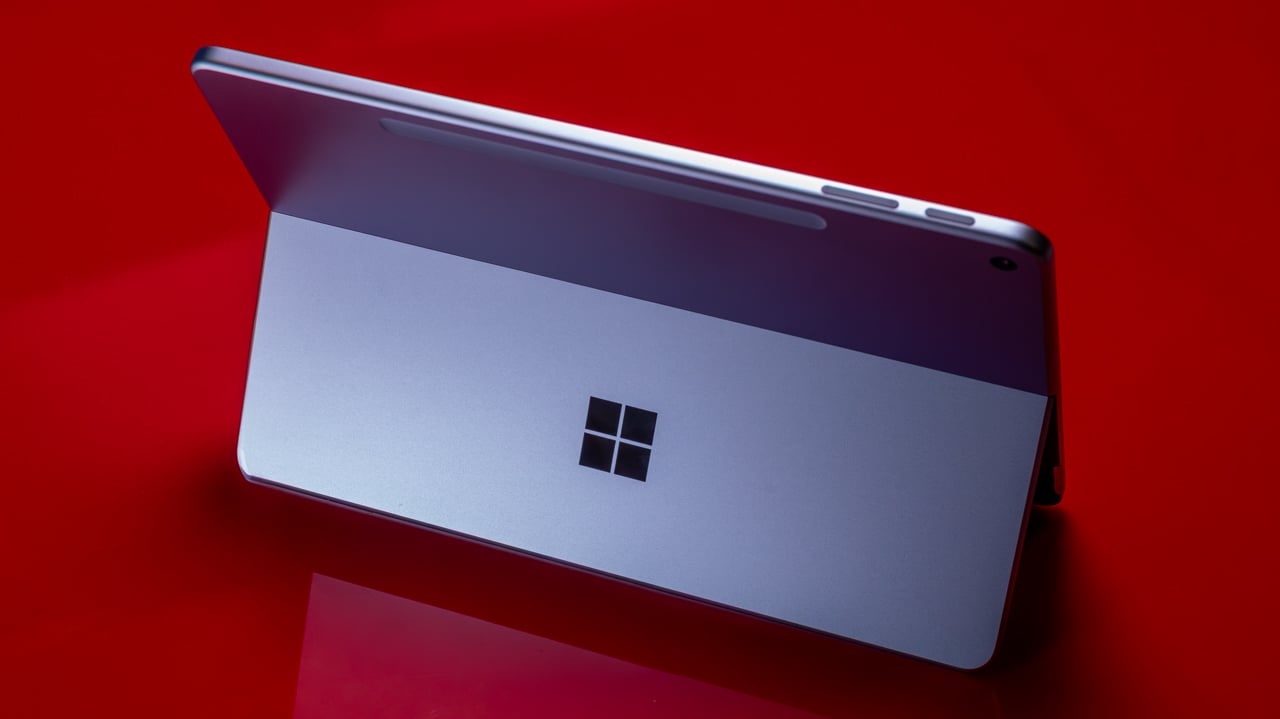
![Microsoft's Affordable Surface Devices: A New Era of Budget Computing [2025]](https://tryrunable.com/blog/microsoft-s-affordable-surface-devices-a-new-era-of-budget-c/image-1-1782338650311.jpg)
Microsoft's Affordable Surface Devices: A New Era of Budget Computing [2025]
Microsoft has taken a bold step forward in making technology more accessible with the introduction of cheaper Surface devices. These new models come with half the memory of their predecessors, but they offer a significant opportunity for budget-conscious consumers and educational institutions. This article delves into the implications of these new releases, exploring their technical specifications, potential use cases, and how they fit into the broader landscape of affordable computing.
TL; DR
- Affordable Pricing: Microsoft's new Surface devices offer budget-friendly options with reduced memory, making them accessible to more users. As noted by Gizmodo, these devices are designed to be more affordable.
- Target Audience: Ideal for students, educators, and budget-conscious consumers looking for reliable computing without breaking the bank.
- Technical Trade-offs: The devices feature half the memory of previous models, which could affect performance in memory-intensive tasks. According to The Verge, this reduction in RAM is a notable change.
- Versatile Applications: Suitable for everyday tasks such as web browsing, document editing, and media consumption.
- Future Trends: Expect a growing trend towards affordable computing solutions as technology becomes more integral to everyday life.
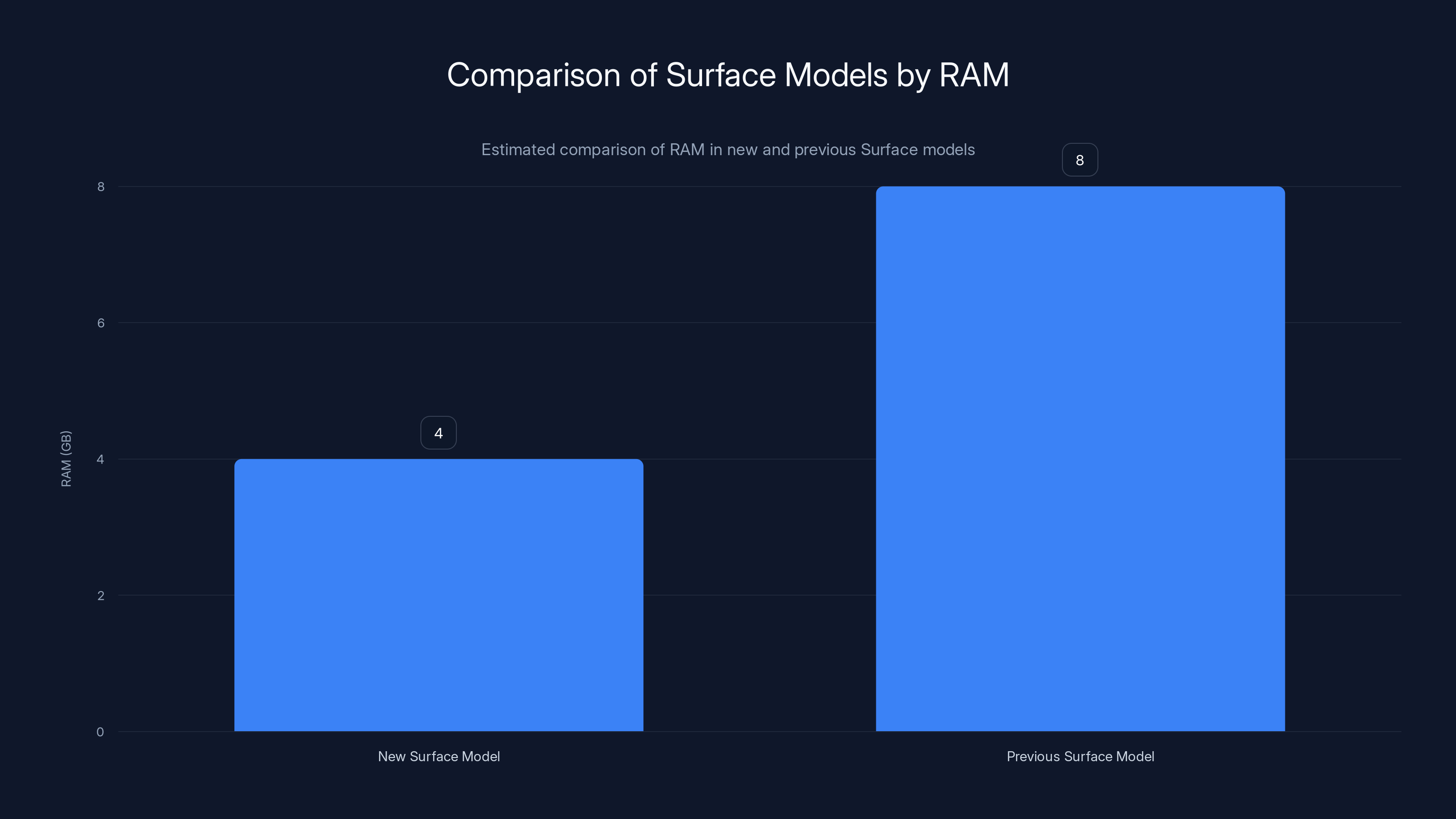
The new budget Surface model features 4GB of RAM, half of the 8GB found in previous models, reflecting a strategic cost-reduction approach. Estimated data.
The Rise of Budget Computing
In today's world, access to technology is more important than ever. With remote work and online learning becoming the norm, having a reliable computer is essential. However, not everyone can afford high-end devices. Recognizing this gap, Microsoft has introduced a new line of Surface devices at a lower price point, albeit with reduced memory. According to Microsoft's official announcements, these devices are part of a broader strategy to make technology more accessible.
Why Memory Matters
Memory, or RAM, is a critical component in any computing device. It directly affects the device's ability to perform multiple tasks simultaneously. More memory usually means better performance, especially for demanding applications such as video editing or gaming. However, not all users require high-performance devices. For many, basic tasks like web browsing, streaming, and document editing don't necessitate large amounts of RAM. As highlighted by The New York Times' Wirecutter, many users find that 4GB of RAM is sufficient for everyday tasks.
Technical Specifications
The new Surface models come equipped with 4GB of RAM, compared to the standard 8GB found in previous models. This reduction in memory is a strategic decision to lower costs while still providing a functional device for everyday use.
- Processor: Intel Core i 3 or equivalent
- Storage: 64GB SSD
- Display: 12.3-inch Pixel Sense display
- Battery Life: Up to 10 hours on a single charge
These specifications are detailed in PhoneArena's coverage of the latest Surface models.
Use Cases and Target Audience
These devices are aimed at students, educators, and budget-conscious consumers who need a reliable, portable computer for basic tasks. The reduced memory may limit the device's ability to handle more demanding applications, but for the target audience, this trade-off is often acceptable.
Educational Institutions
Schools and universities can benefit from the lower cost of these devices, allowing them to equip more students with the technology needed for modern learning environments. The Surface devices support educational software and cloud-based applications, making them ideal for classroom use. This aligns with findings from Cybersecurity Ventures, which emphasize the growing reliance on digital tools in education.
Everyday Consumers
For users who primarily use their devices for internet browsing, streaming, and office applications, the new Surface models provide a cost-effective solution. They offer the essential features needed for everyday tasks without the added expense of higher-end models. As reviewed by Mashable, these devices are among the best options for budget-conscious buyers.
Practical Implementation and Best Practices
Implementing these devices in an educational or personal setting requires understanding their limitations and optimizing usage to get the most out of their capabilities.
Configuring for Performance
- Optimize Settings: Disable unnecessary startup programs to free up RAM.
- Use Cloud Storage: Save files to cloud services like One Drive to make the most of limited local storage.
- Regular Maintenance: Perform routine updates and clear cache files to maintain performance.
Network Considerations
Ensure that the device is connected to a reliable internet connection, as many applications and services will rely on cloud-based resources.
Common Pitfalls and Solutions
Limited Memory Management
- Problem: Running multiple applications simultaneously can slow down performance.
- Solution: Close unused applications and use browser extensions sparingly.
Storage Constraints
- Problem: Limited storage space can fill up quickly.
- Solution: Regularly transfer files to external storage or utilize cloud storage.
Future Trends in Affordable Computing
As technology becomes more integral to everyday life, the demand for affordable computing solutions is expected to rise. Companies are likely to continue developing cost-effective devices that provide essential features without unnecessary extras. This trend is driven by the need to make technology accessible to a broader audience, including those in developing regions. According to Cybersecurity Ventures, the global data landscape is expanding rapidly, necessitating more accessible technology.
The Role of Cloud Computing
Cloud computing will play a significant role in this shift. By offloading processing and storage to the cloud, devices can be made more affordable without sacrificing functionality. This is supported by insights from Microsoft's comprehensive guide on utilizing Surface devices efficiently.
AI and Machine Learning
Emerging technologies like AI and machine learning can optimize device performance by predicting user behavior and managing resources more efficiently.
Recommendations for Prospective Buyers
Before purchasing a new Surface device, consider the following:
- Assess Your Needs: Determine if your primary tasks align with the device's capabilities.
- Explore Alternatives: Compare with other devices in the same price range to ensure it meets your requirements. The New York Times' Wirecutter offers a comprehensive comparison of similar devices.
- Future-Proofing: Consider how long you plan to use the device and whether it can meet your needs over time.
Conclusion
Microsoft's new line of affordable Surface devices represents a significant step towards making technology accessible to a wider audience. While the reduced memory may not suit power users, it provides a practical solution for those who need a reliable, cost-effective device for everyday tasks. As the demand for affordable computing grows, we can expect to see more innovations that bridge the gap between cost and functionality.

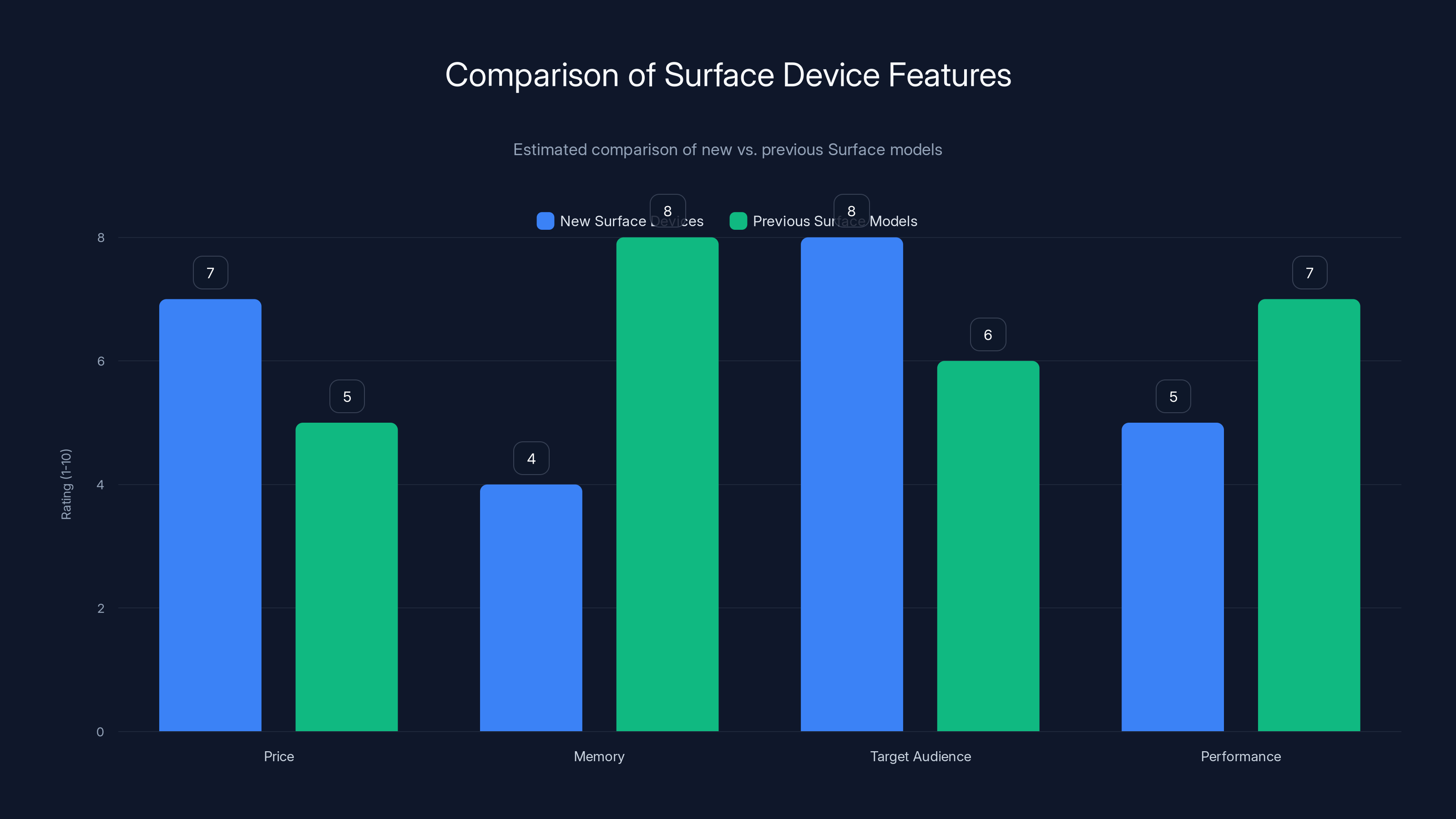
The new Surface devices offer improved affordability and target a broader audience, but with reduced memory, potentially impacting performance in demanding tasks. Estimated data.
FAQ
What is the main advantage of the new Surface devices?
The main advantage is their affordability, making them accessible to a wider range of users without sacrificing essential functionality.
How does the reduced memory affect performance?
Reduced memory can limit the ability to run multiple applications simultaneously but is generally sufficient for basic tasks like web browsing and document editing.
Who should consider buying these new devices?
Students, educators, and budget-conscious consumers who need a reliable device for everyday tasks should consider these new Surface models.
Are there any alternatives to Microsoft's Surface devices?
Yes, there are alternatives from other manufacturers that offer similar specifications and price points, such as Chromebooks and entry-level laptops. For a detailed comparison, see The New York Times' Wirecutter.
How can I optimize my Surface device for better performance?
Optimize performance by disabling unnecessary startup programs, using cloud storage, and performing regular maintenance.
What future trends can we expect in affordable computing?
Expect an increase in cloud-based solutions and AI integration to optimize performance and reduce costs, making devices more accessible.
How does cloud computing benefit budget devices?
Cloud computing allows for offloading of processing and storage, reducing the need for powerful hardware and thereby lowering costs.
What should I consider before purchasing a budget device?
Consider your primary tasks, compare alternatives, and assess whether the device will meet your needs over the long term.
Key Takeaways
- Microsoft's new Surface devices offer affordable computing options with reduced memory.
- These devices are ideal for students and budget-conscious consumers.
- Cloud computing and AI will drive future trends in affordable technology.
- Optimizing device performance can extend its usability and efficiency.
- Expect increasing demand for budget-friendly computing solutions.
Related Articles
- Are Microsoft Surface Price Cuts Worth the RAM Reduction? [2025]
- 3D Printing Your Gaussian Splat: A Modern Marvel of Tech Innovation [2025]
- 'Deepfake as a Service' Dark Web Surge: Implications for Cybersecurity [2025]
- Everything You Need to Launch a Team of AI Agents [2025]
- Why Choose Kindle Colorsoft Over Paperwhite This Prime Day: A Comprehensive Guide [2025]
- Revolutionizing Cargo Security: The Impact of Advanced Tracking Labels [2025]


