
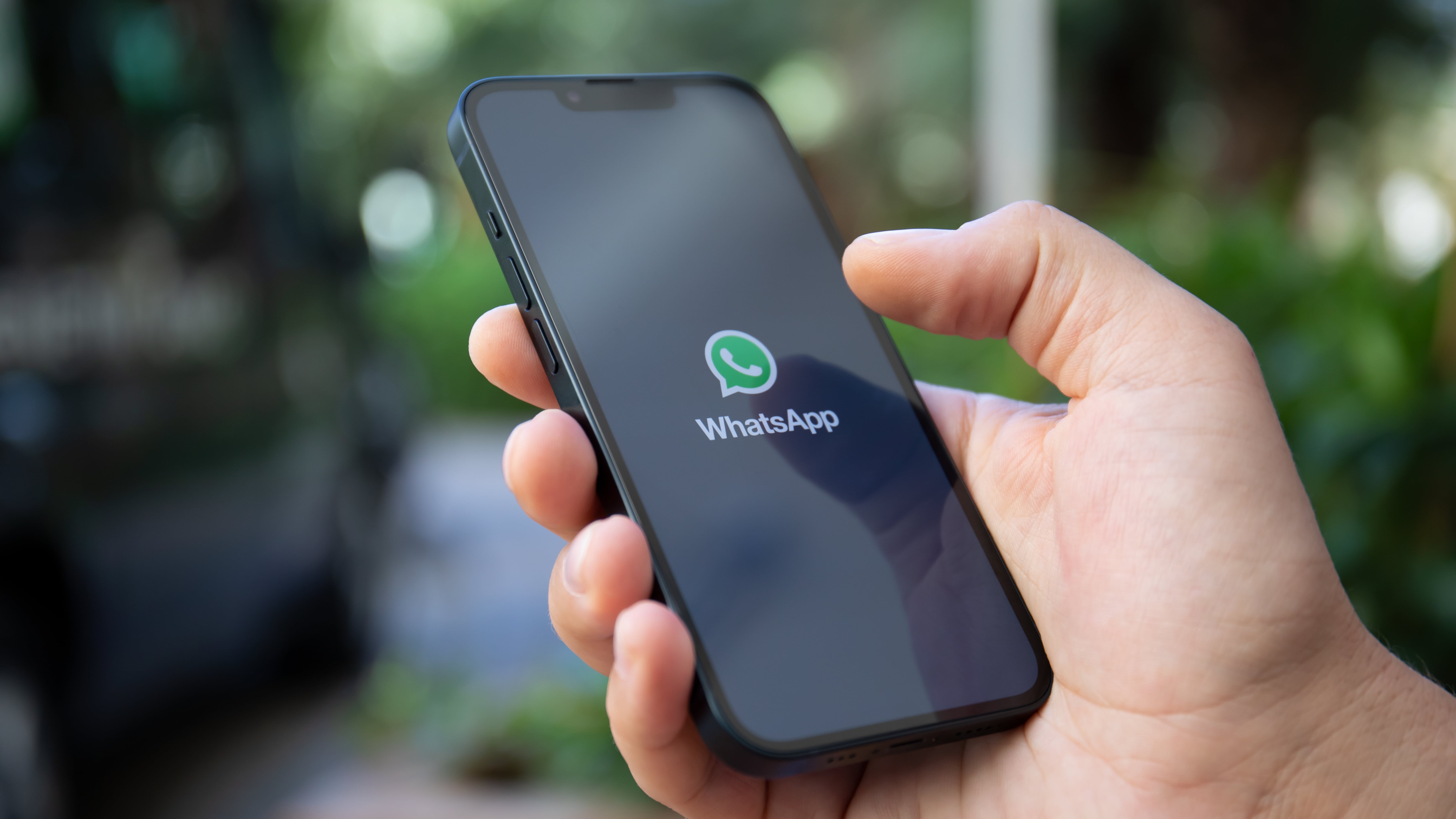
![WhatsApp Spoiler Feature: Hide Content Like Reddit [2025]](https://tryrunable.com/blog/whatsapp-spoiler-feature-hide-content-like-reddit-2025/image-1-1771697177863.jpg)
WhatsApp Gets a Spoiler Shield: Why This Feature Changes Everything
You're scrolling through your group chat when suddenly someone drops a massive spoiler about the finale you haven't watched yet. Panic mode activates. You scroll up frantically, hoping you missed it, but nope—there it is, in permanent digital infamy. Sound familiar?
WhatsApp is about to solve one of group chat's most annoying problems. The platform is developing a spoiler-hiding feature similar to Reddit's spoiler tags, which means you'll finally be able to protect yourself (and others) from unwanted plot reveals, gaming surprises, or shocking news before you've had a chance to experience it yourself.
This isn't just a nice-to-have feature. In a world where streaming services drop entire seasons in 24 hours and social media moves at lightning speed, spoiler protection has become essential. Whether you're waiting for the season finale of your favorite show, avoiding gaming leaks, or protecting friends from news they haven't heard yet, this feature addresses a real friction point in how we communicate.
The best part? It's coming soon to WhatsApp, and it'll work exactly like you'd expect. Let's break down what's actually happening, why it matters, and what it could mean for the future of messaging apps.
TL; DR
- What's Coming: WhatsApp is adding a Reddit-style spoiler tag feature that blurs text until users tap to reveal it
- How It Works: Users can mark text as a spoiler before sending, which automatically hides content from view
- Timeline: The feature is in active development and expected in the coming months
- Why It Matters: Group chats are finally getting protection against accidental spoilers and sensitive content
- The Bigger Picture: This reflects WhatsApp's push to match feature parity with competitors and improve user experience
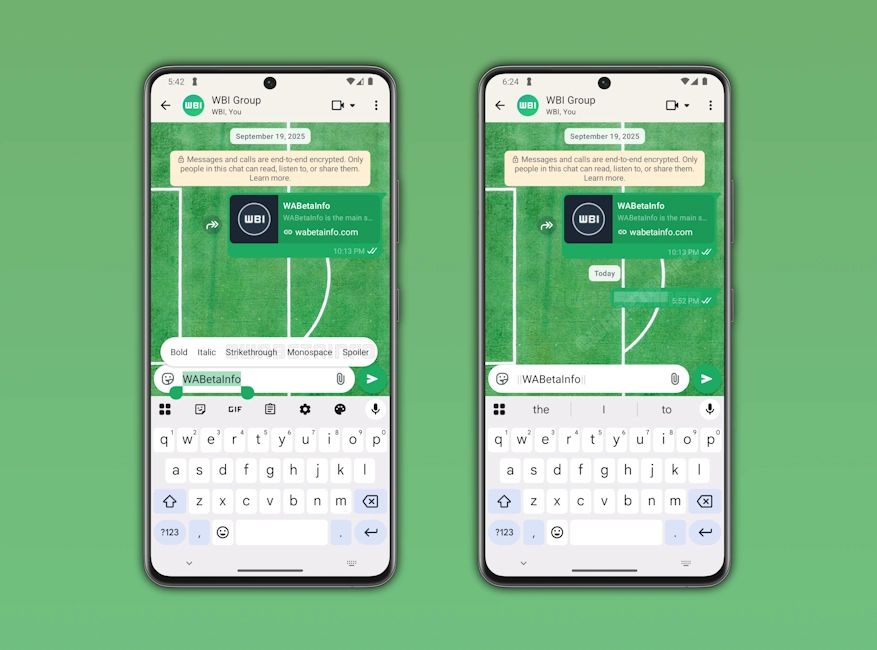
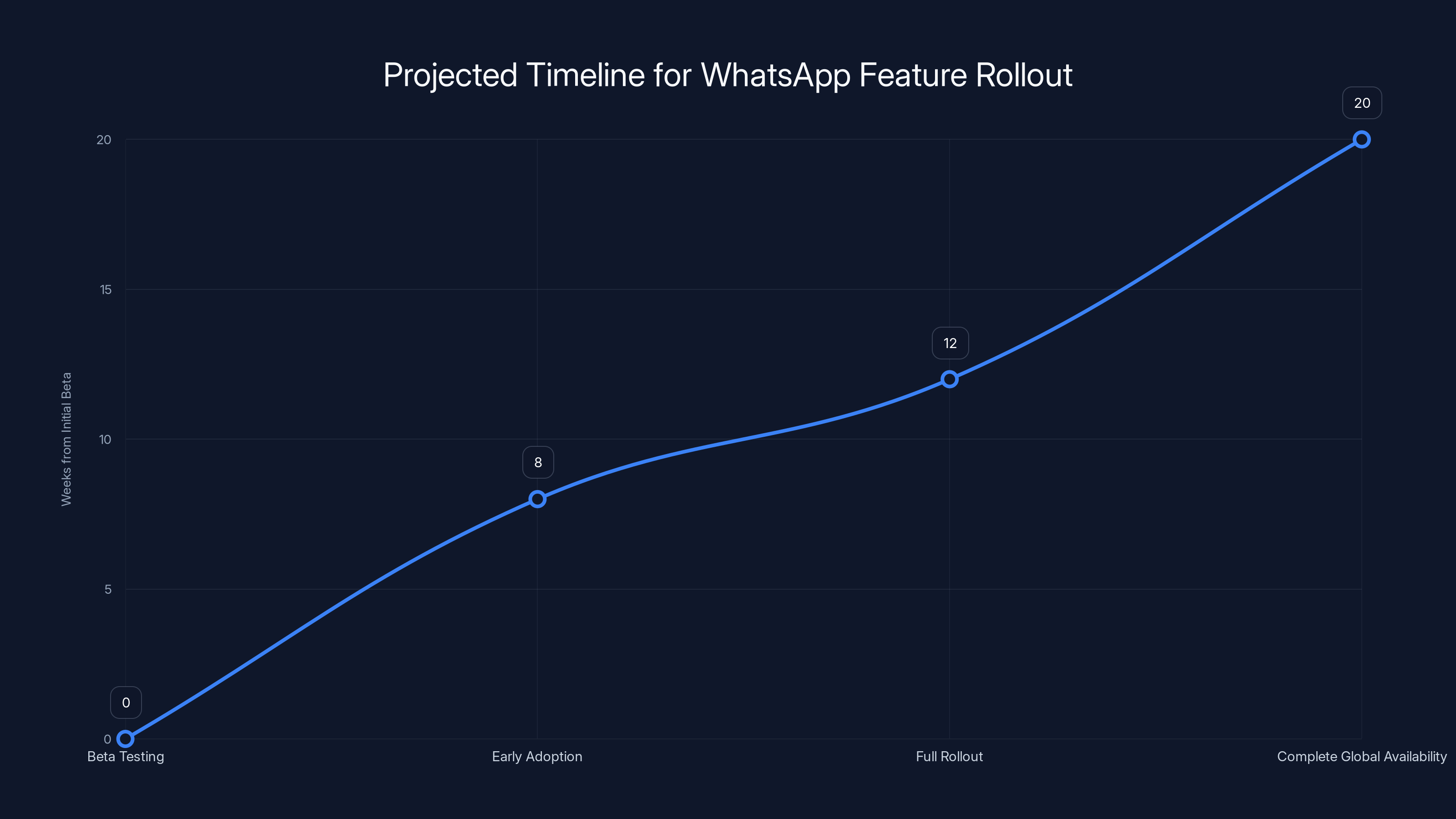
The feature is expected to move from beta testing to complete global availability in approximately 20 weeks, with potential delays extending the timeline to 24 weeks. Estimated data based on typical rollout patterns.
Understanding the Spoiler Feature Problem
Before diving into solutions, let's talk about why spoilers are such a big deal in group chats.
Group conversations are messy. They're fast-paced, unmoderated, and full of people at different points in their lives. Someone finishes watching The Traitors on Tuesday and immediately wants to discuss it. But in that same group, three other people are on episode three. Without a spoiler tag, the conversation becomes a minefield.
Reddit solved this problem years ago with its spoiler tags—users wrap text in special formatting, and it displays as a blurred block until someone taps it. It's simple, effective, and immediately familiar to anyone who's spent time on forums or discussion boards. The person posting gets to share their excitement, and the people who aren't ready get to protect themselves. Nobody's left guessing whether it's safe to read.
Messaging apps have been slower to adopt this. Most platforms focus on end-to-end encryption, read receipts, and emoji reactions—important features, sure, but they don't address the actual problem of accidental information spoiling.
WhatsApp's move here is significant because it's the world's most-used messaging app. Over 100 million messages are sent on WhatsApp every single day, making it the default group chat platform for billions of people globally. Bringing spoiler protection to WhatsApp means bringing it to your family group chat, your friend group, your work team, and essentially everywhere conversations happen.
The problem isn't technical complexity—it's that nobody's bothered to prioritize it. Until now.
How the Reddit Spoiler Tag Works
To understand what's coming to WhatsApp, it helps to look at how Reddit already solved this problem.
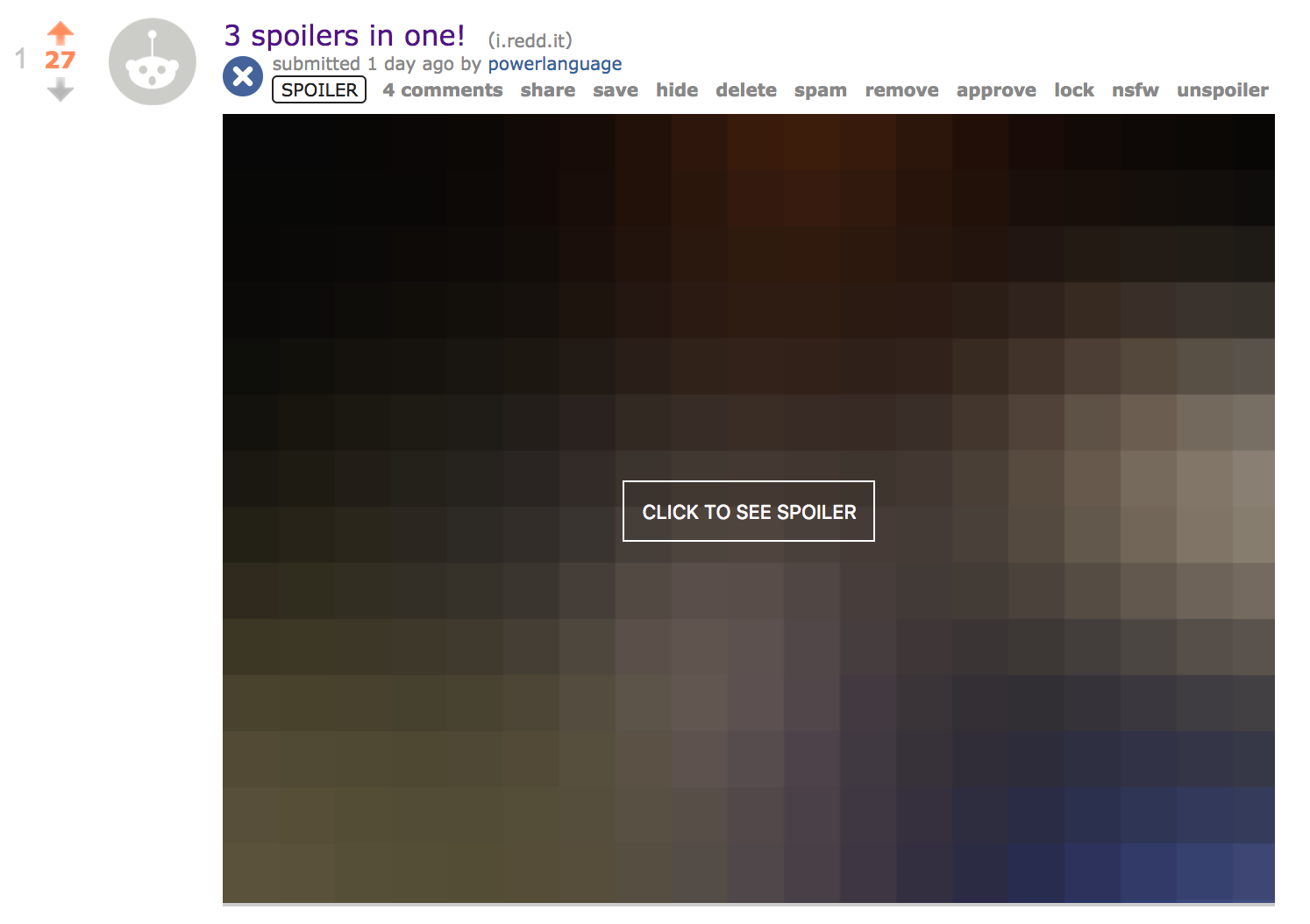
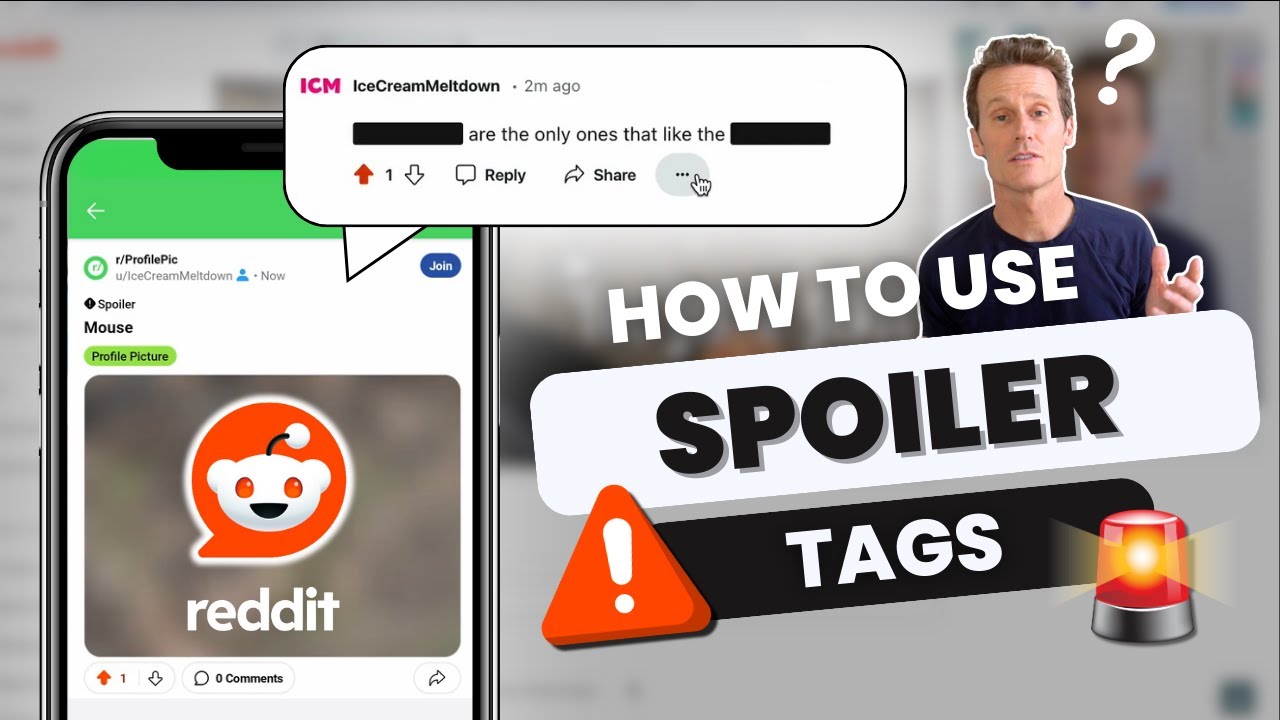
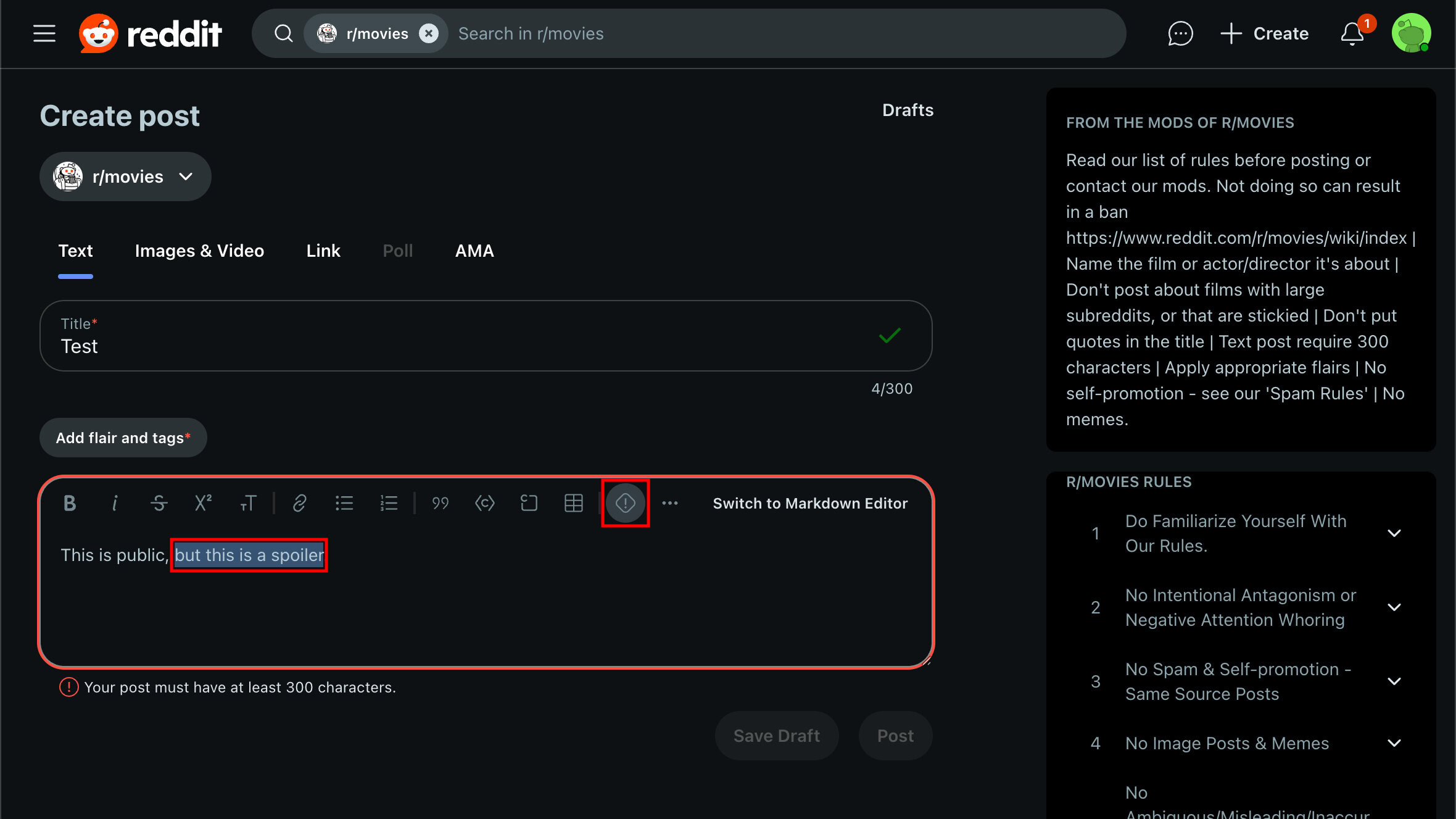
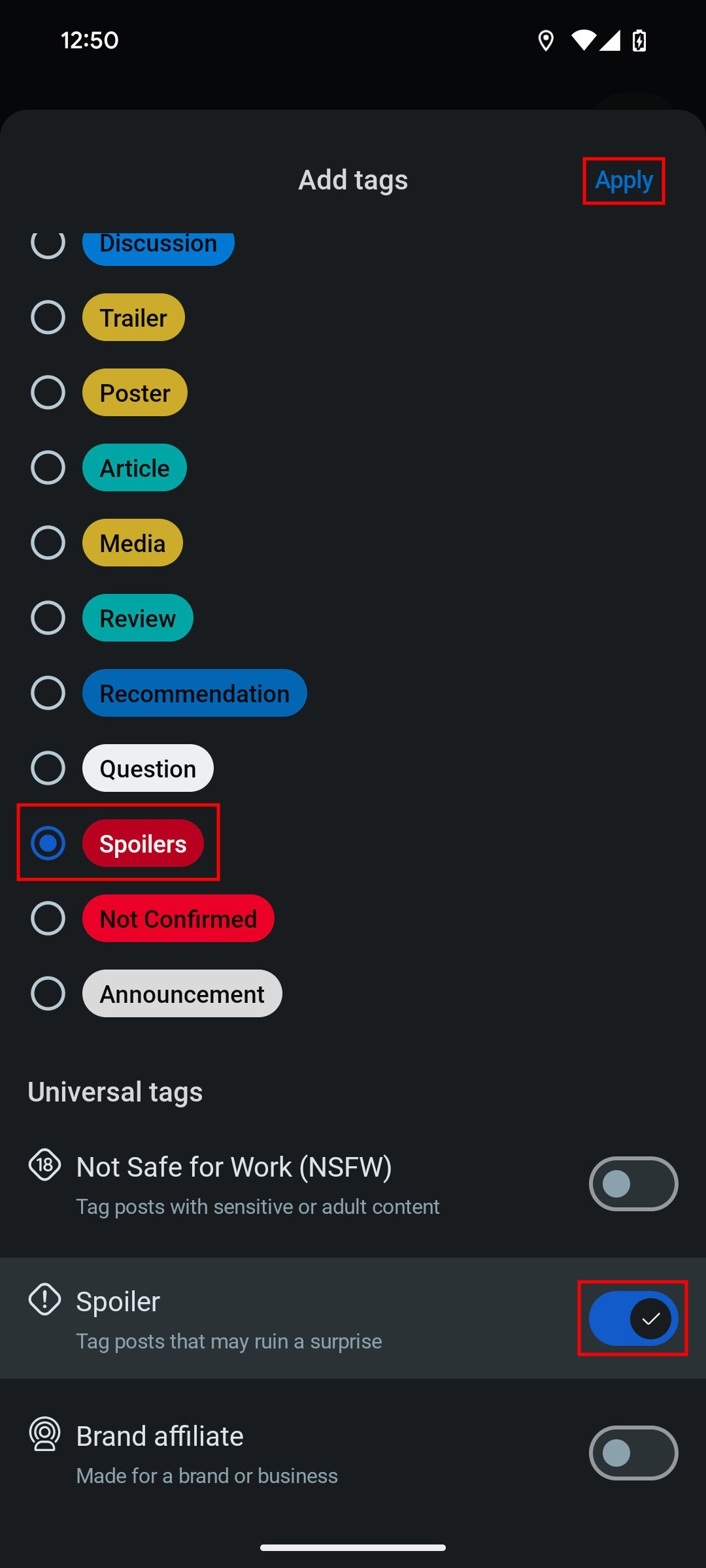
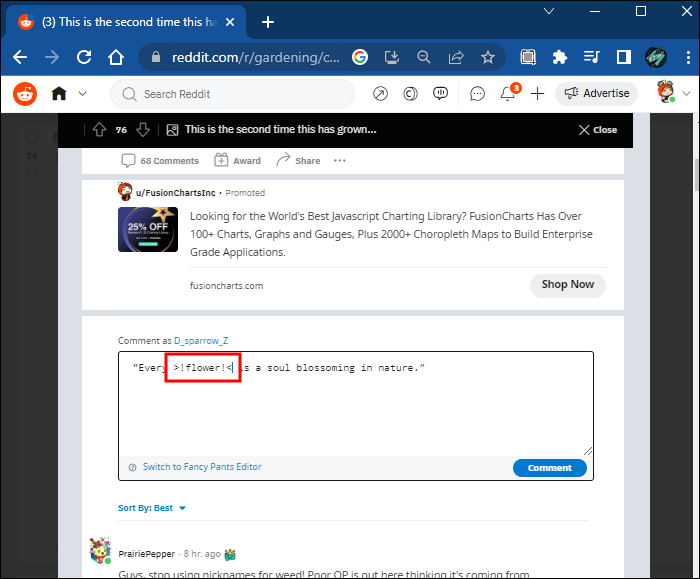
On Reddit, the spoiler tag is dead simple. You wrap text in >! and !< formatting (or use the toolbar button), and the platform renders it as a blurred, clickable block. The text color changes to gray, the block gets a distinct appearance, and hovering over it provides a visual cue that there's hidden content. Users who want to see it click or tap, and it reveals. It's reversible—you can blur it again if you want.
What makes Reddit's approach work so well is the visual clarity. You immediately know something is hidden. There's no ambiguity. You can't accidentally read a spoiler because the spoiler tag makes it impossible—unless you actively choose to reveal it. This is crucial for anxious content consumers who want to protect themselves.
The implementation is also cross-platform. It works identically on Reddit's web version, official app, and third-party apps. The spoiler tag is part of Reddit's markup system, which means it's consistent and reliable.
WhatsApp's version will likely follow this same playbook. Most messaging apps that have adopted similar features have kept the interface intuitive. You'll probably see a "spoiler" button in the text formatting menu, you'll wrap your text, and it'll display as a hidden block until someone taps it. The technical lifting is minimal—messaging apps already support rich text formatting, emoji reactions, and other stylized content.
The real challenge isn't how to build it. It's making sure people actually use it. And that's where user education and default behavior come in.
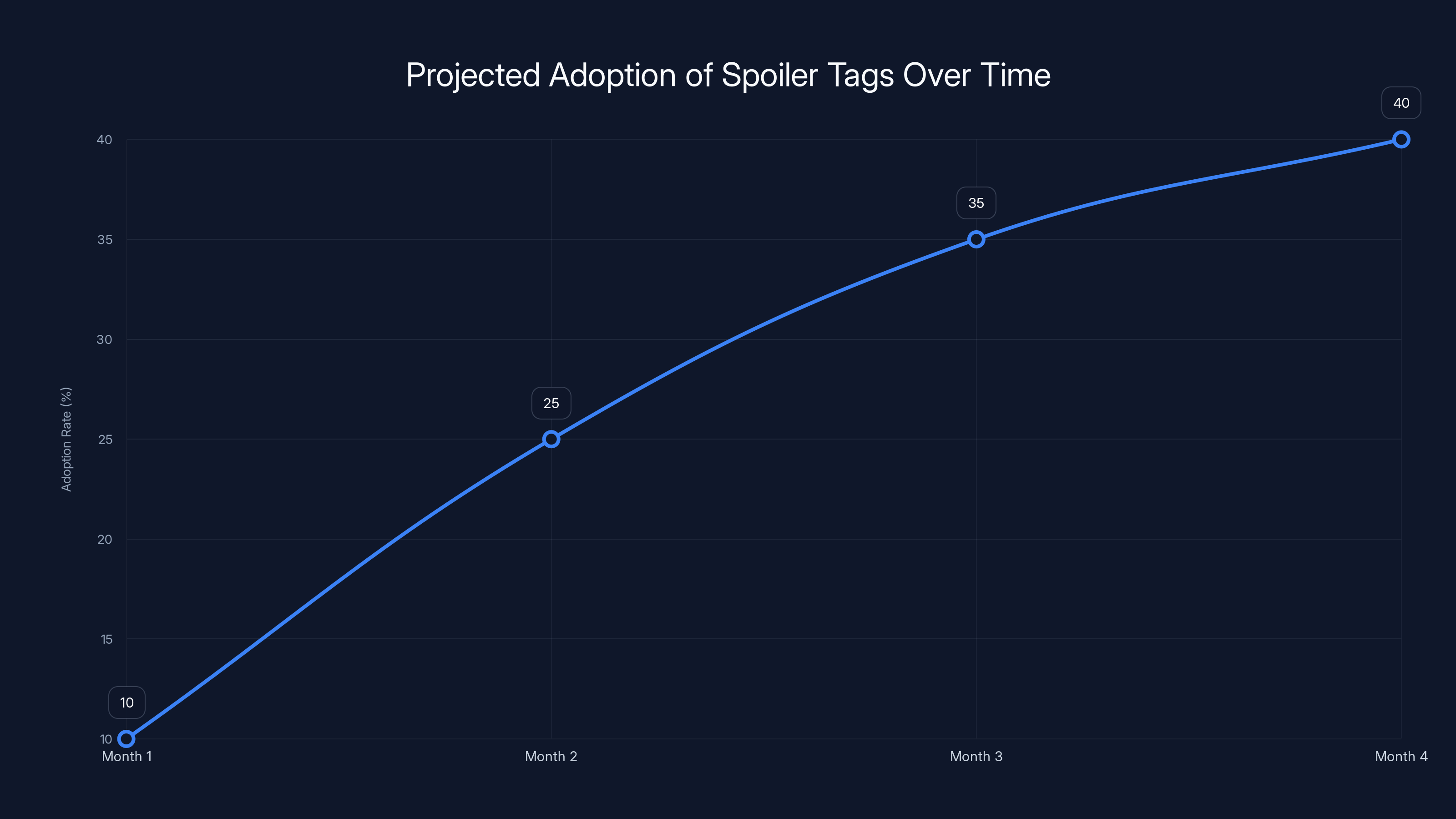
Spoiler tags are expected to reach a 40% adoption rate by the fourth month, with rapid growth in the initial months. Estimated data based on similar feature adoptions.
What WhatsApp Has Officially Announced (And What We Know)
WhatsApp hasn't made a formal press release about the spoiler feature yet, but the evidence is strong and coming from reliable sources tracking the platform's development.
The feature has been spotted in WhatsApp's beta versions, which are testing grounds for upcoming functionality. This is how new features typically appear first—they're buried in beta builds, available to testers, and gradually rolled out to the general population once bugs are ironed out and Meta (WhatsApp's parent company) is confident in stability.
What we know from beta reports:
- The feature is being built as a message formatting option, similar to bold, italic, and strikethrough text
- It integrates into WhatsApp's existing rich text system
- The visual treatment appears consistent with other messaging platforms—a blurred block that reveals on tap
- It's available in both individual chats and group conversations
- There's no indication of moderation or reporting around spoiler tags (unlike some platforms that track abuse)
WhatsApp is historically cautious about rolling out new features. The company tends to test extensively in beta, listen to user feedback, and make iterative improvements before a global launch. This spoiler feature is likely following that same pattern.
The timeline isn't officially confirmed, but given that the feature is already in beta testing, a launch within the next few months seems reasonable. Beta-to-release cycles at WhatsApp typically run 4-8 weeks, though major features sometimes take longer.
What's notable is that WhatsApp isn't building this in isolation. It's part of a broader effort to keep pace with competitors. Telegram has offered rich formatting for years. Signal is constantly adding features. And newer platforms like Discord have extensive formatting and moderation tools built in from the ground up.
Why Group Chats Desperately Need This
Let's be real about the problem this solves. Group chats are where spoilers die. And they die messily.
Consider a typical scenario: Your friend group has a WhatsApp chat. Someone finishes watching House of the Dragon on a Wednesday. By Thursday morning, they're posting about who died in the finale. Meanwhile, three people in that chat are still on season one. Nobody's trying to be malicious—they're just excited and not thinking about where they are in the show.
Without a spoiler tag, the damage is done. You can't un-read text. You can't block out what you've seen. The information is there, burned into your memory. Some people learn to live with it. Others feel genuinely angry, because they wanted to experience that moment without advance knowledge.
This plays out across contexts:
Entertainment spoilers are the obvious use case. TV shows, movies, gaming releases, book reveals—these all have cultural moments that hit harder if you experience them unspoiled. A spoiler tag makes it safe for people to stay in the conversation without fear.
Gaming leaks are brutal in group chats. Someone beats a game and immediately wants to discuss the ending. Without a spoiler tag, everyone else is scrambling to mute the conversation or scroll past.
News and current events matter too. Maybe someone in your chat heard about a celebrity breakup or a major announcement before others. A spoiler tag lets them share without accidentally spoiling the surprise for people who prefer to hear it through official channels.
Personal news is often protected already (most people don't announce engagement rings or pregnancy reveals in a group chat), but spoiler tags would help with things like surprise birthday announcements, movie night plans, or restaurant recommendations that might have plot twists.
The psychological impact of spoilers is real, too. Research on information processing shows that knowing plot outcomes actually diminishes enjoyment of narrative experiences. People who know spoilers ahead of time report less engagement and reduced emotional impact from the media. It's not just about avoiding information—it's about protecting the actual experience.
From a user behavior perspective, spoiler tags also nudge people to be more thoughtful. Just by having the option, users are reminded that spoilers exist, that other people might be on different timelines, and that a little consideration goes a long way. It's friction, but in a good way.

Comparing Spoiler Solutions Across Messaging Platforms
WhatsApp isn't the first to tackle spoilers, and looking at how competitors handle this shows the evolution of the feature.
Reddit's Spoiler Tag (The Gold Standard)
Reddit's implementation is the reference point everyone uses. It's been around since 2018, it works consistently, and users understand it immediately. The tag is visual, reversible, and doesn't require any special knowledge. Type >! text !< or click the button, and you're done.
What makes Reddit's approach work is the clarity and consistency. Every subreddit handles spoilers the same way. The formatting is universal. And because spoilers are a core part of Reddit culture (discussion forums live on spoiler protection), the feature sees high adoption.
Discord (Rich Formatting)
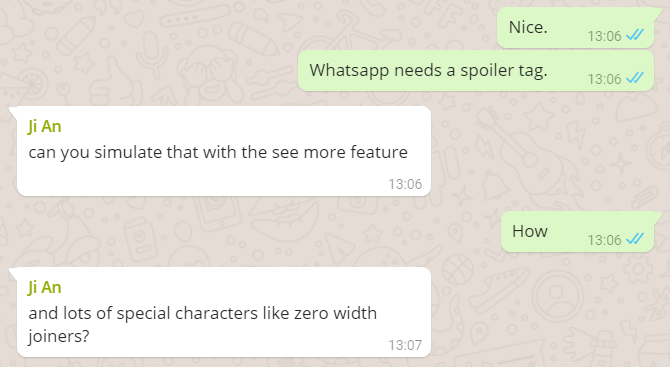
Discord took a different approach. Instead of a dedicated spoiler tag, Discord allows users to | the text, which hides it behind a spoiler blur. It's similar to Reddit's approach but even simpler—just pipe characters around the text. Discord also lets you hide images and attachments as spoilers, which is helpful for fan art, memes, or screenshots that might contain plot points.
What's clever about Discord's implementation is that it works for non-text content. In group chats, people often share images and links, not just text descriptions. A spoiler tag that only works for text misses a large portion of how people actually communicate.
Telegram (Spoiler Formatting)
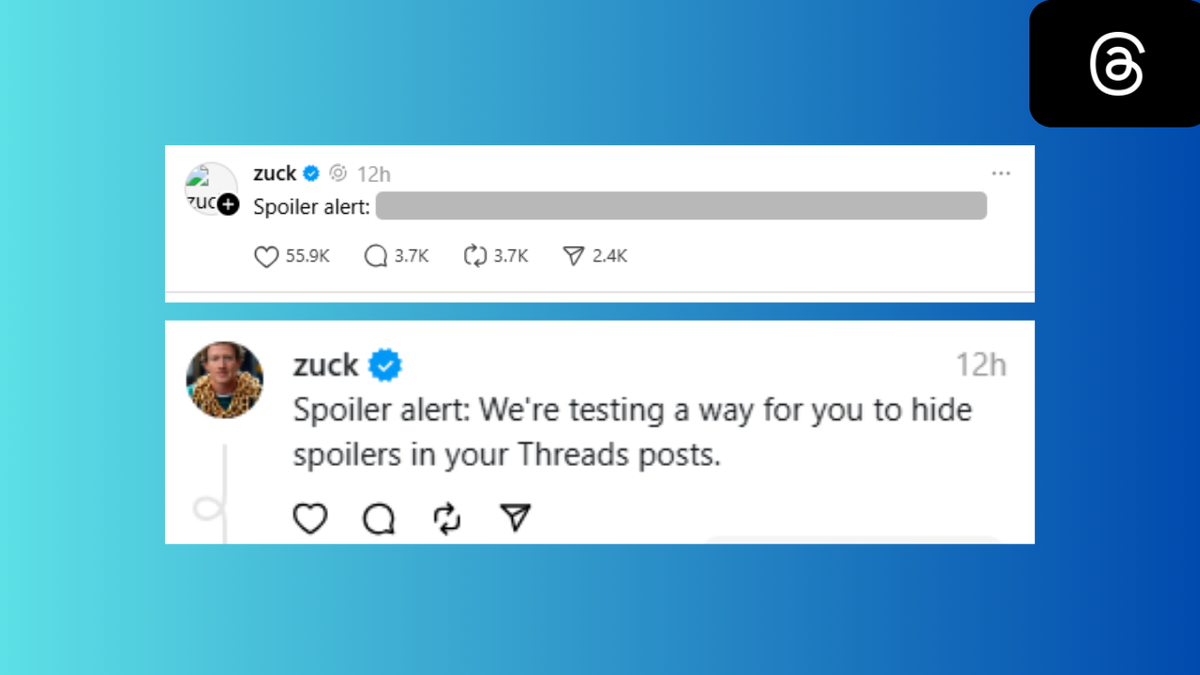
Telegram offers spoiler formatting as part of its broader rich-text system. You can apply spoiler formatting to text, and it displays with a blurred effect. Telegram's approach integrates with its existing formatting system, which includes bold, italic, underline, monospace, and other text styles.
The advantage here is consistency—spoilers work the same way as other text formatting, so there's less to learn. The disadvantage is that Telegram's spoiler tag is less prominent than Reddit's, and adoption rates are lower because users don't discover it unless they actively explore the formatting menu.
Signal (Minimal Approach)
Signal hasn't implemented a dedicated spoiler feature yet, though it has other formatting options. This is partly because Signal is privacy-first and keeps interface complexity minimal. Signal's philosophy is simplicity and security, not feature richness.
Slack (No Spoiler Feature, But Thread Culture)
Slack doesn't have a spoiler tag, but its threading system naturally prevents spoilers from derailing conversations. Threads keep discussion contextualized and separate from main channels. This is a different solution to the same problem—not hiding spoilers, but containing them.
WhatsApp's Upcoming Implementation
WhatsApp's spoiler feature will most likely split the difference. It'll be visual and easy to use (like Reddit), work across content types when possible (like Discord), and integrate with WhatsApp's existing formatting system (like Telegram).
The key differentiator for WhatsApp is reach. Whichever implementation WhatsApp chooses will instantly become the spoiler standard for billions of people globally. This carries weight. If WhatsApp makes the feature discoverable and easy, adoption will be massive.
| Platform | Spoiler Tag | Text Only | Integrated | Discoverability |
|---|---|---|---|---|
| >! !< | Yes | Yes | High | |
| Discord | Pipe characters | No | Yes | Medium |
| Telegram | Formatted text | Yes | Yes | Low |
| Signal | N/A | N/A | N/A | N/A |
| Slack | N/A (threading instead) | N/A | N/A | N/A |
| WhatsApp (upcoming) | TBD | Likely yes | Likely yes | High (expected) |
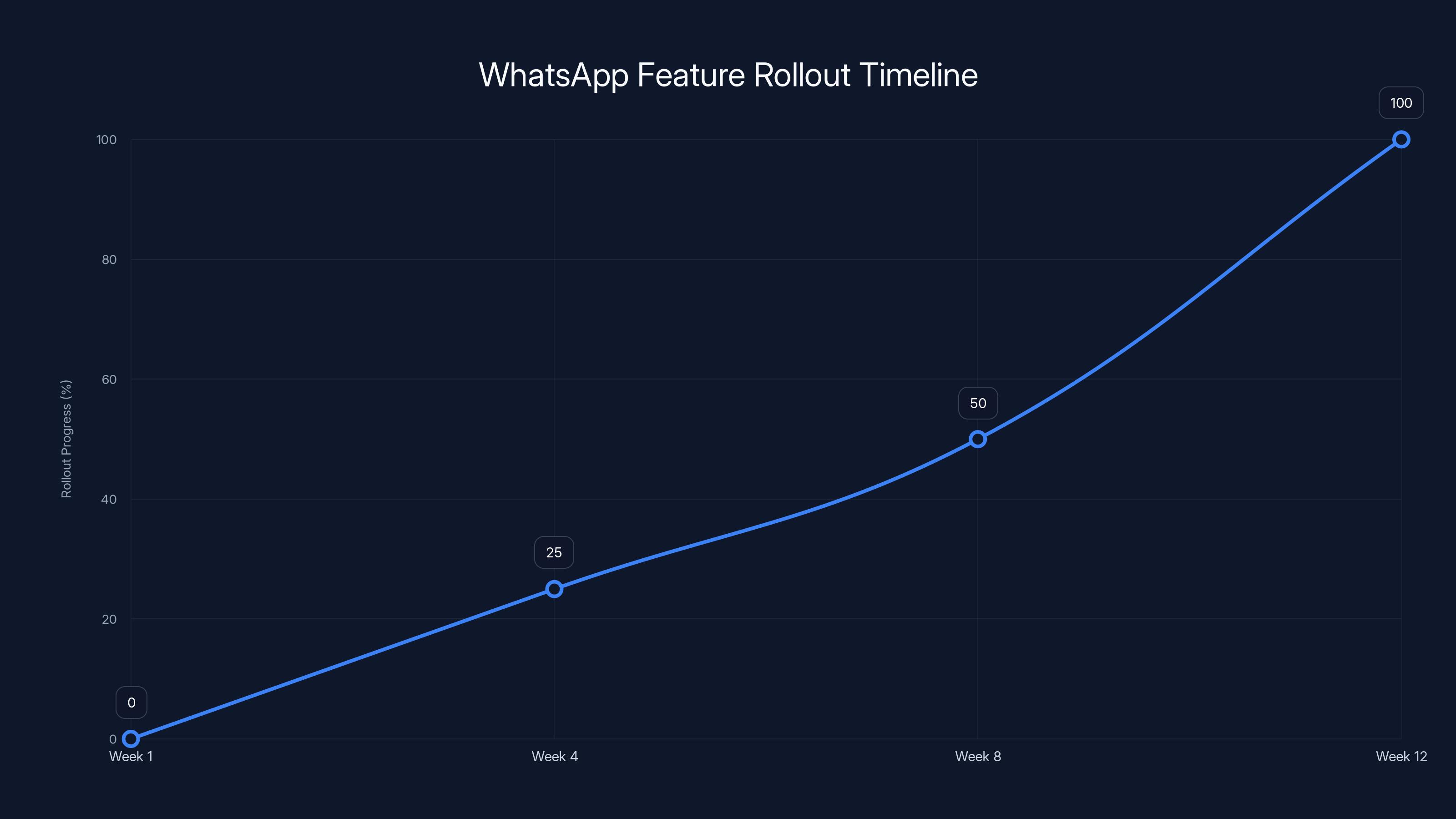
WhatsApp typically rolls out new features over 4-12 weeks, with gradual user access. Estimated data based on past patterns.
How to Use Spoiler Tags Effectively
Once WhatsApp rolls out this feature, using it effectively will matter. The feature only works if people actually use it—and use it thoughtfully.
The Basic Usage Pattern
When the feature launches, the workflow will be straightforward. You'll compose your message, highlight the text you want to hide, and tap a "spoiler" button in the formatting menu. The text will visually change (probably with a blurred or highlighted effect), and it'll display as hidden until someone taps it.
On the receiving end, users will see a blurred block or a special formatting indicator. They'll know something is hidden. If they want to see it, they tap. If they don't, they keep scrolling.
Best Practices for Spoiler Use
Be specific about what you're spoiling. Don't just hide everything. Add context before the spoiler tag: "Major House of the Dragon season 2 finale spoiler below" and then hide the actual reveal. This tells people whether they should avoid this message.
Spoil the bare minimum. Don't hide an entire paragraph about a plot twist. Hide just the key detail that ruins the experience. The more surgical your spoiler tag, the more useful the conversation becomes.
Use spoiler tags for personal reveals too. If you're announcing engagement, pregnancy, or other major life news, consider spoiler-tagging it for people who want to preserve the surprise when you tell them individually.
Respect timing, not just surprise. Someone might not be behind on a show—they might just want to experience it spoiler-free when it releases on their streaming service. A spoiler tag respects their viewing timeline.
Common Mistakes to Avoid
Don't spoiler-tag the context. If you write "Major ending reveal >> [hidden]" and someone doesn't want to see the reveal, they've already been told something major happens at the ending. Context matters.
Don't assume spoiler tags are foolproof. On some platforms, spoiler tags don't work on notifications or previews. People might see the hidden content in their notification badge before they open the app. Keep this in mind when deciding what to hide.
Don't use spoiler tags for everything. A group chat full of hidden messages becomes harder to read, not easier. Reserve spoiler tags for genuinely spoilery content, not for jokes or minor details.
Don't hide too much detail. If you're sharing a recipe and someone's on a diet, you don't need spoiler tags. Spoiler tags are for narrative surprises and genuine plot reveals, not lifestyle choices.
The Bigger Context: Why This Matters for WhatsApp's Future
The spoiler feature isn't just about protecting people from plot twists. It's a signal about WhatsApp's broader direction and competitive positioning.
WhatsApp has been conservative with feature development compared to competitors. Telegram has offered rich formatting, bots, channels, and extensive customization for years. Signal has focused on privacy and reliability. Facebook Messenger (under the same parent company Meta) has added everything from games to financial services.
WhatsApp's approach has always been minimal—simplicity, security, and reliability. No ads, no tracking, just messaging. This philosophy has kept WhatsApp loyal but also made it feel a bit static.
The spoiler feature represents a slight shift. It's still minimal and simple, but it's acknowledging that users want more than just basic message delivery. They want rich communication features. They want solutions to real problems. They want their messaging app to understand how they actually use it.
This sets a precedent. If WhatsApp is willing to add spoiler tags, what else might be coming? Better formatting options? Media-specific features? Richer notification controls? The spoiler feature is almost certainly not the last innovation we'll see from WhatsApp.
For Meta's overall strategy, this makes sense too. Meta is building a messaging ecosystem that spans WhatsApp, Messenger, and Instagram DMs. Parity across these platforms strengthens the network effect—users can have the same experience regardless of which app they use. The spoiler feature will likely appear across all three platforms eventually.
From a product perspective, this is also low-risk innovation. Spoiler tags don't require infrastructure changes, don't involve machine learning, and don't introduce privacy concerns. It's a feature that serves users without complicating WhatsApp's engineering or business model.
Timeline: When Can We Expect This Feature?
Predicting exact launch dates is tricky, but we can make educated guesses based on WhatsApp's historical rollout patterns.
Current Status: The feature is in beta testing. This means it's actively being developed and tested with a limited audience. Beta stages typically last 4-12 weeks, depending on stability and bug severity.
Early Adoption Phase: Once WhatsApp is confident, it'll gradually roll out to a percentage of users. This staged rollout is standard for major features—it helps catch platform-specific bugs and server issues before everyone gets the feature simultaneously.
Full Rollout: After testing on a subset of users, the feature will gradually become available to everyone. This can take another 2-4 weeks as WhatsApp monitors performance and user feedback.
Complete Global Availability: You'll know the feature is fully live when you see it in WhatsApp's official release notes and it's available on all platforms (iOS, Android, WhatsApp Web).
Based on how quickly WhatsApp has moved on recent features, a full rollout within 2-3 months seems realistic. But WhatsApp is deliberately cautious, so it could stretch to 4-6 months if bugs or compatibility issues arise.
Once the feature launches, expect a gradual learning curve. Many users won't discover the spoiler feature immediately. Some will use it wrong. But within a few months, spoiler tags will become as normal in WhatsApp groups as emoji reactions.
One variable to watch: platform updates. If a major iOS or Android update rolls out around the same time, WhatsApp might stagger the release to avoid complication. Meta coordinates across platforms, so there's often a quiet alignment between OS releases and app feature launches.
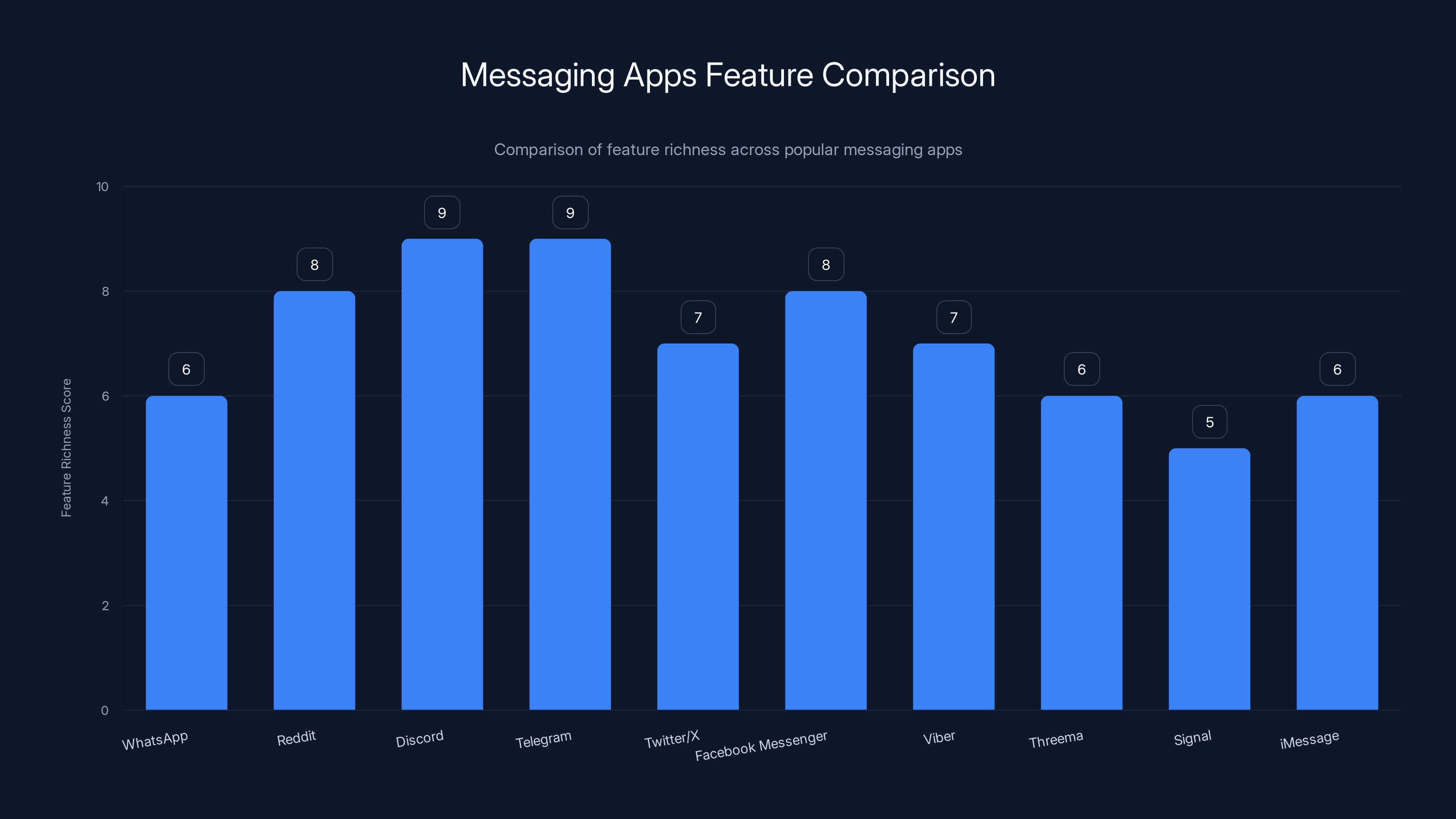
Estimated feature richness scores show Discord and Telegram leading in features, while Signal and iMessage focus on simplicity. WhatsApp is enhancing features to stay competitive.
Potential Use Cases Beyond Entertainment
Spoiler tags might seem like a feature for TV and movie fans, but the actual use cases are broader.
Professional and Educational Contexts
Imagine a group chat for online course students. An instructor might hide upcoming exam content or problem solutions behind spoiler tags, allowing students to stay in the conversation without accidentally seeing answers they need to figure out.
In professional settings, spoiler tags could protect confidential announcements until an official launch. "Spoiler: major announcement coming tomorrow" with the details hidden until the timing is right.
Mental Health and Content Warnings
Spoiler tags can serve a dual purpose as content warnings. Someone might hide text about disturbing news, triggering content, or heavy topics. This isn't technically a spoiler, but the mechanism—hiding content until someone chooses to see it—serves the same protective purpose.
Group chats for support communities could use spoiler tags to hide triggering content while keeping conversations accessible.
Research and Surprise Planning
If you're buying a gift for someone in a group chat, spoiler tags let you discuss it without the gift recipient accidentally discovering what they're getting. Same applies to birthday party planning, surprise travel announcements, or other events where the reveal matters.
Meme Culture and Humor
Memes and jokes often rely on surprise. Spoiler tags could hide punchlines or setup reveals. Someone might post a meme and spoiler-tag the funny part, forcing the reveal to land exactly when intended.
Community Management
For moderators managing group chats, spoiler tags become a tool for organization. You could hide off-topic discussions or thread them with spoiler tags to keep main conversations clean.
How Spoiler Tags Improve Group Chat Culture
Beyond the obvious benefit of protecting against unwanted information, spoiler tags actually improve how group chats function.
First, they solve an asymmetry problem. In a typical group chat, people are at different life stages and consumption schedules. Someone binge-watches The Crown in a week. Another person watches one episode a month. Without spoiler protection, the fast consumer has to either wait or risk alienating the slow consumer. Spoiler tags let both proceed at their own pace.
Second, they reduce conflict. Spoiler-related arguments—"Why didn't you warn me?" "Why didn't you mute the chat?"—are surprisingly common and surprisingly bitter. Introducing a mechanism specifically designed to prevent this conflict removes a pain point.
Third, they encourage more thoughtful communication. By having a tool designed for spoilers, people are reminded that spoilers exist and that consideration matters. The option itself makes people think before hitting send.
Fourth, they preserve conversation flow. Without spoiler tags, groups often develop "spoiler etiquette" rules that people have to remember and enforce. With built-in spoiler tags, the default behavior becomes thoughtful. No rules needed—the feature itself enforces good behavior.
Finally, they acknowledge a reality about modern life: we're all consuming content at different times. Streaming services have eliminated the shared viewing experience. Everyone's watching different shows in different orders. Spoiler tags are tools for a fractured media landscape.
Common Questions and Misconceptions
"Won't this just create more spoilers?"
No. The feature is designed to protect against spoilers, not enable them. By making it easy to hide content, spoiler tags actually reduce accidental spoiling. People are more likely to use a simple feature than to remember complicated spoiler etiquette rules.
"Can people misuse spoiler tags?"
Sure. Someone could hide the punchline to a joke and call it a spoiler. Or use spoiler tags inappropriately. But the same is true with any feature—people can misuse formatting, emoji, or anything else. The benefit of having the feature outweighs the small risk of misuse.
"Will this work for images and videos?"
Likely not in the initial launch. Text is the simplest use case. WhatsApp might extend spoiler support to images and videos later, but the first version will probably be text-only.
"What if I accidentally tap a spoiler?"
You'll see the hidden content. Some platforms (like Discord) let you re-hide content, so you can blur it again if you accidentally revealed it. WhatsApp will likely work the same way.
"Can I hide spoilers across multiple messages?"
Probably not easily. Spoiler tags will likely work within single messages. If you need to hide multiple messages, you might need to apply the tag to each one separately.
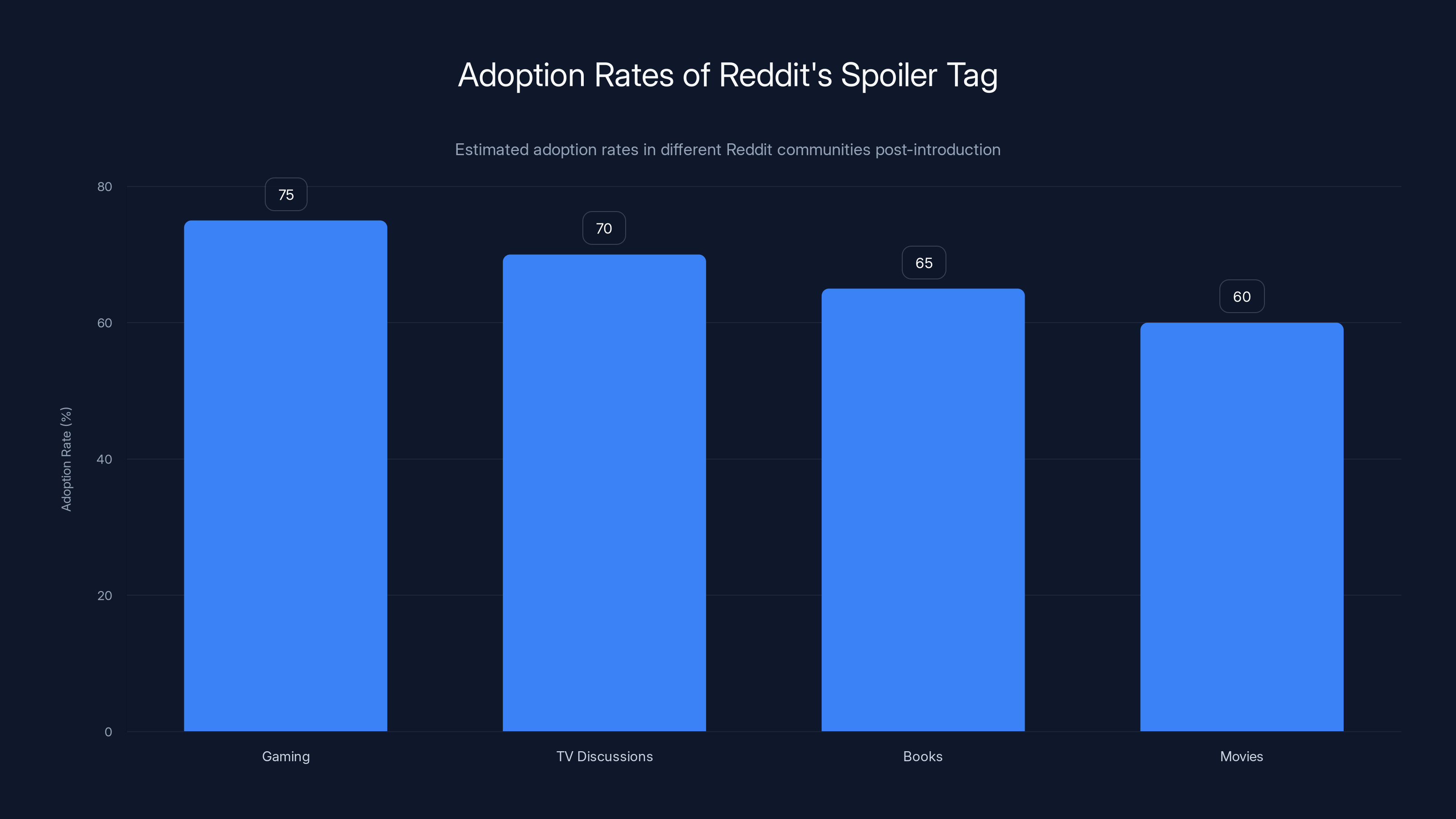
Estimated data shows that gaming and TV discussion communities had the highest adoption rates of Reddit's spoiler tag, with over 70% usage shortly after its introduction.
The Competitive Landscape: Where Other Apps Stand
Understanding where WhatsApp is positioning itself requires looking at the entire messaging landscape.
Apps With Spoiler Features
Reddit, Discord, and Telegram all have spoiler features already. Twitter/X has content warnings (not exactly spoiler tags, but similar). These platforms show that spoiler protection is becoming standard in online communication.
Apps Building Toward Feature Parity
Facebook Messenger (Meta-owned, like WhatsApp) is adding richer features constantly. Viber, Threema, and other niche players are competing on features and privacy.
Apps Staying Minimal
Signal continues prioritizing privacy and simplicity over features. iMessage (Apple) has added features gradually but remains focused on iOS integration. These apps compete on principle rather than feature richness.
WhatsApp's move suggests it's accepting that feature competition matters. Users want messaging to do more than just deliver text. By adding spoiler tags (and potentially more features in the future), WhatsApp is staying competitive without abandoning its core values of simplicity and privacy.
What This Signals About the Future
If WhatsApp is adding spoiler tags, what does that tell us about where messaging is going?
Signal 1: User Experience is Winning Over Minimalism
WhatsApp has historically kept its interface as simple as possible. This feature suggests that simplicity is taking a back seat to actual user needs. If spoiler tags are valuable enough to build, what else is?
Signal 2: Feature Parity is Real
Meta wants WhatsApp, Messenger, and Instagram DMs to feel like a unified platform. Spoiler tags will likely roll out across all three apps simultaneously. This is strategic integration.
Signal 3: Niche Use Cases Matter
Spoiler tags are genuinely niche—they don't matter to everyone. But WhatsApp is building them anyway, signaling that the company cares about users who care about this. It's a quality signal.
Signal 4: Group Chat is Still King
Spoilers are almost entirely a group chat problem. By solving this, WhatsApp is acknowledging that group conversations are where the real value is. Individual chats will get features eventually, but group dynamics matter more.
Implementation Considerations and Technical Details
From a technical standpoint, implementing spoiler tags is straightforward for a platform like WhatsApp, but there are still considerations.
Data Structure
WhatsApp's message format will need to support a spoiler marker. This could be as simple as a boolean flag (isSpoiler: true) or a more complex content markup. Existing messages won't have this flag, so backwards compatibility is important—older versions of WhatsApp should gracefully degrade when encountering spoiler-tagged messages.
Client-Side Rendering
The tricky part is making spoiler tags work consistently across different devices and screen sizes. iOS, Android, and WhatsApp Web all need to render spoilers identically. Different screen densities and text sizes could affect how blur effects look, so WhatsApp will need to test extensively.
Storage and Retrieval
Since WhatsApp uses end-to-end encryption, the spoiler marker must be encrypted too. When you retrieve a message from WhatsApp's servers, the spoiler information comes with it. This is handled at the encryption layer, not the application layer.
User-Facing Implementation
The UI needs to make spoiler tags discoverable but not overwhelming. It'll likely appear in the text formatting menu alongside bold, italic, and strikethrough options. A long-press might also trigger formatting options, or a dedicated formatting toolbar might appear when composing messages.
Edge Cases
What if someone shares a screenshot of a spoiler-tagged message? The spoiler won't be protected because it's now an image. This is a limitation every platform faces, and there's no perfect solution. WhatsApp could warn users when they're sharing screenshots of spoiler content, but it's imperfect.
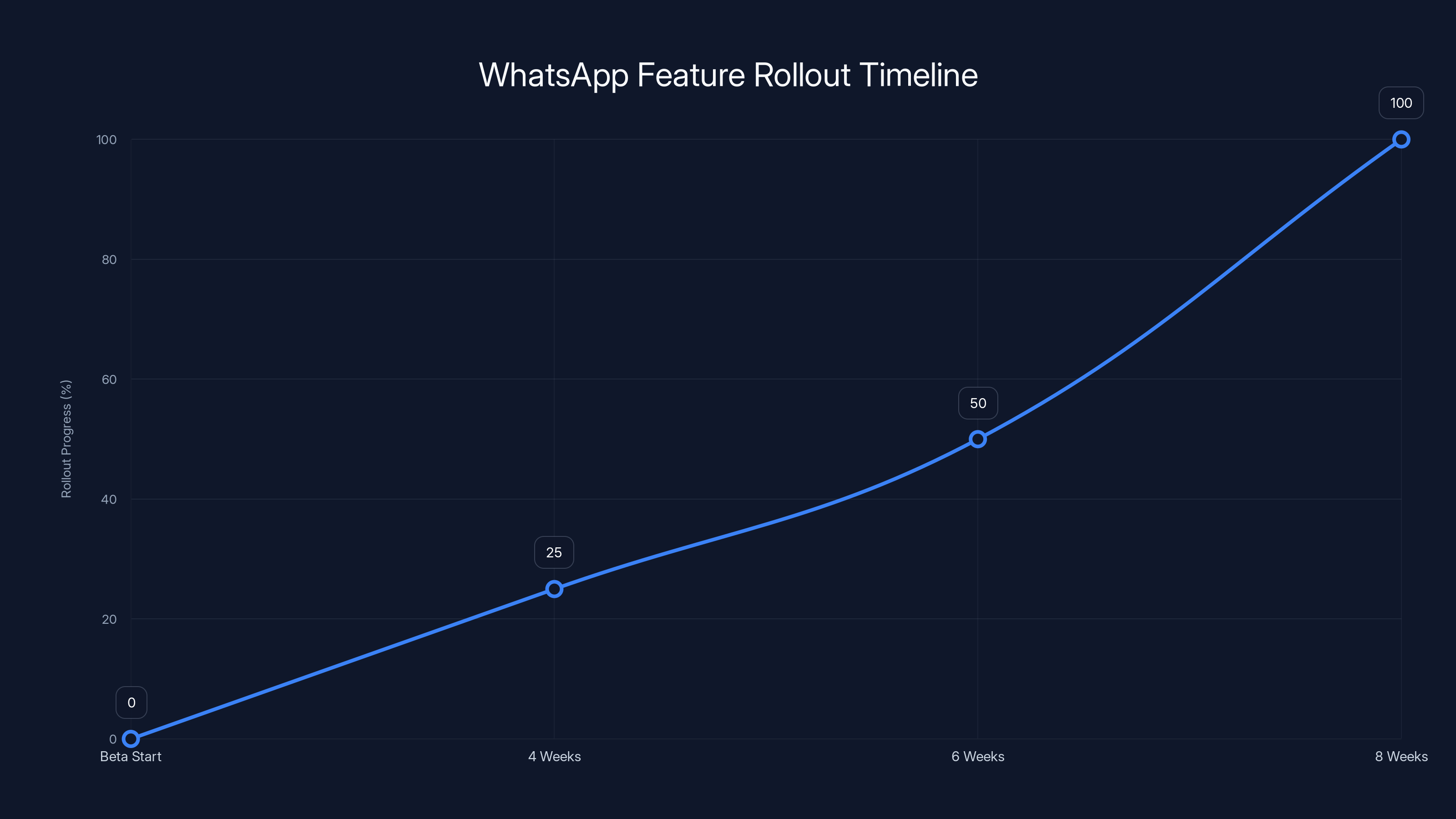
Estimated data shows that WhatsApp's spoiler feature could be fully rolled out in 4-8 weeks, following typical beta-to-release cycles.
Adoption Predictions and Usage Patterns
How quickly will spoiler tags actually be used once they're available?
Early Adoption Phase (First Month)
Enthusiastic users will discover the feature and start using it immediately. Tech-forward groups will jump in first. Usage will be inconsistent—some people will use it religiously, others won't know it exists.
Mainstream Adoption (Months 2-3)
As more people encounter spoiler-tagged messages, they'll discover the feature exists. Usage will accelerate. Group norms will form—some groups will embrace spoiler tags enthusiastically, others will rarely use them.
Plateau Phase (Beyond Month 3)
Usage will stabilize around 30-40% adoption rate for the average user (people who watch TV shows, play games, or engage with story-based content will use it more; others less). This matches the adoption pattern for other optional formatting features like strikethrough text.
Ultimate Equilibrium
Spoiler tags will become standard in any group chat where people discuss entertainment. They'll be considered bad etiquette not to use them for genuine spoilers. Outside entertainment contexts, adoption will be lower.
Addressing Potential Concerns
Privacy and Encryption
Spoiler tags don't change WhatsApp's end-to-end encryption. Meta can't see which messages are spoilers—that information is encrypted like everything else. The spoiler marker is just metadata about the message format, treated the same as bold or italic text.
Data Collection
Will Meta track which messages people spoiler-tag? Probably not—that would defeat the purpose of end-to-end encryption. Even if they wanted to, they couldn't see the hidden content without decrypting it.
Accessibility
This is the real concern. How do screen readers and accessibility tools handle spoiler-tagged content? WhatsApp will need to ensure that visually impaired users can interact with spoilers in a way that preserves their choice to reveal or not reveal content.
Abuse Potential
Could spoiler tags be used to hide harmful content? Potentially, but WhatsApp's reporting system would catch this. You can report messages regardless of whether they contain spoilers or not. The feature doesn't enable abuse—it just adds another formatting option.
Expert Insights and Industry Perspectives
What are messaging platform designers saying about spoiler protection?
The consensus is that spoiler protection is a quality-of-life feature—it doesn't drive adoption or retention, but it improves the experience for users who need it. It's table stakes for any platform that supports group communication around entertainment.
Designers also acknowledge that spoiler tags solve a social problem, not a technical one. The real challenge isn't building the feature—it's getting people to use it consistently. This requires onboarding (teaching users about the feature), discoverability (making it easy to find), and normalization (establishing group chat etiquette).
From a product strategy perspective, spoiler tags are interesting because they're relatively low effort but high impact for certain user groups. They don't require machine learning, don't complicate the codebase, and don't introduce privacy concerns. Yet they solve a real pain point.
Real-World Scenarios: How Spoiler Tags Will Change Things
Let's play out how spoiler tags will actually change group chat dynamics.
Scenario 1: The TV Enthusiasts Group
Before spoiler tags: Group chat about The Traitors explodes when an episode airs. Fast watchers post theories immediately. Slow watchers either mute the group for a week or risk being spoiled. Arguments happen. Someone inevitably writes "Sorry I didn't spoiler tag that," but the damage is done.
After spoiler tags: Same enthusiasm, but the details are hidden behind spoiler tags. Fast watchers can still discuss immediately. Slow watchers can avoid spoilers but stay in the conversation. Everyone's happy.
Scenario 2: The Multi-Media Family Group
Before spoiler tags: Dad watches movies at his own pace. Kids watch shows week-by-week. Someone posts about a movie ending. Dad hasn't seen it yet. Annoyance ensues.
After spoiler tags: Spoilers are tagged. Dad can participate without fear. The family's communication improves because the barrier to entry is lower.
Scenario 3: The Gaming Community Group
Before spoiler tags: New game releases. Speedrunners finish in days. Casual players take weeks or months. Speedrunners celebrate online—and ruin the experience for others.
After spoiler tags: Spoilers are hidden. Both groups coexist peacefully. Game discussions happen without gatekeeping.
Best Practices for Developers and Platform Designers
If you're building messaging features or considering adding spoiler protection to your app, here's what successful implementations look like.
Make it visible: Reddit's spoiler tag is immediately recognizable. It's not hidden in a menu—it's apparent when you see it. Telegram's spoiler feature is discoverable but less obvious. Better to be visible and obvious.
Make it easy: The feature should require one click, not three. Toolbar buttons, long-press options, or keyboard shortcuts work best.
Make it consistent: Spoiler tags should work the same way across platforms. If WhatsApp has spoiler tags on iOS but not Android, adoption drops.
Make it reversible: Users should be able to reveal and re-hide spoiler content without issue. This reduces anxiety about accidentally tapping something.
Educate users: Documentation, tooltips, and in-app guidance help users discover and understand the feature.
Design for mobile: Most messaging happens on phones. The feature needs to work perfectly on small screens with touch interfaces.
Looking Ahead: What's Next for WhatsApp
Spoiler tags are just the beginning. If Meta is serious about evolving WhatsApp, what other features might be coming?
Rich media reactions: Beyond emoji, WhatsApp might allow reactions to images, videos, and attachments.
Better formatting: Extended text options like superscript, subscript, or colored text.
Thread improvements: Better organization of sub-conversations within larger chats.
Status and context: More sophisticated status messages or read receipts with context.
Group management tools: Better moderation, message filtering, and admin capabilities.
None of this is confirmed, but the spoiler tag signals that WhatsApp isn't opposed to adding quality-of-life features. The app isn't going to become Discord (feature-rich and complex), but it's definitely becoming more sophisticated than it was five years ago.
Conclusion: Why This Small Feature Matters
A spoiler tag might seem like a minor addition. It's one feature in an app with hundreds of features. But it represents something bigger: WhatsApp recognizing that real problems deserve real solutions, even if those problems affect only some users.
The value of a spoiler tag isn't technical—it's social. It acknowledges that group chats are where people actually live, and that protecting the experience of shared entertainment matters. It says that WhatsApp cares about the full spectrum of how people communicate, not just the mechanics of message delivery.
When this feature launches, it'll immediately make group chats better for millions of people who've been frustrated by spoilers. Within weeks, it'll feel like it always existed. Within months, not using spoiler tags for genuine spoilers will seem rude.
This is how features should work. Not flashy, not revolutionary—just useful and thoughtful. WhatsApp has been predictable for a while, playing it safe with minimal changes. The spoiler feature signals a shift. The company is listening to what users actually need and building toward it.
For anyone who's ever had a show ruined by a group chat spoiler, or felt excluded from conversations because you weren't caught up yet—this feature is for you. And it's worth the wait.
FAQ
What is a spoiler tag?
A spoiler tag is a formatting feature that hides text or content until someone chooses to reveal it by tapping or clicking. It displays as a blurred block or special formatting, protecting the hidden content from accidental viewing. Spoiler tags are primarily used to hide plot twists, game endings, or other information that could diminish the experience of consuming entertainment content.
How does the WhatsApp spoiler feature work?
Once WhatsApp launches the feature, you'll select text in your message, tap a "spoiler" button in the formatting menu, and the text will display as a hidden block. Recipients will see the spoiler tag but not the content until they actively tap to reveal it. The implementation is similar to Reddit's spoiler tag system, which has been tested and proven effective for years.
When will WhatsApp's spoiler feature launch?
The feature is currently in beta testing and hasn't received an official launch date. Based on WhatsApp's typical rollout patterns, a global launch within 2-3 months is realistic. The company usually tests features for 4-12 weeks before gradual rollout to all users. You can join the WhatsApp beta program to test it early.
Will spoiler tags work for images and videos?
The initial implementation will most likely support text only. WhatsApp might extend support to images and videos in future updates, but text-based spoilers are the priority. This follows how other platforms (like Reddit and Telegram) have rolled out spoiler features progressively.
Can spoiler tags hide personal information or sensitive content?
Yes. While designed for entertainment spoilers, spoiler tags can hide any sensitive information—personal news, surprise announcements, triggering content warnings, or confidential details. The mechanism works the same way regardless of content type. Some groups might establish etiquette around what deserves a spoiler tag beyond entertainment spoilers.
How will spoiler tags affect group chat culture?
Spoiler tags should reduce conflict by making it easy to discuss content without worrying about others' consumption timelines. They encourage more thoughtful communication, preserve conversation flow, and allow people at different content consumption speeds to coexist peacefully. Early indicators from platforms like Reddit and Discord show adoption reduces spoiler-related frustration significantly.
Are spoiler tags secure and private?
Yes. The spoiler marker is encrypted along with your message content, just like every other part of your WhatsApp messages. Meta cannot see which messages you've spoiler-tagged because end-to-end encryption protects that information. The spoiler feature doesn't introduce any new privacy or security concerns.
Will I need to update WhatsApp to use spoiler tags?
You'll need to update WhatsApp to the version that includes the spoiler feature once it's released. WhatsApp typically pushes these updates automatically through app stores, but you can also manually check for updates. When the feature launches, older versions might display spoiler-tagged messages as regular text, so staying updated ensures the full experience.
How do I access the spoiler feature on WhatsApp Web?
Once launched, the spoiler feature will work on WhatsApp Web (the browser version) alongside the mobile app. You'll likely access it through a formatting toolbar when composing messages. WhatsApp Web support is typically included in the initial rollout, though some features occasionally reach mobile before web.
What if someone misuses spoiler tags?
Misuse is possible—someone could hide non-spoiler content or misuse the feature for other purposes. However, spoiler tags remain the property of the message sender, and receiving users can still report the message if it violates group norms. The benefit of having an effective spoiler protection mechanism far outweighs the small risk of misuse.
Can I hide an entire conversation with spoiler tags?
No. Spoiler tags work on a per-message basis, likely within single messages or text selections. If you need to hide multiple messages, you'd need to apply the spoiler tag to each separately. WhatsApp isn't designed for hiding entire threads, but threaded conversations and message reactions help organize complex discussions.
Key Takeaways
- WhatsApp is developing a spoiler feature similar to Reddit's, currently in beta testing with expected launch within 2-3 months
- The feature will hide text behind a blurred block until users choose to reveal it, addressing a major pain point in group chats
- Spoiler tags solve the fundamental problem of people consuming entertainment at different speeds, reducing conflict and improving conversation dynamics
- Implementation will likely be text-only initially, integrating with WhatsApp's existing formatting menu alongside bold, italic, and strikethrough options
- Adoption patterns suggest 30-40% usage rates for optional features like spoiler tags, becoming standard in entertainment-focused group chats within months
Related Articles
- WhatsApp's New Group Chat Features Crush iMessage & Telegram [2025]
- WhatsApp Group Chats: Member Tags, Text Stickers & Event Reminders [2025]
- Meta Shuts Down Messenger Website: What Users Need to Know [2025]
- WhatsApp Security Features: Complete Privacy Guide [2025]
- Resident Evil Requiem Leaks: Capcom's Spoiler Battle [2025]
- Meta Shuts Down Messenger Website: What It Means for Users [2026]


