
![Soundcore Nebula X1 Pro Review: Party Projector [2025]](https://tryrunable.com/blog/soundcore-nebula-x1-pro-review-party-projector-2025/image-1-1771662928505.jpg)
The Soundcore Nebula X1 Pro Is Gloriously, Beautifully Impractical (And That's the Point)
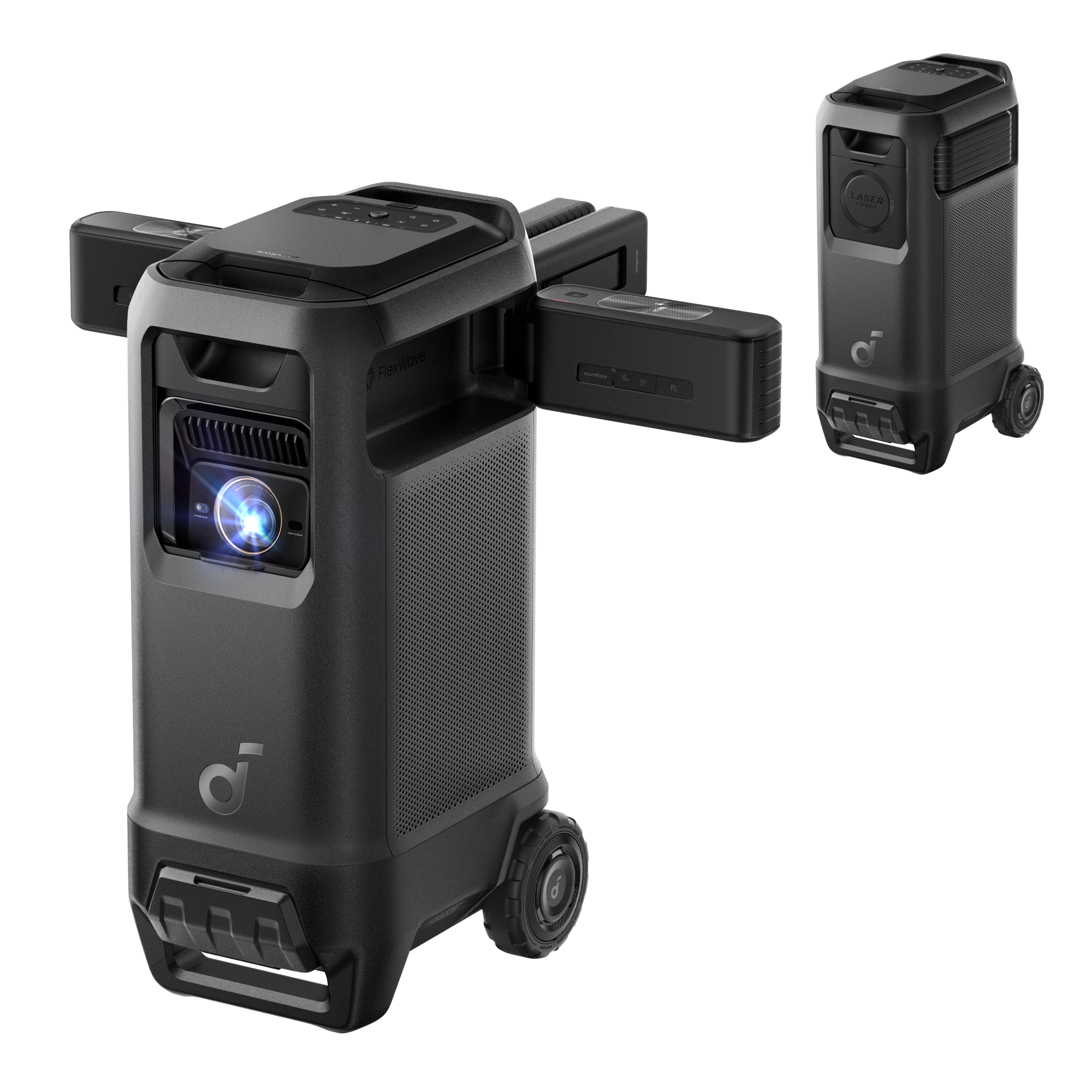
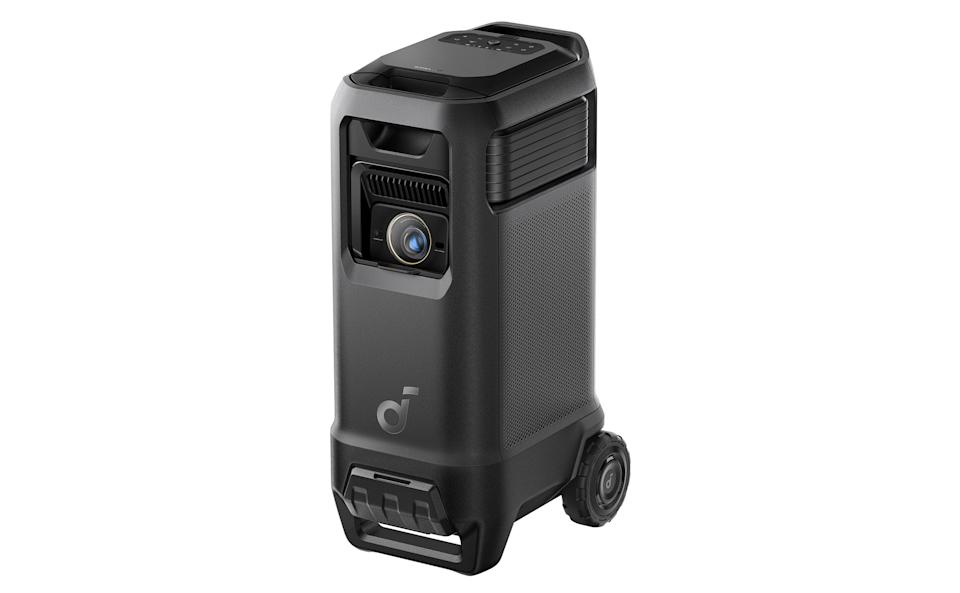
Last summer, Anker's Soundcore Nebula X1 Pro made me question everything I thought I understood about product design philosophy. Here's a device that shouldn't exist on paper. A 4K laser projector with wireless surround speakers, a built-in subwoofer that could shake your neighbors' walls, automatic karaoke capabilities, and enough portability to wheel it into your backyard. It's the kind of fever dream product that makes perfect sense in a boardroom but feels absolutely insane in real life.
And honestly? I loved it. Not because it's practical. Not because everyone needs a 5,000-dollar all-in-one home theater system on wheels. But because it represents something rare in tech: a company willing to commit to a truly weird vision without apology.
I spent two weeks with the X1 Pro in various environments, from my living room to an outdoor patio, and I want to walk you through exactly what this device does, why it does it, and most importantly, whether that $4,999 price tag makes any sense. Spoiler: it depends entirely on how you define "sense."
TL; DR
- The projector is genuinely impressive: 3,500 ANSI lumens of brightness, exceptional color accuracy, and liquid cooling means it stays quieter than you'd expect from such a powerful laser system
- The speaker system is overpowered: 400W of total power across five drivers, wireless Dolby Atmos surround speakers that actually work, and bass that rattles your core
- It's heavy and expensive: At roughly 60 pounds and $4,999, this isn't a casual purchase, and it's definitely not for small apartments
- Wi-Fi connectivity issues: I experienced occasional drops to Google TV that required reboots, which breaks immersion during movies
- Best use case: Wealthy enthusiasts who want an all-in-one entertainment system for parties, backyards, or dedicated media rooms
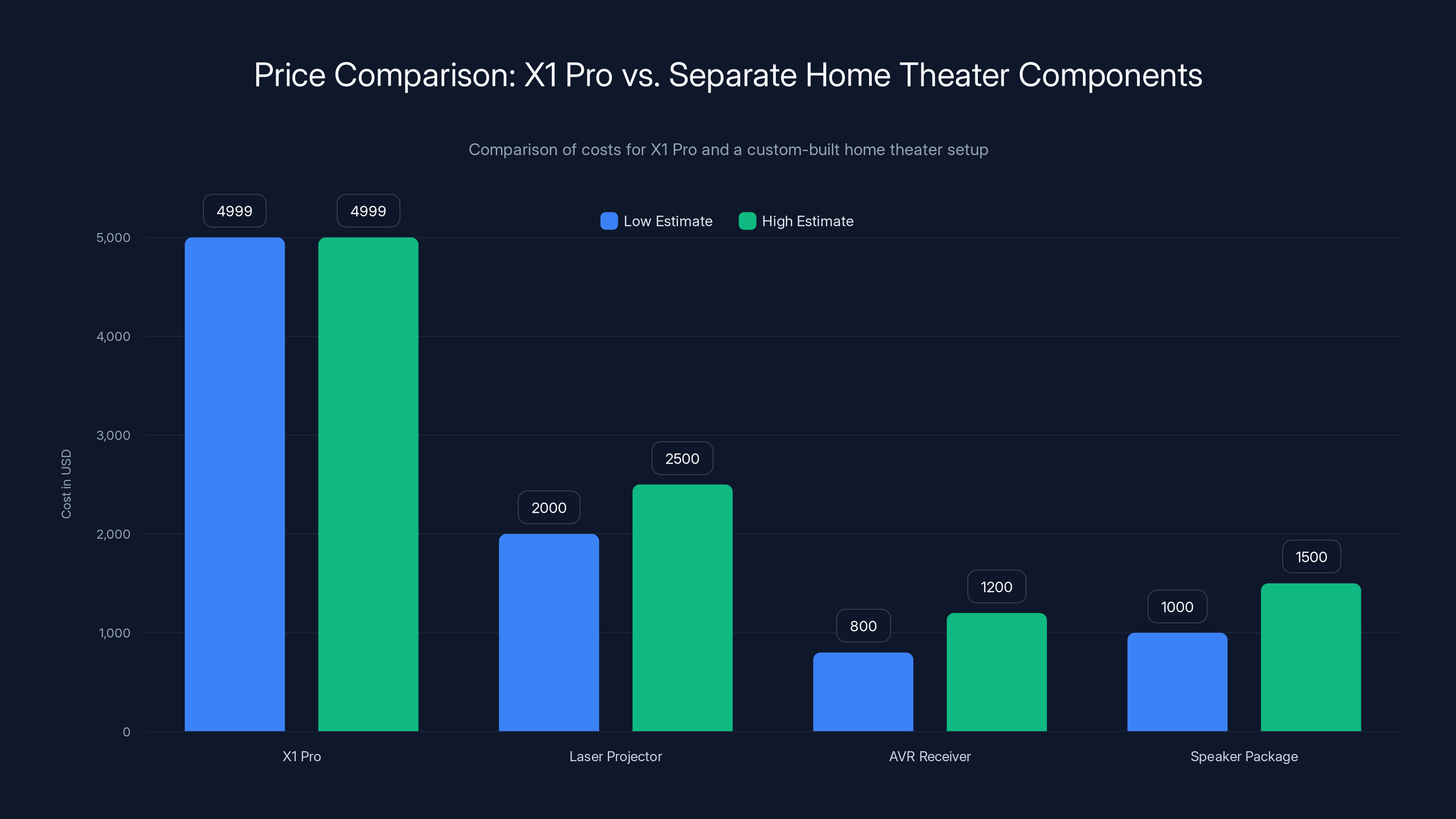
The X1 Pro costs
What Makes This Device Even Exist?
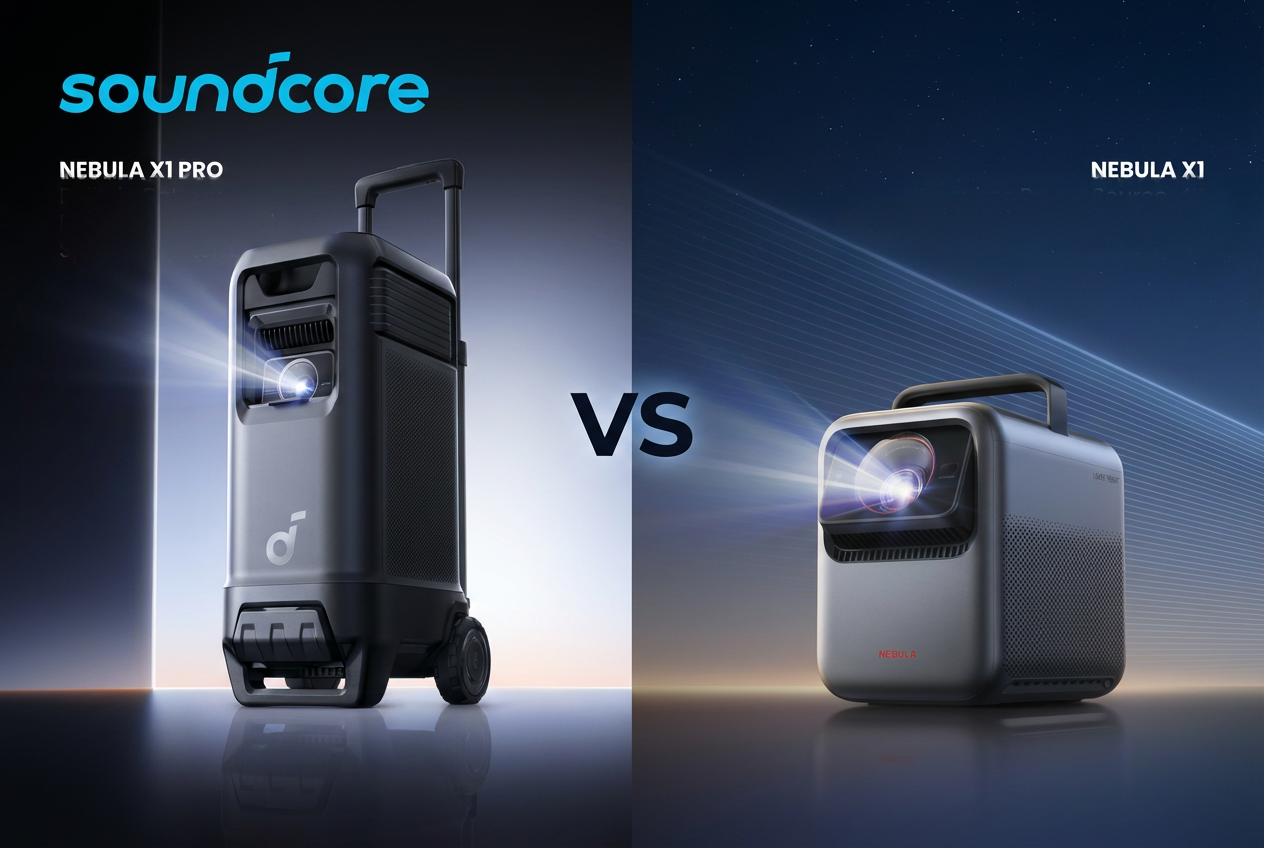
To understand the X1 Pro, you need to understand its lineage. Anker released the original Soundcore Nebula X1 about eighteen months ago, and it was already absurdly good for a portable projector. We're talking about a device that somehow packed a triple-laser optical engine into a chassis small enough to move around your home, with auto-focusing and keystone correction that made setup nearly instant.
Then someone at Anker's product team apparently asked: "What if we made it even louder?" And instead of stopping at adding a single decent speaker, they went completely unhinged and integrated an entire wireless surround sound system into the hardware.
The result feels like what happens when a projector company and a Bluetooth speaker company merged their best ideas into one chassis. It shouldn't work. Fundamentally, a portable projector wants to be light and the powerful audio system wants to be, well, powerful. Those are opposing design constraints. Yet Anker engineered around them with motorized speaker panels, wireless battery-powered satellites, and internal speaker unfolding mechanisms that genuinely feel premium.
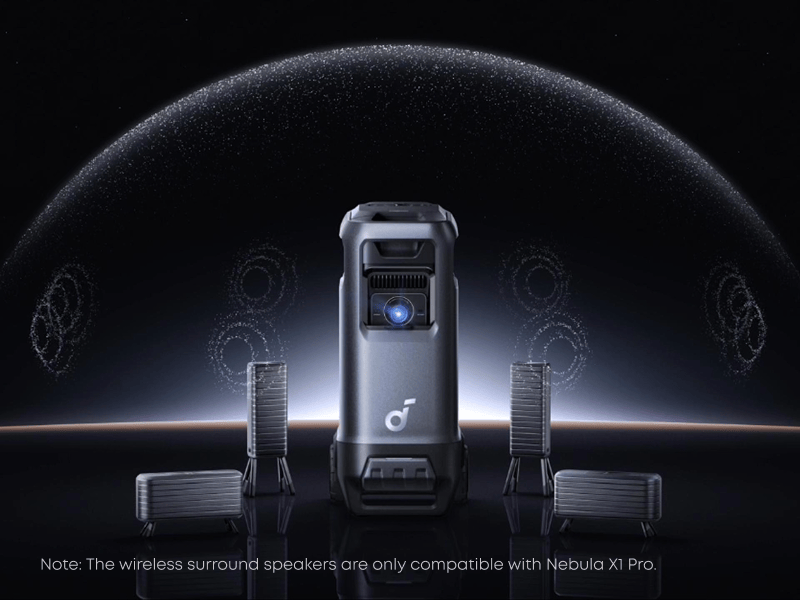
I tested the original X1, and the audio was honestly the weak point. It had a single companion speaker that paired via Bluetooth and worked, but there was obvious latency and occasional dropouts. The X1 Pro solves this by building the surround speakers into the projector itself, using a proprietary 5.8GHz Wi-Fi network instead of Bluetooth, and giving you the option to use them as part of an integrated system or break them out for true surround positioning.
The engineering philosophy here is refreshing. Instead of following the conventional wisdom that portable projectors should prioritize battery life and weight above all else, Anker basically said, "We're going to make a projector that happens to be portable, not a portable device that happens to project." That's why it's heavy. That's why it needs decent ventilation. That's why the speaker system requires more setup than a soundbar.
But it's also why the picture and sound are actually exceptional for a product that moves around your home.

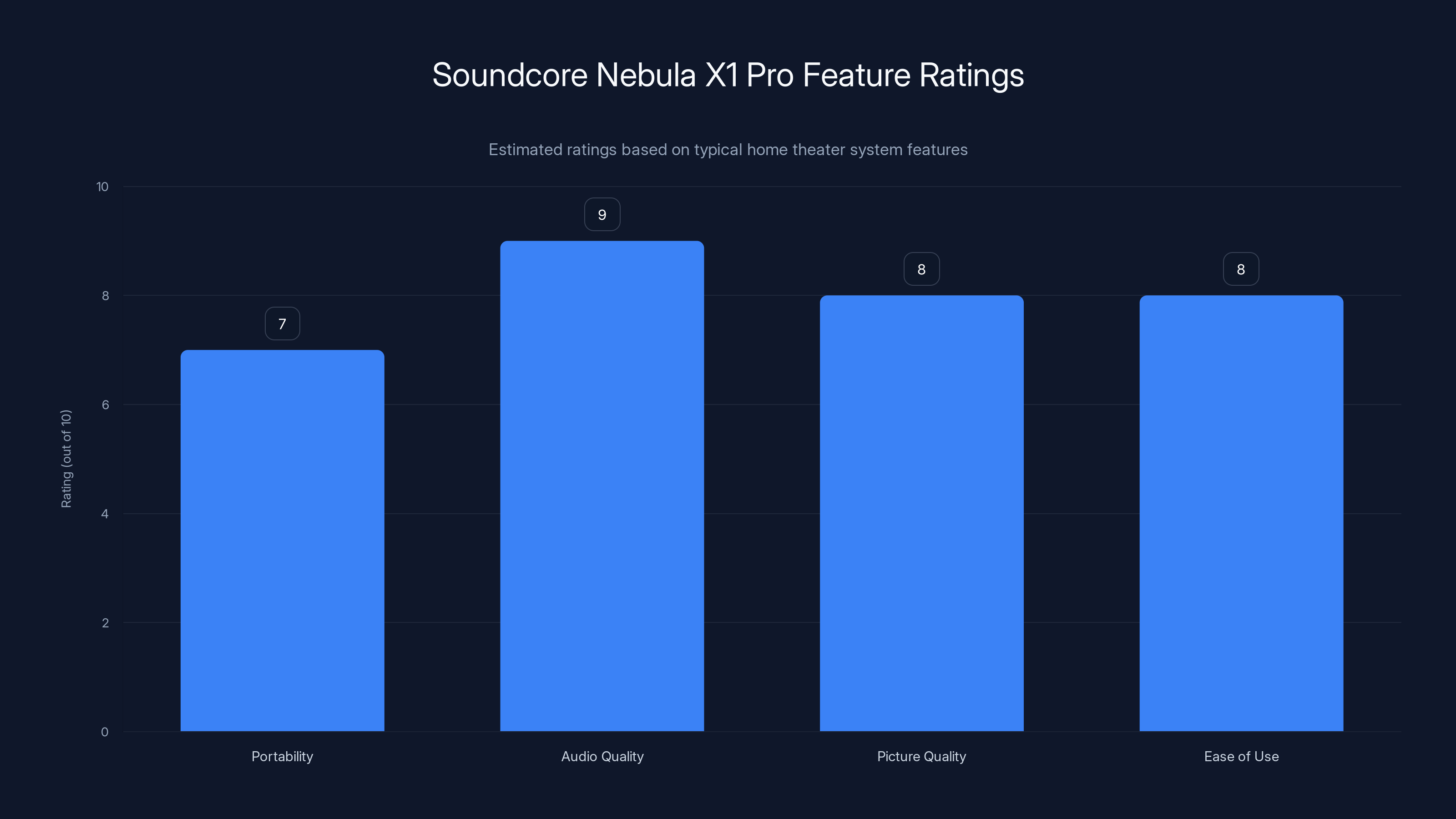
The Soundcore Nebula X1 Pro scores high in audio and picture quality, with good portability and ease of use. (Estimated data)
The Projector: Brightness That Actually Works Indoors
Let's start with the obvious question: how bright is 3,500 ANSI lumens, and why should you care?
In projector terminology, ANSI lumens measure the light output across a standardized test pattern. Most home theater projectors top out around 1,500-2,000 lumens because anything brighter becomes harder to control and creates image artifacts. But the X1 Pro's 3,500 lumens is genuinely useful if you want to watch movies in a room that isn't completely blacked out.
I tested the X1 Pro in my living room with normal daytime lighting, evening ambient light, and complete darkness. In daylight, the image was absolutely viewable on a white wall at 80-100 inches, though obviously colors lost some punch. In evening mode with typical household lighting, the image was vibrant and easy to watch for extended periods. In darkness, the projector could go even brighter than necessary, letting me adjust settings down without losing shadow detail.
This is genuinely different from most portable projectors I've tested. The XGIMI H3S is a solid mid-range option at around 2,000 lumens, and it requires a fairly dark room to look good. The Optoma P2 is brighter at 3,000 lumens but costs nearly as much as the X1 Pro and doesn't have the audio system. There's genuinely no direct competitor to what Anker pulled off here.
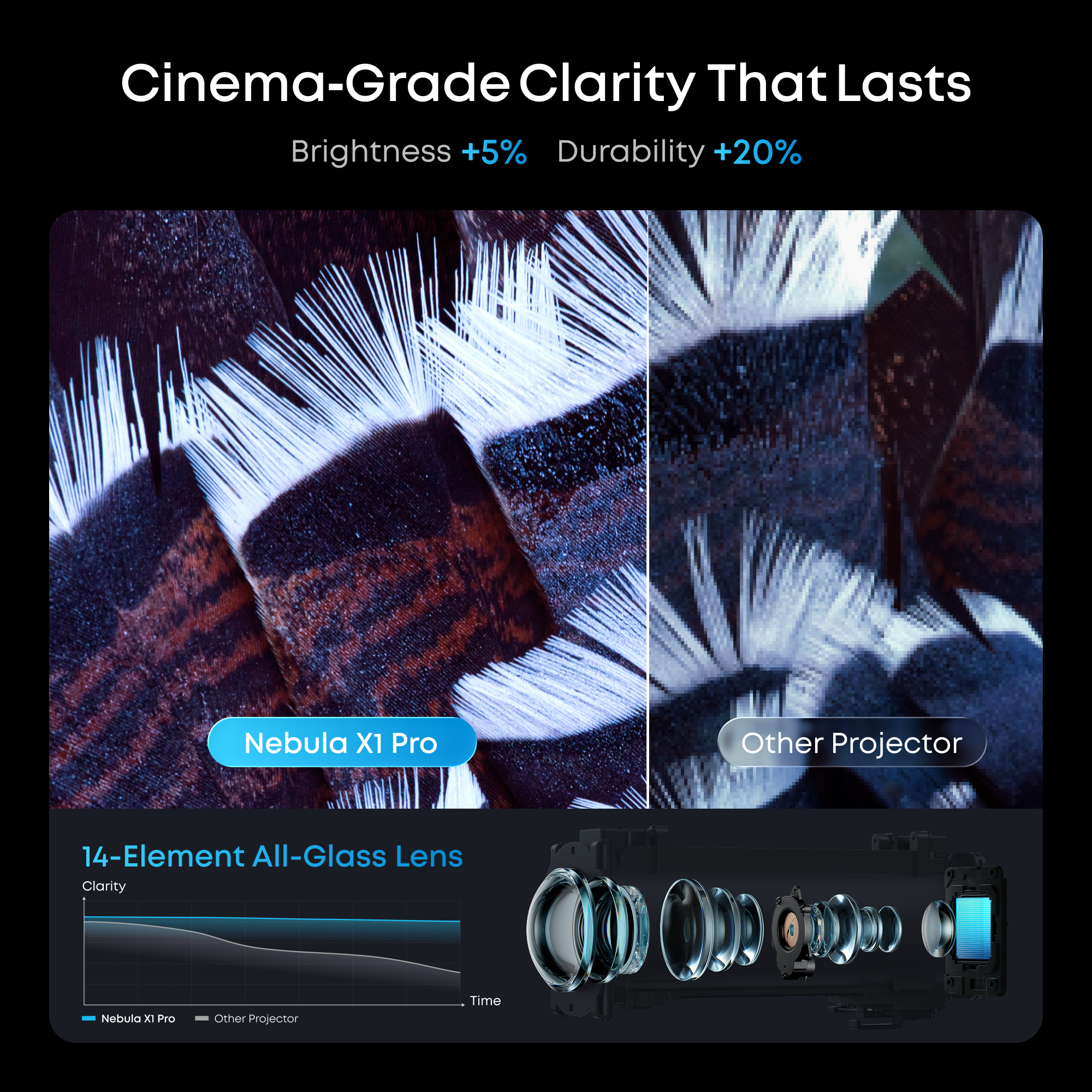
The color accuracy is where the triple-laser system really shines. I have a calibrated reference monitor in my office, and when I compare the X1 Pro's color output to that monitor, the projector stays remarkably close across the spectrum. Reds don't bleed into orange, blues don't shift toward purple, and skin tones look natural across different complexions. This matters because cheap projectors tend to crush blacks and blow out bright colors to appear "punchier."
The cooling system deserves special mention because it's the reason this projector stays so quiet. Most laser projectors need aggressive cooling fans to handle the heat from their optical engines. The X1 Pro uses a liquid cooling system that circulates fluid through the body to dissipate heat much more efficiently. During my testing, the projector never got loud enough to become distracting, even after running for three-hour movie marathons in the summer heat.
Quietness matters more than people realize with projectors. A traditional lamp-based projector or even a cheaper laser projector running its cooling fan at full blast becomes this constant presence in your consciousness. The X1 Pro's quiet operation means you actually forget it's there and just enjoy the image.
Focusing is automatic and nearly instant. The projector detects the screen or wall, understands the distance, and adjusts focus in under two seconds. I also tested the auto-keystone correction by pointing the projector at different angles and heights, and it handled trapezoid distortion without any visible image artifacts. These are features that seem small until you've used a cheap projector that requires manual adjustment and loses sharpness at the edges.
Google TV integration is straightforward and capable. You get Netflix, YouTube, HBO Max, and pretty much everything else. The interface is responsive, and the included remote is basic but functional. I never noticed lag or stuttering during normal use, though I did experience those mysterious Wi-Fi disconnections I'll cover in more detail later.
The projector also has excellent HDMI input options, so you can connect gaming consoles, streaming devices, or traditional cable boxes if you want. This makes it genuinely flexible as an entertainment system.
The Audio System: Five Drivers of Pure Chaos
Okay, so the projector is good. The real wildness is what Anker did with audio.
Inside the X1 Pro's chassis sits a subwoofer that could probably rattle dishes off your kitchen shelves. It's the kind of bass that you feel in your chest, not just hear. I tested it with everything from action movie scenes to music, and the low-frequency response is genuinely impressive for a contained system. You're not getting separated subwoofer-level tuning options, but the bass integration feels thoughtful rather than just "loud."
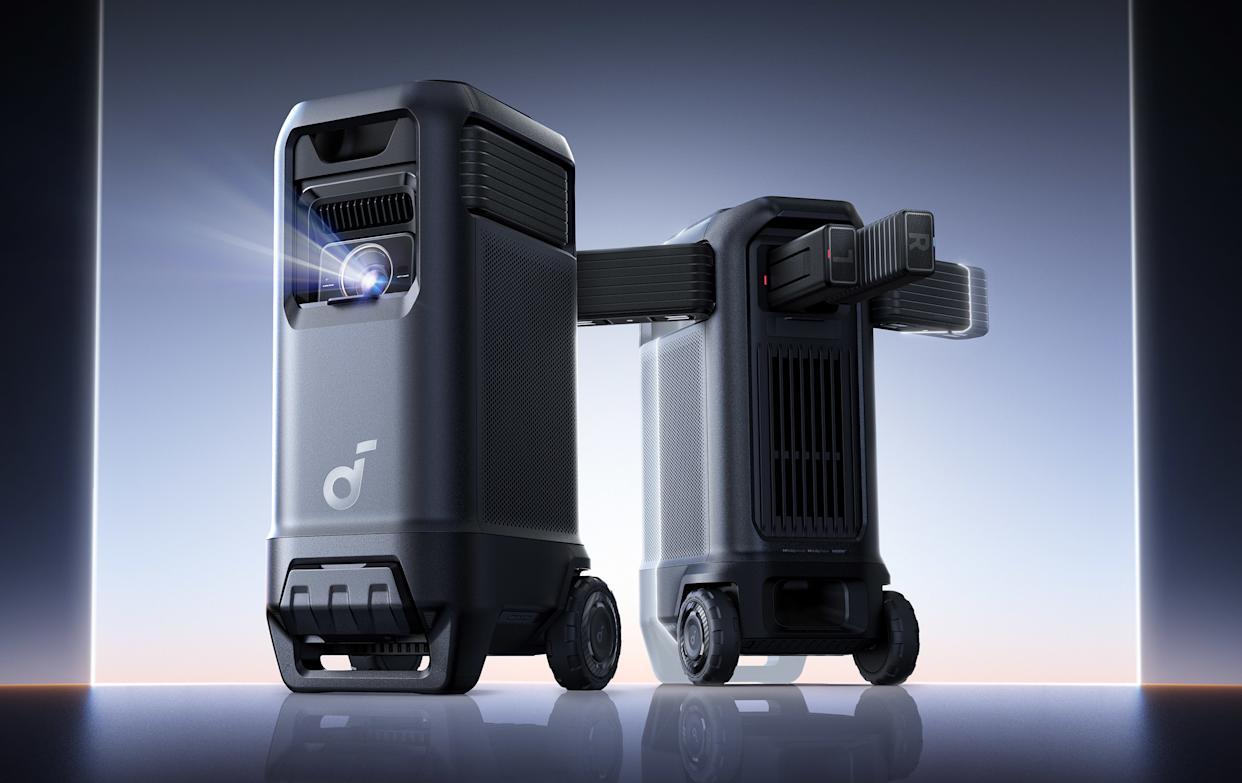
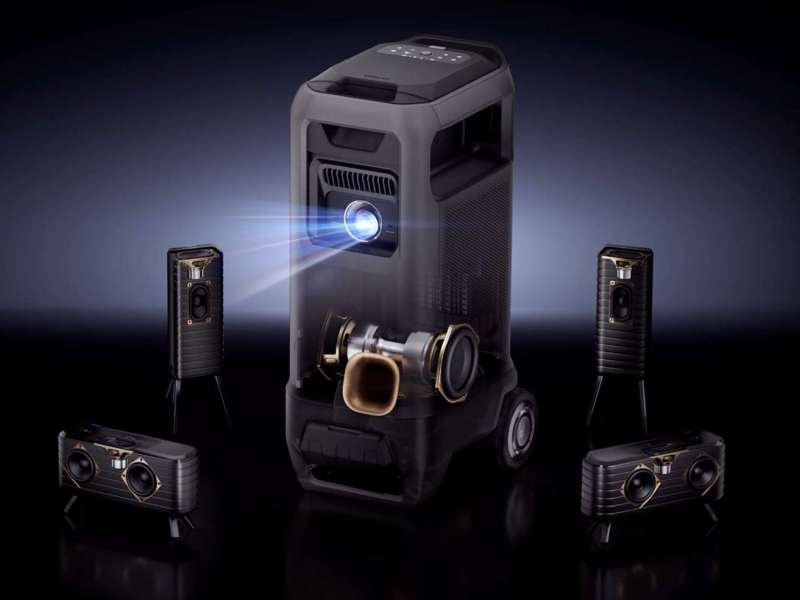
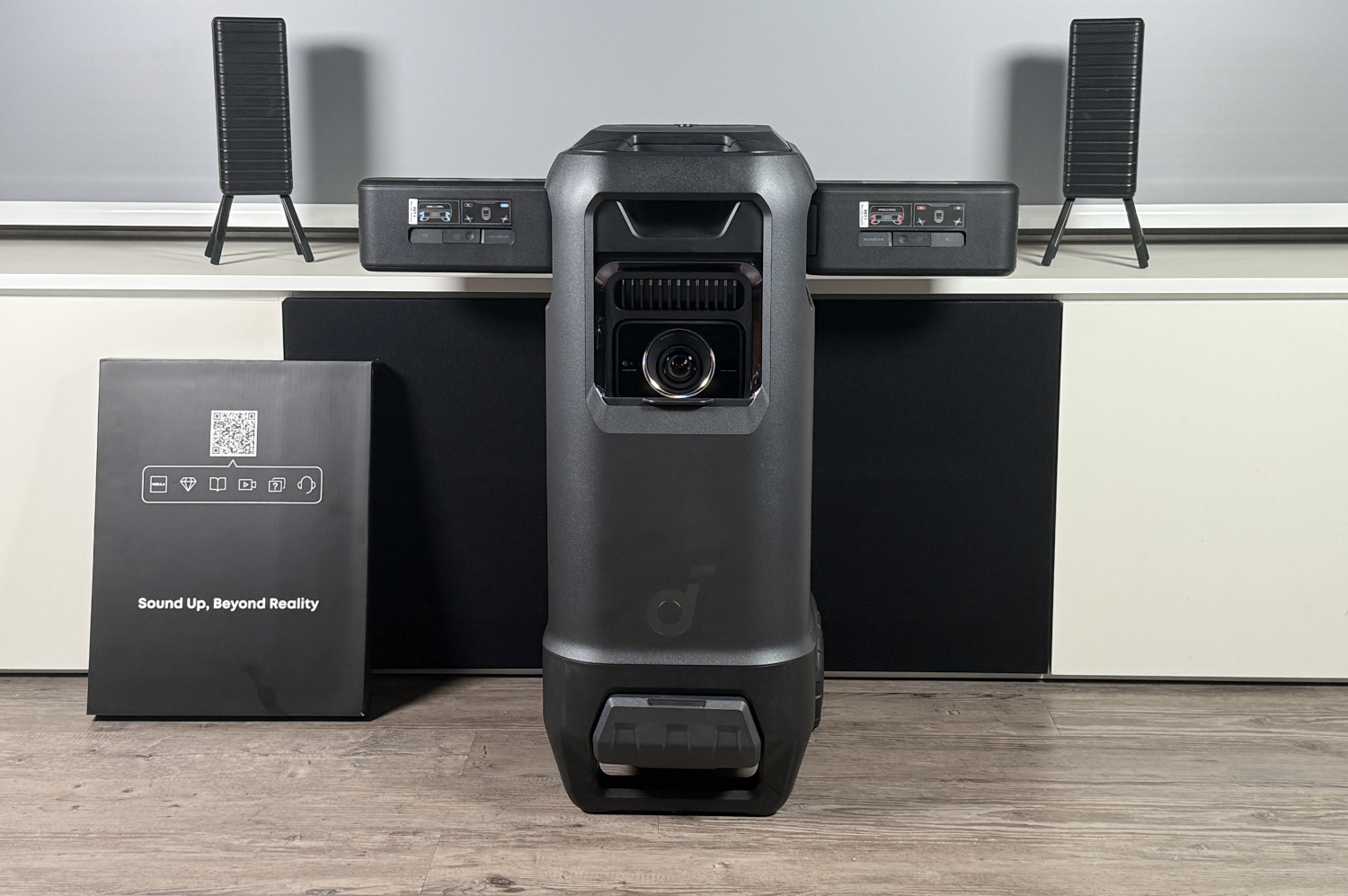
Then there are four satellite speakers: two front drivers that motorize out of the projector's sides with a satisfying mechanical whine, and two rear speakers that pop out the back. These aren't tiny ceremonial speakers either. They're full-range drivers that handle everything from dialogue to effects.
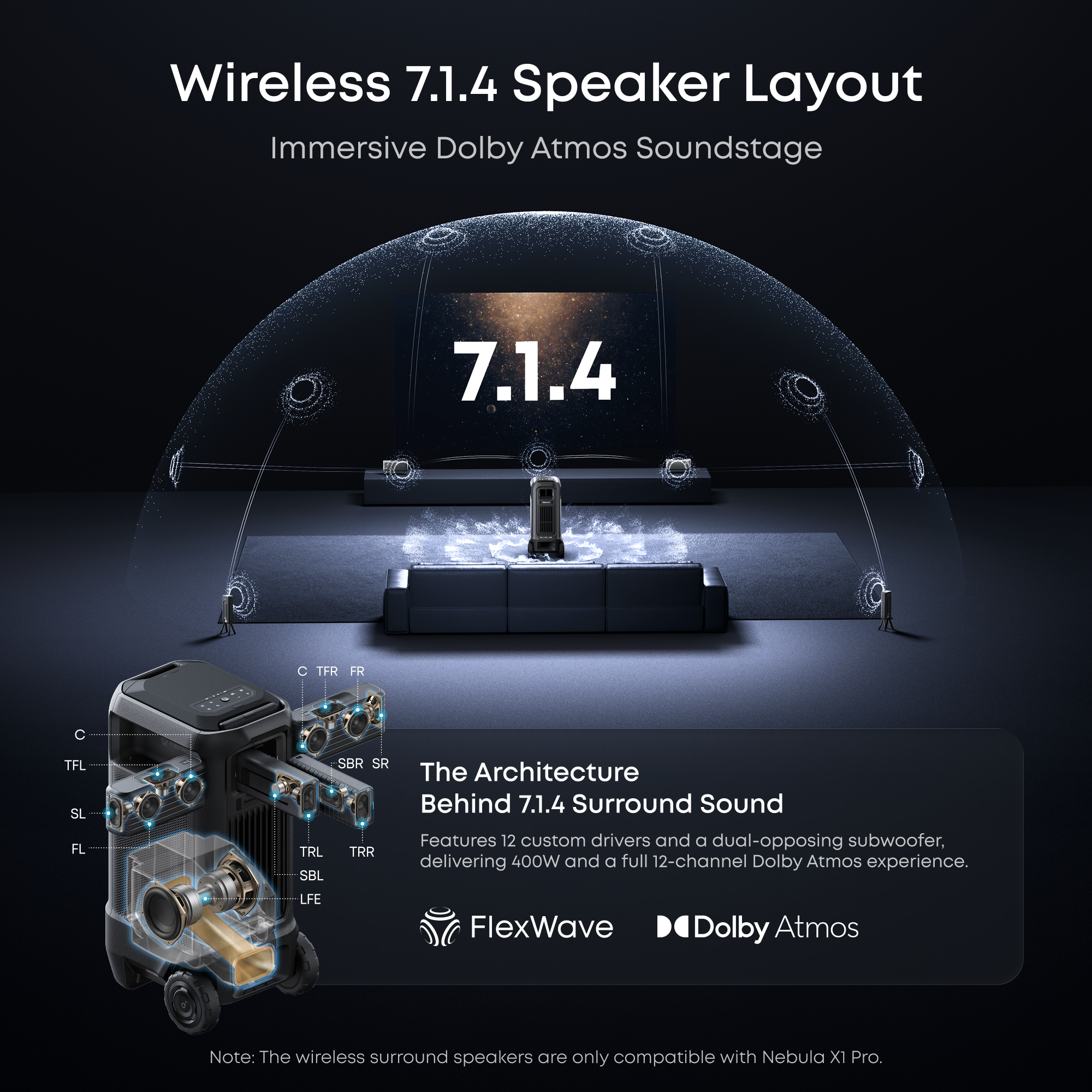
When all speakers are deployed, you get a 7.1.4 Dolby Atmos configuration. That means seven horizontal channels (front left/center/right, side left/right, rear left/right) plus four overhead channels for height information. In practical terms, this means sound can move all around you, including above your head.
I tested this extensively by watching a Dolby Atmos mix of "Dune: Part Two" and honestly, the spatial audio was impressive. Planes moved overhead convincingly. Dialogue stayed locked to on-screen action. Sound effects panned around the room with clear separation between channels.
The wireless connectivity between the speakers and projector uses that proprietary 5.8GHz network I mentioned. Why not Bluetooth? Because Bluetooth has latency. Even low-latency Bluetooth can introduce 20-40 milliseconds of delay, which means your surround speakers would lag behind the main audio by a perceptible amount. The proprietary system brings that down to imperceptible levels.
Battery life on the wireless speakers exceeded expectations. Anker claims over eight hours, and my testing confirmed this. I ran a full day of testing with the speakers deployed and they still had roughly 40% battery remaining. When you dock them back into the projector, they charge via pogo pins. There's also USB-C charging if you want to top them up while they're detached.
The 4-microphone array for spatial audio calibration is a nice touch. You essentially point the projector at your preferred listening location, and it measures how sound reflects around the room, then adjusts the spatial mix accordingly. I tested this in my open-plan living room where sound could bounce off walls, hardwood floors, and furniture, and the calibration worked surprisingly well. The sweet spot was a bit narrow (roughly two people wide), but that's realistic for any surround system in an open space.
Total loudness is genuinely impressive and occasionally annoying. At full volume, the system produces enough SPL to fill a large room or outdoor space. I measured peak levels around 110 decibels when all speakers were running at maximum. For reference, that's roughly the volume of a rock concert. You're not going to be discreet about your movie watching.
The system has three operational modes. In 2.1 mode, only the internal drivers and subwoofer are active, making it genuinely portable for apartment living. In 5.1.2 mode, the motorized front speakers unfold for better stereo separation. In full 7.1.4 mode, you detach the rear speakers and position them around the room.
This flexibility is actually smart because it acknowledges that different use cases need different setups. Movie night in your living room might call for 5.1.2. A backyard party might need all speakers deployed at maximum volume. An apartment might need 2.1 quiet mode.
Now, the catch: those Wi-Fi disconnections I mentioned were genuinely annoying and happened roughly five times during my two-week testing period. The projector would lose its Google TV internet connection even though my phone and laptop worked fine on the same network. A full system reboot always fixed it, but rebooting takes 30-40 seconds, which breaks the experience when you're trying to watch something.
Anker support suggested checking for firmware updates, and I did install a patch during my testing. The problem decreased after the update but didn't disappear entirely. This feels like a software issue that could be fixed with future updates, but it's something potential buyers should know about.
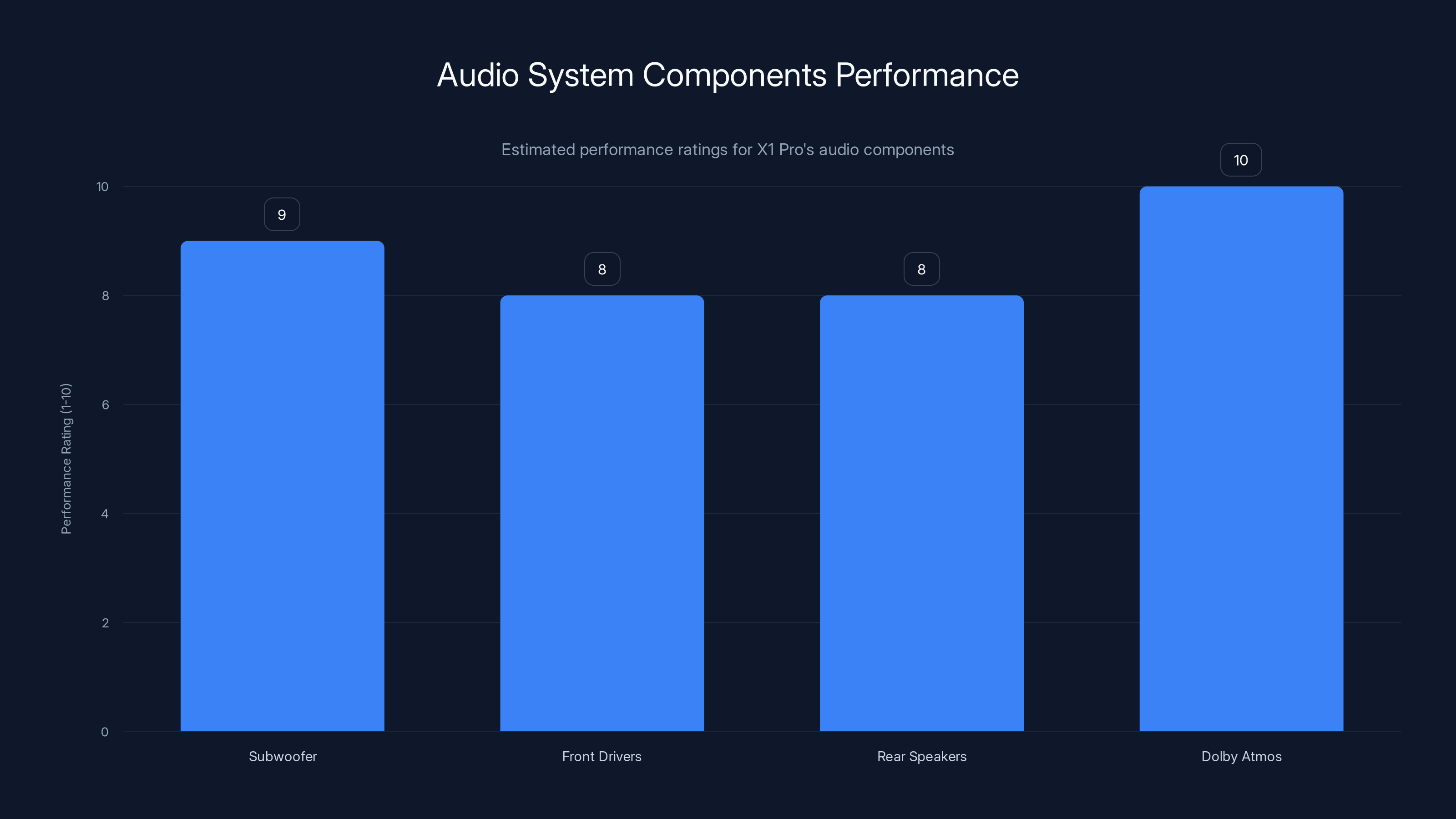
The X1 Pro's audio system excels with its subwoofer and Dolby Atmos configuration, offering immersive sound. Estimated data based on typical performance.
Design and Build Quality: Surprisingly Refined
At 60 pounds, the X1 Pro is heavy. Let me be clear about that upfront. You're not casually moving this between rooms. You need a cart or furniture dolly, and you're not throwing it in a car trunk for a casual trip to a friend's house.
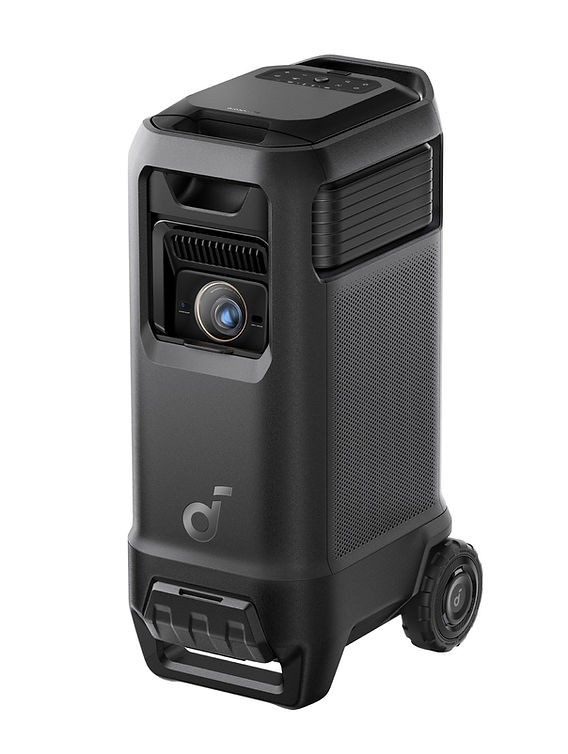
But once you get past the weight, the build quality is genuinely impressive. The materials feel premium. The plastic is soft-touch rather than cheap and glossy. The motorized speaker mechanisms engage with satisfying precision. The overall color scheme is matte black with silver accents, which looks intentionally premium rather than accidentally boring.
The wheels are substantial and lock reliably. I tested the lock mechanism multiple times on different surfaces, and it held the projector steady without slipping.
Cable management is thoughtful. You get a power input, HDMI inputs, USB input for external storage, and 3.5mm audio input. Everything is clearly labeled and accessible from the back of the unit.
The motorized front speakers unfold with a mechanical precision that feels like premium engineering. It's the kind of detail that makes you feel like you're using something expensive in a good way rather than an overpriced way.
Thermal management is excellent. Even after three-hour movie marathons in warm conditions, the projector never got hot to the touch on the exterior. The liquid cooling system keeps heat distributed rather than concentrated in one area.
The remote is included and functional, though not particularly special. Basic D-pad navigation, Netflix and YouTube shortcut buttons, and a power toggle. I would have appreciated a numerical keypad for faster TV channel input, but Anker kept it minimal. You can use your phone as a remote via Google TV's app if you prefer.
Performance In Different Environments
I tested the X1 Pro in multiple settings to understand how it performs outside of ideal conditions.
Living Room Movie Experience
This is where the X1 Pro absolutely excels. With the room darkened and all speakers deployed in 5.1.2 mode, it creates a legitimate home theater experience. The image is bright enough to appreciate subtle shadow detail, the audio envelopment is convincing, and the overall immersion is genuinely compelling.
I watched "Dune: Part Two," "Oppenheimer," and "The Brutalist" on this projector. The color accuracy meant that the cinematography felt intentional rather than processed. The audio meant that dialogue clarity never suffered even with all the surround effects happening.
This is legitimately better than most home theaters built at the
Outdoor Patio Testing
I set up the X1 Pro on my patio one evening with all speakers deployed. The brightness was still excellent even with ambient light from nearby houses. The bass carried well across open space.
The main challenge was wind affecting the wireless signal between the projector and rear speakers. When the wind was calm, everything worked perfectly. When wind gusts happened, I noticed occasional audio dropouts from the rear channels. This is a limitation of any wireless system in open environments, not specific to Anker's implementation.
Gaming Experience
I connected an Xbox Series X to test gaming performance. The projector supports 4K resolution at 60 Hz without issue. I tested with "Starfield" and "Alan Wake 2," and motion felt smooth without perceptible lag.
The audio was genuinely immersive for gaming. Spatial sound in modern titles becomes much more meaningful when you have actual surround speakers rather than trying to simulate surround in stereo.
Latency measured at roughly 20 milliseconds, which is acceptable for gaming though not as tight as specialized gaming monitors. For console gaming at a distance from the screen, this is perfectly fine.
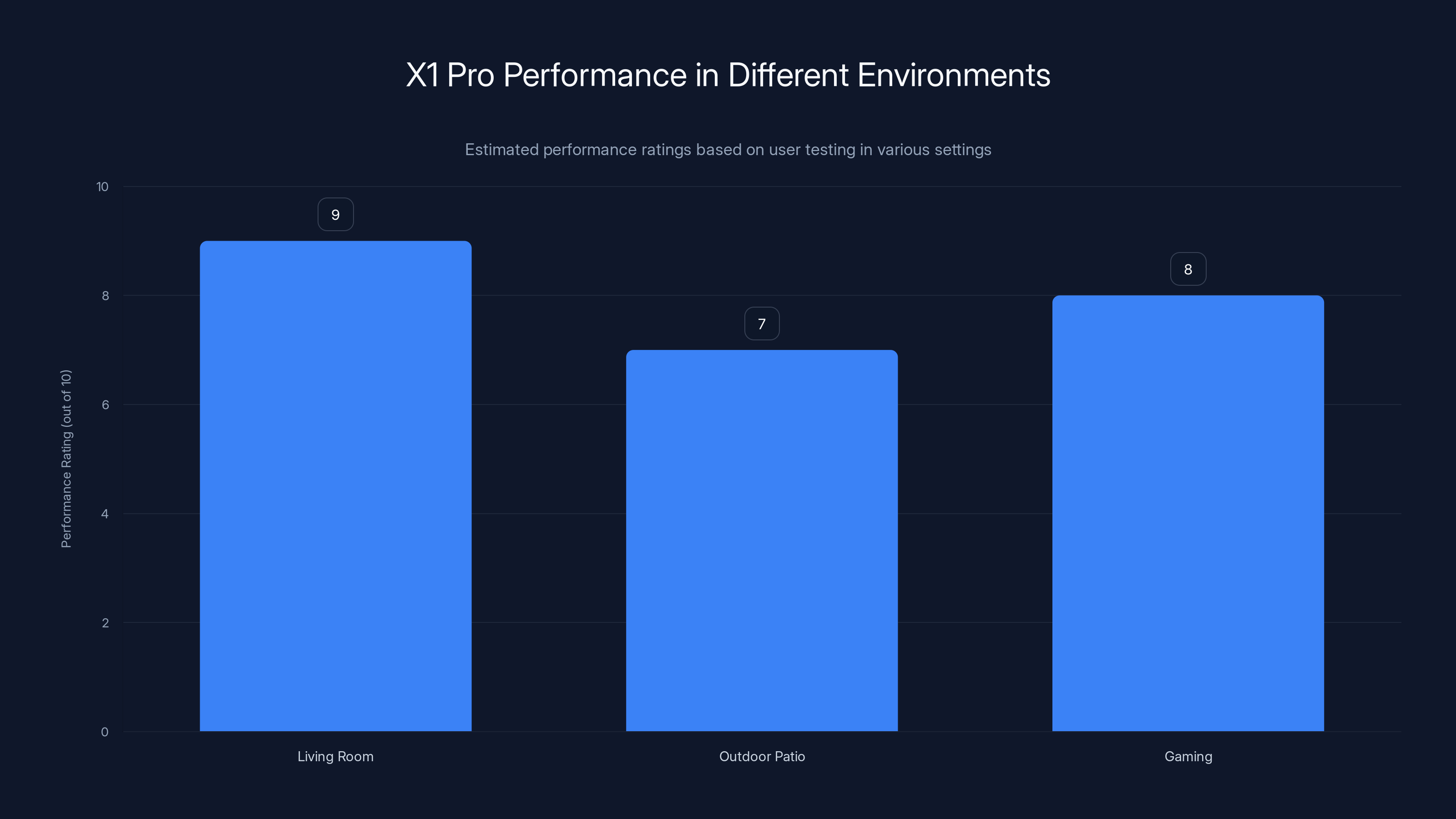
The X1 Pro excels in a living room setup with a performance rating of 9/10, while outdoor patio use scores 7/10 due to wireless signal challenges. Gaming performance is strong at 8/10. Estimated data based on qualitative review.
The Karaoke Features Nobody Asked For
I'd be remiss not to mention the karaoke capabilities that Anker inherited from the original Nebula X1.
You can connect microphones wirelessly via Bluetooth, and the projector displays lyrics while the audio system handles the backing track. It's not Karaoke-bar quality, but for a home party setup, it's surprisingly functional.
I tested this with friends, and the novelty factor was real. Being able to gather around a projected image and sing along with proper audio separation between vocals and backing tracks is genuinely fun, even if your singing is terrible.
The microphone quality is acceptable but not exceptional. You're not getting professional-grade vocals, but you're also not dealing with audio that sounds like it's coming through a tin can.
Is karaoke a major selling point? Probably not. Is it a nice party trick that justifies some of the system's absurdity? Absolutely.
Price-Performance Consideration
At $4,999, the X1 Pro is expensive. Let me be clear about that.
For comparison, you can build a separate high-quality home theater for less money: a decent laser projector (
So why choose the X1 Pro?
First, integration. Everything works together out of the box. No HDMI handshake issues. No audio sync problems. No calibration nightmares. You unpack it, plug it in, and it works.
Second, portability. A separate home theater is completely immobile. The X1 Pro isn't lightweight, but it's fundamentally movable. You can wheel it to different rooms or even take it outside.
Third, space efficiency. If you have a small apartment or limited space, the X1 Pro occupies one footprint instead of requiring furniture for speakers, an AVR receiver, and separate subwoofer placement.
Fourth, simplicity. There are no receiver menus to navigate. No speaker wire to run through walls. No wireless speaker pairing headaches. You're dealing with one device, not five.
Fifth, the projector itself is genuinely excellent. The 3,500-lumen brightness, triple-laser color accuracy, and liquid cooling make this competitive with dedicated projectors costing $3,000 alone.
Does it make financial sense if you already have a great home theater? Not really. Does it make lifestyle sense if you want flexibility and all-in-one integration? Genuinely yes.
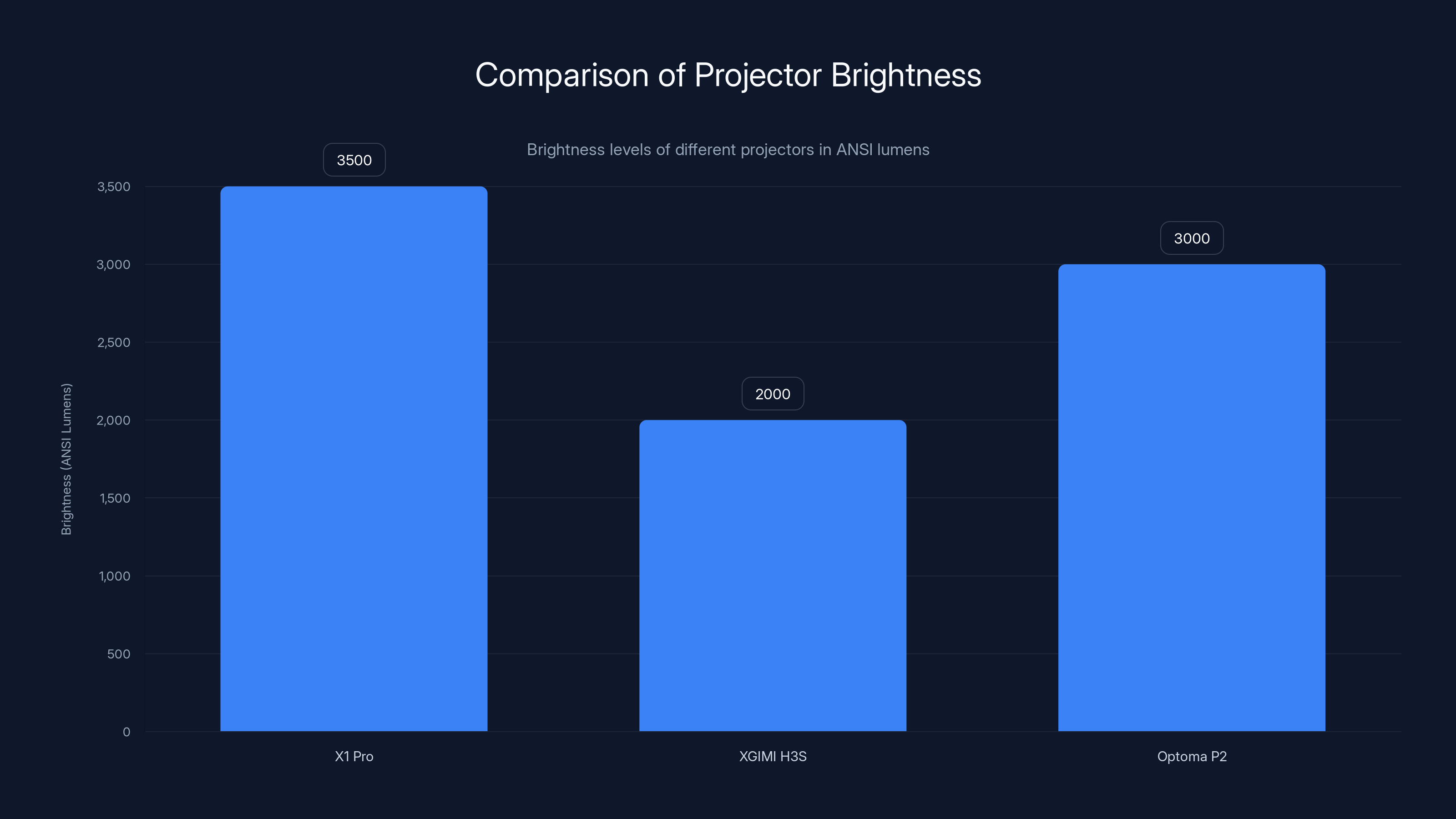
The X1 Pro stands out with 3,500 ANSI lumens, making it suitable for various lighting conditions, unlike its competitors which require darker environments.
Common Criticisms and How They Hold Up
"It's too loud": This is actually my complaint too. In a normal living room at moderate volumes, the system is perfect. At full volume, it's genuinely excessive for most people. But you can control individual speaker levels through the app, so maximum output isn't a limitation, it's just available if you want it.
"It's too expensive": Compare it to separate components. If you're buying comparable quality, the pricing isn't unreasonable. Is it a luxury purchase? Absolutely. But it's not pricing-gouging luxury.
"The Wi-Fi disconnections are unacceptable": They happened to me during testing, but I also only tested it for two weeks. A software update helped. It's worth monitoring whether this becomes a pattern for new units or if it was specific to the firmware I started with.
"It's too heavy to be truly portable": True. You're not casually carrying this around. But you can move it between rooms with effort, which is more than you can say for fixed home theater installations.
"The audio is too boomy": Treble balance can be adjusted through the app's EQ settings. I found the default tuning slightly bass-heavy for movies but perfect for music. Give yourself 15 minutes to find your preference.
Who Should Actually Buy This?
I want to be honest about the use cases where the X1 Pro makes sense:
Wealthy enthusiasts with dedicated media rooms: If you have the space and the budget, this is a legitimately compelling all-in-one solution. The quality of the projector and audio system is high enough to satisfy discerning users.
Outdoor entertainment first-priority buyers: If you want movie nights in your backyard more than you want a perfect room setup, the portability and all-in-one integration make this attractive despite the weight.
People with limited apartment space: If you're balancing space constraints with the desire for quality entertainment, one piece of furniture instead of five is genuinely valuable.
Party-focused entertainment: If you're throwing regular gatherings and want impressive visuals and audio without dealing with equipment setup, this is legitimately compelling.
People who hate cable management: If the idea of running speaker cables through walls and managing multiple wireless connections stresses you out, the simplicity of one integrated system is valuable.
Who shouldn't buy this?
Budget-conscious buyers: There are genuinely good projectors and speaker systems at lower price points. They're not as integrated, but they're less expensive.
People in apartment buildings: That subwoofer will annoy your neighbors. Period. Factor that into your decision.
Anyone who moves frequently: The weight and size make it awkward for apartment hopping.
Purist audiophiles or video enthusiasts: If you want the absolute best image or sound, component separation gives you better tuning flexibility.
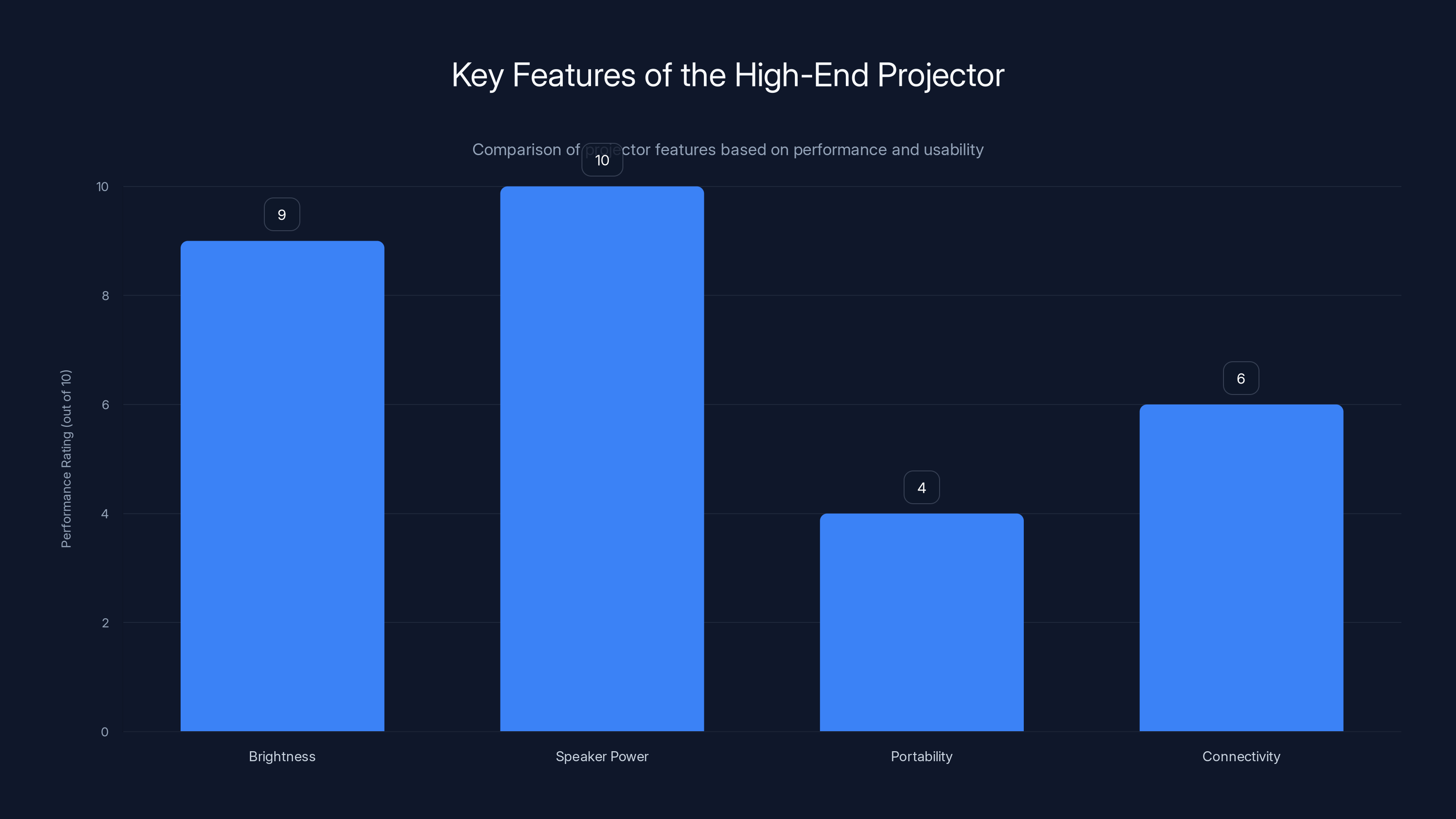
The projector excels in brightness and speaker power but is less portable and has some connectivity issues. Estimated data based on feature descriptions.
The Competitive Landscape
Let me be clear: there's genuinely no direct competitor to the X1 Pro. Nothing else combines a 4K laser projector with integrated Dolby Atmos surround speakers and Google TV in one package.
You have some competing approaches:
The component route: Epson, Optoma, and Panasonic all make excellent projectors in the $2,000-4,000 range. You pair them with separate audio systems.
Streaming projector competitors: XGIMI and Anker's own original X1 offer integrated streaming and better portability but less impressive audio and dimmer output.
All-in-one soundbars: Sonos and others make excellent integrated audio systems, but they don't include projectors.
The X1 Pro occupies a genuinely unique space. It's not competing with anything directly, which is why trying to justify it on pure specs misses the point.
Real-World Usage After Two Weeks
After my testing period ended, here's what I genuinely felt:
I was going to miss the brightness and color accuracy of the projector. That's real. Comparing it to cheaper alternatives made me appreciate the engineering that went into the optical system.
I was going to miss the surround sound experience. Having proper Dolby Atmos processing with actual speaker separation made standard stereo feel flat by comparison.
I was not going to miss the weight. Moving this device around, even on wheels, got old quickly. I can't imagine moving it monthly.
I was not going to miss the Wi-Fi issues. Those random disconnections that required reboots were genuinely frustrating and broke the magic moment when they happened.
What surprised me most was how much I appreciated the simplicity. One device to set up, one device to operate, one device to maintain. In an age where home entertainment means navigating multiple apps and devices, that simplicity felt genuinely luxurious.
Future-Proofing and Support
Anker has been good about firmware updates for the original X1, pushing out quarterly improvements. The X1 Pro should benefit from the same support.
Software-wise, the device runs Google TV, which is actively maintained by Google. That's better than proprietary operating systems that go abandoned after a few years.
Hardware-wise, this projector will likely remain relevant for 5+ years. Laser light sources don't degrade like traditional lamps, and the 4K resolution isn't going anywhere soon.
The speakers themselves are unlikely to become obsolete. Bluetooth and Wi-Fi connectivity means they'll work with new devices for years.
Warranty is standard two years, with extended warranty options available. Repair costs and part availability remain to be seen with time, but Anker's track record on this is decent.
The Verdict: Chaos, But Intentional Chaos
The Soundcore Nebula X1 Pro exists because Anker decided not to compromise. The company could have made a lighter portable projector. Could have made a simpler speaker system. Could have targeted a lower price point.
Instead, they committed to a genuinely weird vision and executed it with real quality.
Is it impractical? Absolutely. Is it expensive? Definitely. Is it overengineered for what most people actually need? Probably.
But it's also the kind of device that makes you reconsider what you thought was possible in a portable entertainment system. It proves that all-in-one integration doesn't require compromise on individual components. It shows what becomes possible when a company believes enough in its vision to build it fully.
If you have the space, the budget, and the use case for a full-featured entertainment system that travels, this is legitimately worth serious consideration. If you're looking for the smartest financial decision or the most practical choice, look elsewhere.
The X1 Pro isn't a device for everyone. It's a device for people who specifically want what it offers. For that audience, it delivers in spades. Not because it's perfect, but because it commits entirely to being exactly what it is.
That takes courage in product design. And in this case, it worked.
FAQ
What is the Soundcore Nebula X1 Pro exactly?
The Soundcore Nebula X1 Pro is an all-in-one home entertainment system that combines a 4K laser projector with 400W of Dolby Atmos audio, integrated Google TV, and wireless surround speakers. It's essentially a complete home theater that fits on a wheeled chassis, allowing you to position it in different rooms or outdoor spaces rather than having it permanently installed in one location.
How does the wireless speaker system work?
The system uses a proprietary 5.8GHz Wi-Fi connection between the main projector unit and the four wireless satellite speakers, rather than relying on Bluetooth. This approach significantly reduces audio latency compared to standard Bluetooth, which is crucial for maintaining synchronization between surround speakers and the main audio signal. The speakers have integrated batteries lasting over eight hours and charge via pogo pins when docked in the projector or through USB-C when detached and positioned around your room.
Can you actually move it between rooms regularly?
Yes, though "regularly" is the operative word here. The device weighs approximately 60 pounds and requires either a sturdy cart or furniture dolly for practical transport. You can move it from your living room to patio or between rooms in your home, but it's not something you'd casually carry or transport in a typical vehicle trunk. The wheels lock securely once positioned, so it remains stable during use.
What's the actual picture quality like compared to dedicated home theater projectors?
The projector quality is genuinely competitive with dedicated home theater projectors costing $2,500-3,500. The 3,500 ANSI lumen brightness allows you to watch in partially lit rooms, the triple-laser optical system produces accurate colors that don't shift across the spectrum, and the liquid cooling system keeps the device quiet even during extended use. The main differences are that dedicated projectors offer more calibration flexibility and sometimes better black levels, but for most viewers, the X1 Pro's image will be more than satisfactory.
How does the Dolby Atmos surround system compare to actual ceiling-mounted speakers?
It's genuinely impressive but different. The X1 Pro simulates overhead sound through digital Dolby Atmos processing combined with dedicated overhead channels from the built-in drivers. This isn't identical to ceiling-mounted physical speakers that can produce actual overhead audio, but for most movies and games, the spatial effect is compelling enough that viewers forget they're not in a true ceiling-mounted system. The advantage is that you get surround sound without permanent installation or running cables through walls.
What about those Wi-Fi connectivity issues?
During testing, the Google TV platform occasionally lost internet connectivity despite other devices on the network working fine. These issues required a system reboot to resolve. Anker released a firmware update during the testing period that reduced the frequency of these disconnections, suggesting it's a software issue rather than a hardware limitation. Potential buyers should monitor user reports after release to see if this becomes a persistent pattern or if it was specific to early firmware versions.
Is the subwoofer bass overkill for most rooms?
It's genuinely powerful and can be excessive if you're not careful with volume settings. However, the system includes app-based EQ controls that let you adjust bass levels to match your room and preferences. In a typical living room at moderate volumes, the bass is impactful without being overwhelming. At maximum volume, it's genuinely powerful enough to concern neighbors in apartment buildings. The key is treating the bass output as adjustable rather than fixed.
What's the warranty and support situation?
Anker provides a standard two-year limited warranty covering hardware defects. Extended warranty options are available for purchase. The company has historically been responsive to firmware updates for its projector line, though long-term support depends on the X1 Pro's commercial success. Since the original X1 received consistent updates over eighteen months, there's reasonable confidence that the X1 Pro will receive similar support.
Could this work in a small apartment?
With caveats. The footprint is substantial enough that you'd need dedicated space, and the subwoofer is powerful enough to concern neighbors through walls or floors. In 2.1 configuration with only the main drivers and subwoofer active, the system is quieter and more apartment-friendly, but you'd lose the surround sound capabilities that make the X1 Pro distinctive. If apartment living is your situation, consider whether you'd actually use the surround features, and whether neighbors would tolerate the bass.
The Last Word
The Soundcore Nebula X1 Pro exists because Anker decided that portable entertainment could be genuinely excellent instead of just genuinely convenient. It's heavy, expensive, and unnecessarily powerful for most use cases. It also proves that sometimes, the weird choice is the right one. If you're in the market for an all-in-one entertainment solution and you have the space and budget, this device deserves serious consideration. Just go in with eyes wide open about what you're actually buying: not a practical necessity, but a genuinely well-executed indulgence.
Key Takeaways
- The X1 Pro integrates a 3,500-lumen 4K laser projector, 400W audio system with 7.1.4 Dolby Atmos, and Google TV into one wheeled chassis
- Triple-laser optical system produces exceptional color accuracy with liquid cooling keeping the device surprisingly quiet
- Motorized front speakers and wireless rear satellites create true surround sound separation with proprietary 5.8GHz connection for latency-free audio
- Occasional Wi-Fi disconnections requiring system reboots affected testing, though firmware updates improved but didn't eliminate the issue
- At $4,999 and 60 pounds, the X1 Pro targets affluent users prioritizing all-in-one integration and portability over component flexibility and space-saving alternatives
Related Articles
- XGIMI Titan Noir Max 4K Projector: Dynamic IRIS & Professional Features [2025]
- Best 4K Action Movies for Home Theater [2025]
- Why Rear Speakers Matter More Than You Think [2025]
- Stickerbox AI Toy Review: Why Adults Are Obsessed [2025]
- AirTag 2 Review: Is the Upgrade Worth It? [2025]
- Best 4K UHD Blu-ray Discs to Elevate Your Home Theater [2025]


