![Is It Time to Upgrade Your Old Kindle? A Comprehensive Guide [2025]](https://tryrunable.com/blog/is-it-time-to-upgrade-your-old-kindle-a-comprehensive-guide-/image-1-1775621055365.jpg)
Is It Time to Upgrade Your Old Kindle? A Comprehensive Guide [2025]
If you're still using a Kindle from 2012 or earlier, you might want to consider an upgrade. Amazon announced that it is officially ending support for its oldest e-readers, leaving many users wondering what this means for their beloved devices. In this guide, we'll delve into the implications of this change, explore the benefits of modern Kindles, and provide a roadmap for upgrading your device.
TL; DR
- Support Ending: Amazon is ending support for Kindles from 2012 or earlier, impacting software updates and access to new features.
- Upgrade Benefits: Newer Kindles offer enhanced displays, battery life, and access to a broader range of content.
- Choosing a Model: Consider factors like display size, storage, and additional features when selecting a new Kindle.
- Data Transfer: Learn how to seamlessly transfer your data and content to a new device.
- Future Trends: Expect more integration with smart home devices and AI-assisted reading features.
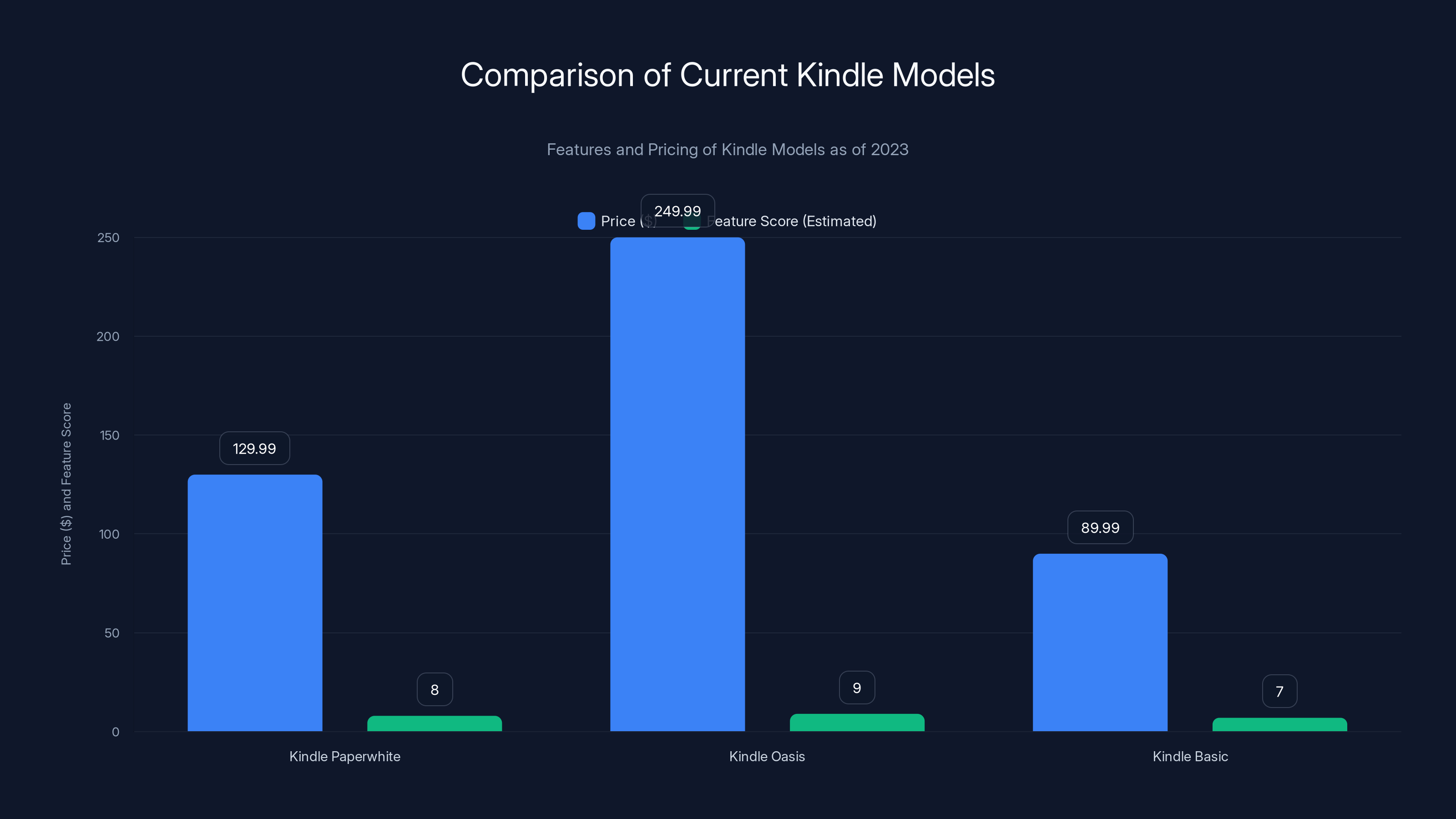
The Kindle Oasis offers a premium experience with the highest price, while the Kindle Basic is the most budget-friendly. Feature scores are estimated based on standout features.
The End of an Era: Why Amazon Is Ending Support
Amazon's decision to discontinue support for older Kindles stems from technological advancements and security concerns. Devices from 2012 or earlier lack the hardware capabilities to support new software updates, leading to vulnerabilities.
What It Means for Users
Without support, your Kindle may not receive security patches, leaving it exposed to potential threats. Additionally, access to the Amazon store and cloud services could become limited, affecting your reading experience.
A Brief History of the Kindle
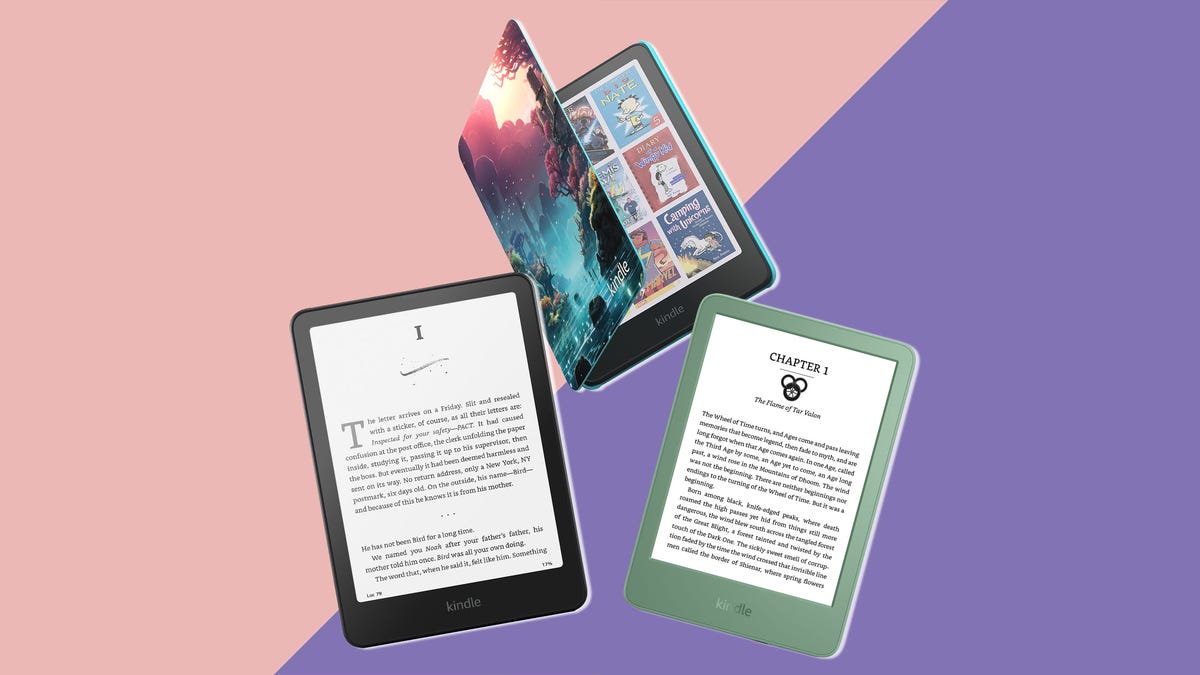
The Kindle has evolved significantly since its debut in 2007. From the basic Kindle with a monochrome display to the latest Kindle Oasis with adjustable warm light and waterproofing, Amazon has continuously improved its e-readers.
Why Upgrade? The Benefits of Modern Kindles
Upgrading to a newer Kindle model offers numerous advantages, from improved hardware to enhanced software features.
Enhanced Display Technology
Modern Kindles feature high-resolution displays with better contrast and brightness, making for a more comfortable reading experience. The latest e-ink technology mimics the look of paper more closely than ever.
Improved Battery Life
Newer models boast weeks of battery life, reducing the need for frequent charging. This is especially beneficial for avid readers who travel frequently.
Expanded Content Access
With a new Kindle, you'll gain access to the latest features, such as Kindle Unlimited, which offers a vast library of books, audiobooks, and magazines.
Additional Features
Modern Kindles often include features like waterproofing, Bluetooth connectivity for audiobooks, and adjustable lighting to reduce eye strain.
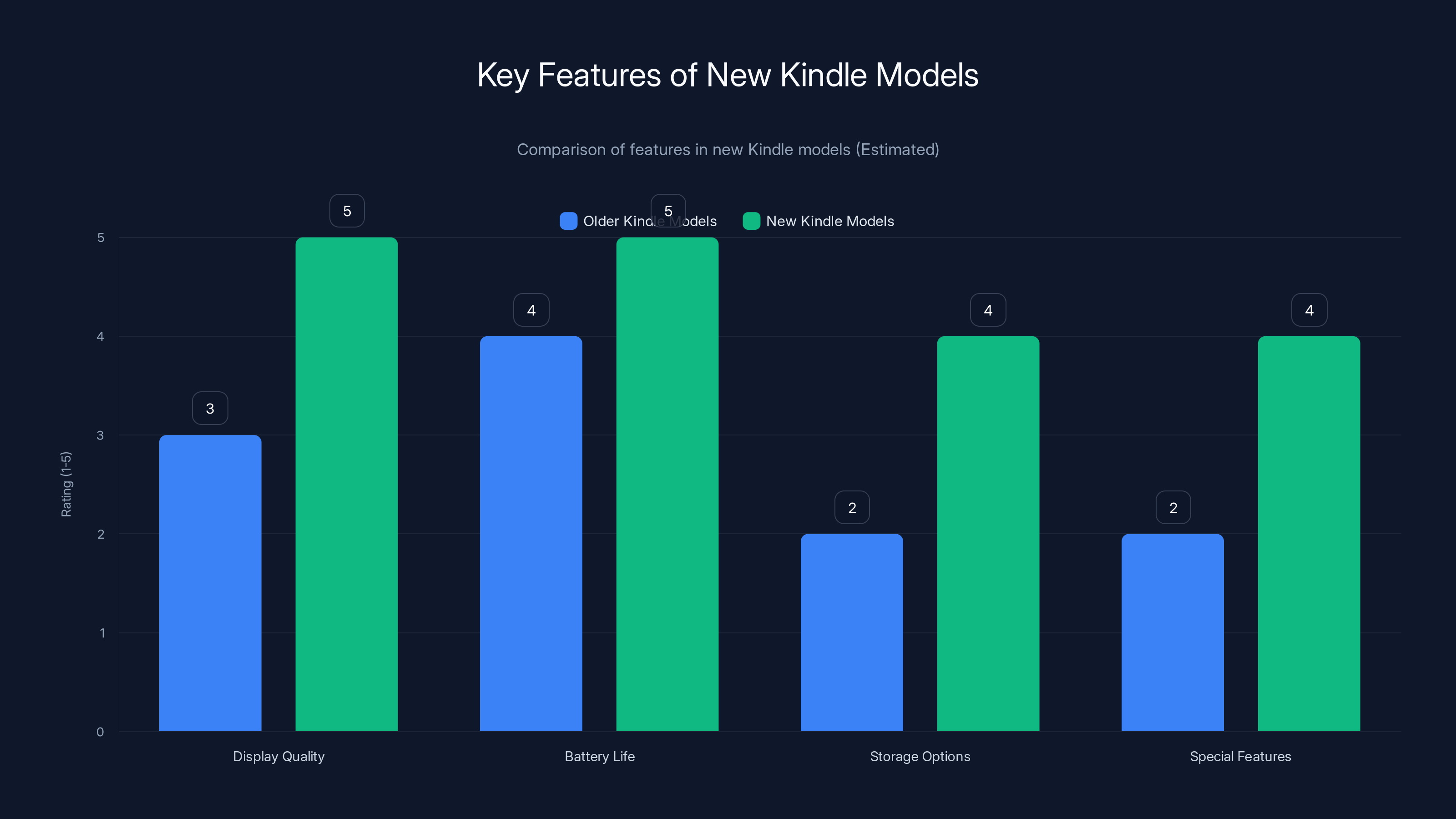
New Kindle models offer significant improvements in display quality, battery life, and special features compared to older models. Estimated data based on typical upgrades.
Choosing the Right Kindle for Your Needs
When considering an upgrade, it's essential to choose a model that suits your reading habits and lifestyle.
Key Considerations
- Display Size: Larger screens are ideal for graphic novels and PDFs.
- Storage Capacity: More storage means you can keep a larger library offline.
- Special Features: Decide if you need waterproofing, audiobook support, or cellular connectivity.
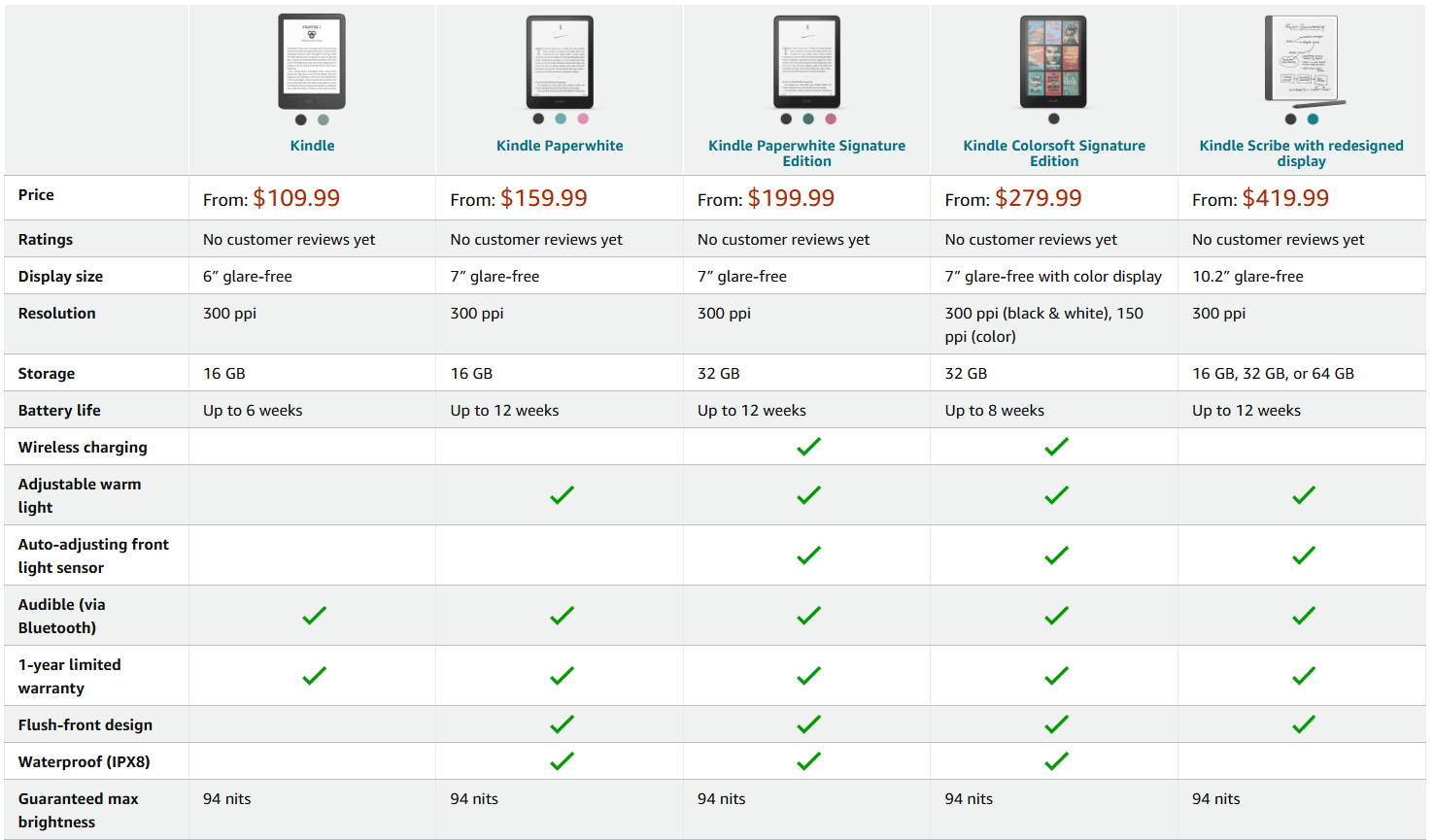
Comparison of Current Kindle Models
| Model | Best For | Standout Feature | Price Range |
|---|---|---|---|
| Kindle Paperwhite | Everyday reading | Waterproofing | $129.99 |
| Kindle Oasis | Premium experience | Adjustable warm light | $249.99 |
| Kindle Basic | Budget-friendly option | Long battery life | $89.99 |
How to Prepare for Your Upgrade
Transitioning to a new device can be seamless with the right preparation.
Backing Up Your Data
Ensure all your books and documents are backed up to the Amazon cloud. This will allow for easy restoration on your new device.
Transferring Content
Use Amazon's Whispersync to synchronize your bookmarks and reading progress across devices.
Setting Up Your New Kindle
Once your new Kindle arrives, setting it up is straightforward:
- Charge the device fully before starting setup.
- Connect to Wi-Fi and log into your Amazon account.
- Download your library and enjoy your enhanced reading experience.
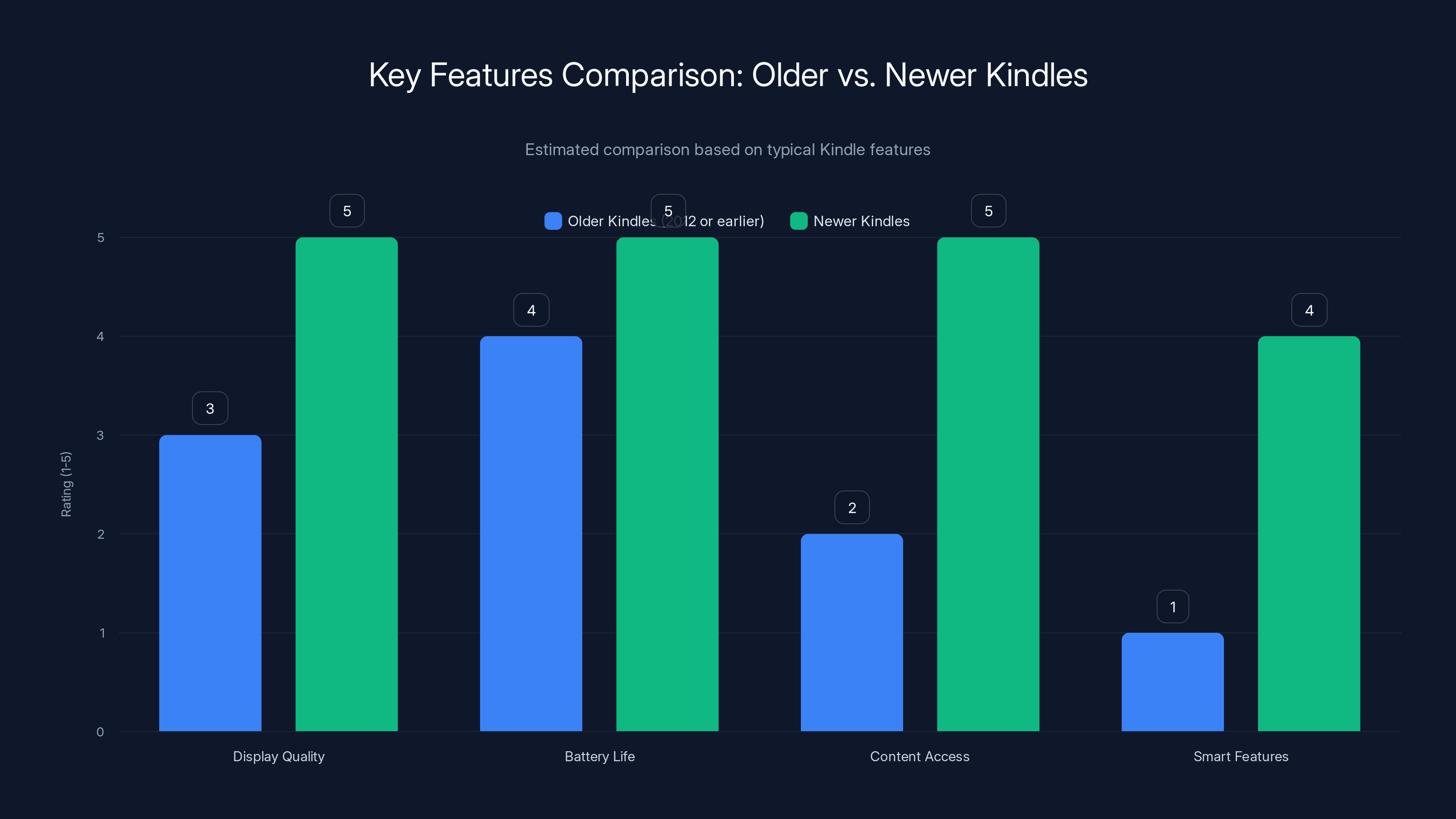
Newer Kindles significantly outperform older models in display quality, battery life, and smart features. Estimated data based on typical improvements.
Common Pitfalls and How to Avoid Them
Transitioning to a new device can come with challenges. Here's how to tackle them.
Forgotten Passwords
If you've forgotten your Amazon password, reset it before setting up your new device.
Content Not Syncing
Ensure your old Kindle is connected to Wi-Fi and has synced recently to capture the latest reading data.

Future Trends in E-Readers
E-reader technology continues to evolve, with several exciting developments on the horizon.
AI and Personalization
Expect more personalized reading experiences with AI analyzing your reading habits to suggest new titles.
Integration with Smart Home Devices
Future Kindles may integrate more deeply with smart home ecosystems, allowing for voice commands and more.
Recommendations for the Best Reading Experience
- Use a Protective Case: To prevent damage, especially if you travel often.
- Adjust Lighting Settings: Use the adjustable warm light feature to reduce eye strain during nighttime reading.
- Explore Kindle Unlimited: Take advantage of Amazon's subscription service to access a wide range of content.
Conclusion
Upgrading your Kindle opens up a world of new possibilities, from enhanced reading experiences to greater security. Consider your reading habits and needs to choose the right model, and enjoy the benefits of modern e-reader technology.
FAQ
What happens if I don't upgrade my old Kindle?
You'll lose access to software updates, security patches, and potentially new content features, affecting your reading experience.
Can I transfer my Kindle library to a new device?
Yes, with Amazon's Whispersync, you can transfer your entire library and reading progress to a new Kindle.
What's the best Kindle model for audiobooks?
The Kindle Oasis is ideal for audiobooks due to its Bluetooth connectivity and premium audio support.
How do I back up my Kindle books?
Ensure your Kindle is connected to Wi-Fi and that all purchases are synced to the Amazon cloud for easy backup.
Are there any trade-in programs for old Kindles?
Amazon occasionally offers trade-in programs. Check their website for the latest offers.
What's the difference between Kindle Unlimited and Prime Reading?
Kindle Unlimited offers a broader selection of books and audiobooks, while Prime Reading is a smaller collection available to Amazon Prime members.
Key Takeaways
- Amazon's ending support for older Kindles due to security and performance issues.
- Upgrading offers better displays, battery life, and access to new features.
- Consider display size, storage, and special features when choosing a new Kindle.
- Use Whispersync to easily transfer your library and reading progress.
- Expect future e-readers to integrate AI and smart home capabilities.
The Future of E-Readers
As technology advances, e-readers will continue to offer more immersive and personalized reading experiences. From AI-driven recommendations to seamless integrations with other digital ecosystems, the future of reading is bright.
For more information on Kindle upgrades and options, visit Amazon's Kindle Page.