
![How to Protect Your macOS from North Korean Cyber Threats [2025]](https://tryrunable.com/blog/how-to-protect-your-macos-from-north-korean-cyber-threats-20/image-1-1776433109089.jpg)
How to Protect Your mac OS from North Korean Cyber Threats [2025]
In recent times, cybersecurity threats have evolved into complex, multi-layered attacks that target various operating systems. A significant concern has been raised by Microsoft experts regarding North Korean attackers employing a 'highly reliable infection chain' to compromise mac OS users. These attacks aim to steal sensitive information such as passwords and financial data. This comprehensive guide will delve into the nature of these threats, how they operate, and most importantly, how you can protect yourself and your organization from falling victim.
TL; DR
- North Korean cyber attackers are increasingly targeting mac OS users.
- Infection chains often start with phishing emails or fake job offers.
- Prevention strategies include using up-to-date antivirus software and enabling firewall protections.
- Regular updates to mac OS and applications can help mitigate risks.
- User awareness and training are crucial in identifying phishing attempts.
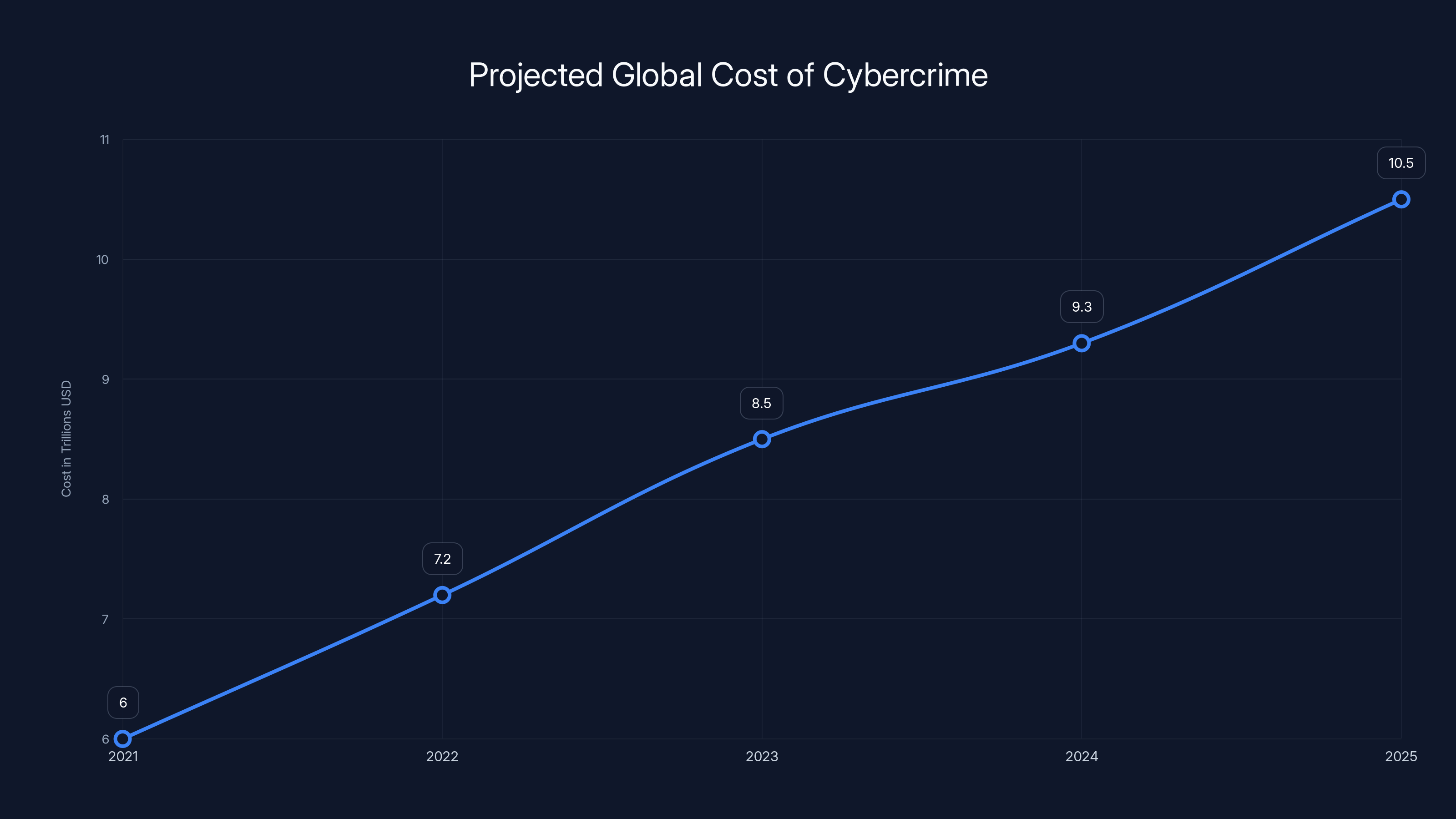
The global cost of cybercrime is projected to rise from
Understanding the Threat Landscape
Cybersecurity threats from nation-state actors like North Korea are not new, but their sophistication continues to grow. These attackers often have specific objectives, ranging from stealing intellectual property to gaining financial assets. The latest wave of attacks targeting mac OS users exemplifies how these groups adapt and evolve their tactics.
The Infection Chain
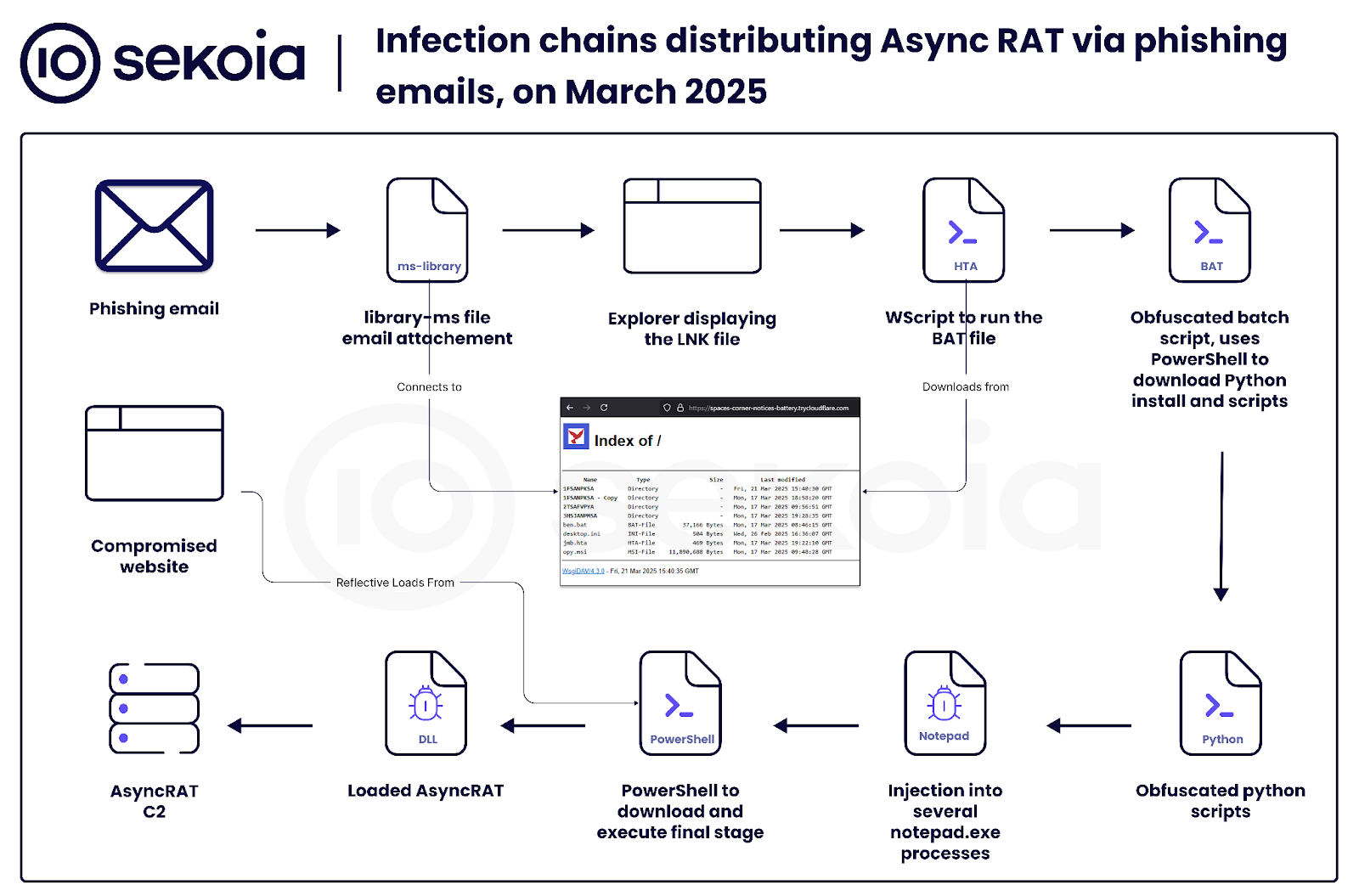
The term 'infection chain' refers to the series of steps an attacker uses to infiltrate a system. In the case of the North Korean attacks on mac OS, this chain often begins with phishing emails. These emails are meticulously crafted to appear legitimate and often contain links or attachments that, when clicked, execute malicious scripts.
Example of an Infection Chain
- Phishing Email: An email that appears to be from a reputable source, such as a well-known company or even a job offer.
- Malicious Attachment: The email contains an attachment or link that, when opened, downloads malware onto the user's system.
- Payload Execution: The malware installs itself and begins executing its payload, which may include keylogging, data exfiltration, or installing additional backdoors.
- Data Exfiltration: The malware collects sensitive data from the user's device and transmits it back to the attacker.
The Role of mac OS in Cybersecurity
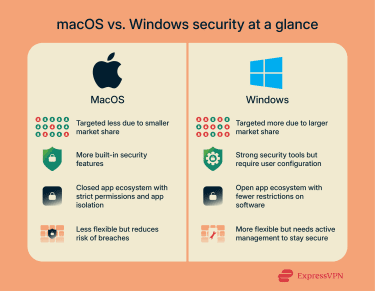
While mac OS has traditionally been perceived as a secure operating system, this perception is being challenged by increasingly sophisticated threats. Apple’s built-in security measures, such as Gatekeeper and XProtect, offer a baseline of protection, but they are not foolproof.
Key Security Features of mac OS:
- Gatekeeper: Ensures that only trusted software runs on your Mac.
- XProtect: Provides built-in malware detection.
- File Vault: Encrypts your entire hard drive to protect your data.
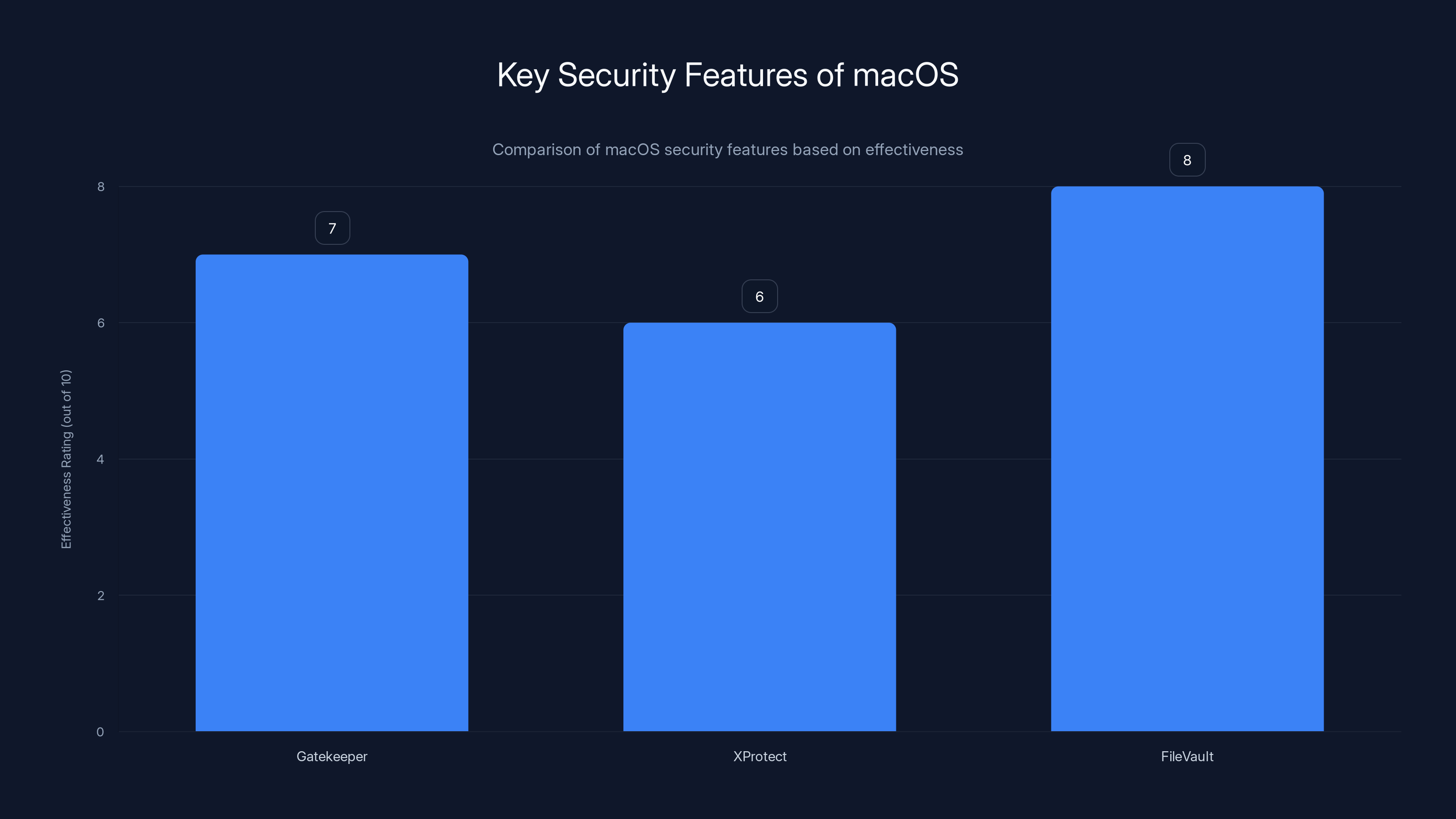
FileVault is rated as the most effective macOS security feature, providing robust data encryption. Estimated data.
How Do These Attacks Work?
Understanding the mechanics behind these attacks is crucial in developing effective defense strategies. The North Korean attackers use a combination of social engineering, malware, and network infiltration techniques.
Phishing and Social Engineering
Social engineering is a psychological manipulation tactic employed by attackers to trick users into revealing confidential information. Phishing emails are a common vector for these attacks.
Phishing Tactics Include:
- Impersonation: Pretending to be a trusted entity.
- Urgency: Creating a sense of urgency that compels the user to act quickly without thinking.
- Spoofed Domains: Using domain names that closely resemble legitimate ones to trick users.
Malware and Exploits
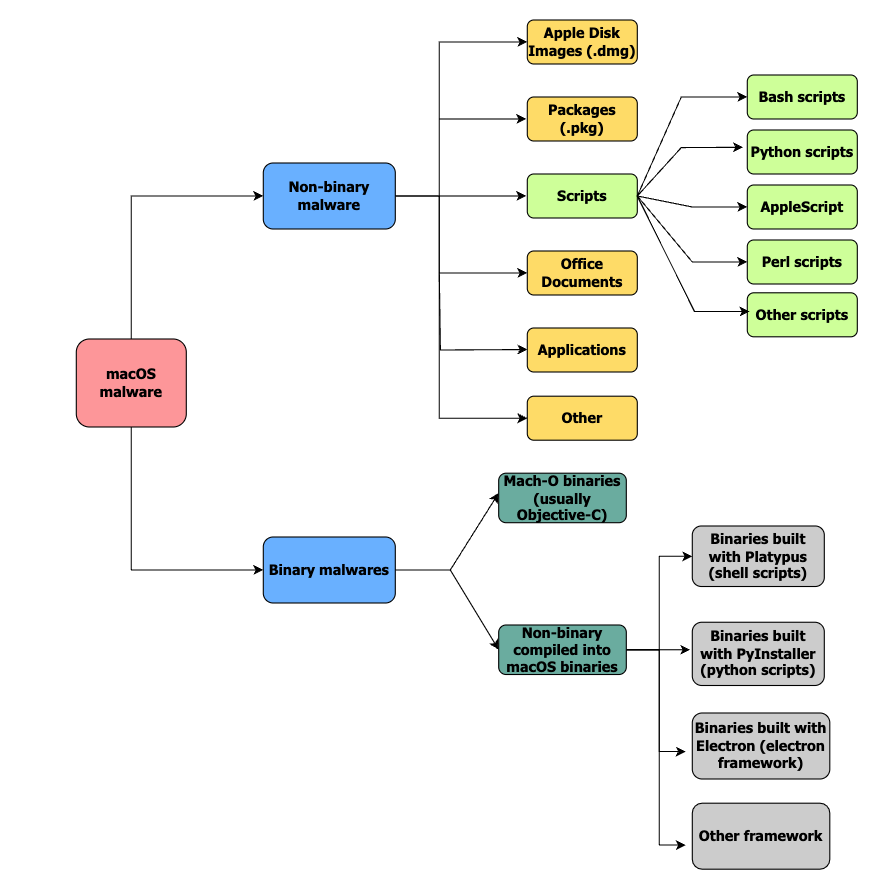
Once the attacker has tricked the user into downloading a malicious file, the malware is executed. This malware can perform various functions, such as:
- Keylogging: Capturing keystrokes to steal passwords.
- Data Harvesting: Collecting files and information stored on the device.
- Remote Access: Allowing the attacker to control the device remotely.
Network Infiltration
Advanced attackers may use the infected device as a launchpad to infiltrate larger networks. This can lead to widespread data breaches and potential harm to entire organizations.
Best Practices for mac OS Security
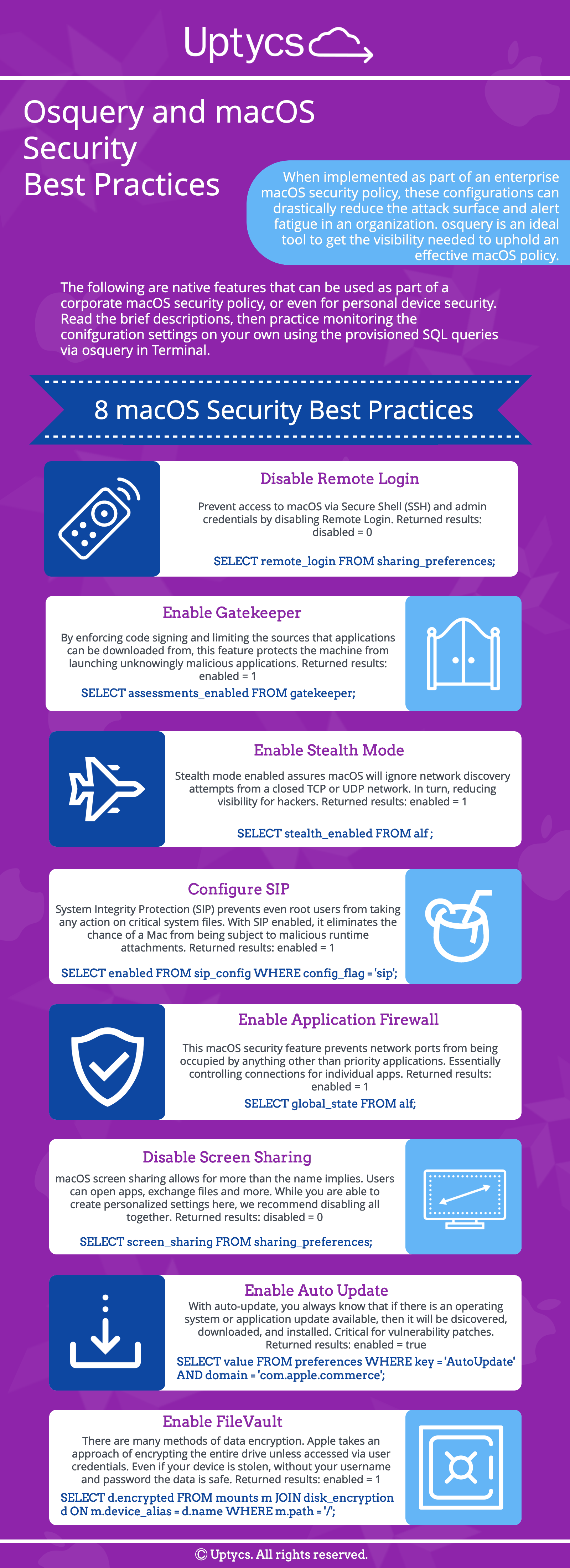
Staying ahead of potential threats requires a proactive approach to security. Here are some best practices to protect your mac OS device:
Software and System Updates
Regularly updating your mac OS and installed applications is one of the simplest yet most effective ways to protect against vulnerabilities.
- Automatic Updates: Enable automatic updates for both mac OS and apps.
- Security Patches: Install security patches as soon as they are released.
Use Comprehensive Security Software
While mac OS has built-in protections, additional security software can provide an extra layer of defense. According to PCMag, using a reputable antivirus that offers real-time scanning and threat detection is crucial.
- Antivirus Programs: Use a reputable antivirus that offers real-time scanning and threat detection.
- Firewall: Ensure your firewall is enabled to block unauthorized access.
Implement Strong Password Policies
Using strong, unique passwords for all accounts can significantly reduce the risk of unauthorized access.
- Password Managers: Use a password manager to generate and store complex passwords.
- Two-Factor Authentication (2FA): Enable 2FA wherever possible to add an extra layer of security.
Secure Your Network
Securing your network is essential to prevent attackers from gaining access to sensitive information.
- Change Default Router Passwords: Ensure your router password is strong and unique.
- Network Encryption: Use WPA3 encryption for Wi-Fi networks.
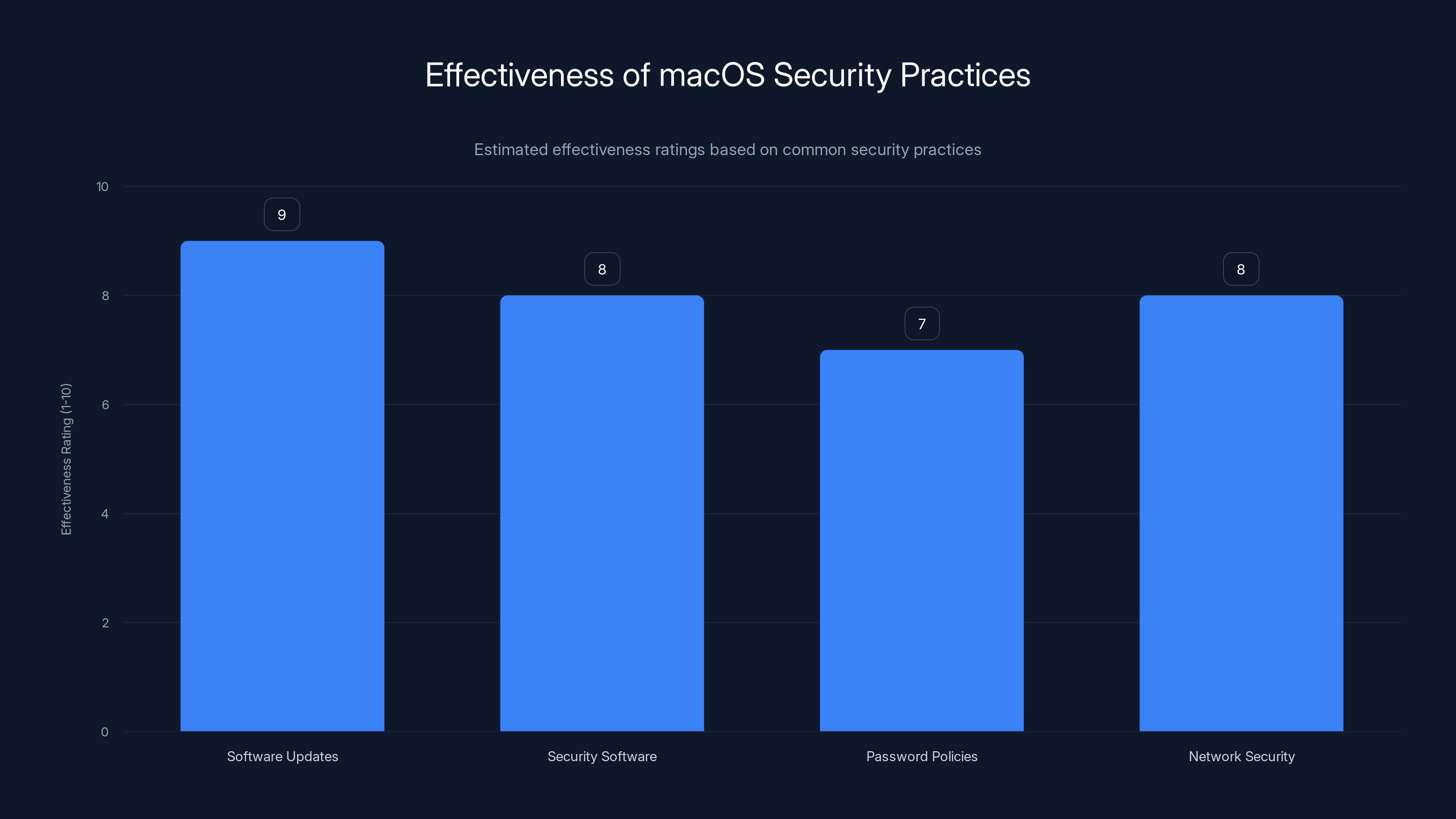
Regular software updates are rated as the most effective macOS security practice, followed closely by network security and comprehensive security software. (Estimated data)
Common Pitfalls and How to Avoid Them
Despite best efforts, some common mistakes can leave systems vulnerable to attacks. Here are some pitfalls to avoid:
Ignoring Software Updates
Delaying updates can expose your system to known vulnerabilities. Always prioritize installing updates.
Weak Passwords
Using simple or reused passwords makes it easy for attackers to gain access. Use a password manager to help create strong passwords.
Falling for Phishing Scams
Be skeptical of unsolicited emails, especially those requesting sensitive information or urging immediate action.

Future Trends in Cybersecurity
As cybersecurity threats continue to evolve, staying informed about future trends can help you prepare for emerging risks.
Increased Use of AI in Cybersecurity
Artificial intelligence is playing a growing role in threat detection and response. AI can analyze vast amounts of data to identify patterns and predict potential threats.
Enhanced Threat Intelligence Sharing
Organizations are increasingly collaborating to share threat intelligence, which helps improve the collective defense against cyber threats.
Zero Trust Architecture
The zero-trust model operates on the principle of 'never trust, always verify'. This approach ensures that every access request is thoroughly vetted, regardless of its origin.
Recommendations for mac OS Users
Implementing comprehensive security measures can significantly reduce your risk of falling victim to cyber attacks. Here are some recommendations:
- Stay Informed: Keep up-to-date with the latest security news and threats.
- Regular Backups: Ensure you have regular backups of important data.
- Educate Yourself and Others: Training and awareness are key to recognizing and avoiding threats.
Conclusion
While the threat landscape continues to evolve, equipping yourself with the right knowledge and tools can help you stay one step ahead of cyber attackers. By implementing the best practices outlined in this guide, you can protect your mac OS device from North Korean cyber threats and maintain the integrity of your personal and professional data.

FAQ
What is a phishing attack?
A phishing attack is a cybercrime in which a target is contacted by email, telephone, or text message by someone posing as a legitimate institution to lure individuals into providing sensitive data.
How can I recognize a phishing email?
Look for red flags such as poor grammar, mismatched URLs, or an urgent call to action. Verify the sender's email address and avoid clicking on suspicious links.
What is the zero-trust security model?
The zero-trust security model assumes that threats can come from both inside and outside the network and requires strict identity verification for every person and device attempting to access resources on a private network.
How often should I update my mac OS?
It's recommended to install updates as soon as they become available to ensure your system is protected against the latest threats.
What is two-factor authentication (2FA)?
Two-factor authentication (2FA) is an additional security layer used to ensure that people trying to gain access to an online account are who they say they are. First, the user enters their username and a password. Then, instead of immediately gaining access, they will be required to provide another piece of information.
Why is using a VPN important?
A VPN encrypts your internet traffic and disguises your online identity, making it more difficult for third parties to track your activities online and steal data.

Key Takeaways
- North Korean attackers target macOS users with sophisticated malware.
- Phishing emails are the primary vector for these attacks.
- Regular system updates are crucial for security.
- Using strong passwords and two-factor authentication is essential.
- AI is increasingly used in cybersecurity for threat detection.
- Zero-trust models enhance security by verifying all access requests.
Related Articles
- Stay Safe from iCloud Phishing Scams: What Every Apple User Needs to Know [2025]
- Inside Europol's Operation PowerOFF: A Game-Changer in Combating DDoS-for-Hire Services [2025]
- How FIFA World Cup Partners Could Be Exposing Fans to Email Attacks: An In-Depth Analysis [2025]
- Cyber Warfare: Preparing Your Enterprise for the Digital Frontlines [2025]
- WordPress Plugin Security Attacks: Safeguarding Your Site [2025]
- The Future of Connectivity: Launching a Giant Cell Tower into Space [2025]


