
![Google's New Storage Policy: What Android Users Need to Know [2025]](https://tryrunable.com/blog/google-s-new-storage-policy-what-android-users-need-to-know-/image-1-1783377204681.jpg)
Google's New Storage Policy: What Android Users Need to Know [2025]
Google has announced a significant change in its storage policy that directly affects Android users. As of July 7, all data in your Android backups will count toward your Google account's storage limit. Previously, only specific types of data, such as media uploaded to Google Photos and MMS data, were counted. Now, this change will encompass all Android backup data, bringing a new dynamic to how users manage their digital storage, as detailed by 9to5Google.
TL; DR
- All Android backup data now counts toward your storage cap, affecting how you manage Google account storage, according to 9to5Google.
- Average impact is estimated at 40MB, which is manageable for most users.
- New transparency tools allow users to monitor and control backup data more effectively.
- Review your backup settings to optimize storage usage and avoid unnecessary data accumulation.
- Future trends may include more integrated storage solutions, enhancing user control and efficiency.

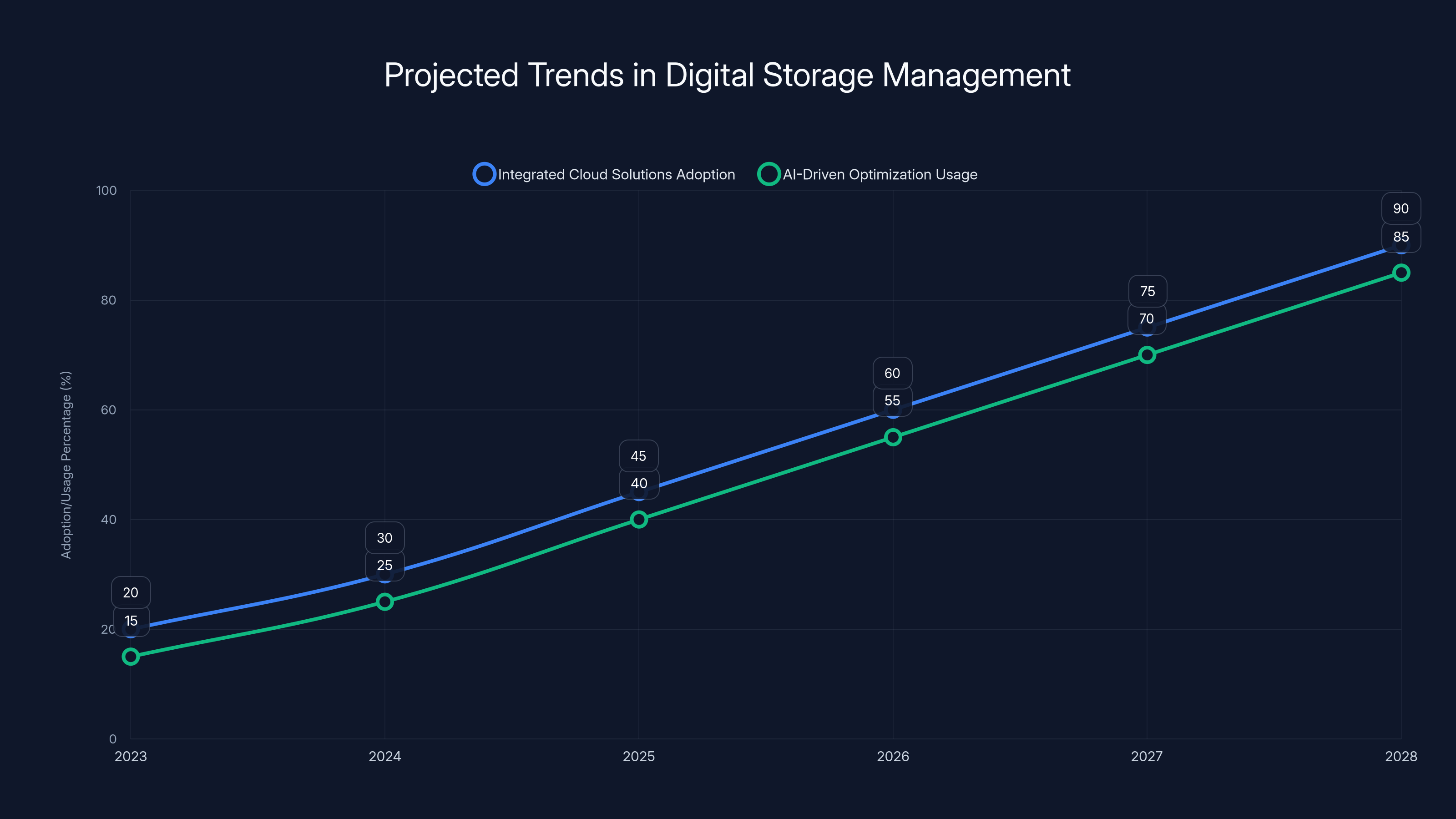
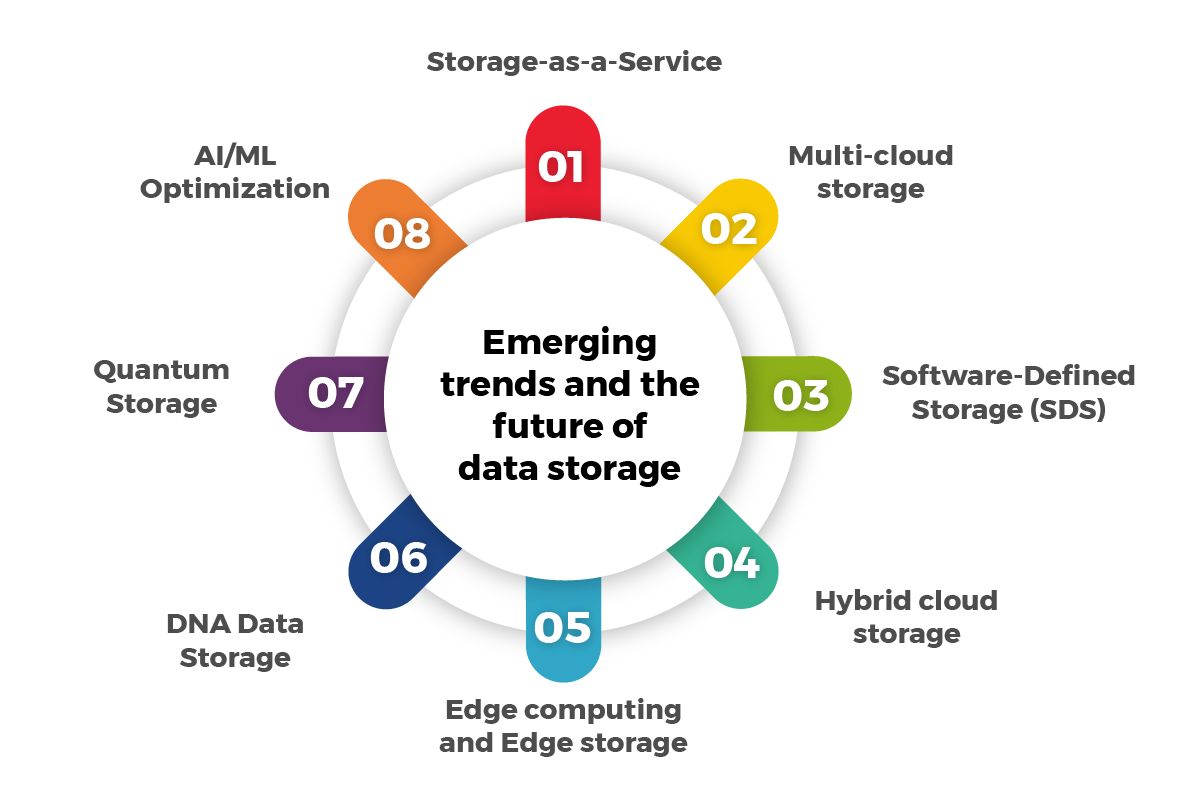
Integrated cloud solutions and AI-driven optimization are expected to see significant adoption growth by 2028. (Estimated data)
Understanding Google's Policy Change
Google's decision to include all Android backup data in your storage cap is a strategic move to streamline storage management across its services. This change aligns with Google's broader strategy to create a unified approach to data storage across its ecosystem, as noted by Android Police.
What Counts as Backup Data?
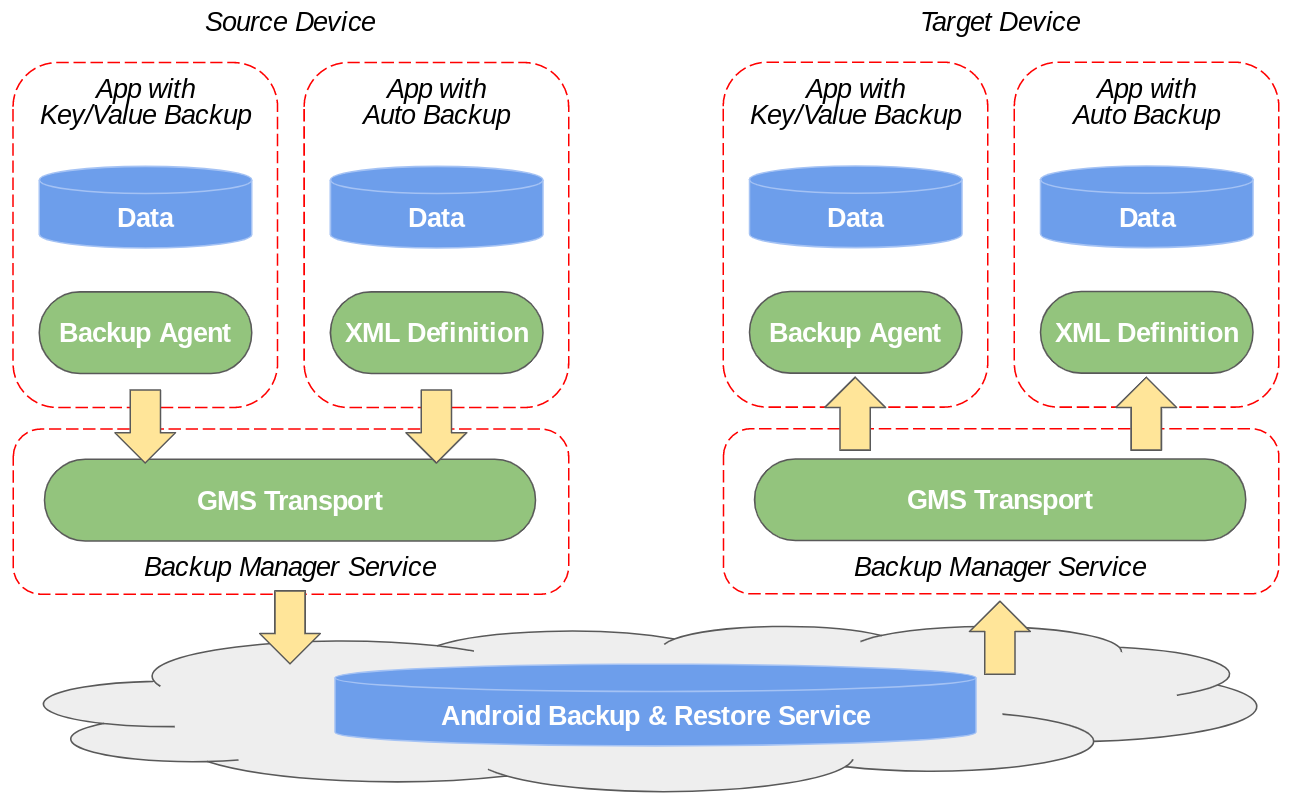
Backup data includes everything from your app data, call history, device settings, and SMS messages to Wi-Fi passwords and wallpapers. Essentially, it's a digital snapshot of your device settings and personal data, enabling seamless restoration when switching devices or restoring after a factory reset.
Why the Change?
Google aims to provide users with a more comprehensive view of their data usage. By counting all backup data, users can better understand what contributes to their storage consumption, leading to more informed decisions about managing their digital footprint, as explained by PCMag.
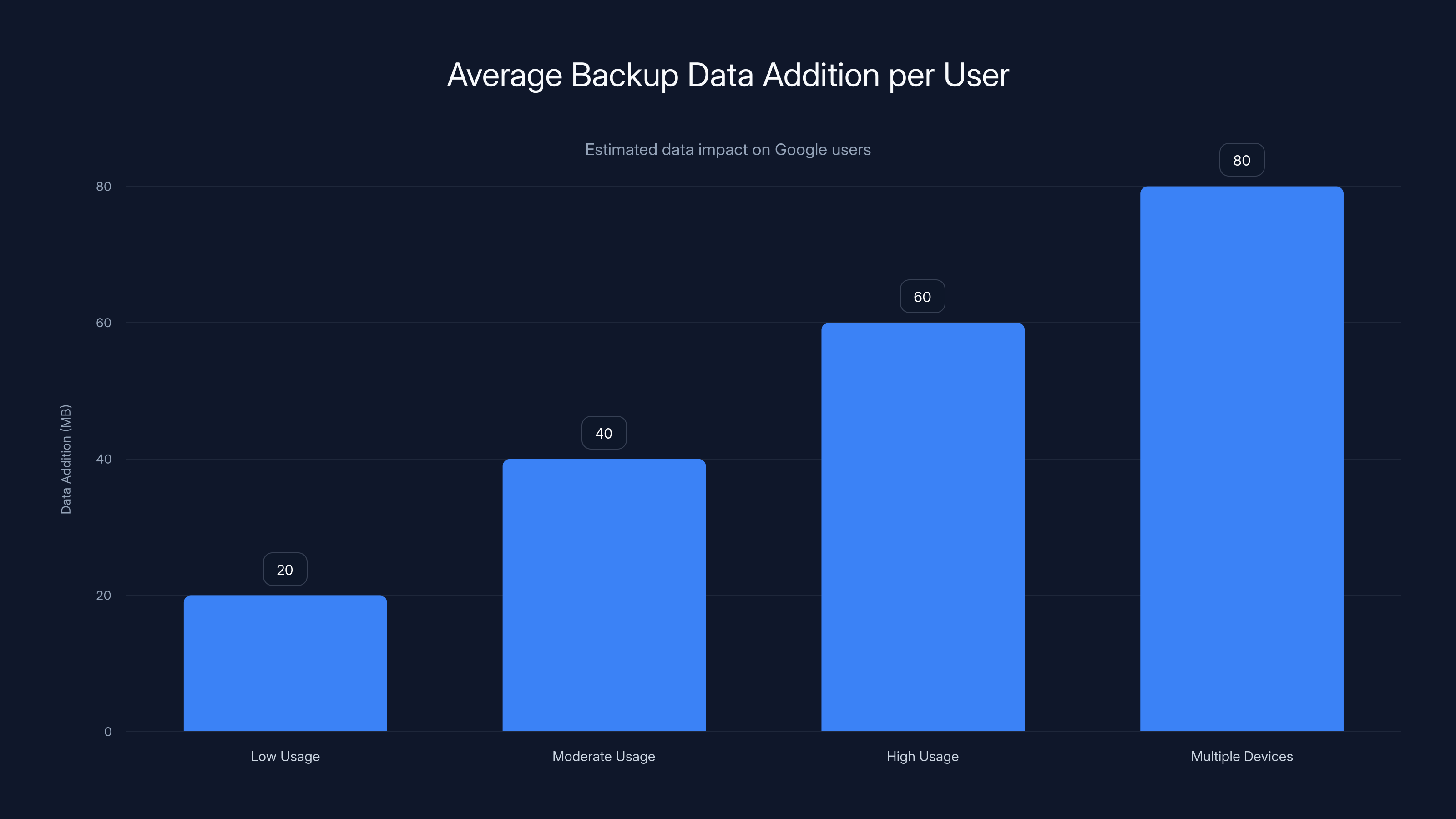
Estimated data shows that average backup data addition varies from 20MB to 80MB depending on usage and number of devices. Estimated data.
Impact on Users
For most users, the impact of this change is minimal. Google estimates that the average backup data addition will be around 40MB. However, this can vary based on individual usage patterns and the number of devices linked to a Google account, as reported by Fortune Business Insights.
Managing Your Storage Cap
To avoid hitting your storage limit, it's crucial to manage your backup settings effectively. Here's how you can optimize your storage:
- Review and Clean Up Backups: Regularly check what data is being backed up and remove unnecessary items.
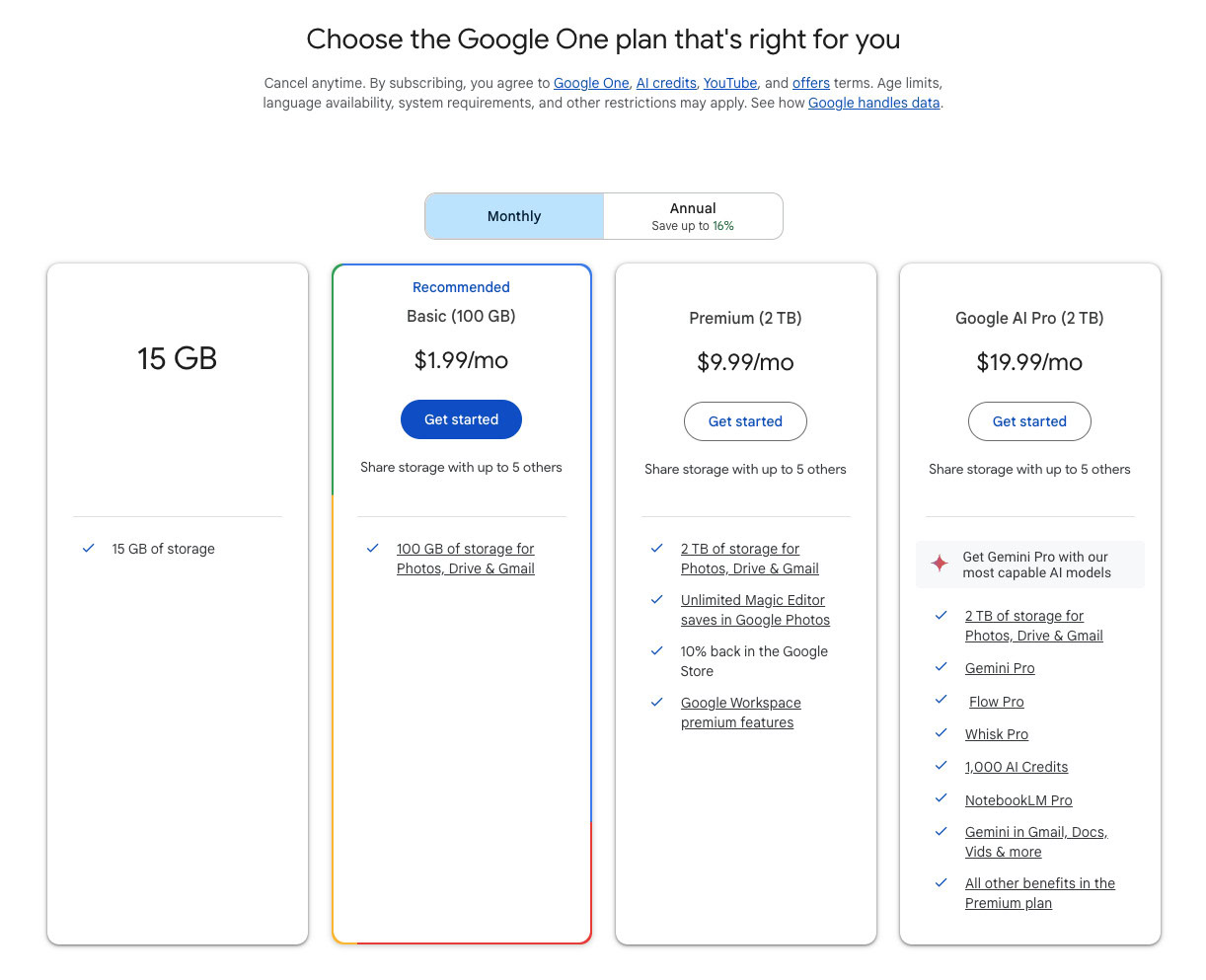
- Use Google One: Consider upgrading to Google One for more storage options if needed, as suggested by ZDNet.
- Optimize App Settings: Some apps offer options to exclude specific data from backups.
Implementation Guide
Implementing these changes requires a strategic approach to managing your data. Here are some practical steps and best practices:
Step 1: Audit Your Current Storage
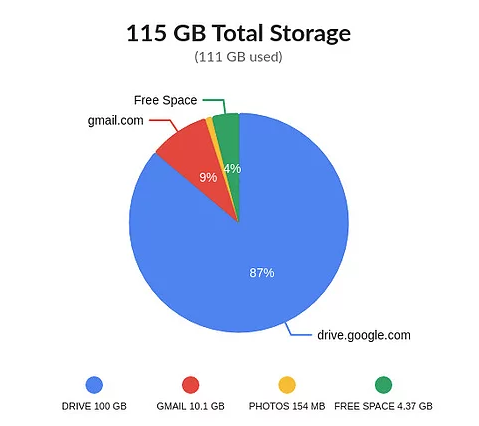
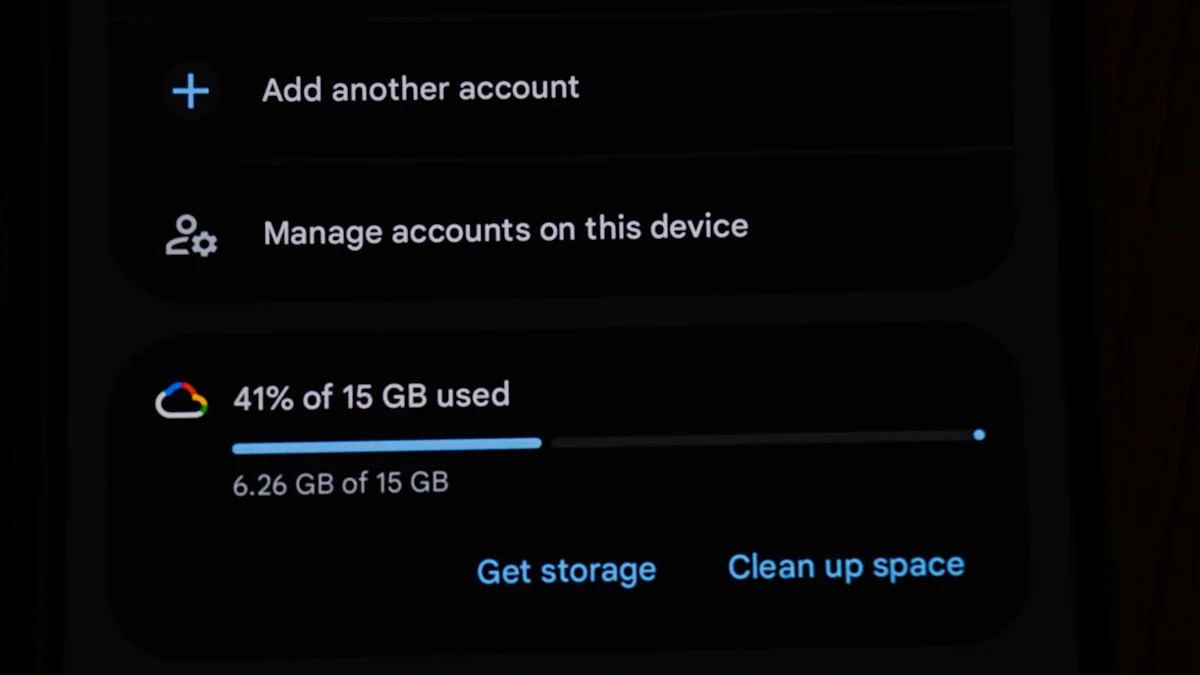
Start by auditing your current storage usage. Navigate to your Google Account settings and view your storage summary. Identify areas where you can reduce data, as recommended by Google Developers Blog.
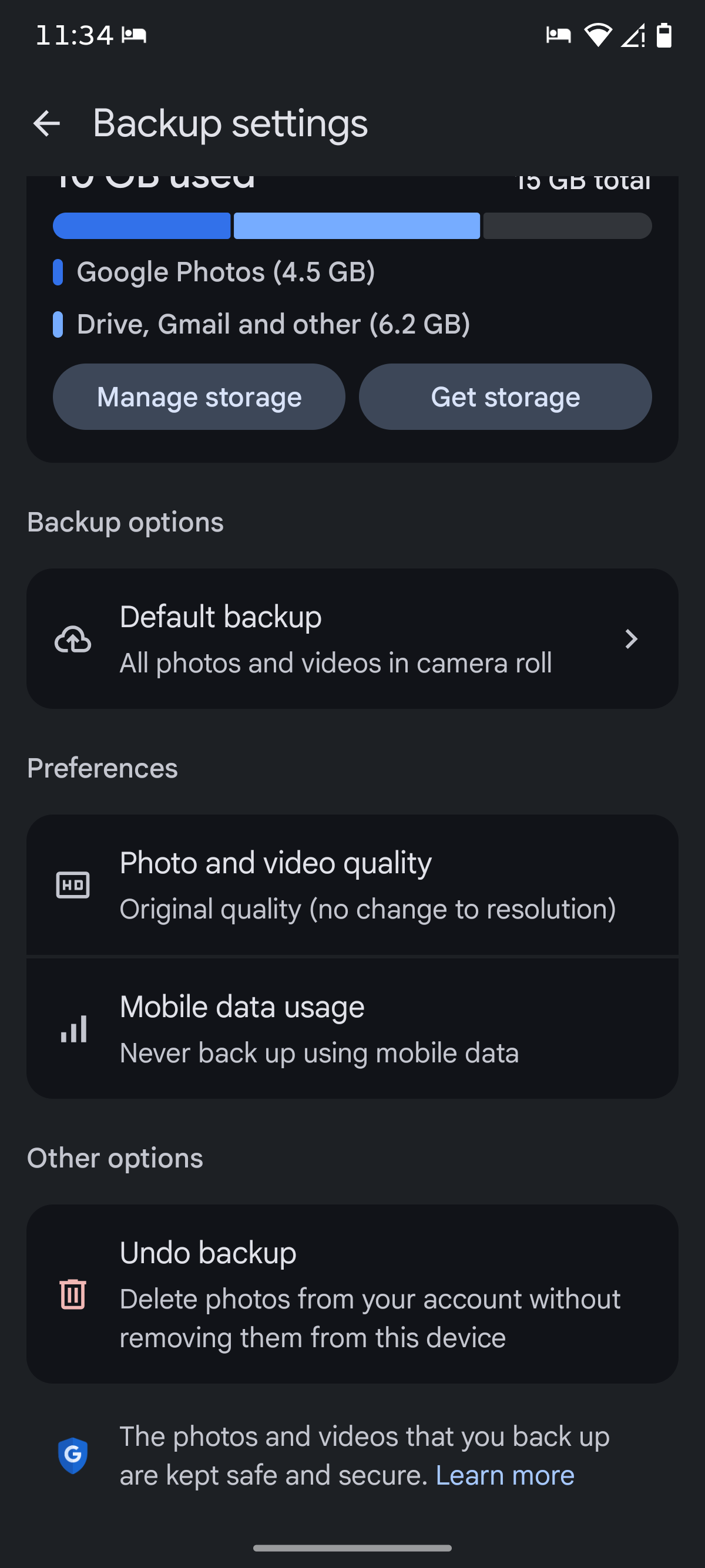
Step 2: Adjust Backup Settings
Access your device's settings to manage what gets backed up. Consider disabling backups for apps that don't require it.
Step 3: Regular Maintenance
Schedule regular maintenance to clean up unnecessary files and optimize storage. This includes deleting old emails, unused apps, and redundant files.
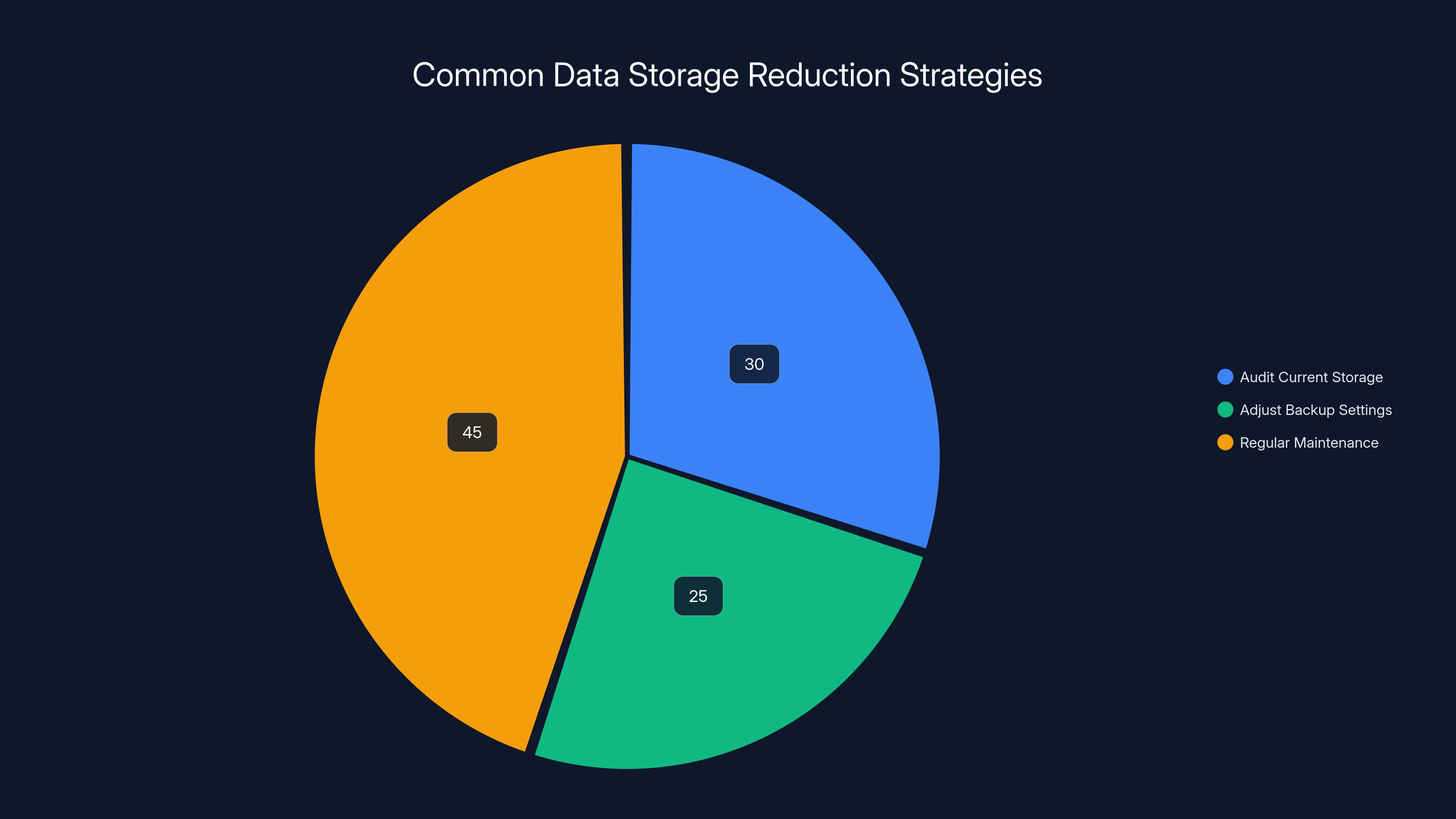
Estimated data shows that regular maintenance is the most common strategy for reducing data storage, accounting for 45% of efforts.
Common Pitfalls and Solutions
Pitfall 1: Overlooking Unused Apps
Unused apps can accumulate data that takes up valuable space. Regularly review and uninstall apps you no longer need.
Solution: Set monthly reminders to review installed apps and clean up your device.
Pitfall 2: Ignoring Google Photos Settings
Photos and videos can be significant storage hogs. Ensure you're leveraging Google Photos settings to optimize media storage, as highlighted by Android Police.
Solution: Use Google's high-quality storage setting to reduce file sizes without noticeable quality loss.

Future Trends and Recommendations
As technology evolves, so will the ways in which we manage digital storage. Here are some trends and recommendations to consider:
Trend 1: Integrated Cloud Solutions
Expect more integrated solutions that seamlessly manage storage across devices and platforms, enhancing user experience and control, as noted by Tribune.
Recommendation: Stay informed about new Google services that offer enhanced storage management features.
Trend 2: AI-Driven Optimization
AI will play a larger role in predicting storage needs and optimizing data usage, helping users maintain efficient storage without manual intervention, as supported by UC San Diego.
Recommendation: Explore AI tools that offer predictive storage management to stay ahead of your data needs.
Conclusion
Google's updated storage policy marks a shift toward more transparent and efficient data management for Android users. By understanding and adapting to these changes, users can better manage their digital footprint and make informed decisions about their storage needs. As technology continues to advance, staying updated on these trends will be crucial for optimizing your digital experience.
FAQ
What is Google's new storage policy for Android backups?
Google's new policy counts all Android backup data toward your Google account's storage cap, allowing for more comprehensive storage management, as explained by 9to5Google.
How does this policy change affect my storage usage?
The average impact is estimated at 40MB, but this can vary based on individual usage patterns and the number of devices linked to your account.
What can I do to manage my storage effectively?
Regularly review your backup settings, clean up unnecessary data, and consider upgrading to Google One for additional storage options.
Are there tools to help optimize my storage?
Yes, Google offers various tools and settings to manage your storage, including Google One and app-specific backup settings.
What future trends should I be aware of?
Look for more integrated cloud solutions and AI-driven storage optimization tools that enhance user experience and control.
How often should I review my backup settings?
It's recommended to review your settings monthly to ensure you're optimizing your storage effectively.
Key Takeaways
- Google's policy now counts all Android backup data toward storage limits.
- Average impact is minimal at approximately 40MB per user.
- New tools offer enhanced transparency and control over data usage.
- Regular storage audits and backup reviews are essential for optimization.
- AI-driven solutions will advance storage management in the future.
Related Articles
- Mastering the PixelDrive Screwdriver: Your Complete Guide to Hoto’s Precision Tool [2025]
- Reddit's Strategy: Combating AI with More AI [2025]
- Microsoft's Strategic Shift: Navigating Layoffs Amidst Technological Evolution [2025]
- How Data Governance Builds True Business Resilience [2025]
- Mastering AI-Native Marketing: Insights from Google Cloud's VP of Growth [2026]
- How to Avoid Spoilers Online and in Chats [2025]


