
![Amazon S3 Files: Bridging the Gap Between AI Agents and Object Storage [2025]](https://tryrunable.com/blog/amazon-s3-files-bridging-the-gap-between-ai-agents-and-objec/image-1-1775588670455.jpg)
Amazon S3 Files: Bridging the Gap Between AI Agents and Object Storage [2025]
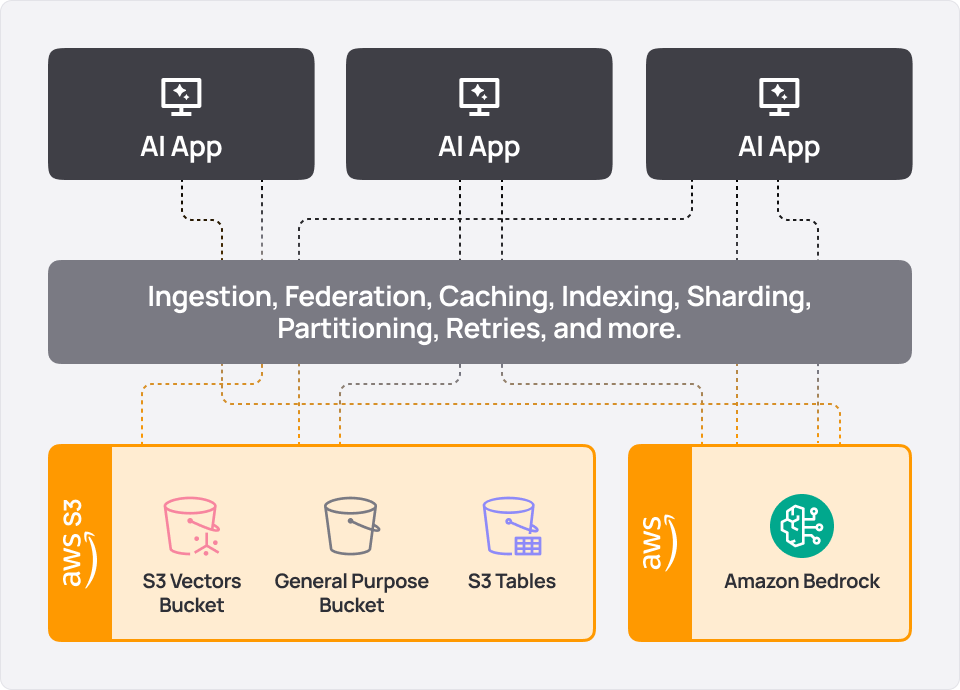
AI agents are revolutionizing how enterprises manage and utilize massive data sets. But there's a catch: these agents traditionally rely on file systems to access data, yet much of the data resides in object storage systems like Amazon S3. This disconnect has led to a persistent challenge—the object-file split—that complicates multi-agent pipelines. Let's dive deep into how Amazon S3 Files is addressing this gap and explore best practices, technical details, and future trends.
TL; DR
- Amazon S3 Files: Provides a native file system workspace for AI agents, solving the object-file split.
- Improved Efficiency: Reduces the need for duplicated data and sync pipelines.
- Seamless Integration: Allows AI agents to navigate and access S3 data using standard file system tools.
- Enhanced Collaboration: Facilitates better multi-agent pipeline management.
- Future Trends: Predicts further integration of AI with cloud storage solutions.
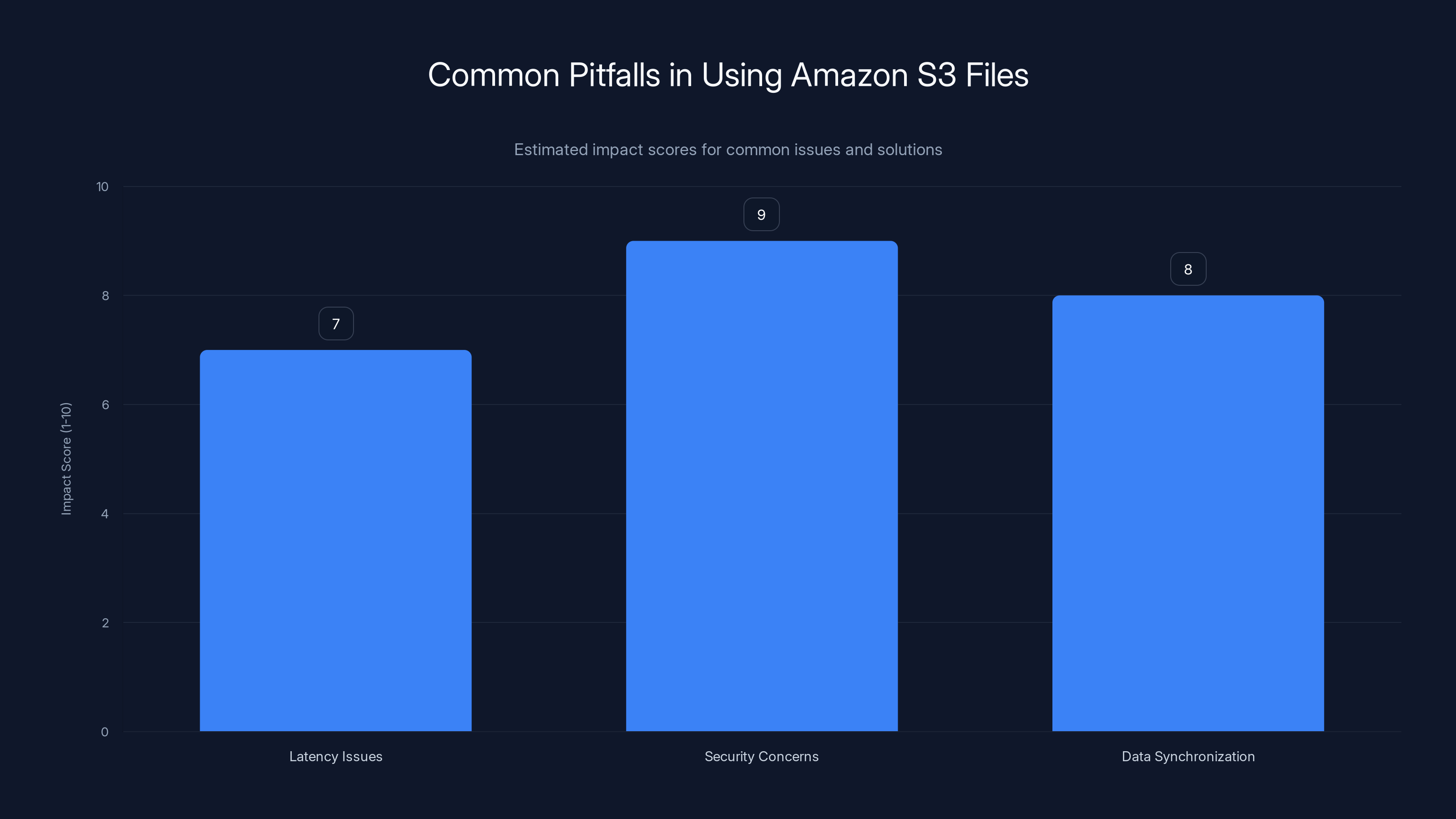
Security concerns have the highest impact score, indicating the critical importance of implementing robust security measures. Estimated data.
Understanding the Object-File Split
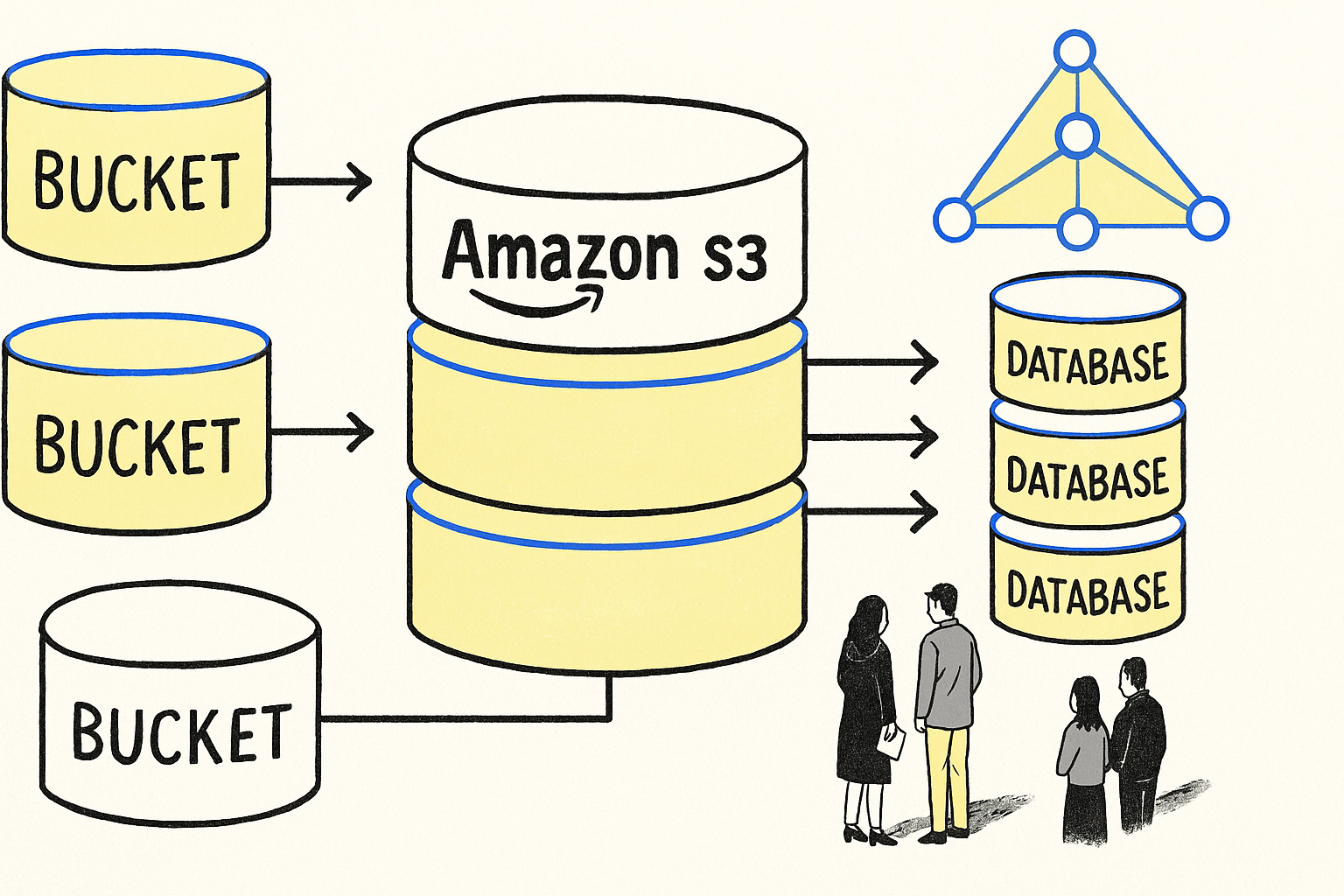
To fully appreciate the innovation behind Amazon S3 Files, we need to understand the object-file split. Traditional file systems use a hierarchical structure with directories and file paths, which AI agents navigate effortlessly. However, object storage systems like Amazon S3 operate differently—they store data as objects with unique identifiers and metadata, accessed through API calls rather than file paths.
This fundamental difference has long required a workaround: creating a separate file system layer alongside S3. This layer duplicates data and requires sync pipelines to keep both systems aligned, introducing complexity and potential data discrepancies.
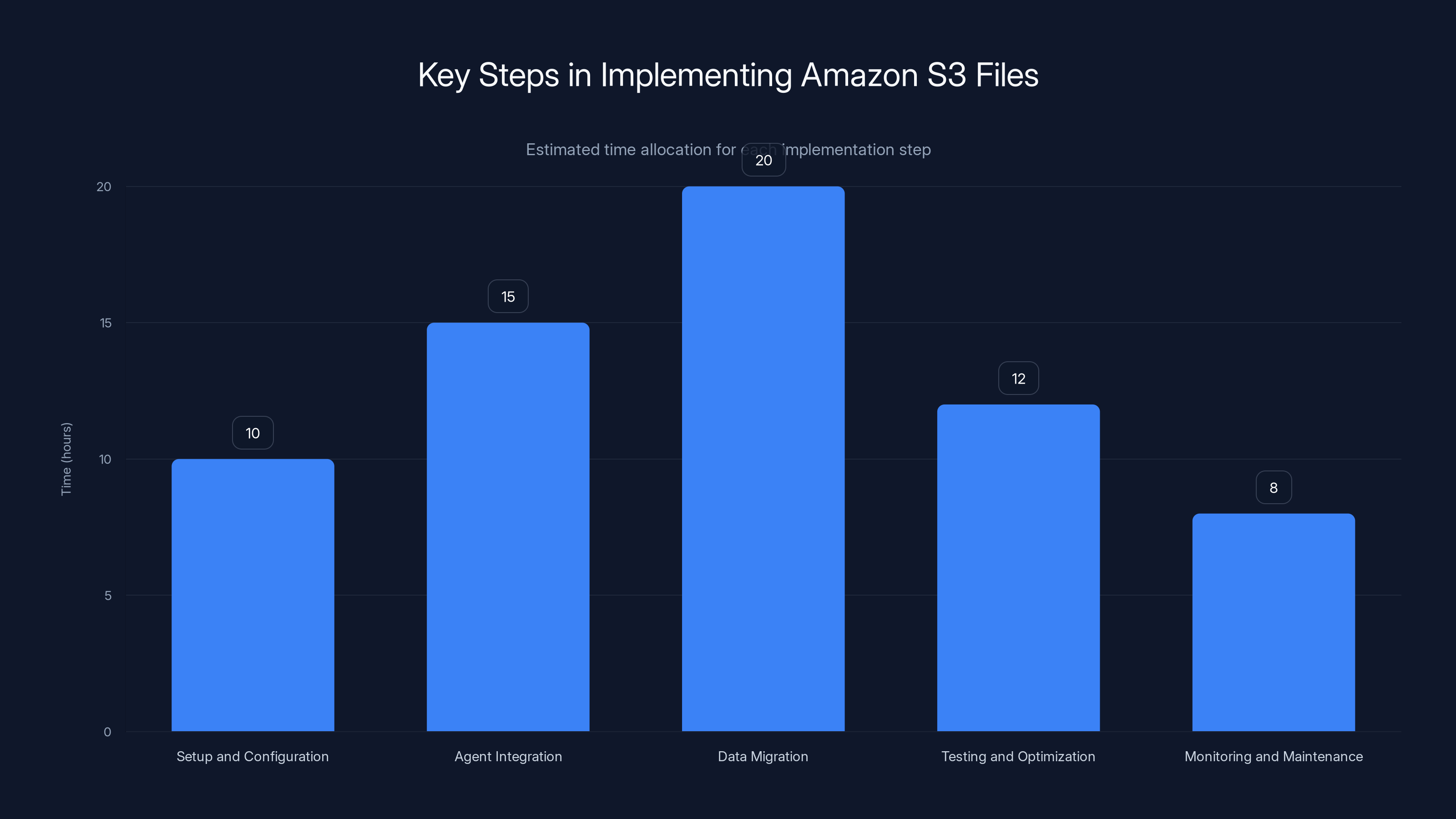
The chart estimates the time allocation for each step in implementing Amazon S3 files in AI workflows. Data migration is projected to take the longest time.
Enter Amazon S3 Files
Amazon S3 Files eliminates the need for these cumbersome workarounds by providing a native file system interface for AI agents. This integration allows agents to access S3 data as if it were part of their local file system, bridging the gap between object storage and file-based workflows.
Key Features of Amazon S3 Files
- Native File System Interface: Enables AI agents to navigate S3 data using familiar file system commands.
- Seamless Data Access: Reduces latency and improves data access efficiency by eliminating the need for data duplication.
- Enhanced Security: Leverages Amazon S3's robust security features, including encryption and access controls.
- Scalability: Supports vast datasets typical of enterprise environments.
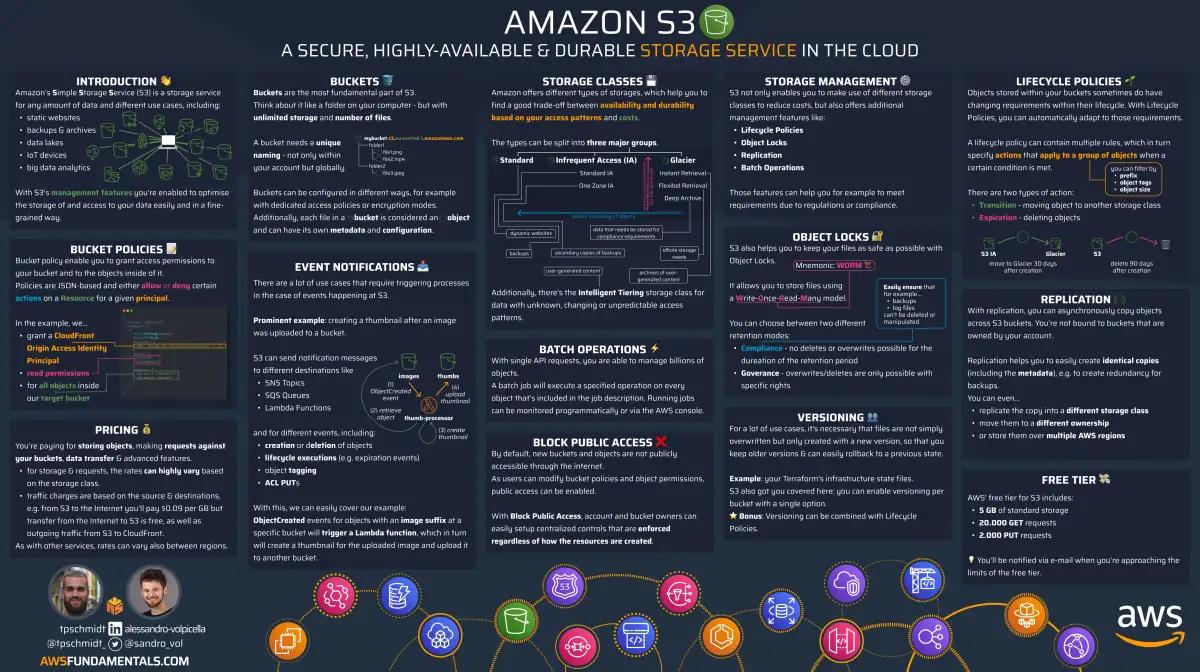
Practical Implementation Guide
Implementing Amazon S3 Files in your AI workflows involves several key steps:
- Setup and Configuration: Begin by configuring your Amazon S3 bucket to use the S3 Files interface. This involves setting up the necessary IAM roles and policies to ensure secure access.
- Agent Integration: Modify your AI agents to interact with S3 data through the file system interface instead of traditional API calls. This may involve updating scripts and workflows to utilize standard file commands.
- Data Migration: If your data is currently stored in a separate file system layer, plan a migration strategy to consolidate it within Amazon S3. This reduces duplication and aligns your data management practices.
- Testing and Optimization: Conduct thorough testing to ensure that your agents can access and process data efficiently. Optimize your setup based on performance benchmarks.
- Monitoring and Maintenance: Implement monitoring tools to track data access patterns and system performance. Regular maintenance ensures ongoing efficiency and security.
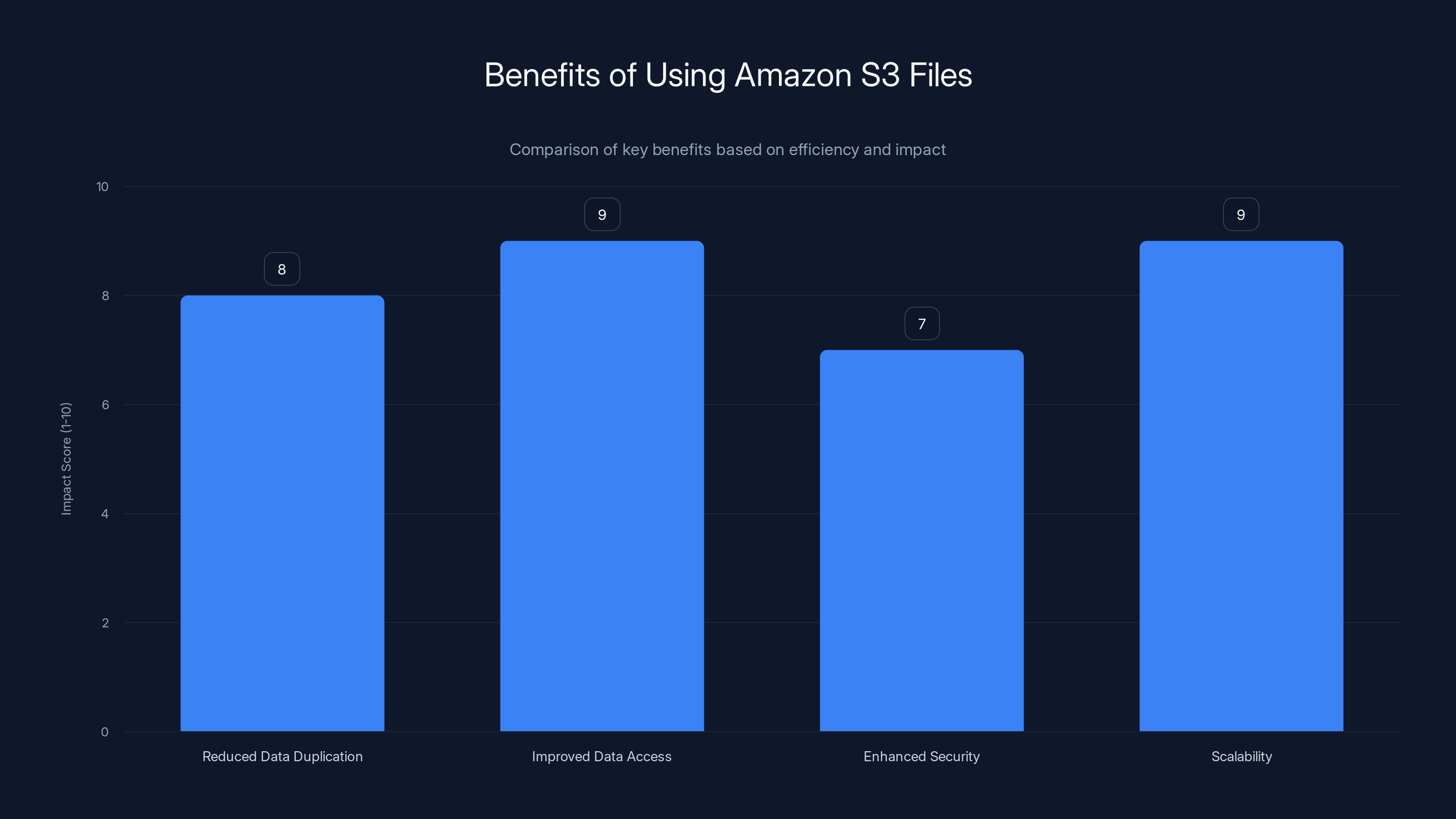
Amazon S3 Files significantly improves data access and scalability, with high impact scores in these areas. (Estimated data)
Common Pitfalls and Solutions
Even with a robust solution like Amazon S3 Files, challenges can arise. Here are some common pitfalls and how to address them:
Latency Issues
While Amazon S3 Files reduces latency by eliminating data duplication, network latency can still impact performance. To mitigate this:
- Optimize Network Configuration: Ensure your network setup is optimized for low-latency access. Consider using AWS Direct Connect for a dedicated network connection.
- Leverage Caching: Implement caching strategies to store frequently accessed data locally, reducing the need for repeated S3 access.
Security Concerns
Ensuring data security is paramount. To address security concerns:
- Use Encryption: Utilize Amazon S3's encryption features to protect data at rest and in transit.
- Implement Strict Access Controls: Define granular access permissions using IAM policies to ensure only authorized agents and users can access S3 data.
Data Synchronization Challenges
If you're migrating from a separate file system layer, data synchronization can be challenging. To streamline this process:
- Plan a Staged Migration: Gradually migrate data in stages to minimize disruptions and ensure continuity.
- Automate Synchronization: Use AWS tools like AWS Data Sync to automate and manage the migration process.
Future Trends and Recommendations
The integration of AI with cloud storage solutions is poised to grow, with several key trends on the horizon:
AI-Driven Storage Optimization
Expect AI to play a larger role in optimizing storage solutions. AI algorithms can analyze access patterns and predict storage needs, leading to more efficient data management.
Enhanced Multi-Agent Collaboration
As AI agents become more sophisticated, the need for seamless collaboration will increase. Amazon S3 Files sets the stage for enhanced multi-agent pipelines, facilitating better cooperation between agents.
Expansion of Cloud-Native Features
Cloud providers will continue to expand their native features, offering more integrated solutions for AI and data storage. This trend will simplify workflows and reduce the need for third-party tools.

Conclusion
Amazon S3 Files represents a significant step forward in resolving the object-file split that has long hindered multi-agent pipelines. By providing a native file system interface, it streamlines data access, enhances collaboration, and paves the way for future innovations in AI and cloud storage integration.
For organizations looking to leverage AI capabilities to their fullest, adopting Amazon S3 Files is a strategic move that promises to simplify workflows and boost efficiency.
FAQ
What is Amazon S3 Files?
Amazon S3 Files is a feature that provides a native file system interface for accessing data stored in Amazon S3, allowing AI agents to navigate and utilize S3 data as if it were part of a local file system.
How does Amazon S3 Files work?
It integrates with AI agents by offering a file system interface that eliminates the need for API calls to access S3 data, streamlining workflows and reducing latency.
What are the benefits of using Amazon S3 Files?
Benefits include reduced data duplication, improved data access efficiency, enhanced security, and scalability to manage large datasets.
How can I implement Amazon S3 Files in my workflows?
Begin by configuring your S3 bucket, modifying AI agent scripts for file system access, planning data migration, and testing for performance optimization.
What are common challenges when using Amazon S3 Files?
Challenges include addressing network latency, ensuring data security, and managing data synchronization during migration.
How is Amazon S3 Files expected to evolve in the future?
Future trends include AI-driven storage optimization, enhanced multi-agent collaboration, and the expansion of cloud-native features.
Key Takeaways
- Amazon S3 Files creates a native file system for AI agents, solving the object-file split.
- Integrates seamlessly with AI workflows, reducing latency and data duplication.
- Leverages Amazon S3's security features for enhanced data protection.
- Facilitates improved multi-agent collaboration and pipeline management.
- Future trends include AI-driven storage optimization and expansion of cloud-native features.
Related Articles
- Sony's Bold New Service: Bringing Players Into PlayStation Games [2025]
- Apple's Foldable iPhone: A New Era in Smartphone Technology [2025]
- Why NASA Astronauts Chose a Decade-Old DSLR for Iconic Moon and Earth Photos [2025]
- Unfolding Delays: The Real Story Behind Apple's Foldable iPhone [2025]
- How Databricks Sells to Diverse Industries Without a Single Vertical Product [2025]
- Europe's Sovereignty Ambitions Require Smarter Infrastructure [2025]


